FCSS_LED_AR-7.6 Exam Details
-
Exam Code
:FCSS_LED_AR-7.6 -
Exam Name
:Fortinet NSE 6 - LAN Edge 7.6 Architect -
Certification
:Fortinet Certifications -
Vendor
:Fortinet -
Total Questions
:48 Q&As -
Last Updated
:Jul 14, 2026
Fortinet FCSS_LED_AR-7.6 Online Questions & Answers
-
Question 11:
Refer to the exhibits.
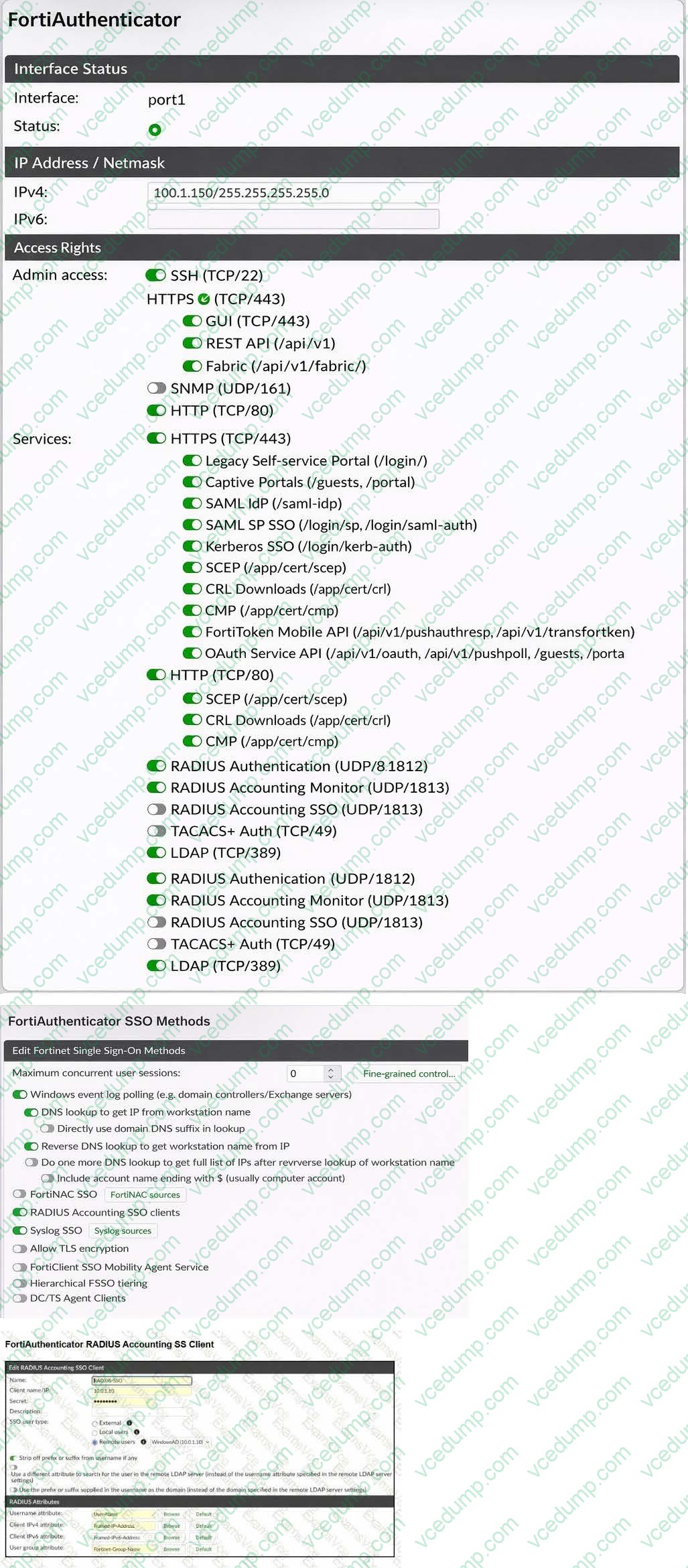
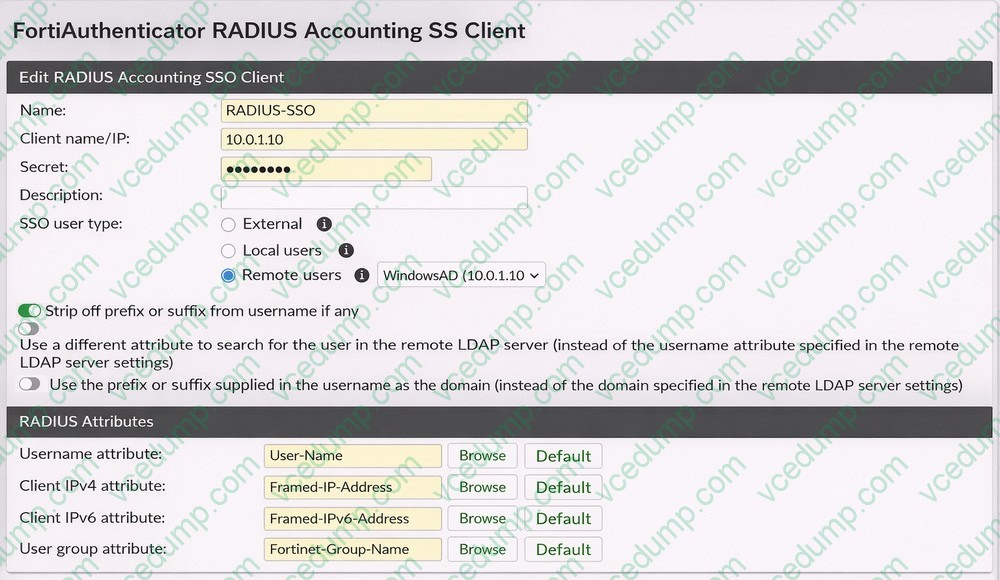
A company has multiple FortiGate devices deployed and wants to centralize user authentication and authorization. The administrator decides to use FortiAuthenticator to convert RSSO messages to FSSO, allowing all FortiGate devices to receive user authentication updates.
After configuring FortiAuthenticator to receive RADIUS accounting messages, users can authenticate, but FortiGate does not enforce the correct policies based on user groups. Upon investigation, the administrator discovers that FortiAuthenticator is receiving RADIUS accounting messages from the RADIUS server and successfully queries LDAP for user group information. But, FSSO updates are not being sent to FortiGate devices and FortiGate firewall policies based on FSSO user groups are not being
applied.
What is the most likely reason FortiGate is not receiving FSSO updates?
A. The RADIUS Username and Client IPv4 attributes are not defined on FortiAuthenticator.
B. The LDAP server is not configured to retrieve group memberships for RSSO users.
C. FortiAuthenticator is missing the FSSO user group attribute in the configuration.
D. The FortiAuthenticator interface is not enabled to receive RADIUS accounting messages. -
Question 12:
FortiGate has been added successfully to FortiAIOps and is shown as Online. The site also uses FortiSwitch managed by that FortiGate through FortiLink. The administrator wants to monitor the FortiSwitch from FortiAIOps. Which action must be performed in FortiAIOps to add the FortiSwitch?
A. Add the FortiSwitch by entering its serial number
B. Add the FortiSwitch by entering its management IP address
C. No additional action is required; it is discovered automatically through the managed FortiGate
D. Configure FortiSwitch credentials (user ID and password) in FortiAIOps -
Question 13:
A network administrator connects a new FortiGate to the network, allowing it to automatically discover andI register with FortiManager. What occurs after FortiGate retrieves the FortiManager address?
A. FortiGate establishes a secure tunnel to FortiManager over TCP port 541.
B. The device needs to be manually authorized on FortiManager.
C. FortiGate configures its interface settings based on a DHCP response from FortiManager.
D. FortiGate sends a discovery request to all devices on the local network using UDP port 1068. -
Question 14:
Refer to the exhibits.
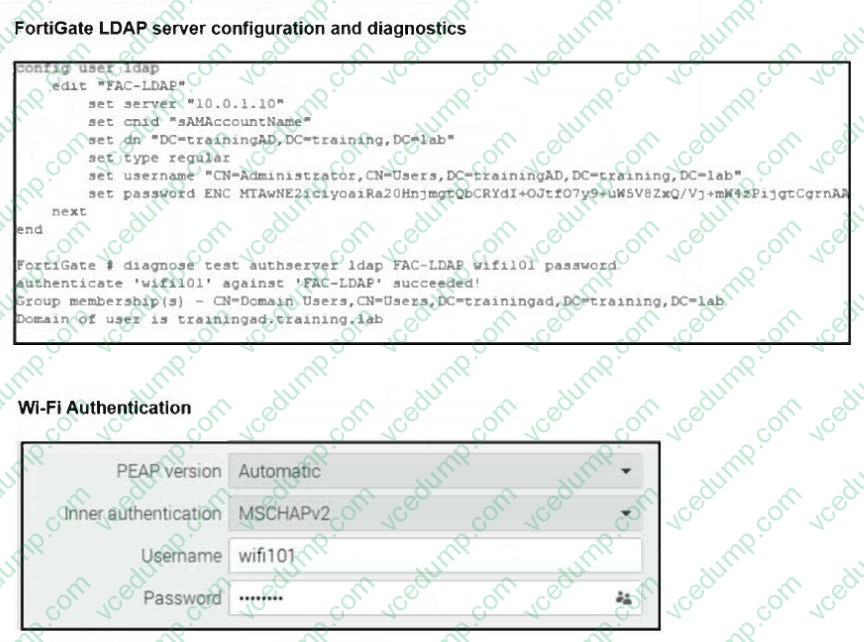
An LDAP server has been successfully configured on FortiGate. which forwards LDAP authentication requests to a Windows Active Directory (AD) server. Wireless users report that they are unable to authenticate. Upon troubleshooting, you find that authentication fails when using MSCHAPv2. What is the most likely reason for this issue?
A. A firewall policy is missing an LDAP authentication rule.
B. The Windows AD server requires LDAPS (LDAP over SSL) for authentication.
C. The FortiGate LDAP configuration is missing the correct Bind DN.
D. FortiGate does not support MSCHAPv2 for LDAP authentication. -
Question 15:
What is the expected behavior when enabling auto TX power control on a FortiAP interface?
A. FortiGate monitors the signal strength of nearby AP interfaces and adjusts its own transmit power every 30 seconds to match the signal strength of the adjacent AP
B. FortiGate measures the signal strength of nearby FortiAP interfaces every 30 seconds and adjusts their transmit power to ensure they remain detectable at -70 dBm.
C. FortiGate periodically measures the signal strength of the weakest associated client and adjusts the AP radio power to align with the detected signal strength of that client.
D. The AP periodically evaluates the signal strength of its own transmission from the client perspective and adjusts its power to ensure the signal is detected at -70 dBm. -
Question 16:
When the MAC address of a device is placed in quarantine on FortiSwitch, what happens to its egress traffic?
A. Traffic is sent to an access VLAN.
B. Traffic is assigned to the native VLAN.
C. Traffic is sent as untagged traffic.
D. Traffic is sent to an allowed VLAN. -
Question 17:
A FortiGate receives RADIUS accounting messages for RSSO on port3. The accounting packets include the username in User-Name and the group membership in Class. Users appear as authenticated, but they are not mapped into the expected RSSO user groups, so group-based policies do not match. Which configuration is required to ensure correct group mapping?
A. Set the RSSO agent sso-attribute to Class and configure the RSSO user group "RADIUS Attribute Value" to match the Class value
B. Enable device detection and Security Fabric Connection on port3
C. Set the RSSO agent rsso-endpoint-attribute to Framed-IP-Address
D. Configure the firewall policy to match only after captive portal authentication -
Question 18:
A FortiSwitch is not appearing in the FortiGate management interface after being connected via FortiLink. What could be a first troubleshooting step?
A. Ensure that the FortiGate security policies allow traffic from the FortiSwitch.
B. Manually assign a static IP to the FortiSwitch.
C. Verify that FortiGate device DHCP server is assigning an IP to the FortiSwitch.
D. Ensure the FortiSwitch has internet access. -
Question 19:
Refer to the exhibits.
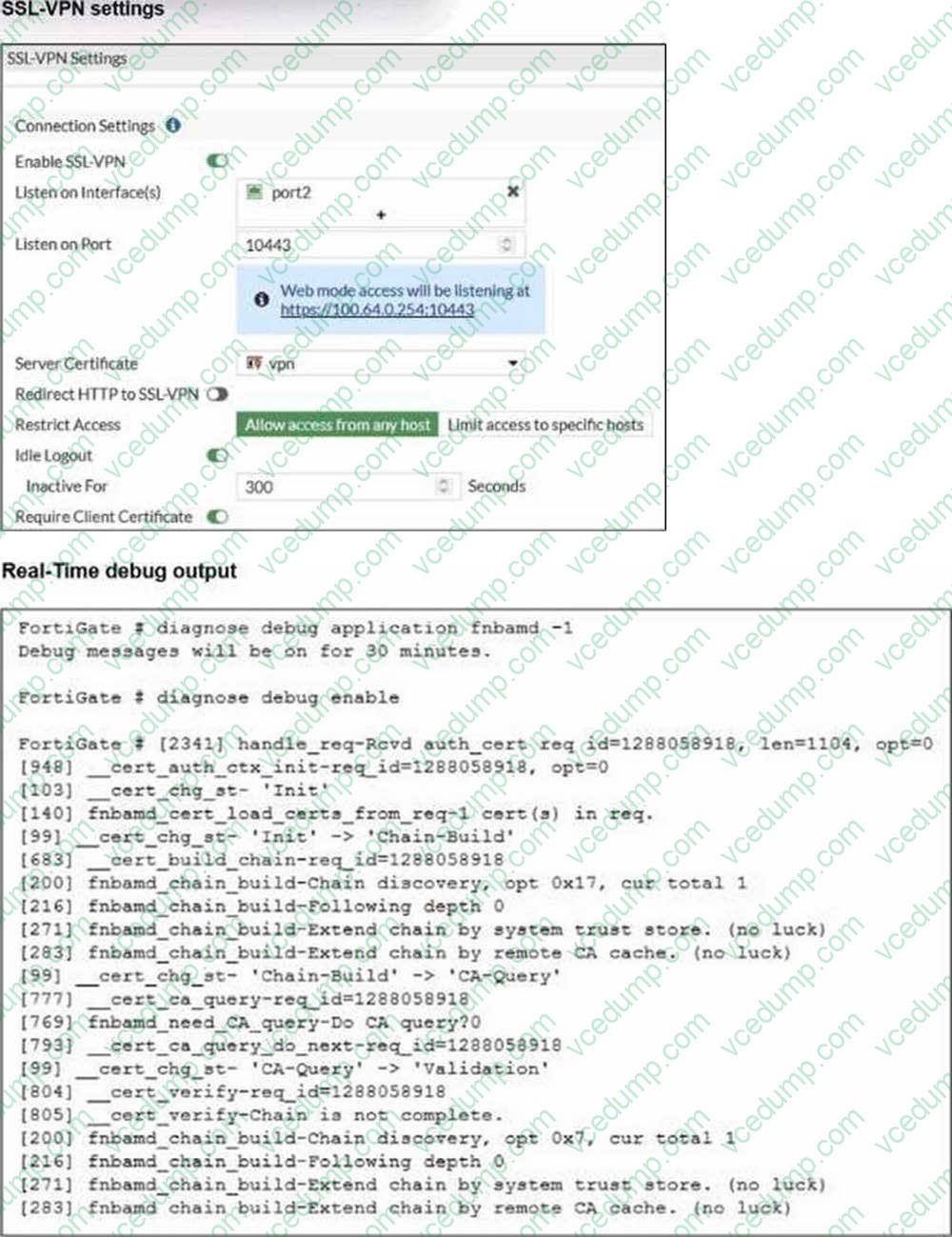
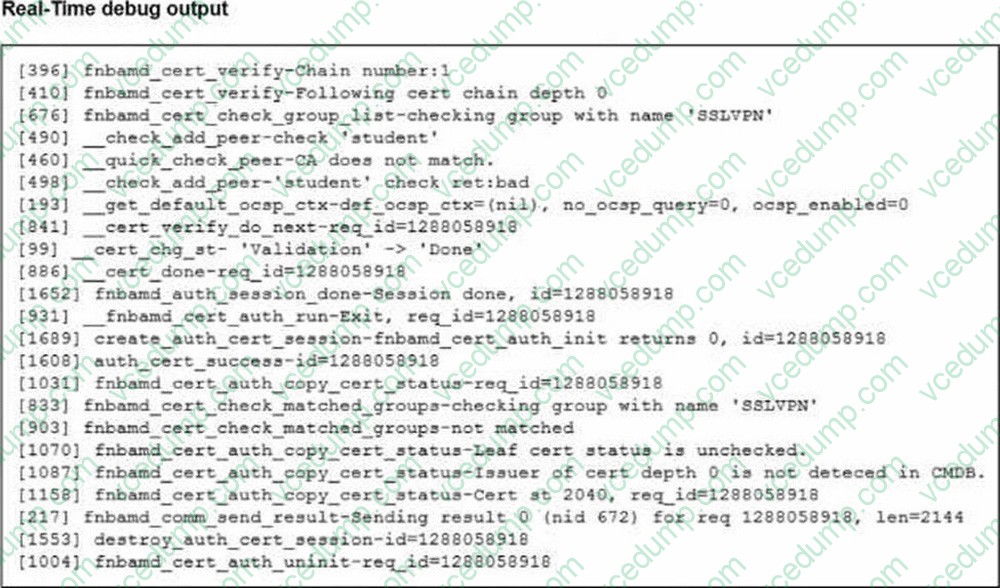
Which include debug output and SSL VPN configuration details.
An SSL VPN has been configured on FortiGate. To enhance security, the administrator enabled Required Client Certificate in the SSL VPN settings. However, when a user attempts to connect, authentication fails.
Which configuration change is needed to fix the issue and allow the user to connect?
A. Enable Redirect HTTP to SSL-VPN on the SSL VPN configuration page.
B. Import the CA that signed the SSL VPN Server Certificate to FortiGate.
C. Set the user certificate as the Server Certificate on the SSL VPN configuration page.
D. Import the CA that signed the user certificate to FortiGate. -
Question 20:
Refer to the exhibits.
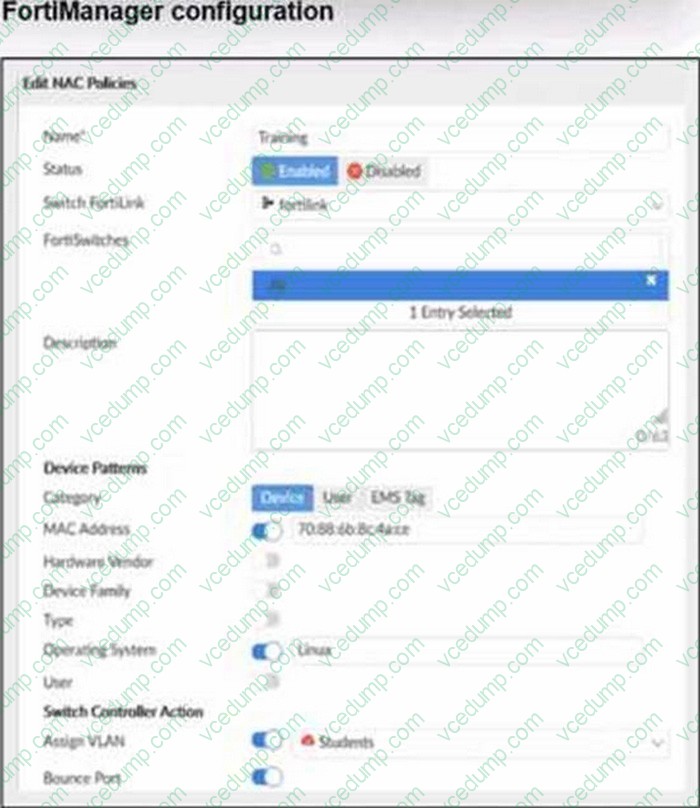
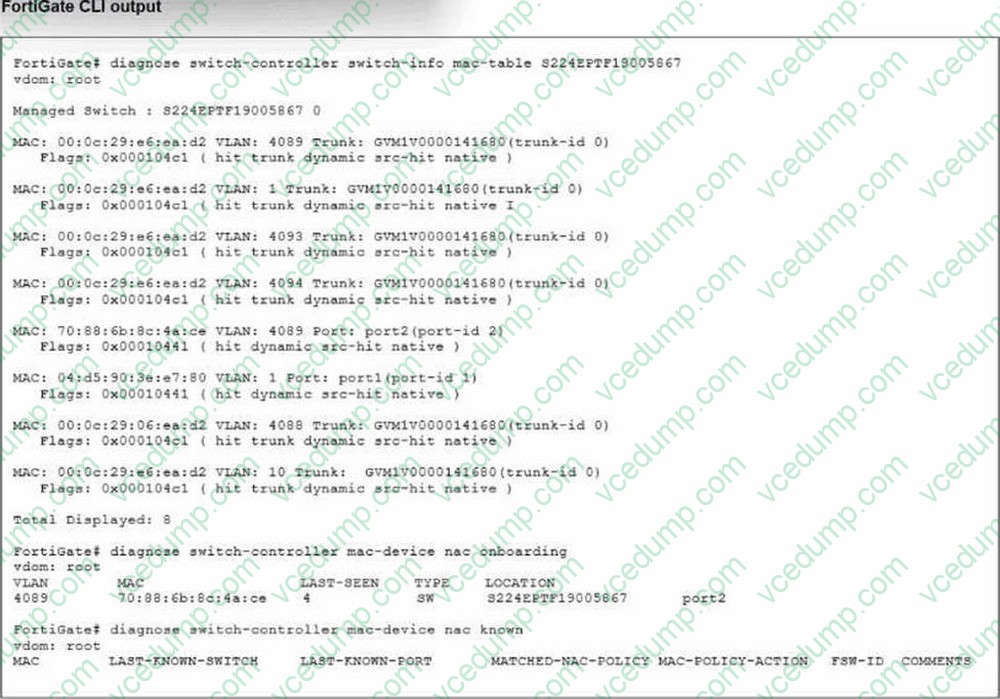
Examine the FortiManager configuration and FortiGate CLI output shown in the exhibit.
The NAC feature is being tested with a device connected to port2 on managed FortiSwitch S224SPTF19005867. The NAC policy has been applied to port2, and traffic was generated from the test device. However, the traffic from the test device does not match the NAC policy and remains in the onboarding VLAN.
What are two possible reasons why the test device is not being correctly classified by the NAC policy? (Choose two.)
A. Device detection is not enabled on VLAN 4089.
B. The device operating system detected by FortiGate is not Linux.
C. Management communication between FortiGate and FortiSwitch is down.
D. The MAC address configured on the NAC policy is incorrect.
Related Exams:
-
EMEA-ADVANCED-SUPPORT
Fortinet EMEA Advanced Support -
FCP_FAC_AD-6.5
FCP - FortiAuthenticator 6.5 Administrator -
FCP_FAZ_AD-7.4
FCP - FortiAnalyzer 7.4 Administrator -
FCP_FAZ_AN-7.4
FCP - FortiAnalyzer 7.4 Analyst -
FCP_FAZ_AN-7.6
Fortinet NSE 5 - FortiAnalyzer 7.6 Analyst -
FCP_FCT_AD-7.2
FCP - Forti Client EMS 7.2 Administrator -
FCP_FCT_AD-7.4
Fortinet NSE 6 - FortiClient EMS 7.4 Administrator -
FCP_FGT_AD-7.4
FCP - FortiGate 7.4 Administrator -
FCP_FGT_AD-7.6
FortiGate 7.6 Administrator FCP_FGT_AD-7.6 -
FCP_FMG_AD-7.4
FCP - FortiManager 7.4 Administrator
Tips on How to Prepare for the Exams
Nowadays, the certification exams become more and more important and required by more and more enterprises when applying for a job. But how to prepare for the exam effectively? How to prepare for the exam in a short time with less efforts? How to get a ideal result and how to find the most reliable resources? Here on Vcedump.com, you will find all the answers. Vcedump.com provide not only Fortinet exam questions, answers and explanations but also complete assistance on your exam preparation and certification application. If you are confused on your FCSS_LED_AR-7.6 exam preparations and Fortinet certification application, do not hesitate to visit our Vcedump.com to find your solutions here.