EX300 Exam Details
-
Exam Code
:EX300 -
Exam Name
:Red Hat Certified Engineer (RHCE) -
Certification
:Red Hat Certifications -
Vendor
:Red Hat -
Total Questions
:88 Q&As -
Last Updated
:Jul 13, 2026
Red Hat EX300 Online Questions & Answers
-
Question 1:
SIMULATION
RHCE Test Configuration Instructions
Information for the two systems you will use in test is the following:
system1.group3.example.com: is one of the main sever. system2.group3.example.com: mainly used as a client.
Password for both of the two systems is atenorth
System's IP is provided by DHCP, you can regard it as normal, or you can reset to Static IP in accordance with the following requirements:
system1.group3.example.com: 172.24.3.5
system2.group3.example.com: 172.24.3.10
The subnet mask is 255.255.255.0
Your system is a member of DNS domain group3.example.com. All systems in DNS domain group3.example.com are all in subnet 172.24.3.0/255.255.255.0, the same all systems in this subnet are also in group3.example.com, unless
specialized, all network services required to be configured can be accessed by systems of domain group3.
host.group3.example.com provides a centralized authentication service domain
GROUP3.EXAMPLE.COM, both system1 and system2 have already been pre-configured to be the client for this domain, this domain provides the following user account:
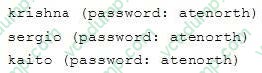
Firewall is enabled by default, you can turn it off when deemed appropriate, other settings about firewall may be in separate requirements.
Your system will be restarted before scoring, so please ensure that all modifications and service configurations you made still can be operated after the restart without manual intervention, virtual machine instances of all examinations must be able to enter the correct multi-user level after restart without manual assistance, it will be scored zero if the test using virtual machine system cannot be restarted or be properly restarted.
Corresponding distribution packages for the testing using operating system Red Hat Enterprise Linux version can be found in the following link: http://server1.group3.example.com/rhel
Part of the requirements include host security, ensure your host security limit does not prevent the request to allow the host and network, although you correctly configured the network service but would have to allow the host or network is blocked, this also does not score.
You will notice that some requirements which clearly do not allow services be accessed by service domain my133t.org, systems of this domain are in subnet 172.25.1.0/252.255.255.0, and systems of these subnets also belong to my 133t.org domain.
PS: Notice that some test questions may depend on other exam questions, for example, you might be asked to perform a series of restrictions on a user, but this user creation may be required in other questions. For convenient identification, each exam question has some radio buttons to help you identify which questions you have already completed or not completed. Certainly, you do not need to care these buttons if you don't need them.
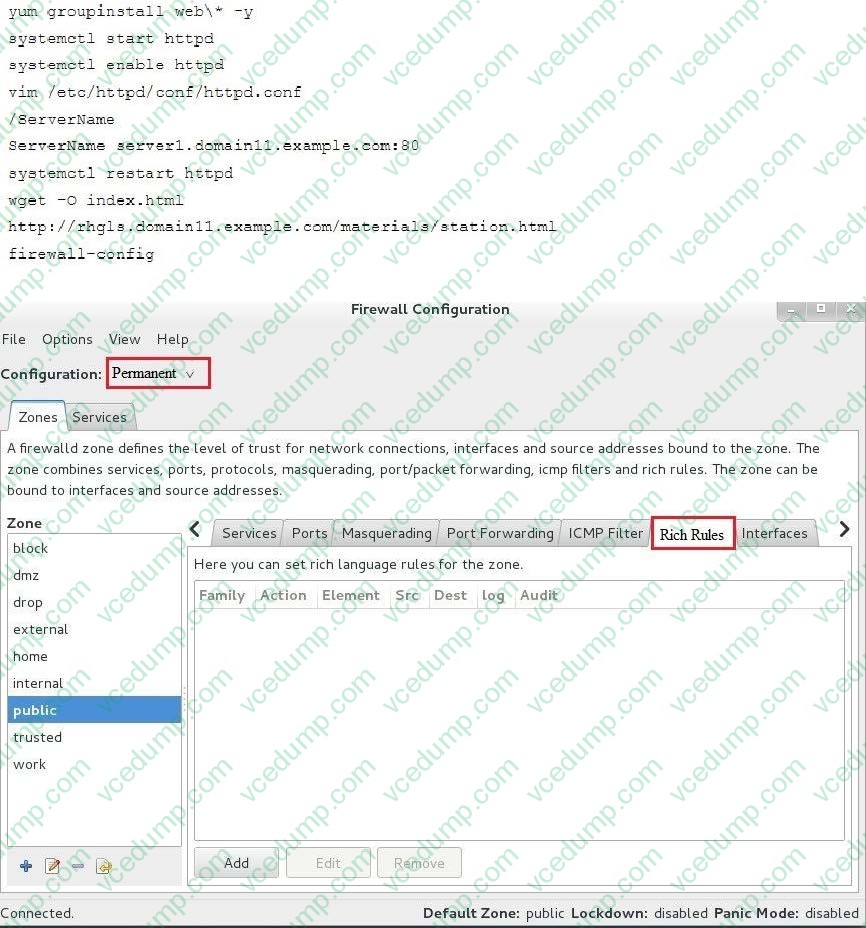
Implement/configure a Web Service.
Configure a site http://systeml. domain11.example.com/ on the system1, then execute the following steps:
(1)
Download file from http://rhgls.domain11.example.com/materials/station.html and rename this files index.html, don't modify the file contents; (2) Copy the file index.html to your web server's DocumentRoot directory
(3)
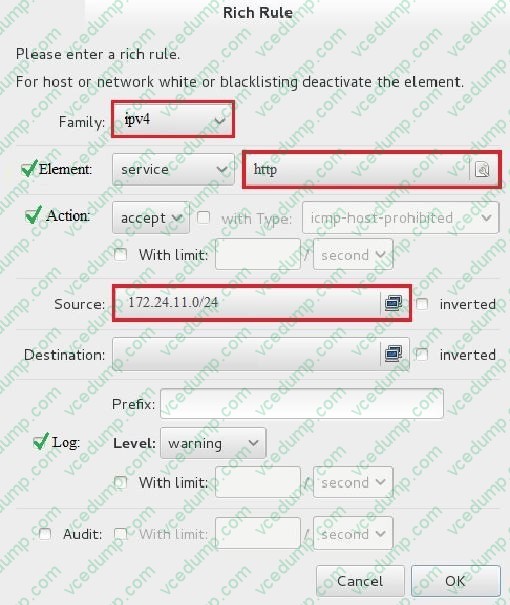
Clients from domain group3.example.com can access to this web service
(4)
Clients from domain my133t.org deny access to this web service
A. explanation -
Question 2:
SIMULATION
Whoever creates the file on /data make automatically owner group should be the group owner of /data directory.
A. explanation -
Question 3:
SIMULATION
One Package named zsh is dump on ftp://server1.example.com under pub directory. Install the package from ftp server.
A. explanation -
Question 4:
SIMULATION
Give Full Permission to owner user and owner group member but no permission to others on /data.
A. explanation -
Question 5:
SIMULATION
Install the Cron Schedule for jeff user to display "Hello" on daily 5:30.
A. explanation -
Question 6:
SIMULATION
There are Mail servers, Web Servers, DNS Servers and Log Server. Log Server is already configured. You should configure the mail server, web server and dns server to send the logs to log server.
A. explanation -
Question 7:
SIMULATION
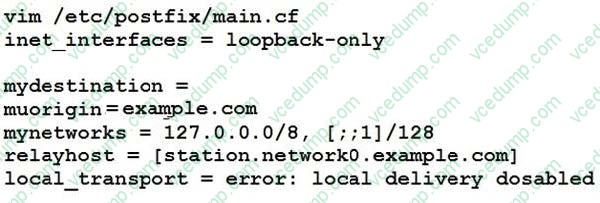
There were two systems: system1, main system on which most of the configuration take place system2, some configuration here SMTP Configuration. Configure the SMTP mail service on serverX and desktopX which relay the mail only from local system through station.network0.example.com, all outgoing mail have their sender domain as example.com. Ensure that mail should not store locally. Verify the mail server is working by sending mail to a natasha user. Check the mail on both serverX and desktopX with the below URL http://station.network0.example.com/system1 http://station.network0.example.com/system2
A. explanation -
Question 8:
SIMULATION
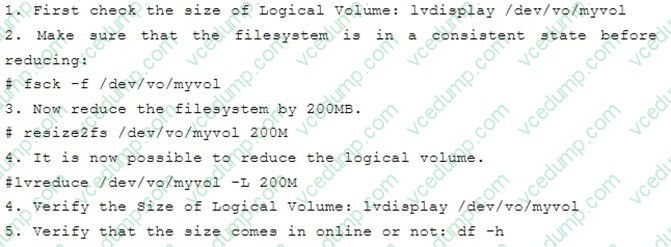
One Logical Volume is created named as myvol under vo volume group and is mounted. The Initial Size of that Logical Volume is 400MB. Make successfully that the size of Logical Volume 200MB without losing any data. The size of logical volume 200MB to 210MB will be acceptable.
A. explanation -
Question 9:
SIMULATION
RHCE Test Configuration Instructions
Information for the two systems you will use in test is the following:
system1.group3.example.com: is one of the main sever. system2.group3.example.com: mainly used as a client.
Password for both of the two systems is atenorth
System's IP is provided by DHCP, you can regard it as normal, or you can reset to Static IP in accordance with the following requirements:
system1.group3.example.com: 172.24.3.5
system2.group3.example.com: 172.24.3.10
The subnet mask is 255.255.255.0
Your system is a member of DNS domain group3.example.com. All systems in DNS domain group3.example.com are all in subnet 172.24.3.0/255.255.255.0, the same all systems in this subnet are also in group3.example.com, unless
specialized, all network services required to be configured can be accessed by systems of domain group3.
host.group3.example.com provides a centralized authentication service domain
GROUP3.EXAMPLE.COM, both system1 and system2 have already been pre-configured to be the client for this domain, this domain provides the following user account:
Firewall is enabled by default, you can turn it off when deemed appropriate, other settings about firewall may be in separate requirements.
Your system will be restarted before scoring, so please ensure that all modifications and service configurations you made still can be operated after the restart without manual intervention, virtual machine instances of all examinations must be
able to enter the correct multi-user level after restart without manual assistance, it will be scored zero if the test using virtual machine system cannot be restarted or be properly restarted.
Corresponding distribution packages for the testing using operating system Red Hat Enterprise Linux version can be found in the following link:
http://server1.group3.example.com/rhel
Part of the requirements include host security, ensure your host security limit does not prevent the request to allow the host and network, although you correctly configured the network service but would have to allow the host or network is
blocked, this also does not score.
You will notice that some requirements which clearly do not allow services be accessed by service domain my133t.org, systems of this domain are in subnet 172.25.1.0/252.255.255.0, and systems of these subnets also belong to my 133t.org
domain.
PS: Notice that some test questions may depend on other exam questions, for example, you might be asked to perform a series of restrictions on a user, but this user creation may be required in other questions. For convenient identification,
each exam question has some radio buttons to help you identify which questions you have already completed or not completed. Certainly, you do not need to care these buttons if you don't need them.
Configure the SSH Access as required:
Users can visit your two virtual machine systems via clients of domain group3.example.com through SSH remote.
A. explanation -
Question 10:
SIMULATION
There were two systems: system1, main system on which most of the configuration take place system2, some configuration here
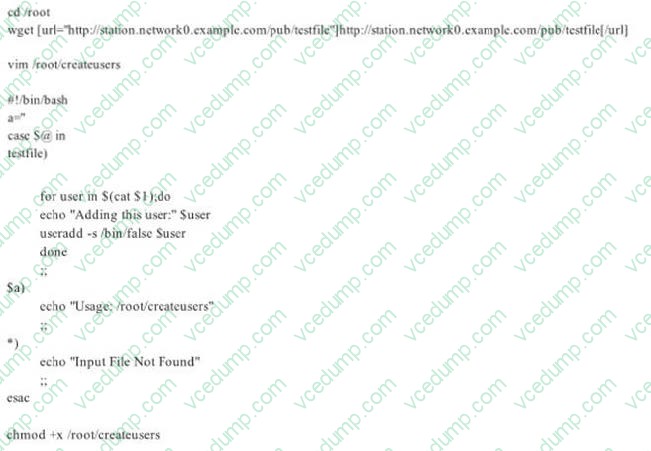
Script2. Create a script on serverX called /root/createusers When this script is called with the argument, it should add all the users from the file Download the file from http://station.network0.example.com/pub/testfile All users should have the login shell as /bin/false, password not required When this script is called with any other argument, it should print the message as "Input File Not Found" When this script is run without any argument, it should display "Usage:/root/createusers" NOTE: if the users are added no need to delete
A. explanation
Related Exams:
-
EX200
Red Hat Certified System Administrator (RHCSA) -
EX294
Red Hat Certified Engineer (RHCE) -
EX300
Red Hat Certified Engineer (RHCE) -
EX318
Red Hat Certified Specialist in Virtualization Exam -
EX407
Red Hat Certified Specialist in Ansible Automation -
EX447
Red Hat Certified Specialist in Advanced Automation: Ansible Best Practices -
RH033
Red Hat Linux Essentials -
RH133
Red Hat Linux System Administration -
RH202
Red Hat Certified Technician on Red Hat Enterprise Linux 5 (Labs) -
RH302
Red Hat Certified Engineer on Red Hat Enterprise Linux 5 (Labs)
Tips on How to Prepare for the Exams
Nowadays, the certification exams become more and more important and required by more and more enterprises when applying for a job. But how to prepare for the exam effectively? How to prepare for the exam in a short time with less efforts? How to get a ideal result and how to find the most reliable resources? Here on Vcedump.com, you will find all the answers. Vcedump.com provide not only Red Hat exam questions, answers and explanations but also complete assistance on your exam preparation and certification application. If you are confused on your EX300 exam preparations and Red Hat certification application, do not hesitate to visit our Vcedump.com to find your solutions here.