DP-100 Exam Details
-
Exam Code
:DP-100 -
Exam Name
:Designing and Implementing a Data Science Solution on Azure -
Certification
:Microsoft Certifications -
Vendor
:Microsoft -
Total Questions
:617 Q&As -
Last Updated
:Jul 17, 2026
Microsoft DP-100 Online Questions & Answers
-
Question 261:
HOTSPOT
You manage an Azure Machine Learning workspace by using the Python SDK v2.
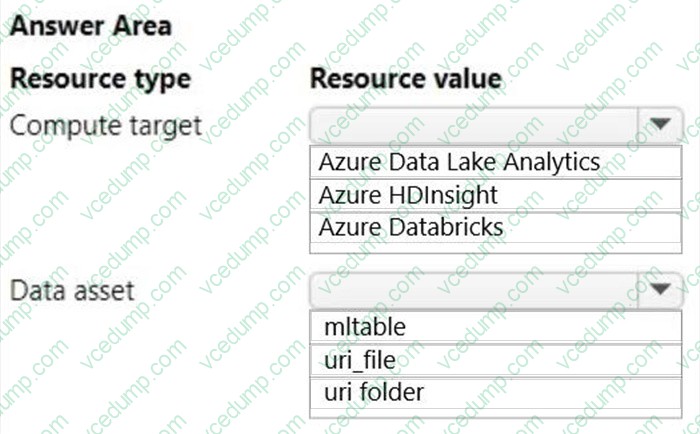
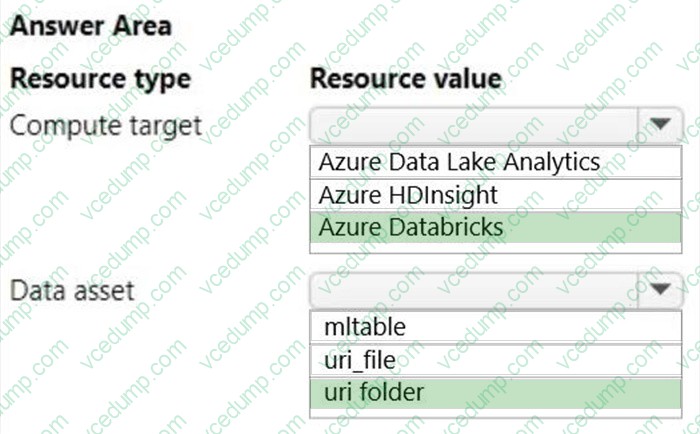
You must create an automated machine learning job to generate a classification model by using data files stored in Parquet format.
You must configure an autoscaling compute target and a data asset for the job.
You need to configure the resources for the job.
Which resource configuration should you use? To answer, select the appropriate options in the answer area.
NOTE: Each correct selection is worth one point.
-
Question 262:
You need to select a feature extraction method.
Which method should you use?
A. Mutual information
B. Mood's median test
C. Kendall correlation
D. Permutation Feature Importance -
Question 263:
You create an Azure Machine Learning workspace named workspace1. You create a Python SDK v2 notebook to perform custom model training in workspace1.
You need to run the notebook from Azure Machine Learning Studio in workspace1.
What should you provision first?
A. default storage account
B. real-time endpoint
C. Azure Machine Learning compute cluster
D. Azure Machine Learning compute instance -
Question 264:
DRAG DROP
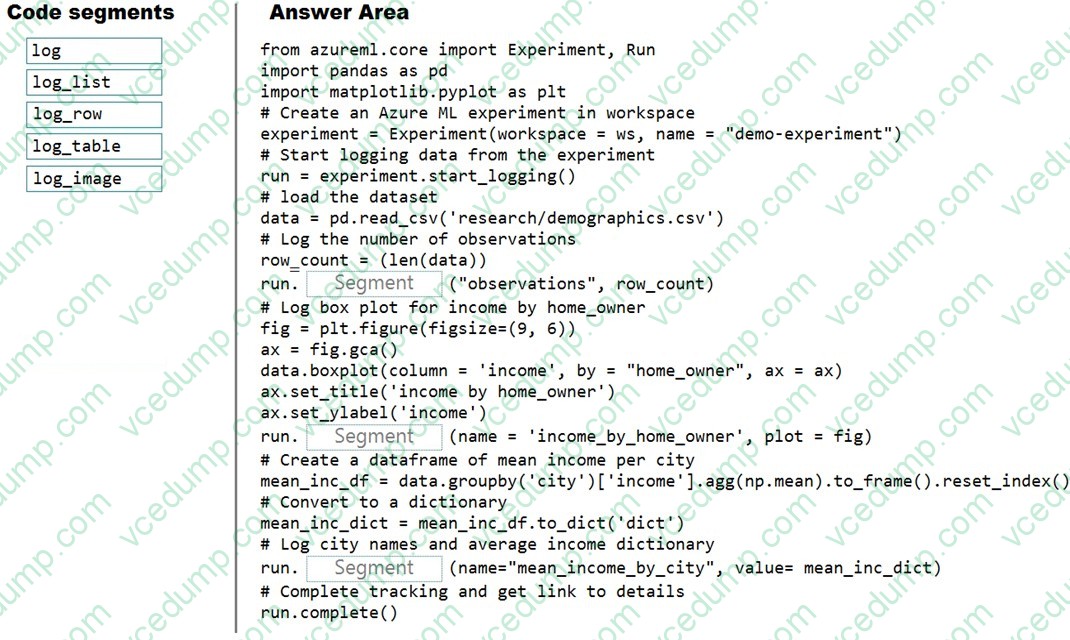
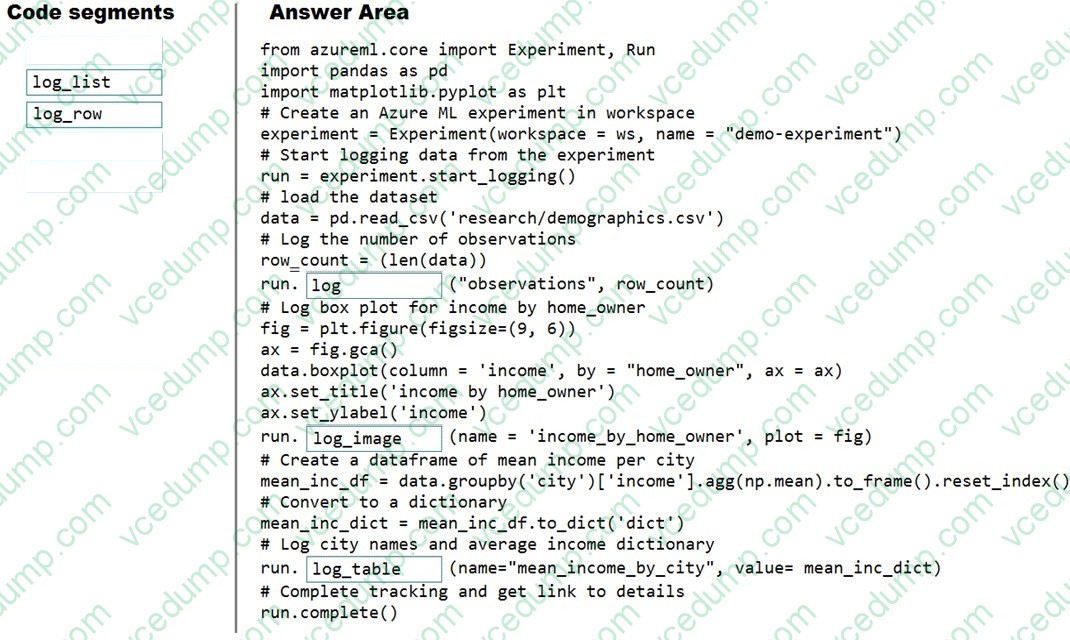
You plan to explore demographic data for home ownership in various cities. The data is in a CSV file with the following format:
<pdf2txt-u>age,city,income,home_owner</pdf2txt-u> <pdf2txt-u>21,Chicago,50000,0</pdf2txt-u> <pdf2txt-u>35,Seattle,120000,1</pdf2txt-u> <pdf2txt-u>23,Seattle,65000,0</pdf2txt-u> <pdf2txt-u>45,Seattle,130000,1</pdf2txt-u> <pdf2txt-u>18,Chicago,48000,0</pdf2txt-u>
You need to run an experiment in your Azure Machine Learning workspace to explore the data and log the results. The experiment must log the following information:
1. the number of observations in the dataset
2. a box plot of income by home_owner
3. a dictionary containing the city names and the average income for each city
You need to use the appropriate logging methods of the experiment's run object to log the required information.
How should you complete the code? To answer, drag the appropriate code segments to the correct locations. Each code segment may be used once, more than once, or not at all. You may need to drag the split bar between panes or scroll to view content.
NOTE: Each correct selection is worth one point.
Select and Place:
-
Question 265:
You use an Azure Machine Learning workspace.
You have a trained model that must be deployed as a web service. Users must authenticate by using Azure Active Directory.
What should you do?
A. Deploy the model to Azure Kubernetes Service (AKS). During deployment, set the token_auth_enabled parameter of the target configuration object to true
B. Deploy the model to Azure Container Instances. During deployment, set the auth_enabled parameter of the target configuration object to true
C. Deploy the model to Azure Container Instances. During deployment, set the token_auth_enabled parameter of the target configuration object to true
D. Deploy the model to Azure Kubernetes Service (AKS). During deployment, set the auth.enabled parameter of the target configuration object to true -
Question 266:
HOTSPOT
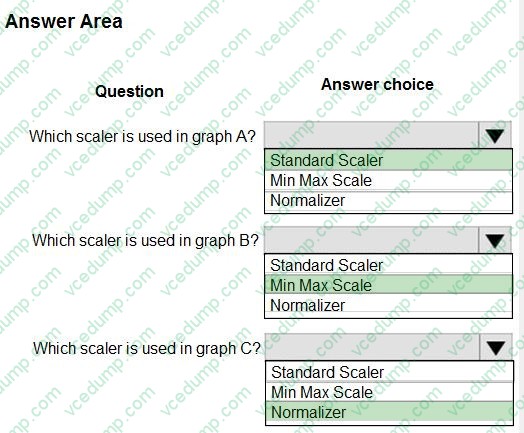
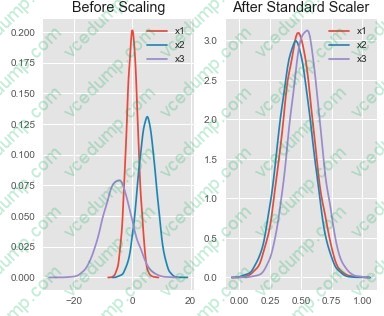
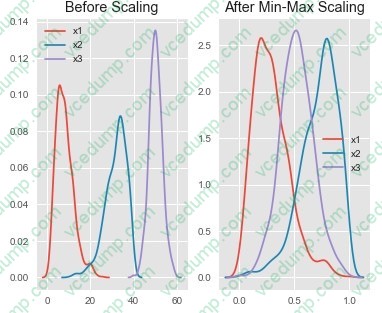
You are performing feature scaling by using the scikit-learn Python library for x.1 x2, and x3 features.
Original and scaled data is shown in the following image.
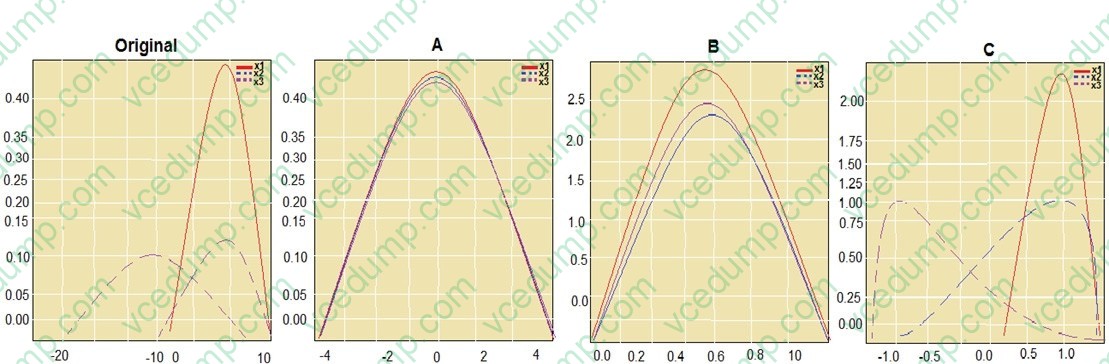
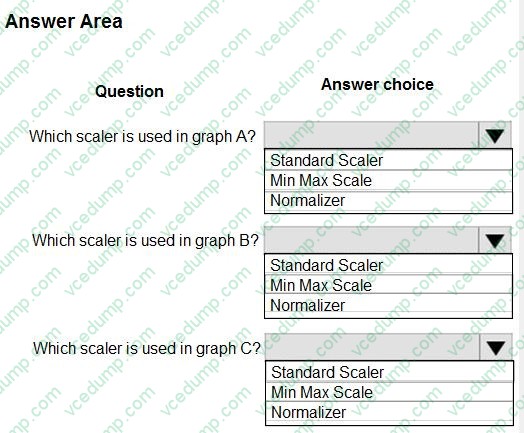
Use the drop-down menus to select the answer choice that answers each question based on the information presented in the graphic.
NOTE: Each correct selection is worth one point.
-
Question 267:
You plan to deliver a hands-on workshop to several students. The workshop will focus on creating data visualizations using Python. Each student will use a device that has internet access.
Student devices are not configured for Python development. Students do not have administrator access to install software on their devices. Azure subscriptions are not available for students.
You need to ensure that students can run Python-based data visualization code.
Which Azure tool should you use?
A. Anaconda Data Science Platform
B. Azure BatchAl
C. Azure Notebooks
D. Azure Machine Learning Service -
Question 268:
HOTSPOT
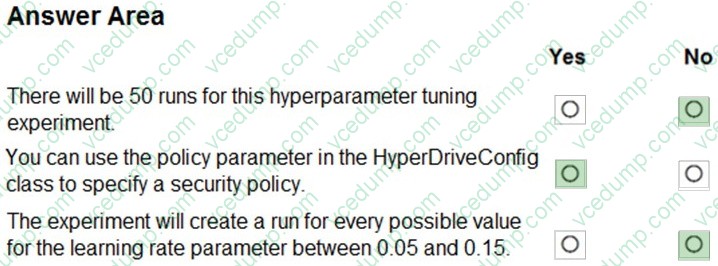
You plan to use Hyperdrive to optimize the hyperparameters selected when training a model. You create the following code to define options for the hyperparameter experiment:
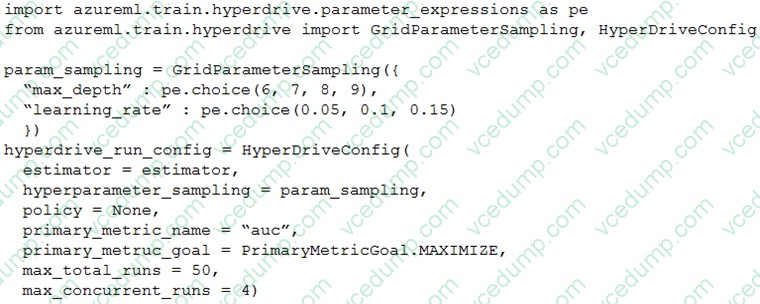
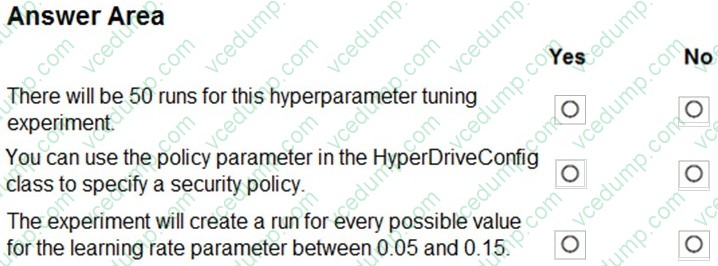
For each of the following statements, select Yes if the statement is true. Otherwise, select No.
NOTE: Each correct selection is worth one point.
-
Question 269:
Note: This question is part of a series of questions that present the same scenario. Each question in the series contains a unique solution that might meet the stated goals. Some question sets might have more than one correct solution, while others might not have a correct solution.
After you answer a question in this section, you will NOT be able to return to it. As a result, these questions will not appear in the review screen.
You train and register a machine learning model.
You plan to deploy the model as a real-time web service. Applications must use key-based authentication to use the model.
You need to deploy the web service.
Solution: Create an AciWebservice instance.
Set the value of the ssl_enabled property to True.
Deploy the model to the service.
Does the solution meet the goal?
A. Yes
B. No -
Question 270:
You write a Python script that processes data in a comma-separated values (CSV) file.
You plan to run this script as an Azure Machine Learning experiment.
The script loads the data and determines the number of rows it contains using the following code:
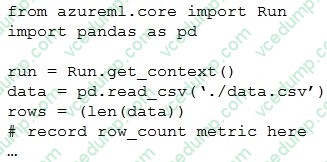
You need to record the row count as a metric named row_count that can be returned using the get_metrics method of the Run object after the experiment run completes.
Which code should you use?
A. run.upload_file(`row_count', `./data.csv')
B. run.log(`row_count', rows)
C. run.tag(`row_count', rows)
D. run.log_table(`row_count', rows)
E. run.log_row(`row_count', rows)
Related Exams:
-
62-193
Technology Literacy for Educators -
70-243
Administering and Deploying System Center 2012 Configuration Manager -
70-355
Universal Windows Platform – App Data, Services, and Coding Patterns -
77-420
Excel 2013 -
77-427
Excel 2013 Expert Part One -
77-725
Word 2016 Core Document Creation, Collaboration and Communication -
77-726
Word 2016 Expert Creating Documents for Effective Communication -
77-727
Excel 2016 Core Data Analysis, Manipulation, and Presentation -
77-728
Excel 2016 Expert: Interpreting Data for Insights -
77-731
Outlook 2016 Core Communication, Collaboration and Email Skills
Tips on How to Prepare for the Exams
Nowadays, the certification exams become more and more important and required by more and more enterprises when applying for a job. But how to prepare for the exam effectively? How to prepare for the exam in a short time with less efforts? How to get a ideal result and how to find the most reliable resources? Here on Vcedump.com, you will find all the answers. Vcedump.com provide not only Microsoft exam questions, answers and explanations but also complete assistance on your exam preparation and certification application. If you are confused on your DP-100 exam preparations and Microsoft certification application, do not hesitate to visit our Vcedump.com to find your solutions here.