D-PDD-DY-23 Online Practice Questions

Dell PowerProtect DD Deploy 2023

91 questions available · Page 1 of 10

Updated Exam DumpsVerified AnswersPass Guarantee

Get Complete Exam Dumps
Question 1 Single choice

Which factors must be considered when determining capacity needs?

  1. A

    Deduplication rate, data type, change rate, and throughput

  2. B

    Data size, data type, number of backup servers, and change rate

  3. C

    Data type, data size, change rate, and deduplication rate

  4. D

    Change rate, data size, throughput, and number of backup servers

Show answer and explanation

Correct answer: C

Explanation

Data Type: Different types of data may compress and deduplicate differently, affecting how much storage is needed.
Data Size: The total size of the data that needs to be backed up is a fundamental factor in determining capacity.
Change Rate: The frequency with which data changes impacts how much new data is generated and needs to be stored.
Deduplication Rate: Understanding how effective deduplication will be is essential for estimating how much physical storage will be needed after backups are processed.
Question 2 Single choice

Which fabric zoning configuration is recommended by Dell Technologies for implementing a DD VTL?

  1. A

    Multiple initiators; single target

  2. B

    Single initiator; multiple targets

  3. C

    Multiple initiators; multiple targets

  4. D

    Single initiator; single target

Show answer and explanation

Correct answer: D

Explanation

The best practice for fabric zoning with PowerProtect DD Virtual Tape Library (VTL) is single initiator-single target zoning. This configuration minimizes cross-talk and reduces risks of interference, resulting in a more stable and secure data transfer environment.

Question 3 Single choice

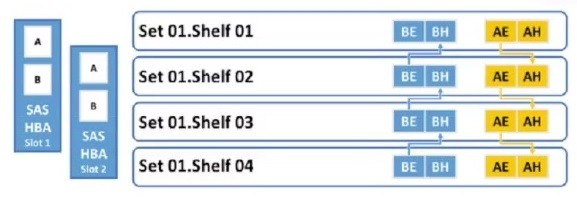
Refer to the exhibit.

To which shelf and port should SAS HBA slot 1 port B be connected?

  1. A

    Shelf 01 BE

  2. B

    Shelf 01 BH

  3. C

    Shelf 04 BH

  4. D

    Shelf 04 BE

Show answer and explanation

Correct answer: D

Explanation

Based on the configuration: SAS HBA Slot 1 has ports labeled A and B.
The connection sequence suggests that: Shelf 01 is the first shelf connected, and it has ports BE and BH. Shelf 02 through Shelf 04 continues the pattern with their respective ports.

Given the layout:
SAS HBA Slot 1 Port B should be connected to Shelf 01 BH to maintain proper connectivity according to the configuration flow.

Question 4 Single choice

Which command removes the configuration associated with resources enclosures, the migration destination, and restarts the file system?

  1. A

    storage migration finalize

  2. B

    storage migration resume

  3. C

    storage migration start

Show answer and explanation

Correct answer: A

Explanation

The storage migration finalize command is used at the end of the storage migration process. This command removes any temporary configurations related to resources, enclosures, and migration destinations that were created during the migration process. It also restarts the file system, ensuring that the new configuration is fully implemented. Essentially, this command marks the official completion of the migration process, cleaning up any residual configurations and making the new storage setup fully operational.

Question 5 Single choice

A storage administrator finished the zoning between the PowerProtect DD and the NetWorker backup server.

How can they verify that the zoning was completed properly and the server HBA are visible?

  1. A

    scsitarget show initiator list

  2. B

    scsitarget show initiator

  3. C

    scsitarget initiator show list

  4. D

    scsitarget initiator list

Show answer and explanation

Correct answer: A

Explanation

The command scsitarget show initiator list is used to display a list of initiators (such as the backup server HBAs) that are connected to the PowerProtect DD system. This allows the storage administrator to confirm that the zoning was successfully configured and that the HBAs from the NetWorker backup server are visible and recognized by the system.

Question 6 Drag & drop

DRAG DROP

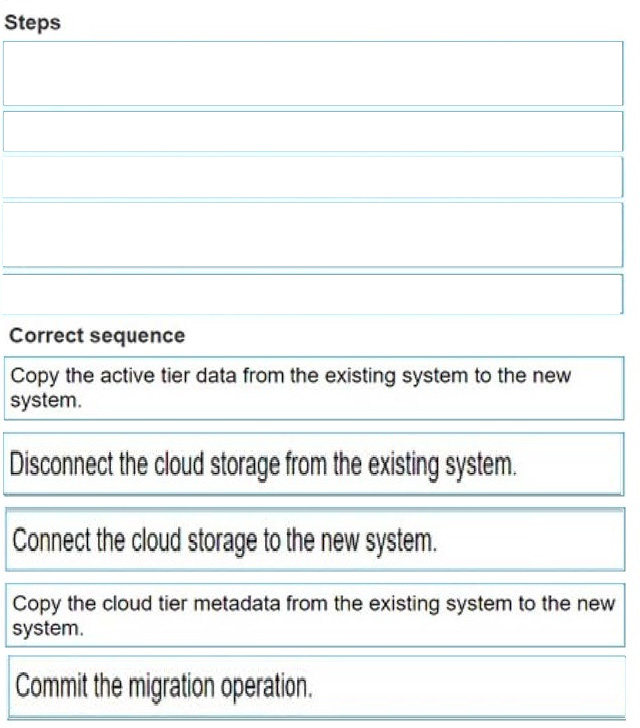
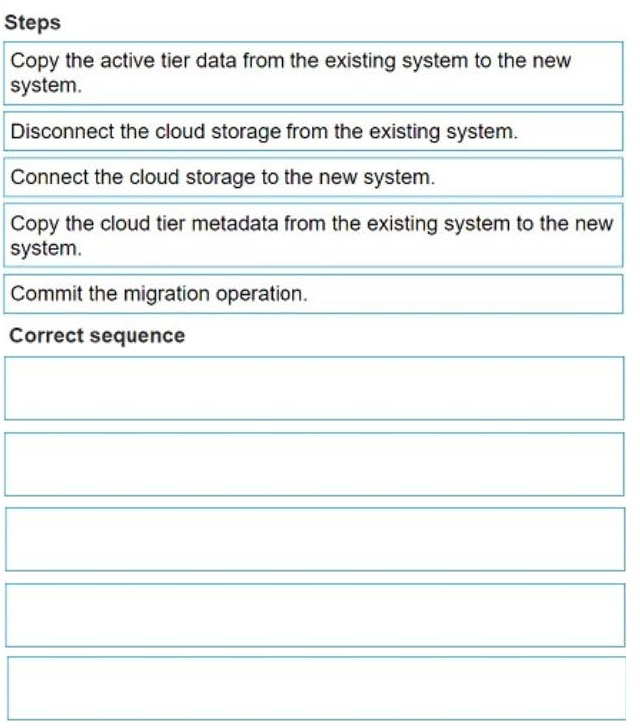
What is the correct sequence to perform Cloud Tier migration?

Question diagram
Show answer and explanation
Correct answer diagram
Explanation

The correct sequence to perform Cloud Tier migration is as follows: Copy the active tier data from the existing system to the new system.
Disconnect the cloud storage from the existing system.
Connect the cloud storage to the new system.
Copy the cloud tier metadata from the existing system to the new system.
Commit the migration operation.
Copy Active Tier Data: Start by transferring active tier data from the current system to the new PowerProtect DD system. This step ensures that primary data is accessible on the new appliance.
Disconnect Cloud Storage: Once the active tier data is copied, disconnect the cloud storage from the original system to prepare it for reconnection.
Connect Cloud Storage to New System: Attach the cloud storage to the new system. This step transitions cloud storage access from the old to the new appliance, preparing it for continued operations.
Copy Cloud Tier Metadata: Metadata associated with the cloud tier is copied to the new system, ensuring continuity of data access and management in the cloud tier.
Commit Migration Operation: Finally, complete the migration process by committing the changes, solidifying the new system as the primary appliance for both active and cloud tier operations.
This ordered approach ensures a structured and reliable migration process, maintaining data integrity and continuity across PowerProtect DD systems.

Question 7 Single choice

What is the correct practice when creating Fibre Channel zones between PowerProtect DD and the media server?

  1. A

    single-initiator dual-target zoning

  2. B

    dual-initiator dual-target zoning

  3. C

    single-initiator single-target zoning

  4. D

    dual-initiator single-target zoning

Show answer and explanation

Correct answer: C

Explanation

Best practice for Fibre Channel zoning with PowerProtect DD is to use single-initiator single-target zoning, which enhances security and stability in data transfer by isolating connections between devices, minimizing potential interference.

Question 8 Lab simulation

Simulation

A backup administrator finished installing a PowerProtect DD3300. After the installation, they notice disk 1.5 is offline after running the disk fail command in the DDOS CLI.

Using the simulator, flash an LED on the hard drive with the issue and return it to operation.

When you have finished, continue to the next question.

Show answer and explanation

To flash an LED on a hard drive and bring a disk back online using the DD System Manager or DDOS CLI, follow these general steps: Step 1: Identify the Disk
In DD System Manager:
In DDOS CLI (if using CLI):
Step 2: Flash the LED on the Disk
In DD System Manager: In DDOS CLI:
Step 3: Bring the Disk Back Online
In DD System Manager: In DDOS CLI:
Step 4: Verify the Disk Status Confirm in DD System Manager or by using the disk show state command in CLI that Disk 1.5 is now online and functioning.
After completing these steps, the LED should flash to help locate the disk physically, and then Disk 1.5 will be returned to an operational state. Let me know if you need further guidance!

Question 9 Single choice

Which feature helps to ensure that data immutability is maintained on a PowerProtect DD system?

  1. A

    DD Retention Lock

  2. B

    Encryption

  3. C

    Secure Multi-Tenancy

  4. D

    DD Replicator

Show answer and explanation

Correct answer: A

Explanation

DD Retention Lock enforces data immutability, ensuring that critical data cannot be altered or deleted until its retention period expires. This feature is essential for regulatory compliance and data integrity in long-term storage.

Question 10 Single choice

An administrator must display the compression statistics for all files and directories in the file system for the last 7 days and the last 24 hours.

Which command is used to gather this information?

  1. A

    storage show

  2. B

    mtree show

  3. C

    filesys report

  4. D

    quota show

Show answer and explanation

Correct answer: C

Explanation

The filesys report command provides detailed compression statistics, essential for administrators to monitor storage efficiency over time. This insight into compression ratios aids in storage optimization and management planning on PowerProtect DD systems.