A Digital Developer is inspecting the weekly service status report for a critical internally- hosted web service used inthe application and notices that there are too many instances of unavailability. Which two solutions are possible options to reduce the unavailability of the service? (Choose two.)
A. Modify the code that makes the request to the external service to be wrapped in a try / catch block. B. Change the code that makes the request to set the throwOnError attribute, of the service, to be true. C. Increase the web service time out. D. Update the external service to have a faster response time.
A. Modify the code that makes the request to the external service to be wrapped in a try / catch block. C. Increase the web service time out. To reduce the unavailability of a critical internally-hosted web service noticed in the service status reports, two practical solutions would be: A. Modify the code to include a try/catch block around the request to the external service. This approach ensures that even if the service is unavailable, the application can handle the error gracefully and continue functioning, possibly with a fallback mechanism. C. Increase the web service timeout. This allows the service more time to respond before the request is considered failed. It can be particularly useful if the service unavailability is due to delays in response rather than outright outages. Both these strategies are recommended in handling external service interactions to ensure robustness and resilience in the application. They are supported by standard programming practices and Salesforce Commerce Cloud's guidelines on external integration.
Question 42:
Which two methods are efficientand scalable? (Choose two.)
A. ProductMgr.queryAllSiteProducts() B. ProductSearchHit.getRepresentedProducts() C. ProductSearchModel.getProductSearchHits() D. Category.getProducts()
B. ProductSearchHit.getRepresentedProducts() C. ProductSearchModel.getProductSearchHits() Explanation Explanation/Reference:Efficient and scalable methods for accessing product data in Salesforce B2C Commerce involve: B. ProductSearchHit.getRepresentedProducts() - This method retrieves the products represented by search hits in a search result. It is efficient because it allows batch retrieval of product data based on search criteria, reducing the need for individual product queries. C. ProductSearchModel.getProductSearchHits() - This method retrieves a collection of search hits from a product search, which can be used to fetch multiple products efficiently. Using a search model to manage product data retrieval is scalable as it leverages indexed search data rather than querying all products directly. Both methods are part of the Commerce Cloud's search framework, designed to handle large volumes of data efficiently and are recommended for scalable product retrieval operations. The direct querying methods like ProductMgr.queryAllSiteProducts() and Category.getProducts() can be less efficient and scalable due to their broad scope and direct database access.
Question 43:
A developer wants to configure the following products so that same search results ire returned regardless of the search term used. The search term can be bag, purse, pocketbook, and tote. Mow should the developer configure this?
A. Synonyms B. Hypernyms C. Hyponyms
A. Synonyms To configure the search so that the same results are returned regardless of whether the search term is 'bag', 'purse', 'pocketbook', or 'tote', the developer should use Synonyms (Option A). This setup involves configuring each of these terms as synonyms of one another in the site's search dictionary, allowing the search engine to understand that these terms are interchangeable, and thus, to return the same products for any of these terms. Synonym configuration is a common practice in e-commerce search setups to ensure a consistent and user-friendly search experience, accommodating the different terms customers might use to find the same types of products.
Question 44:
Given a NewsletterSubscription custom object that has a key attribute named email of type String, what is the correct syntax to create the NewsletterSubscription custom object and persist it to the database?
A. Var customobject = dw.object.CustomObjectMgr.createNewsletterSubscription(`email',newsLetterForm.email.v alue); B. Var customobject = dw.object.CustomObjectMgr.createCustomObject(newsletterForm.email.value,`Newsletter Subscription'); C. Var customobject = dw.object.CustomObjectMgr.createCustomObject(`NewsletterSubscription', newsLetterForm.email.value); D. Varcustomobject = dw.object.CustomObjectMgr.createCustomObject(`NewsletterSubscription','email', newsLetterForm.email.value);
C. Var customobject = dw.object.CustomObjectMgr.createCustomObject(`NewsletterSubscription', newsLetterForm.email.value); Explanation Explanation/Reference:The correct syntax to create a NewsletterSubscription custom object and persist it to the database using Salesforce B2C Commerce's API is option C: var customObject = dw.object.CustomObjectMgr.createCustomObject ('NewsletterSubscription', newsLetterForm.email.value);. This code uses dw.object.CustomObjectMgr.createCustomObject, which takes two parameters: the first is the type of the custom object (here 'NewsletterSubscription'), and the second is the unique key value for the custom object (in this case, derived from newsLetterForm.email.value). This method is specifically designed to handle the creation and persistence of custom objects based on a unique key.
Question 45:
A Digital Developer has detected storefront pages being rendered with an error message. After inspecting the log files, the Developer discovered that an enforced quota is being exceeded.
What action should the Developer take to stop the quota violation?
A. Rewrite the code that is causing the overage. B. Change the Business Managerconfiguration for the quota settings. C. Take no action, the overage will be resolved when concurrent visitors are reduced. D. Ask support to remove the quota limit.
A. Rewrite the code that is causing the overage. In Salesforce B2C Commerce, encountering a quota limit typically suggests that a certain resource or operation limit set in Business Manager is being exceeded. This could be API calls, bandwidth, or CPU usage, among others. The best approach is to address the root cause of the quota overage. Rewriting or optimizing the code to reduce resource consumption or the frequency of operations can help stay within the quota limits. Changing configuration settings or removing limits might not always be possible due to governance or performance stability reasons. Taking no action could lead to continued interruptions in service or functionality. Therefore, the most effective and sustainable solution is to modify the code to adhere to established quotas.
Question 46:
Refer to the screen shot below:
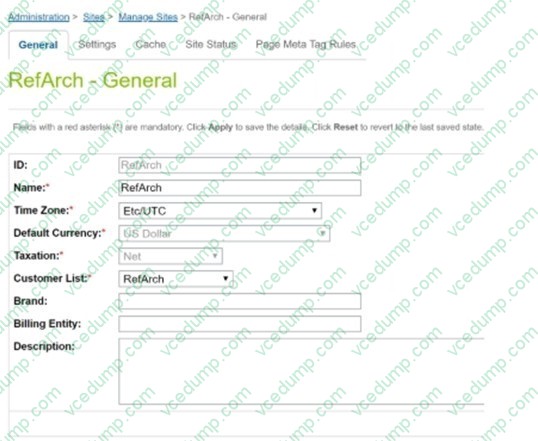
Given a site called RefArch that has the settings shown, what must be done for RefArch to use the same customer list as RefArchGlobal?
A. Import the RefArchGlobal customer list into the RefArch site. B. Enable "Customer List Sharing" in Global Preferences. C. Select RefArchGlobal in the dropdown for Customer List. D. Enable "Customer List Sharing" in Site Preferences.
C. Select RefArchGlobal in the dropdown for Customer List. To configure the RefArch site to use the same customer list as another site, such as RefArchGlobal, the developer should select RefArchGlobal from the dropdown for Customer List in the site settings as shown in the screenshot. This direct selection changes the customer list that the RefArch site references, enabling it to utilize the same customer data as RefArchGlobal without the need for importing customer data or enabling customer list sharing options. This setting is site-specific and directly modified in the site's general settings in Business Manager.
Question 47:
A developer is given a task to implement a new Page Designer layout component that doesn't accept certain asset components.
How should the developer achieve the above task?
A. Add component_type_inclusion in the layout json configuration B. Addcomponent_type_Exclusions in the layout json configuration C. Add layout_type_inclusion in the target components json configurations. D. Add layout_type_exclusion in the other asset components json configuration.
B. Addcomponent_type_Exclusions in the layout json configuration To implement a new Page Designer layout component that does not accept certain asset components, the developer should use component_type_Exclusions in the layout JSON configuration. This property allows the developer to specify which types of asset components should be excluded from being used in the layout, effectively limiting the component types that can be included. This is a straightforward method for controlling the compatibility and behavior of components within Page Designer layouts, ensuring that only desired components can be used within the specified layout.
Question 48:
A merchant has a requirement to render personalized content ton a category page via a Content Slot that targets VIP high-spending customers during a specific promotional period.
Which two items should the developer create to achieve the specified requirements? Choose 2 answers:
A. VIP Customer Group B. Page Template C. Slot Configuration D. Rendering Template
A. VIP Customer Group C. Slot Configuration To render personalized content on a category page via a Content Slot targeting VIP high- spending customers during a specific promotional period, the developer should focus on configuring the target audience and the slot itself to display the appropriate content. The necessary items to create are:A. VIP Customer Group - This is essential for defining and managing the group of high-spending customers. By creating a VIP Customer Group, the developer can target this specific segment with personalized content.C. Slot Configuration - This involves setting up the content slot to deliver the specific content only to the defined VIP Customer Group during the designated promotional period. The slot configuration will include conditions and rules that dictate when and how the content is displayed to this group.These components work together to ensure that only eligible customers view the personalized content, aligning with the merchant's strategy to enhance engagement and sales with high-value customers.
Question 49:
The developer is asked to enhance the functionality of an existing controller route by adding information to the response's viewData.
How should thedeveloper approach this task while following SFRA best practices?
A. Replace the callback function of the existing route using superModule. B. Use the "extend" method of the server module for the existing route. C. Copy the existing route in a new cartridge and modify where necessary. D. Use the "append" method of the server module for the existing route.
B. Use the "extend" method of the server module for the existing route. In Salesforce Commerce Cloud's Storefront Reference Architecture (SFRA), the recommended way to enhance the functionality of an existing controller route without altering the original code is to use the "extend" method provided by the server module. This method allows developers to extend an existing route and add or modify its functionality by adding additional processing or modifying viewData. This approach keeps the base controller intact and ensures that the customization is isolated, which simplifies updates and maintenance. By using "extend", the original route remains unchanged, and new functionality is layered on top of it, which aligns with best practices for modularity and maintainability in software development.
Question 50:
A developer is working on a new site for the U.S based on an existing Canadian site. One of the requirements is a change to the address form. The current Canadian form has an list with the correct two-letter abbreviation for the
provinces.
The U.S. requirements are to:
Have an list withthe correct two-letter abbreviation for the states in place of the province field.
Set the U.S site locale.
Add the options list field definition to the XML file.
How should the developer set up the files before making the required edits?
A. Create a copyof existing address.xml file in the default folder. Rename that file toadres_US.xml B. Create a new sub-folder in the forms folder. Name it US. Copy existing address.xml file inthe new folder. C. Create a copy of existing address.xml file in the defaultfolder. Rename that file toaddress_en_US.xml D. Create a new sub-folder in the forms folder. Name it en_US. Copy existing address.xml filein the new folder.
D. Create a new sub-folder in the forms folder. Name it en_US. Copy existing address.xml filein the new folder. Explanation Explanation/Reference:To accommodate the requirement of changing the address form for a U.S.-based site from a Canadian configuration, the appropriate setup is option D: Create a new sub-folder in the forms folder named en_US and copy the existing address.xml file into this new folder. This method is consistent with Salesforce B2C Commerce best practices for managing site- specific customizations and localizations. This structure allows the system to easily identify and apply the correct localization settings based on the site context, enabling the U.S. site to use a specific form configuration that differs from the Canadian version by providing the correct two-letter state abbreviations in the list.
Nowadays, the certification exams become more and more important and required by more and more
enterprises when applying for a job. But how to prepare for the exam effectively? How to prepare
for the exam in a short time with less efforts? How to get a ideal result and how to find the
most reliable resources? Here on Vcedump.com, you will find all the answers.
Vcedump.com provide not only Salesforce exam questions,
answers and explanations but also complete assistance on your exam preparation and certification
application. If you are confused on your B2C-COMMERCE-DEVELOPER exam preparations
and Salesforce certification application, do not hesitate to visit our
Vcedump.com to find your solutions here.