AZ-900 Exam Details
-
Exam Code
:AZ-900 -
Exam Name
:Microsoft Azure Fundamentals -
Certification
:Microsoft Certifications -
Vendor
:Microsoft -
Total Questions
:472 Q&As -
Last Updated
:Jul 12, 2026
Microsoft AZ-900 Online Questions & Answers
-
Question 381:
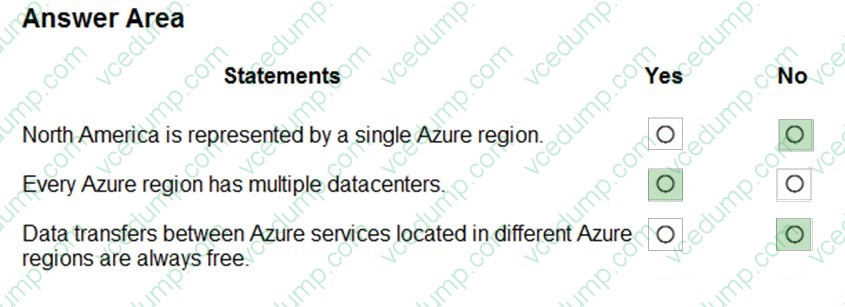
HOTSPOT
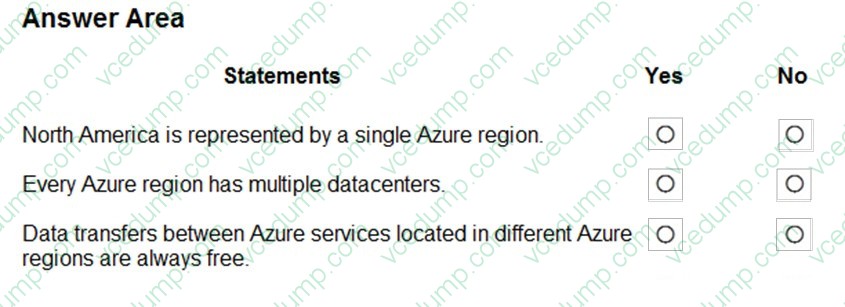
For each of the following statements, select Yes if the statement is true. Otherwise, select No.
NOTE: Each correct selection is worth one point.
-
Question 382:
Note: This question is part of a series of questions that present the same scenario. Each question in the series contains a unique solution that might meet the stated goals. Some question sets might have more than one correct solution, while others might not have a correct solution.
After you answer a question in this section, you will NOT be able to return to it. As a result, these questions will not appear in the review screen.
You plan to deploy several Azure virtual machines.
You need to ensure that the services running on the virtual machines are available if a single data center fails.
Solution: You deploy the virtual machines to two or more resource groups.
Does this meet the goal?
A. Yes
B. No -
Question 383:
HOTSPOT
Select the answer that correctly completes the sentence.

-
Question 384:
What is used to grant permission to Azure Virtual Desktop resources?
A. tags
B. role-based access control (RBAC) roles
C. resource groups
D. application security groups -
Question 385:
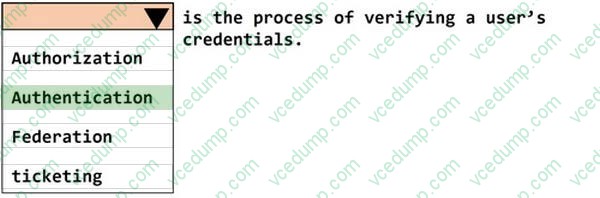
HOTSPOT
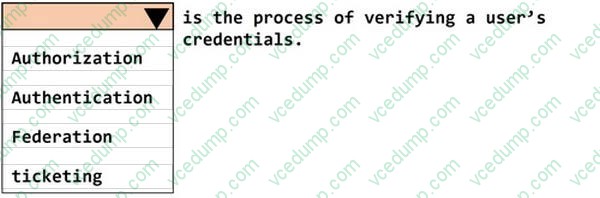
______________ is the process of verifying a user's credentials.
To complete the sentence, select the appropriate option in the answer area.
-
Question 386:
This question requires that you evaluate the underlined text to determine if it is correct.
You can use Advisor recommendations in Azure to send email alerts when the cost of the current billing period for an Azure subscription exceeds a specified limit.
Instructions: Review the underlined text. If it makes the statement correct, select "No change is needed." If the statement is incorrect, select the answer choice that makes the statement correct.
A. No change is needed.
B. Access control (IAM)
C. Budget alerts
D. Compliance -
Question 387:
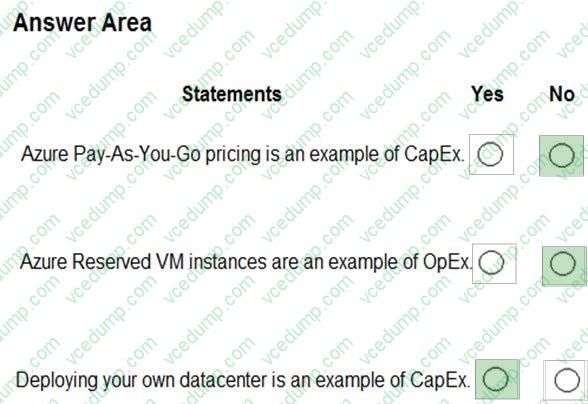
HOTSPOT
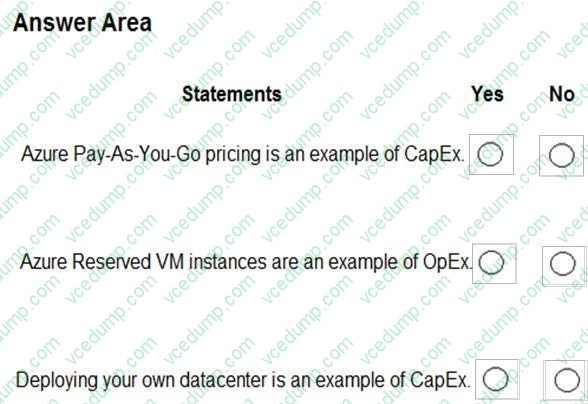
For each of the following statements, select Yes if the statement is true. Otherwise, select No.
NOTE: Each correct selection is worth one point.
-
Question 388:
Microsoft 365 is an example of which cloud service model?
A. infrastructure as a service (laaS)
B. platform as a service (PaaS)
C. software as a service (SaaS) -
Question 389:
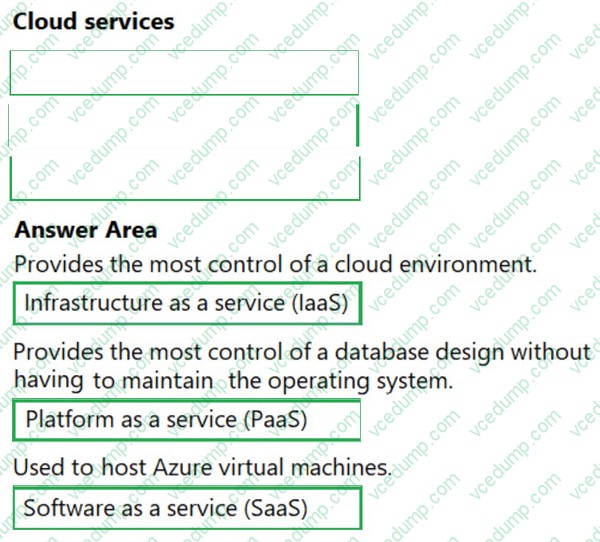
DRAG DROP
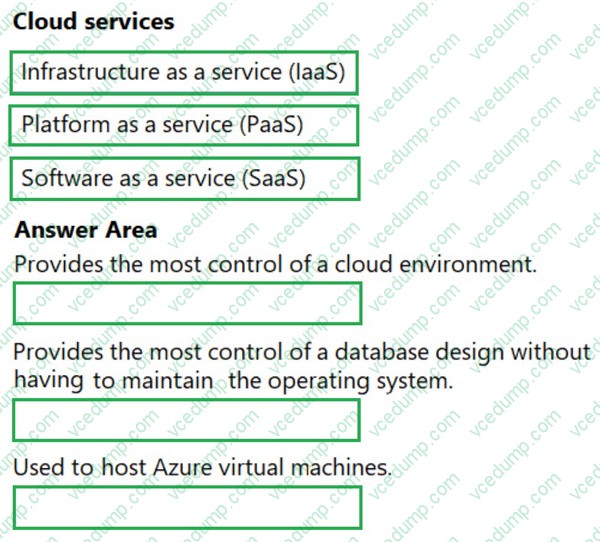
Match the cloud service to the appropriate description.
To answer, drag the appropriate cloud service from the column on the left to its description on the right. Each service may be used once, more than once, or not at all.
NOTE: Each correct match is worth one point.
Select and Place:
-
Question 390:
You have an Azure application that uses the services shown in the following table.

How should you calculate the composite SLA for the application?
A. 0.999 * 0.9999 = 0.9989001 = 99.89001%
B. 0.999 / 0.9999 = 0.9991 = 99.91%
C. Max(0.999, 0.9999) = 0.9999 = 99.99%
D. Min(0.999, 0.9999) = 0.999 = 99.9%

Related Exams:
-
62-193
Technology Literacy for Educators -
70-243
Administering and Deploying System Center 2012 Configuration Manager -
70-355
Universal Windows Platform – App Data, Services, and Coding Patterns -
77-420
Excel 2013 -
77-427
Excel 2013 Expert Part One -
77-725
Word 2016 Core Document Creation, Collaboration and Communication -
77-726
Word 2016 Expert Creating Documents for Effective Communication -
77-727
Excel 2016 Core Data Analysis, Manipulation, and Presentation -
77-728
Excel 2016 Expert: Interpreting Data for Insights -
77-731
Outlook 2016 Core Communication, Collaboration and Email Skills
Tips on How to Prepare for the Exams
Nowadays, the certification exams become more and more important and required by more and more enterprises when applying for a job. But how to prepare for the exam effectively? How to prepare for the exam in a short time with less efforts? How to get a ideal result and how to find the most reliable resources? Here on Vcedump.com, you will find all the answers. Vcedump.com provide not only Microsoft exam questions, answers and explanations but also complete assistance on your exam preparation and certification application. If you are confused on your AZ-900 exam preparations and Microsoft certification application, do not hesitate to visit our Vcedump.com to find your solutions here.