AZ-900 Real Exam Questions

Microsoft Azure Fundamentals

472 questions available · Page 1 of 48

Updated Exam DumpsVerified AnswersPass Guarantee

Get Complete Exam Dumps
Question 1 Hotspot

HOTSPOT

For each of the following statements, select Yes if the statement is true. Otherwise, select No.

NOTE: Each correct selection is worth one point.
Question diagram
Show answer and explanation
Correct answer diagram
Explanation

Single sign-on is an authentication method that allows users to sign in using one set of credentials to login across applications. Single sign-on makes it easier to manage passwords and increases security capabilities.

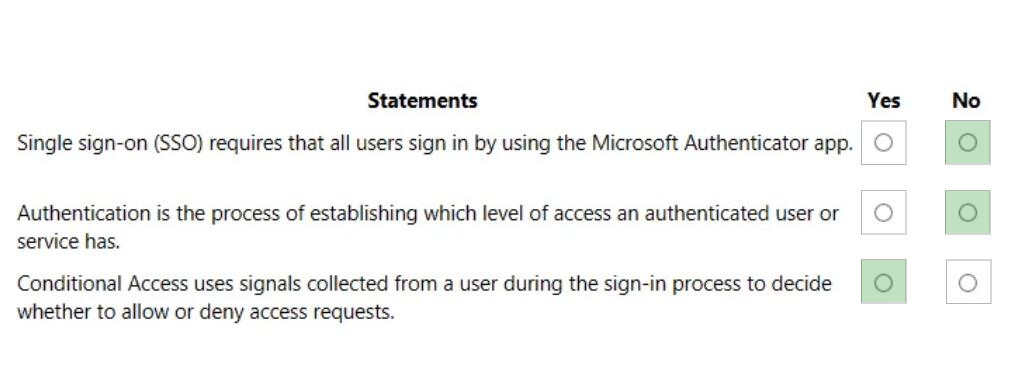
Single sign-on requires that all users sign in by using the microsoft authenticator app. No
Authorization is the process of establishing what level of access a legitimate user or service should have.

During sign-in, Conditional Access collects signals from the user, makes decisions based on those signals, and then enforces that decision by allowing or denying the access request or challenging for a multifactor authentication response.

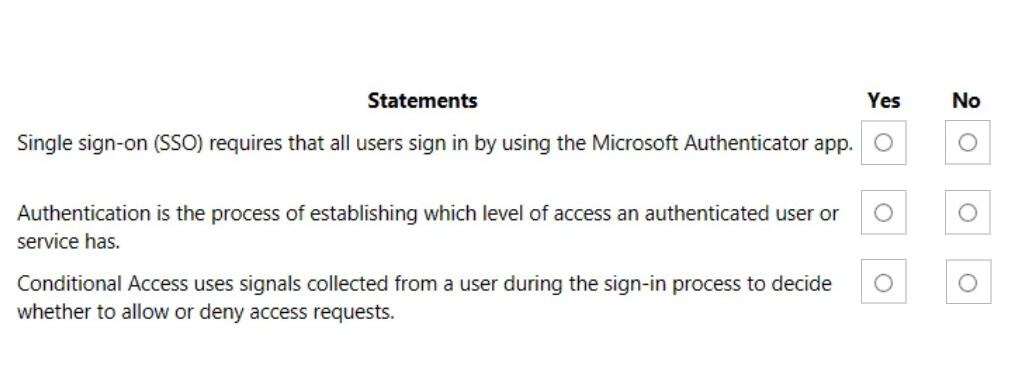
Single sign-on (SSO) requires that all users sign in by using the Microsoft authenticator app. No
Authentication is the process of establishing which level of access an authenticated user or service has. No
Conditional access uses signals collected from a user during the sign-in process to decide whether to allow or deny access requests. Yes

References:
https://docs.microsoft.com/learn/modules/secure-access-azure-identity-services/3-what-is-azure-active-directory
https://docs.microsoft.com/learn/modules/secure-access-azure-identity-services/2-compare-authentication-authorization
https://docs.microsoft.com/learn/modules/secure-access-azure-identity-services/4-what-are-mfa-conditional-access
Question 2 Multiple choice

Your Azure environment contains multiple Azure virtual machines.

You need to ensure that a virtual machine named VM1 is accessible from the Internet over HTTP.

What are two possible solutions? Each correct answer presents a complete solution.

NOTE: Each correct selection is worth one point.

  1. A

    Modify an Azure Traffic Manager profile

  2. B

    Modify a network security group (NSG)

  3. C

    Modify a DDoS protection plan

  4. D

    Modify an Azure firewall

Show answer and explanation

Correct answers: B, D

Explanation

A network security group works like a firewall. You can attach a network security group to a virtual network and/or individual subnets within the virtual network. You can also attach a network security group to a network interface assigned to a virtual machine. You can use multiple network security groups within a virtual network to restrict traffic between resources such as virtual machines and subnets.

You can filter network traffic to and from Azure resources in an Azure virtual network with a network security group. A network security group contains security rules that allow or deny inbound network traffic to, or outbound network traffic from, several types of Azure resources.

In this question, we need to add a rule to the network security group to allow the connection to the virtual machine on port 80 (HTTP).

References:
https://docs.microsoft.com/en-us/azure/virtual-network/security-overview

Question 3 Hotspot

HOTSPOT

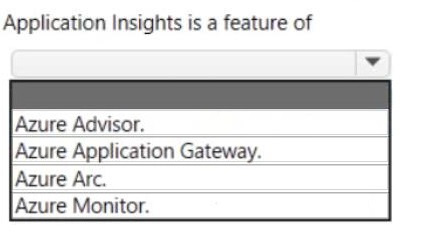
Select the answer that correctly completes the sentence.

Question diagram
Show answer and explanation
Correct answer diagram
Explanation

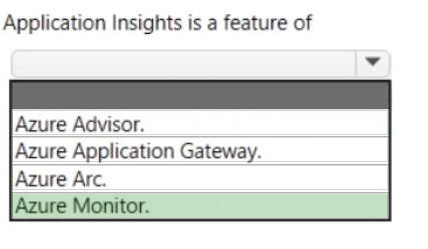
Application Insights is a feature of Azure Monitor that provides extensible application performance management (APM) and monitoring for live web apps.
Application Insights is a feature of azure monitor.
References:
https://docs.microsoft.com/en-us/azure/azure-monitor/app/app-insights-overview

Question 4 Hotspot

HOTSPOT

For each of the following statements, select Yes if the statement is true. Otherwise, select No.

NOTE: Each correct selection is worth one point.

Question diagram
Show answer and explanation
Correct answer diagram
Explanation

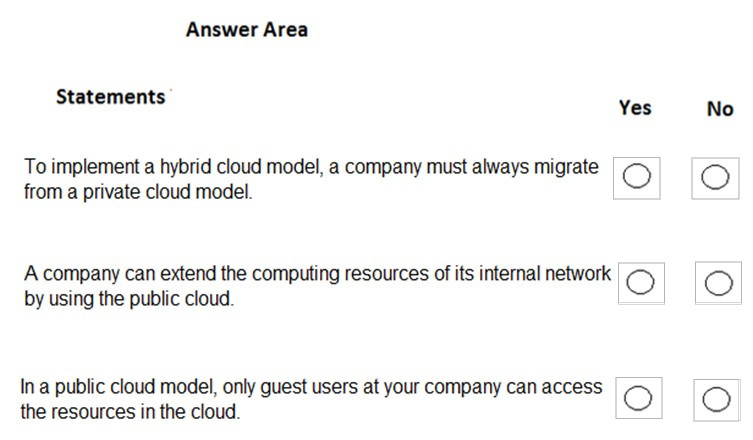
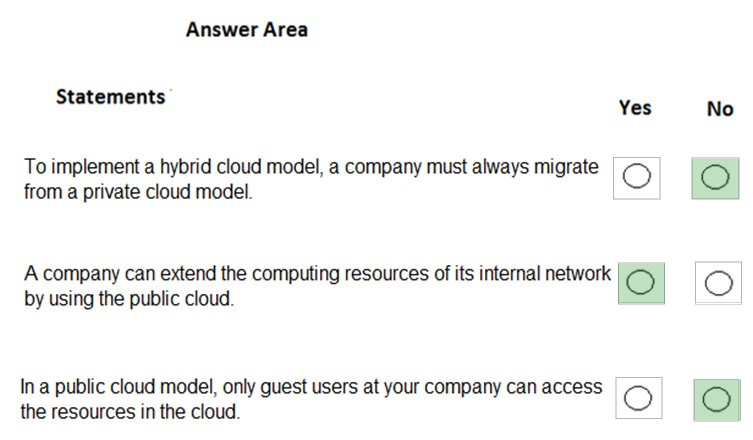
Box 1: No
To implement a hybrid cloud model, a company must always migrate from a private cloud mode.
It is not true that a company must always migrate from a private cloud model to implement a hybrid cloud. You could start with a public cloud and then combine that with an on-premise infrastructure to implement a hybrid cloud.

Box 2: Yes
A company can extend the computing resources of its internal network by using the public cloud. This is very common. When you need more resources, rather than pay out for new on-premises infrastructure, you can configure a cloud environment and connect your on-premises network to the cloud environment by using a VPN.

Box 3: No
It is not true that only guest users can access cloud resources. You can give anyone with an account in Azure Active Directory access to the cloud resources. There are many authentication scenarios but a common one is to replicate your on-premises Active Directory accounts to Azure Active Directory and provide access to the Azure Active Directory accounts. Another commonly used authentication method is 'Federation' where authentication for access to cloud resources is passed to another authentication provider such as an on-premises Active Directory.

https://azure.microsoft.com/en-gb/overview/what-is-hybrid-cloud-computing/

Question 5 Single choice

Note: This question is part of a series of questions that present the same scenario. Each question in the series contains a unique solution that might meet the stated goals. Some question sets might have more than one correct solution, while others might not have a correct solution.

After you answer a question in this section, you will NOT be able to return to it. As a result, these questions will not appear in the review screen.

Your company has an Azure subscription that contains the following unused resources:

1. 20 user accounts in Azure Active Directory (Azure AD)
2. Five groups in Azure AD
3. 10 public IP addresses
4. 10 network interfaces

You need to reduce the Azure costs for the company.

Solution: You remove the unused groups.

Does this meet the goal?

  1. A

    Yes

  2. B

    No

Show answer and explanation

Correct answer: B

Explanation

No - removing Azure AD groups does NOT reduce Azure costs.

1. Azure AD groups are NOT a billable resource.
Azure Active Directory (Azure AD) groups do not have a cost associated with them in the Free or basic tiers.
Microsoft does not charge for the number of groups or users stored in Azure AD.

Because groups have no cost, deleting them does NOT reduce billing.
2. Only billable resources affect Azure cost. Azure costs are generated by billable services such as: Virtual Machines-Public IP addresses-Storage accounts-Load balancers-Disks-Databases-Network services
Since groups are directory objects and not chargeable services, deleting them does not impact cost.
3. Unused public IP addresses ARE a billable resource. Public IP addresses in Azure can incur charges, especially when:
They are static
They are reserved but not attached Deleting unused public IP addresses WOULD reduce Azure cost.
Deleting Azure AD groups would NOT.
4. Removing groups can cause access issues. Groups are often used for: Role-based access control (RBAC)-Application permissions-Security boundaries
Deleting groups might break permissions without providing any cost benefit.

Deleting unused Azure AD groups does NOT meet the goal of reducing Azure costs.

The solution is INCORRECT.

The correct approach should remove unused BILLABLE resources such as public IP addresses or idle compute resources.

REFERENCE LINKS (Microsoft Learn):

1. Azure AD objects are not billed:
https://learn.microsoft.com/en-us/answers/questions/634714/is-there-billing-system-based-on-the-number-of-use
2. No charges if no billable resources exist:
https://learn.microsoft.com/en-us/answers/questions/1366377/does-azure-subscription-costs-if-there-is-no-resou
3. Public IP address pricing:
https://azure.microsoft.com/en-us/pricing/details/ip-addresses/
4. Azure cost optimization using Azure Advisor:
https://learn.microsoft.com/en-us/azure/advisor/advisor-cost-recommendations

Question 6 Single choice

Your company has an Azure subscription that contains the following unused resources:

1. 20 user accounts in Azure Active Directory (Azure AD)
2. Five groups in Azure AD
3. 10 public IP addresses
4. 10 network interfaces

You need to reduce the Azure costs for the company.

Which unused resources should you remove?

  1. A

    the user accounts

  2. B

    the network interfaces

  3. C

    the public IP addresses

  4. D

    the groups

Show answer and explanation

Correct answer: C

Explanation

Unused public IP addresses incur a monthly cost in Azure.-Removing them immediately reduces subscription charges.
Incorrect Options: The user accounts: Azure AD user accounts do not generate subscription costs.-The network interfaces: Unused network interfaces do not incur charges by themselves unless attached to VMs or public IPs.-The groups: Azure AD groups do not incur any costs.
References (Microsoft Learn):
Azure pricing for public IP addresses
https://learn.microsoft.com/en-us/azure/virtual-network/public-ip-addresses#pricing
Azure Advisor cost recommendations
https://learn.microsoft.com/en-us/azure/advisor/advisor-cost-recommendations

References:
https://docs.microsoft.com/en-us/azure/advisor/advisor-cost-recommendations#reduce-costs-by-deleting-or-reconfiguring-idle-virtual-network-gateways

Question 7 Single choice

You have an on-premises application that sends email notifications automatically based on a rule.

You plan to migrate the application to Azure.

You need to recommend a serverless computing solution for the application.

What should you include in the recommendation?

  1. A

    a web app

  2. B

    a server image in Azure Marketplace

  3. C

    a logic app

  4. D

    an API app

Show answer and explanation

Correct answer: C

Explanation

Azure Logic Apps is a cloud service that helps you schedule, automate, and orchestrate tasks, business processes, and workflows when you need to integrate apps, data, systems, and services across enterprises or organizations. Logic Apps simplifies how you design and build scalable solutions for app integration, data integration, system integration, enterprise application integration (EAI), and business-to-business (B2B) communication, whether in the cloud, on premises, or both.

For example, here are just a few workloads you can automate with logic apps:

1. Process and route orders across on-premises systems and cloud services.
2. Send email notifications with Office 365 when events happen in various systems, apps, and services.
3. Move uploaded files from an SFTP or FTP server to Azure Storage.
4. Monitor tweets for a specific subject, analyze the sentiment, and create alerts or tasks for items that need review.

References:
https://docs.microsoft.com/en-us/azure/logic-apps/logic-apps-overview

Question 8 Single choice

What enables a cloud service to adapt quickly to changing requirements?

  1. A

    high availability

  2. B

    predictability

  3. C

    manageability

  4. D

    agility

Show answer and explanation

Correct answer: D

Explanation

Agility is the ability to react quickly.

In the cloud, it takes a minute or two to create a Virtual Machine that is up and running. On the other hand, it takes days or weeks when we submit a request to purchase a physical server and by when it gets delivered.

Agility enables users to be able to allocate and deallocate resources very quickly, and that is a huge benefit of the cloud.

References:
https://coderjony.com/blogs/cloud-computing-concepts-high-availability-scalability-elasticity-agility-fault-tolerance-and-disaster-recovery

Question 9 Single choice

You have an Azure subscription that contains several virtual machines. You need to identify which service provides visibility into CPU utilization trends for the last 30 days.

What should you use?

  1. A

    Azure Monitor

  2. B

    Azure Activity Log

  3. C

    Azure Advisor

  4. D

    Azure Cost Management

Show answer and explanation

Correct answer: A

Explanation

Azure Monitor collects metrics and logs from resources and can display CPU utilization history. Activity Log shows control-plane actions, not performance metrics. Advisor provides recommendations, not monitoring. Cost Management shows cost usage, not VM performance.

Question 10 Single choice

Your company has several business units.

Each business unit requires 20 different Azure resources for daily operation. All the business units require the same type of Azure resources.

You need to recommend a solution to automate the creation of the Azure resources.

What should you include in the recommendations?

  1. A

    Azure Resource Manager templates

  2. B

    virtual machine scale sets

  3. C

    the Azure API Management service

  4. D

    management groups

Show answer and explanation

Correct answer: A

Explanation

You can use Azure Resource Manager templates to automate the creation of the Azure resources. Deploying resource through templates is known as `Infrastructure as code'.

To implement infrastructure as code for your Azure solutions, use Azure Resource Manager templates. The template is a JavaScript Object Notation (JSON) file that defines the infrastructure and configuration for your project. The template uses declarative syntax, which lets you state what you intend to deploy without having to write the sequence of programming commands to create it. In the template, you specify the resources to deploy and the properties for those resources.

References:
https://docs.microsoft.com/en-us/azure/azure-resource-manager/templates/overview