Microsoft AZ-801 Online Practice
Questions and Exam Preparation
AZ-801 Exam Details
Exam Code
:AZ-801
Exam Name
:Configuring Windows Server Hybrid Advanced Services
Certification
:Microsoft Certifications
Vendor
:Microsoft
Total Questions
:324 Q&As
Last Updated
:May 25, 2026
Microsoft AZ-801 Online Questions &
Answers
Question 151:
DRAG DROP
Your on-premises network contains an Active Directory Domain Services (AD DS) domain. The domain contains a scale-out file server (SOFS) cluster named Cluster1. Cluster1 contains four nodes that run Windows Server 2022.
You need to upgrade the nodes to Windows Server 2025. The solution must minimize the downtime of Cluster1.
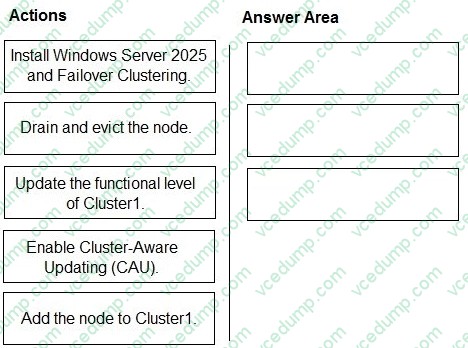
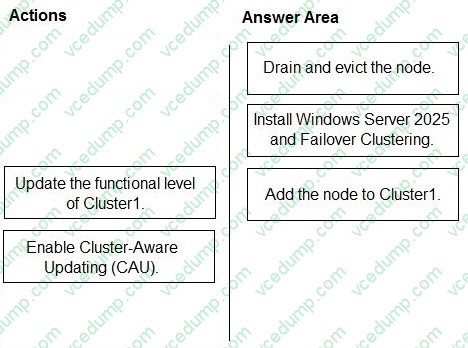
Which three actions should you perform on each node in sequence? To answer, move the appropriate actions from the list of actions to the answer area and arrange them in the correct order.
Select and Place:
To upgrade a Windows Server Failover Cluster (Cluster1) from Windows Server 2022 to Windows Server 2025 with minimal downtime, you should use a rolling upgrade approach. This allows the cluster to remain online while nodes are upgraded one at a time.
Step 1: Drain and evict the node
You must first drain the node to safely move all clustered roles (such as SOFS workloads) to other nodes. This ensures no service interruption. After draining, you evict the node from the cluster so it can be upgraded independently without affecting cluster operations.
Step 2: Install Windows Server 2025 and Failover Clustering Once the node is removed, perform an in-place upgrade or clean installation of Windows Server 2025. After the OS upgrade, reinstall the Failover Clustering feature so the node can rejoin the cluster.
Step 3: Add the node to Cluster1
After the upgrade is complete, add the node back into the cluster. The cluster will operate in mixed OS mode during the rolling upgrade process, allowing coexistence of Windows Server 2022 and 2025 nodes.
Why not other options:
- Update the functional level of Cluster1: This should only be done after all nodes are upgraded. It is a final step, not per-node.
-
Enable Cluster-Aware Updating (CAU): This is used for patching, not for OS version upgrades.
This sequence ensures minimal downtime and maintains service availability throughout the upgrade process.
Question 152:
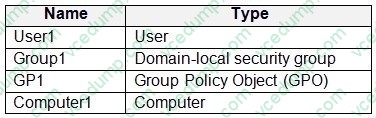
Your network contains two Active Directory Domain Services (AD DS) forests named contoso.com and fabrikam.com. The contoso.com forest contains the resources shown in the following table.
You need to use the Active Directory Migration Tool (ADMT) to migrate the resources from contoso.com to fabrikam.com.
Which resources can be migrated?
A. User1 and Group1 only B. User1, Group1, and GP1 only C. User1, Group1, and Computer1 only D. User1, Group1, GP1, and Computer1
C. User1, Group1, and Computer1 only
Explanation
Use Active Directory Migration Tool (ADMT) to migrate user accounts, groups, and computer accounts.
Use Group Policy Management Console (GPMC) to back up GPOs from the source domain and restore them to the target domain.
The Active Directory Migration Tool version 3.2 (ADMT v3.2) simplifies the process of migrating objects and restructuring tasks in an Active Directory?Domain Service (AD DS) environment. You can use ADMT v3.2 to migrate users, groups, and computers between AD DS domains in different forests (inter-forest migration) or between AD DS domains in the same forest (intra-forest migration). ADMT can also perform security translation (to migrate local user profiles) when performing inter-forest migrations.
Your network contains an Active Directory Domain Services (AD DS) domain. The domain contains a server named Server1 that runs Windows Server.
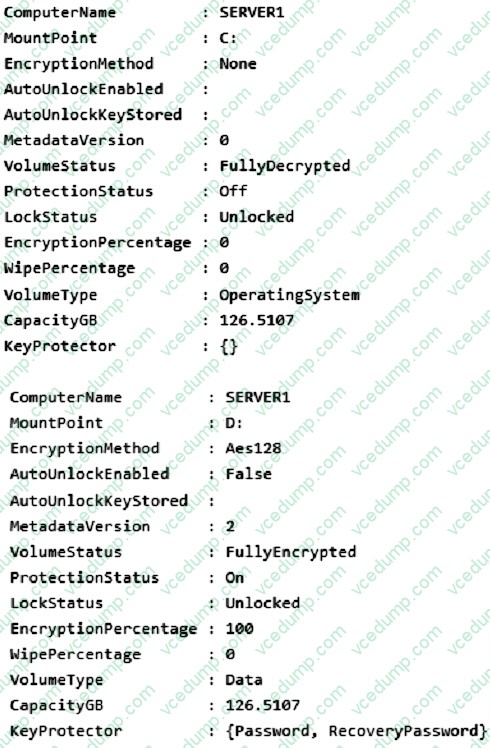
You need to ensure that volume D will be unlocked automatically when Server1 restarts.
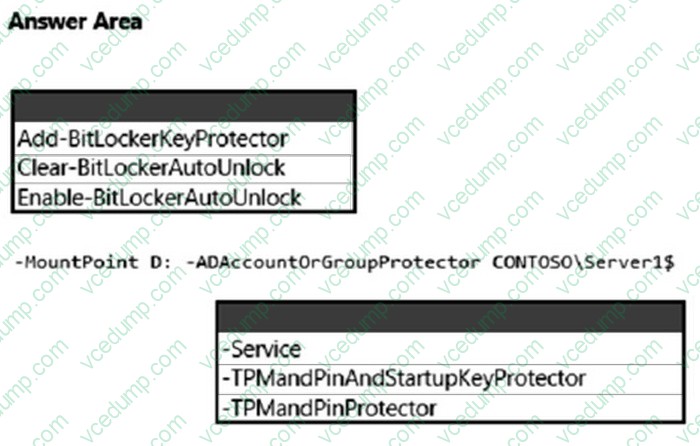
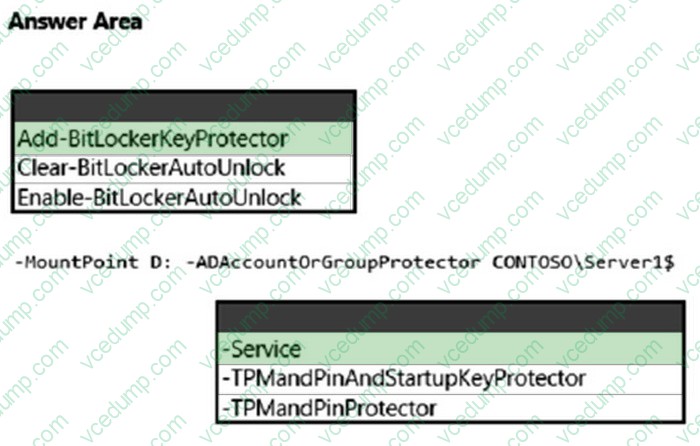
How should you complete the command? To answer, select the appropriate options in the answer area.
NOTE: Each correct selection is worth one point.
Box 1: Add-BitLockerKeyProtector
From the exhibit we see for volume D that AutoUnlockEnabled is False, and AutoUnlockKeyStored is empty.
The Add-BitLockerKeyProtector cmdlet adds a protector for the volume key of the volume protected with BitLocker Drive Encryption.
Example: The following example adds an ADAccountOrGroup protector to the previously encrypted operating system volume using the SID of the account:
Add-BitLockerKeyProtector C: -ADAccountOrGroupProtector -ADAccountOrGroup S-1-5-21-3651336348-8937238915-291003330-500 Active Directory-based protectors are normally used to unlock Failover Cluster enabled volumes.
Box 2: Service - The -Service parameter indicates that the system account for this computer unlocks the encrypted volume.
Add-BitLockerKeyProtector syntax with use of the ADAccountOrGroupProtector parameter:
* The Clear-BitLockerAutoUnlock cmdlet removes all automatic unlocking keys used by BitLocker Drive Encryption. BitLocker stores these keys for the fixed data drives of a system on a volume that hosts a BitLocker-enabled operating system volume so that it can automatically unlock the fixed and removable data volumes in a system. This makes it easier for users to access data volumes.
Your on-premises network connects to Azure by using an Azure VPN gateway named VPN1.
You need to monitor the Azure gateway health probe for VPN1.
Which TCP port should you use?
A. 443 B. 1723 C. 3389 D. 8081 E. 65500
D. 8081
Question 155:
HOTSPOT
Your network contains an Active Directory Domain Services (AD DS) domain named contoso.com.
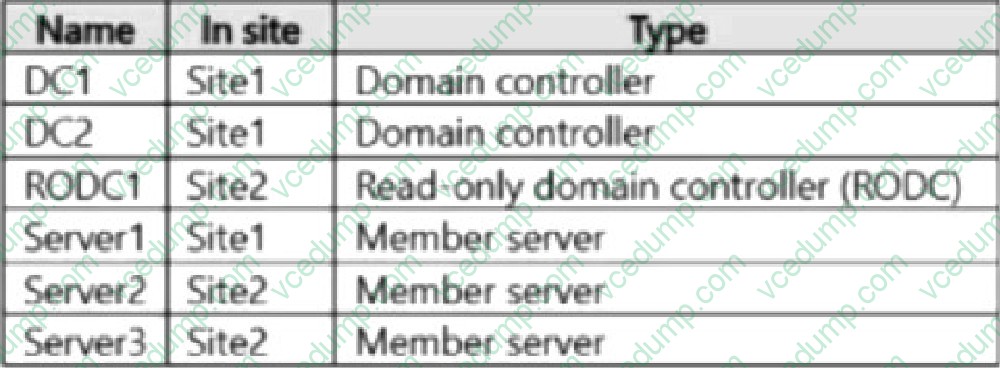
The domain contains two sites named Site1 and Site2 and servers that run Windows Server and are configured as shown in the following table.
The domain contains a group named Group1 that contains Server3.
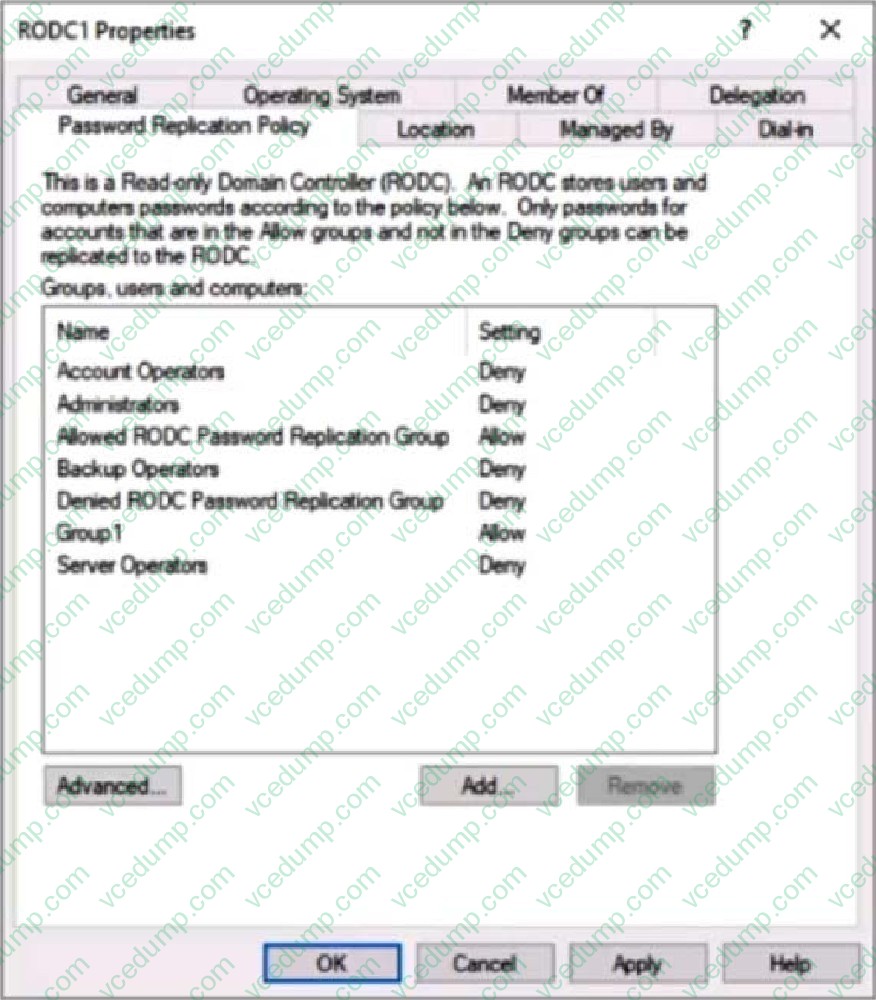
RODC1 has the Password Replication Policy shown in the following exhibit.
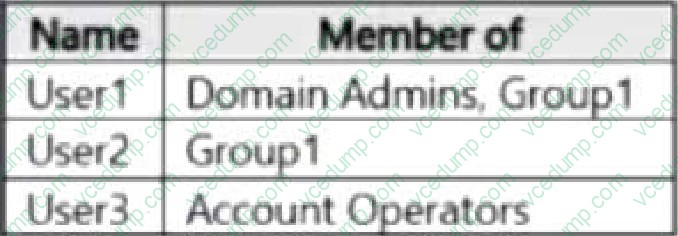
In contoso.com, you create three users as shown in the following table.
User2 signs in to Server2.
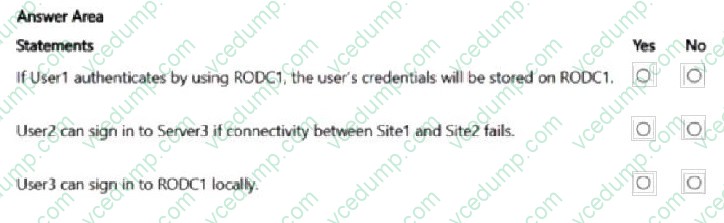
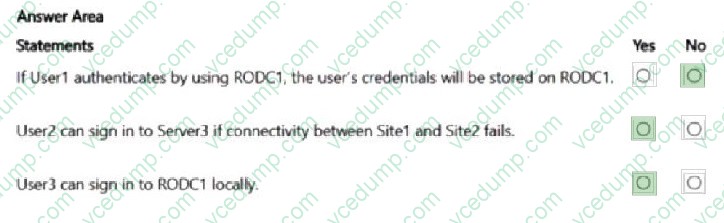
For each of the following statements, select Yes if the statement is true. Otherwise, select No.
NOTE: Each correct selection is worth one point.
Box 1: No No - If User1 authenticates by using RODC1, the user's credentials will be stored on the RODC1.
User1 is member of Domain admins and Group1. The Password Replication Policy has Deny for Administrators, and Allow for Group1. Deny takes precedence, and the User1's credentials are not stored.
Box 2: Yes Yes - User2 can sign in to Server3 if connectivity between Site1 and Site2 fails.
User2 is member of Group1. The Password Replication Policy has Allow for Group1. Group1 contains Server3. Server3 is in Site2.
User2 can sign in as its password has been replicated to Site1.
Box 3: Yes Yes - User3 can sign in to RODC1 locally.
User3 is member of the Account Operators group. The Password Replication Policy has Deny for Account Operators.
Note:
By default, members of the Account Operators group can log in locally to domain controllers. This is a built-in privilege of the group, along with other capabilities like creating and modifying most user and group accounts.
You have an on-premises server named Server1 that runs Windows Server 2016 and has IIS enabled. Server1 contains an ASP.NET 3.5 app named App1
You have an Azure subscription.
You need to use the Azure Migrate App Containerization tool to migrate App1 to Azure App Service. The solution must minimize administrative effort.
Which two actions should you perform on Server1 before you use the Azure Migrate App Containerization tool? Each correct answer presents part of the solution.
NOTE: Each correct answer is worth one point.
A. Install the Web Deploy tool. B. Install NET Framework 4.8. C. Enable remote administration for IIS. D. Enable PowerShell remoting.
A. Install the Web Deploy tool. D. Enable PowerShell remoting.
Explanation
[A] If the Microsoft Web Deployment tool isn't already installed on the machine running the App Containerization tool and the application server, install it.
[D] Enable PowerShell remoting on the application servers: sign in to the application server
Incorrect:
[Not B] The tool currently supports: ASP.NET applications that use .NET Framework 3.5 or later.
Your network contains an Active Directory Domain Services (AD DS) forest. The forest contains a user named User1.
You deploy a read-only domain controller (RODC) named RODC1.
You need to ensure that User1 is a local administrator on RODC1. The solution must use the principle of least privilege.
What should you use?
A. System Configuration B. dsmgmt.exe C. Computer Management D. Active Directory Sites and Services
C. Computer Management
Explanation
Correct:
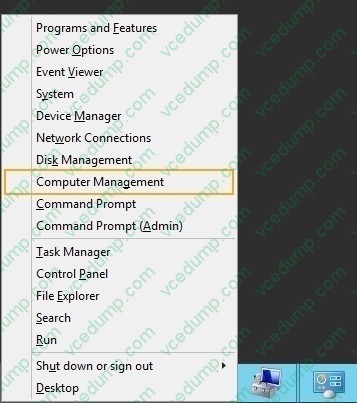
Computer Management
Local Users and Groups
Note: See Step 6 below.
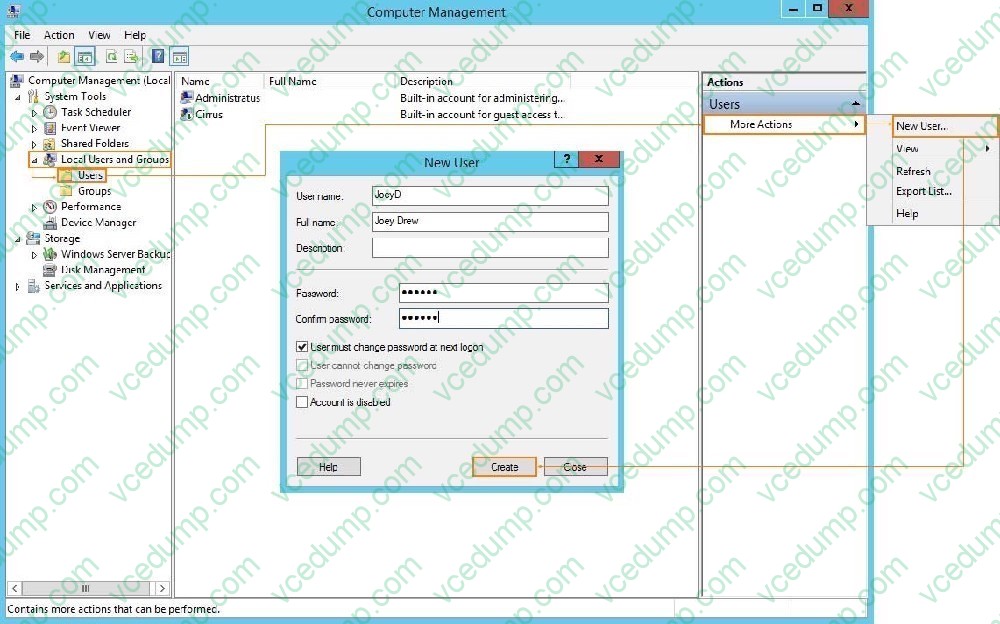
1. Click Start > Computer Management
2. In the console tree navigate to Computer Management > System Tools > Local Users and Groups > Users 3. In Actions menu click More Actions > New user
4. Fill in the user information and adjust password settings.
5. Click Create and then click Close
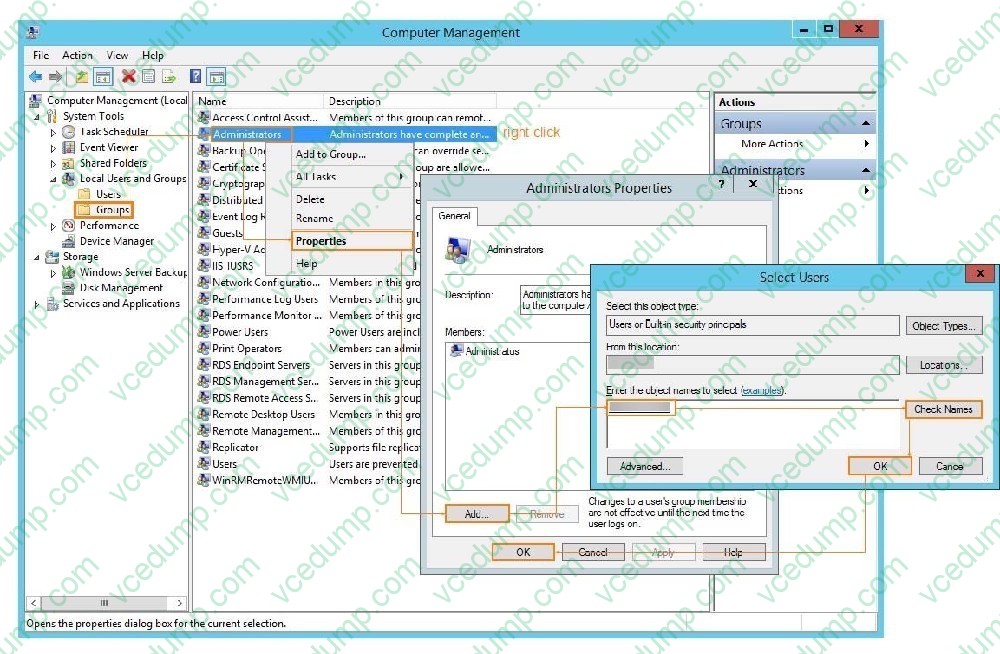
6. In the console tree navigate to Computer Management > System Tools > Local Users and Groups > Groups 7. Right-click Administrators. Select Properties
8. Click Add 9. Enter the name of the User created in Step 5
10. Click Check Names. Then click OK > OK
Incorrect:
* Active Directory Sites and Services
Active Directory Sites and Services is used for managing replication topology and site configuration, not for granting local administrator access to a read-only domain controller (RODC).
Active Directory Users and Computers could be used.
* dsamain.exe dsamain.exe is the Active Directory Database Mounting Tool on Windows Servers, used to mount a snapshot or backup of the Active Directory (AD) or AD LDS database. It exposes the database as an LDAP server, allowing administrators to access and analyze the data offline without affecting the live environment, which is useful for data recovery, auditing, and forest recovery purposes.
* dsmgmt.exe dsmgmt.exe is an interactive, command-line tool included in Windows Server that facilitates the management of Active Directory Lightweight Directory Services (AD LDS) and related features, such as FSMO roles, partitioning, and metadata cleanup. It requires an elevated command prompt and provides a text-based interface for various tasks related to AD LDS and abandoned domain controller cleanup.
* net user
The net user command allows you to add, modify, or delete user accounts, and display detailed information about user accounts on a local computer or domain. This solution does not use the principle of least privilege.
* Ntdsutil.exe
Ntdsutil.exe is a command-line utility for experienced Windows Server administrators to manage and maintain Active Directory (AD) and Active Directory Lightweight Directory Services (AD LDS), providing tools for database maintenance, role management, and metadata cleanup. It allows for tasks such as repairing and defragmenting the AD database, seizing and transferring FSMO roles (Flexible Single Master Operations) from domain controllers, removing metadata of improperly decommissioned servers, and performing database analysis.
You have a single-domain Active Directory Domain Services (AD DS) forest named contoso.com that contains two domain controllers named DC1 and DC2. DC1 and DC2 run Windows Server.
You plan to perform an authoritative restore of SYSVOL on DC1.
You isolate DC1 and restore DC1 from a backup.
You need to ensure that SYSVOL on DC1 replicates to DC2.
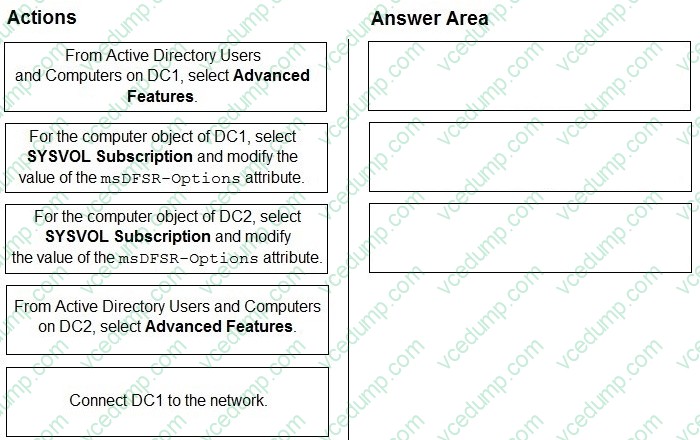
Which three actions should you perform in sequence? To answer, move the appropriate actions from the list of actions to the answer area and arrange them in the correct order.
Select and Place:
Active Directory Forest Recovery - Perform an authoritative synchronization of DFSR-replicated SYSVOL
Use the following steps to perform an authoritative synchronization of SYSVOL (if it's replicated using DFSR) by editing the msDFSR-Options attribute. Note it can also be done using PowerShell.
To perform an authoritative synchronization of DFSR-replicated SYSVOL using Active Directory Users and Computers
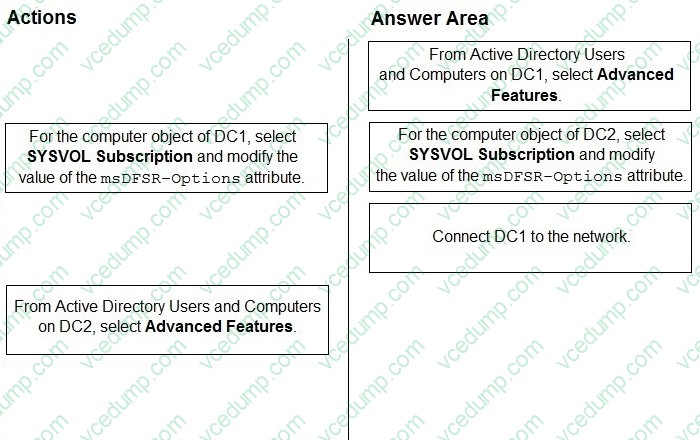
Step 1: From Active Directory Users and Computers on DC1, select Advanced Features.
1. Open Active Directory Users and Computers.
2. Select View, and then select Users, Contacts, Groups, and Computers as containers and Advanced Features.
Step 2: For the computer object of DC1, select the SYSVOL Subscription and modify the value of the msDFSR-Options attribute.
3. In the tree-view, select Domain Controllers, the name of the DC you restored, DFSR-LocalSettings, and then Domain System Volume.
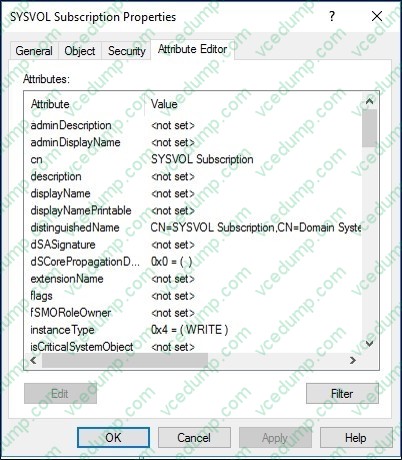
4. In the Details pane, right-click SYSVOL Subscription, select Properties, and select Attribute Editor.
5. Select msDFSR-Options, select Edit, type 1, and select OK.
6. Select OK to close the Attribute Editor.
Step 3: Connect DC1 to the network Reconnect DC1 to the network.
Note: This question is part of a series of questions that present the same scenario. Each question in the series contains a unique solution that might meet the stated goals. Some question sets might have more than one correct solution, while others might not have a correct solution.
After you answer a question in this section, you will NOT be able to return to it. As a result, these questions will not appear in the review screen.
You have a failover cluster named Cluster1 that hosts an application named App1.
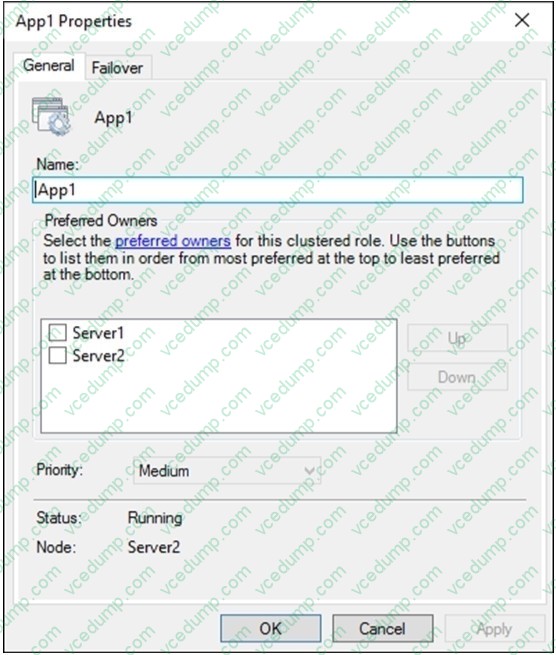
The General tab in App1 Properties is shown in the General exhibit. (Click the General tab.)
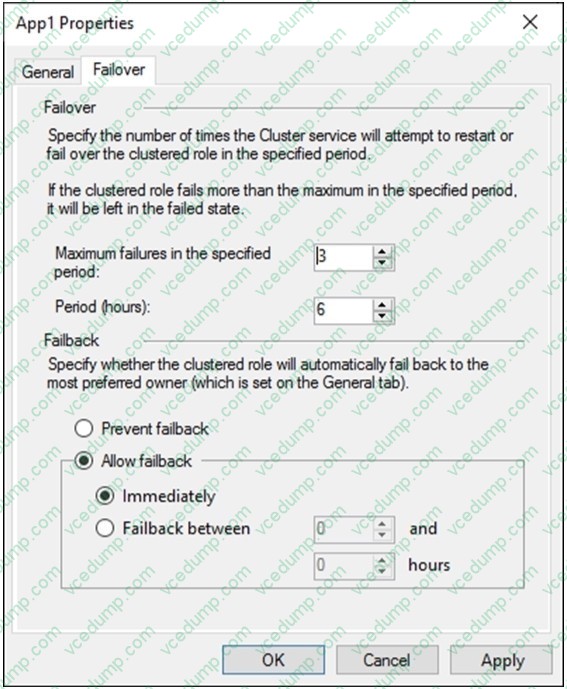
The Failover tab in App1 Properties is shown in the Failover exhibit. (Click the Failover tab.)
Server1 shuts down unexpectedly.
You need to ensure that when you start Server1, App1 continues to run on Server2.
Solution: From the Failover settings, you select Prevent failback.
Does this meet the goal?
A. Yes B. No
A. Yes
Explanation
The Prevent failback setting will prevent the cluster failing back to Server1.
Question 160:
HOTSPOT
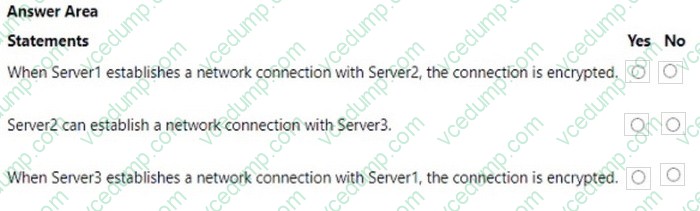
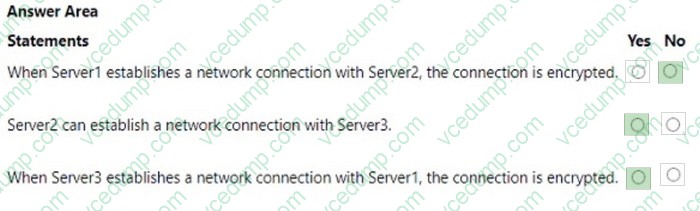
Your network contains an Active Directory Domain Services (AD DS) domain. The domain contains three servers named Server1, Server2, and Server3 that run Windows Server. All the servers are on the same network and have network connectivity.
On Server1, Windows Defender Firewall has a connection security rule that has the following settings:
1. Rule Type: Server-to-server
2. Endpoint 1: Any IP address
3. Endpoint 2: Any IP address
4. Requirements: Require authentication for inbound connections and request authentication for outbound connections
5. Authentication Method: Computer (Kerberos V5)
6. Profile: Domain, Private, Public
7. Name: Rule1
Server2 has no connection security rules.
On Server3, Windows Defender Firewall has a connection security rule that has the following settings:
1. Rule Type: Server-to-server
2. Endpoint 1: Any IP address
3. Endpoint 2: Any IP address
4. Requirements: Request authentication for inbound and outbound connections
5. Authentication Method: Computer (Kerberos V5)
6. Profile: Domain, Private, Public
7. Name: Rule1
For each of the following statements, select Yes if the statement is true. Otherwise, select No. NOTE: Each correct selection is worth one point.
Nowadays, the certification exams become more and more important and required by more and more
enterprises when applying for a job. But how to prepare for the exam effectively? How to prepare
for the exam in a short time with less efforts? How to get a ideal result and how to find the
most reliable resources? Here on Vcedump.com, you will find all the answers.
Vcedump.com provide not only Microsoft exam questions,
answers and explanations but also complete assistance on your exam preparation and certification
application. If you are confused on your AZ-801 exam preparations
and Microsoft certification application, do not hesitate to visit our
Vcedump.com to find your solutions here.