AZ-801 Exam Details
-
Exam Code
:AZ-801 -
Exam Name
:Configuring Windows Server Hybrid Advanced Services -
Certification
:Microsoft Certifications -
Vendor
:Microsoft -
Total Questions
:324 Q&As -
Last Updated
:May 25, 2026
Microsoft AZ-801 Online Questions & Answers
-
Question 121:
You have an Azure subscription. The subscription contains two virtual machines named VM1 and VM2 that run Windows Server.
VM1 experiences a stop error and fails to start.
You need to review the memory dump file of the error.
What should you do first?
A. On VM2, run Azure Serial Console.
B. Attach the OS disk of VM1 to VM2.
C. On VM1, run Azure Serial Console.
D. For VM1, enable boot diagnostics. -
Question 122:
HOTSPOT
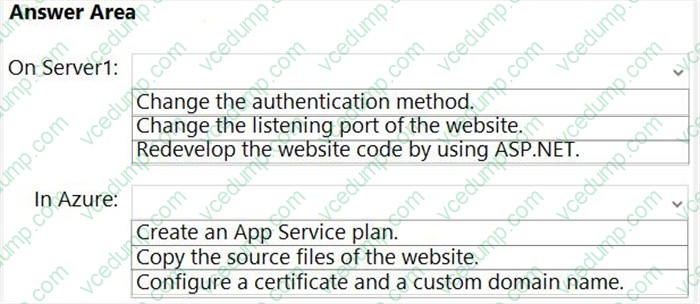
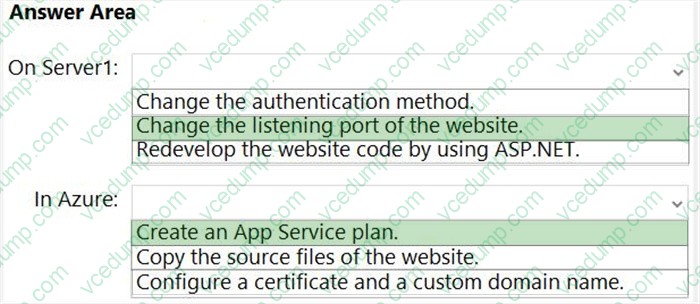
You have a server that runs Windows Server and has the Web Server (IIS) server role installed. Server1 hosts a single website that has the following configurations: Is accessible by using a URL of https://www.contoso.com:8443 and has an SSL certificate that was issued by a third-party certification authority (CA) in the Microsoft Trusted Root Program:
1. Uses anonymous authentication
2. Was developed by using PHP
You plan to use APP Service Migration Assistant to migrate the website to Azure App Service.
You need to migrate the website. The solution must minimize the number of changes made to the existing website.
What should you do manually to ensure that the website migration is successful? To answer, select the appropriate options in the answer area.
NOTE: Each correct selection is worth one point.
-
Question 123:
You have a server that runs Windows Server. The server is configured to encrypt all incoming traffic by using a connection security rule.
You need to ensure that Server1 can respond to the unencrypted tracert commands initiated from computers on the same network.
What should you do from Windows Defender Firewall with Advanced Security?
A. From the IPsec Settings, configure IPsec defaults.
B. Create a new custom outbound rule that allows ICMPv4 protocol connections for all profiles.
C. Change the Firewall state of the Private profile to Off.
D. From the IPsec Settings, configure IPsec exemptions. -
Question 124:
DRAG DROP
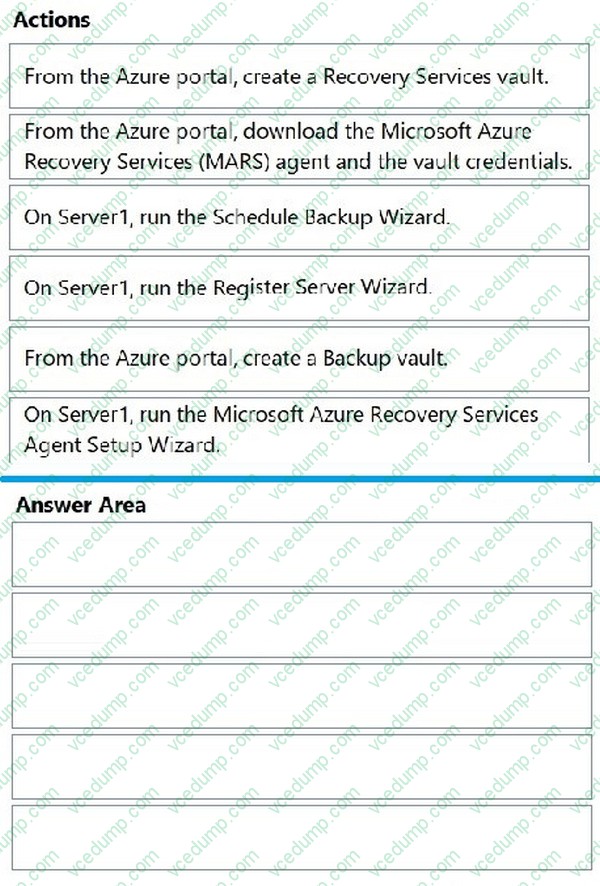
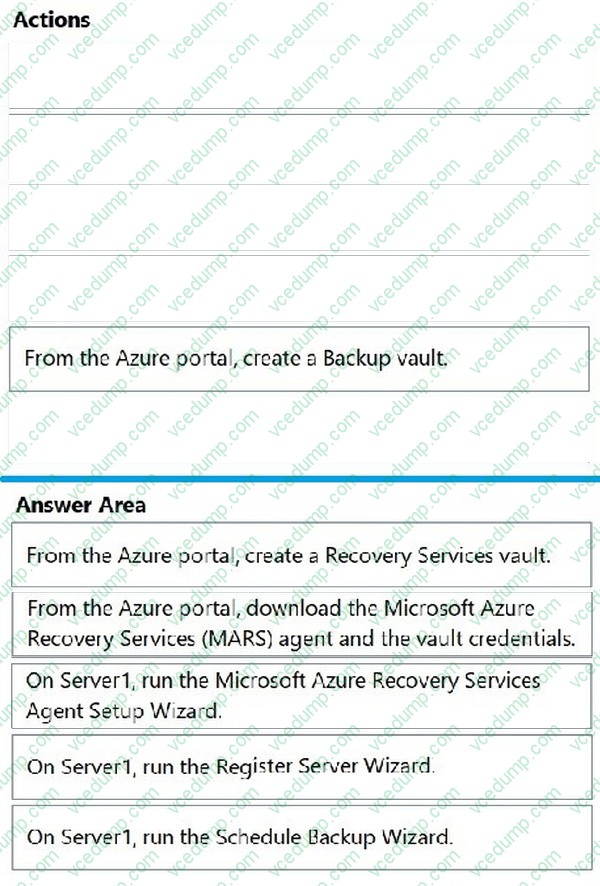
You have an on-premises server named Server1 that runs Windows Server.
You need to perform an on-demand backup of the files on Server1 by using Azure Backup.
Which five actions should you perform in sequence? To answer, move the appropriate actions from the list of actions to the answer area and arrange them in the correct order.
Select and Place:
-
Question 125:
You have a Microsoft Sentinel deployment and 100 Azure Arc-enabled on-premises servers. All the Azure Arc-enabled resources are in the same resource group.
You need to onboard the servers to Microsoft Sentinel. The solution must minimize administrative effort.
What should you use to onboard the servers to Microsoft Sentinel?
A. Azure Automation
B. Azure Policy
C. Azure virtual machine extensions
D. Microsoft Defender for Cloud -
Question 126:
Note: This question is part of a series of questions that present the same scenario. Each question in the series contains a unique solution that might meet the stated goals. Some question sets might have more than one correct solution, while others might not have a correct solution.
After you answer a question in this section, you will NOT be able to return to it. As a result, these questions will not appear in the review screen.
You have an on-premises server named Server1 that runs Windows Server.
You have a Microsoft Sentinel instance.
You add the Windows Firewall data connector in Microsoft Sentinel.
You need to ensure that Microsoft Sentinel can collect Windows Firewall logs from Server1.
Solution: You install the Azure Connected Machine agent and Azure Monitor Agent for Windows extension on Server1.
Does this meet the goal?
A. Yes
B. No -
Question 127:
HOTSPOT
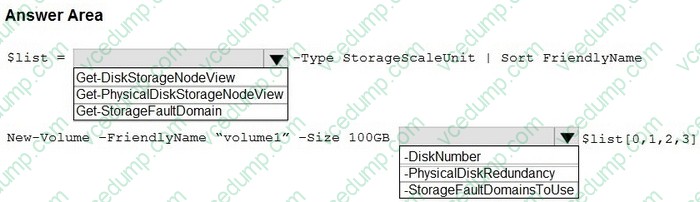
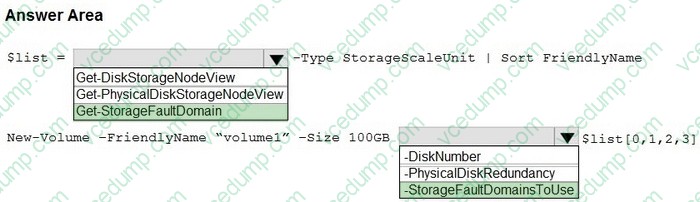
You have a Storage Spaces Direct cluster named Cluster1 that supports delimiting the allocation of volumes.
You need to create a volume and delimit its allocation.
How should you complete the PowerShell script? To answer, select the appropriate options in the answer area.
NOTE: Each correct selection is worth one point.
-
Question 128:
You have an on-premises server named Server1 that runs Windows Server and has the Hyper-V server role installed.
You have an Azure subscription.
You plan to back up Server1 to Azure by using Azure Backup.
Which two Azure Backup options require you to deploy Microsoft Azure Backup Server (MABS)? Each correct answer presents a complete solution.
NOTE: Each correct selection is worth one point.
A. Bare Metal Recovery
B. Files and folders
C. System State
D. Hyper-V Virtual Machines -
Question 129:
HOTSPOT
You have a server named Server1 that runs Windows Server.
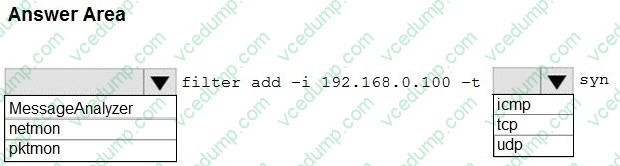
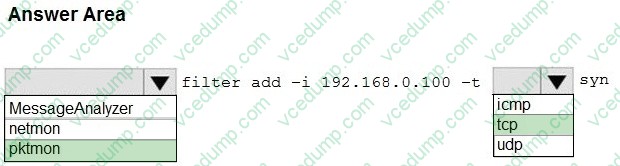
You need to capture the SYN packets exchanged between Server1 and an IP address of 192.168.0.100.
How should you complete the command? To answer, select the appropriate options in the answer area.
NOTE: Each correct selection is worth one point.
-
Question 130:
You have two servers named Server1 and Server2 that run Windows Server. Both servers have the Hyper-V server role installed.
Server1 hosts three virtual machines named VM1, VM2, and VM3. The virtual machines replicate to Server2.
Server1 experiences a hardware failure.
You need to bring VM1, VM2, and VM3 back online as soon as possible.
From the Hyper-V Manager console on Server2, what should you run for each virtual machine?
A. Start
B. Move
C. Unplanned Failover
D. Planned Failover
Related Exams:
-
62-193
Technology Literacy for Educators -
70-243
Administering and Deploying System Center 2012 Configuration Manager -
70-355
Universal Windows Platform – App Data, Services, and Coding Patterns -
77-420
Excel 2013 -
77-427
Excel 2013 Expert Part One -
77-725
Word 2016 Core Document Creation, Collaboration and Communication -
77-726
Word 2016 Expert Creating Documents for Effective Communication -
77-727
Excel 2016 Core Data Analysis, Manipulation, and Presentation -
77-728
Excel 2016 Expert: Interpreting Data for Insights -
77-731
Outlook 2016 Core Communication, Collaboration and Email Skills
Tips on How to Prepare for the Exams
Nowadays, the certification exams become more and more important and required by more and more enterprises when applying for a job. But how to prepare for the exam effectively? How to prepare for the exam in a short time with less efforts? How to get a ideal result and how to find the most reliable resources? Here on Vcedump.com, you will find all the answers. Vcedump.com provide not only Microsoft exam questions, answers and explanations but also complete assistance on your exam preparation and certification application. If you are confused on your AZ-801 exam preparations and Microsoft certification application, do not hesitate to visit our Vcedump.com to find your solutions here.