AZ-700 Exam Details
-
Exam Code
:AZ-700 -
Exam Name
:Designing and Implementing Microsoft Azure Networking Solutions -
Certification
:Microsoft Certifications -
Vendor
:Microsoft -
Total Questions
:452 Q&As -
Last Updated
:Jul 16, 2026
Microsoft AZ-700 Online Questions & Answers
-
Question 271:
You have an Azure subscription that contains a distributed web app named App1. App1 is hosted across multiple Azure regions.
You need to recommend a solution for routing user requests to App. The solution must meet the following requirements:
1. Support the routing of a user request to a resource based on the URL of the request.
2. Support query string replacement.
3. Minimize network latency.
What should you include in the recommendation?
A. Azure Load Balancer
B. Azure Traffic Manager
C. Azure Content Delivery Network (CDN)
D. Azure Front Door -
Question 272:
You have a hybrid environment that uses ExpressRoute to connect an on-premises network and Azure.
You need to log the uptime and the latency of the connection periodically by using an Azure virtual machine and an on-premises virtual machine.
What should you use?
A. Azure Monitor
B. IP flow verify
C. Connection Monitor
D. Azure Internet Analyzer -
Question 273:
HOTSPOT
You have an Azure subscription that contains an Azure Firewall policy named FWPolicy1.
You need to configure FWPolicy1 to meet the following requirements:
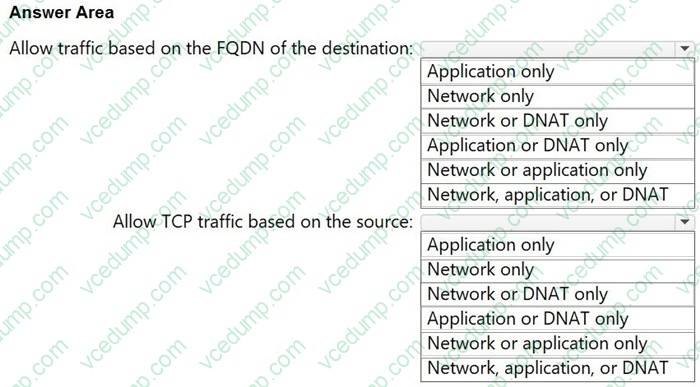
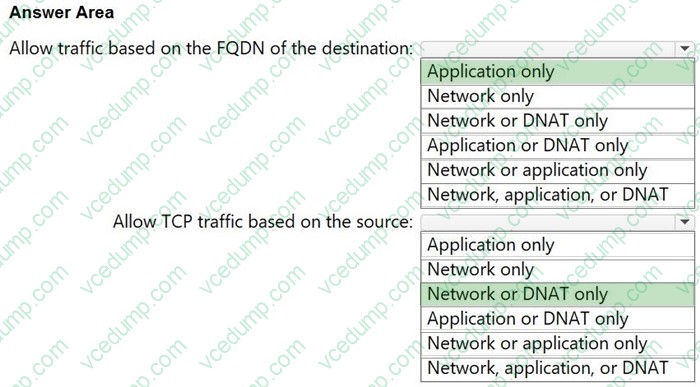
Allow traffic based on the FQDN of the destination.
Allow TCP traffic based on the source.
Which types of rules should you use for each requirement? To answer, select the appropriate options in the answer area.
NOTE: Each correct selection is worth one point.
-
Question 274:
You have an application deployed in to two Azure app services as shown below.
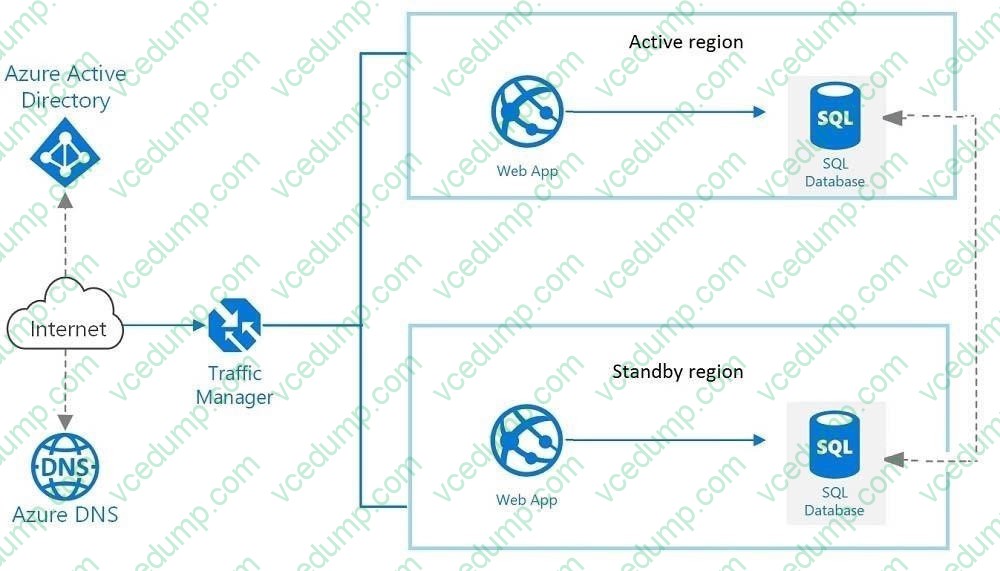
You need to control the threshold for failing over the front end to the standby region.
What should you configure?
A. An application Insights availability test
B. Azure SQL Database failover groups
C. Connection Monitor in Azure Network Watcher
D. Endpoint monitor settings in Traffic Manager -
Question 275:
DRAG DROP
You have two Azure virtual networks named Hub1 and Spoke1. Hub1 connects to an on-premises network by using a Site-to-Site VPN connection.
You are implementing peering between Hub1 and Spoke1.
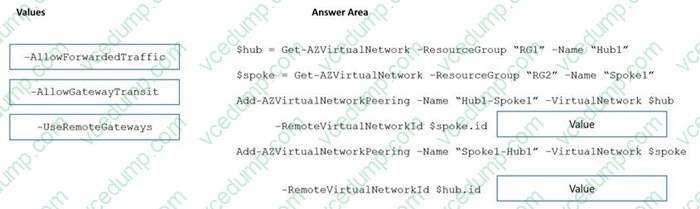
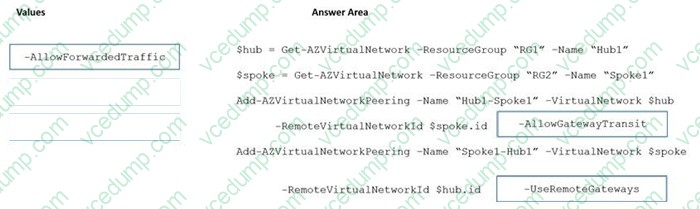
You need to ensure that a virtual machine connected to Spoke1 can connect to the on-premises network through Hub1.
How should you complete the PowerShell script? To answer, drag the appropriate values to the correct targets. Each value may be used once, more than once, or not at all. You may need to drag the split bar between panes or scroll to view content.
NOTE: Each correct selection is worth one point.
Select and Place:
-
Question 276:
What should you implement to meet the virtual network requirements for the virtual machines that connect to Vnet4 and Vnet5?
A. a private endpoint
B. a routing table
C. a service endpoint
D. a private link service
E. a virtual network peering -
Question 277:
HOTSPOT
You have an Azure subscription that contains virtual networks, network security groups (NSGs), load balancer, virtual machines, and virtual network gateways.
You enable Azure Monitor Network Insights.
You need to perform the following actions:
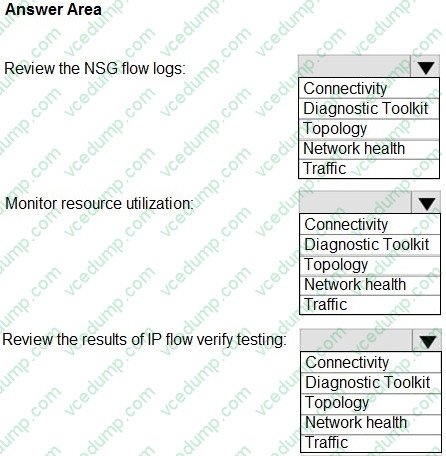
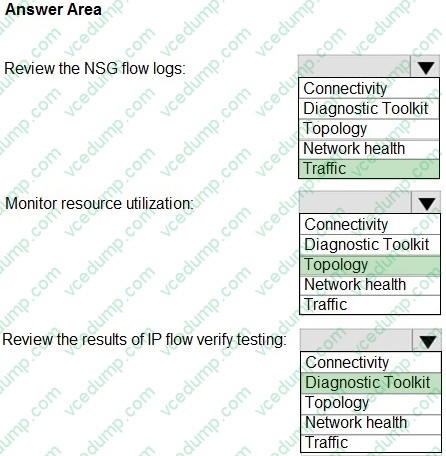
1. Review the NSG flow logs.
2. Monitor resource utilization.
3. Review the results of IP flow verify testing.
Which Azure Monitor Network Insights feature should you use for each action? To answer, select the appropriate options in the answer area.
NOTE: Each correct selection is worth one point.
-
Question 278:
Your company has two on-premises sites in New York and Los Angeles.
Your company has Azure virtual networks in the East US Azure region and the West US Azure region.
Each on-premises site has Azure ExpressRoute circuits to both regions.
You need to recommend a solution that meets the following requirements:
Outbound traffic to the Internet from workloads hosted on the virtual networks must be routed through the closest available on-premises site.
If an on-premises site fails, traffic from the workloads on the virtual networks to the Internet must reroute automatically to the other site.
What should you include in the recommendation to route from virtual networks to on-premises locations?
A. Azure Default routes
B. Border Gateway Protocol (BGP)
C. User-defined routes -
Question 279:
SIMULATION

Username and password
Use the following login credentials as needed:
To enter your username, place your cursor in the Sign in box and click on the username below.
To enter your password, place your cursor in the Enter password box and click on the password below.
Azure Username: [email protected] Azure Password: xxxxxxxxxx
If the Azure portal does not load successfully in the browser, press CTRL-K to reload the portal in a new browser tab.
The following information is for technical support purposes only:
Lab Instance: 12345678
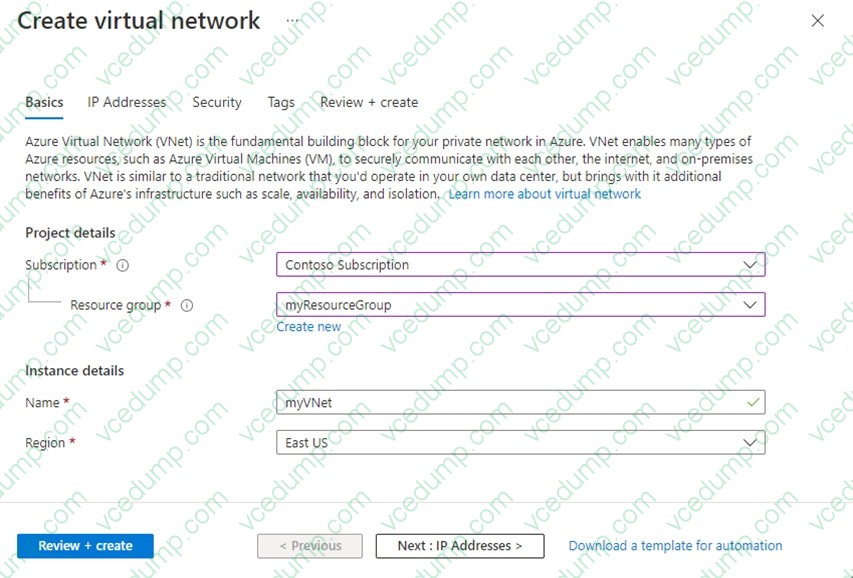
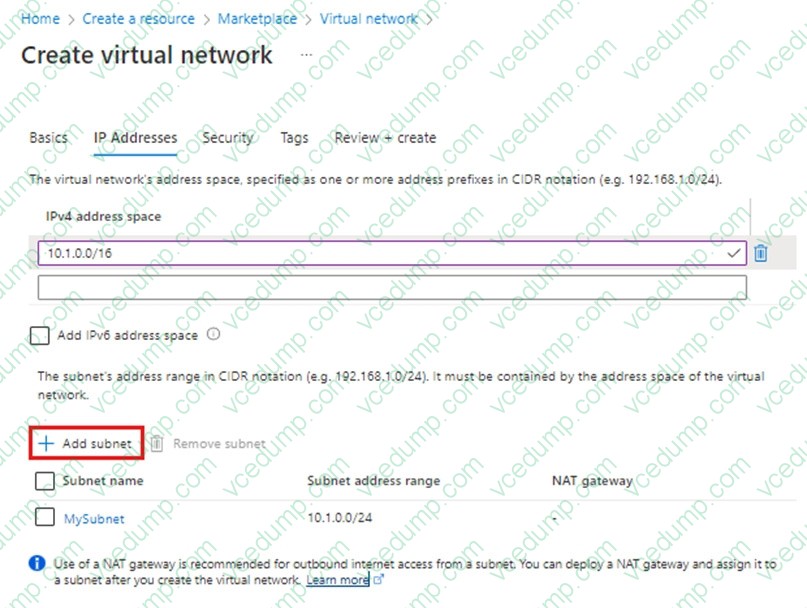
You need to ensure that you can deploy Azure virtual machines to the France Central Azure region. The solution must ensure that virtual machines in the France Central region are in a network segment that has an IP address range of 10.5.1.0/24.
To complete this task, sign in to the Azure portal.
A. See explanation below.
B. Placeholder
C. Placeholder
D. Placeholder -
Question 280:
Note: This question is part of a series of questions that present the same scenario. Each question in the series contains a unique solution that might meet the stated goals. Some question sets might have more than one correct solution, while others might not have a correct solution.
After you answer a question in this section, you will NOT be able to return to it. As a result, these questions will not appear in the review screen.
You have an Azure application gateway that has Azure Web Application Firewall (WAF) enabled.
You configure the application gateway to direct traffic to the URL of the application gateway.
You attempt to access the URL and receive an HTTP 403 error. You view the diagnostics log and discover the following error.
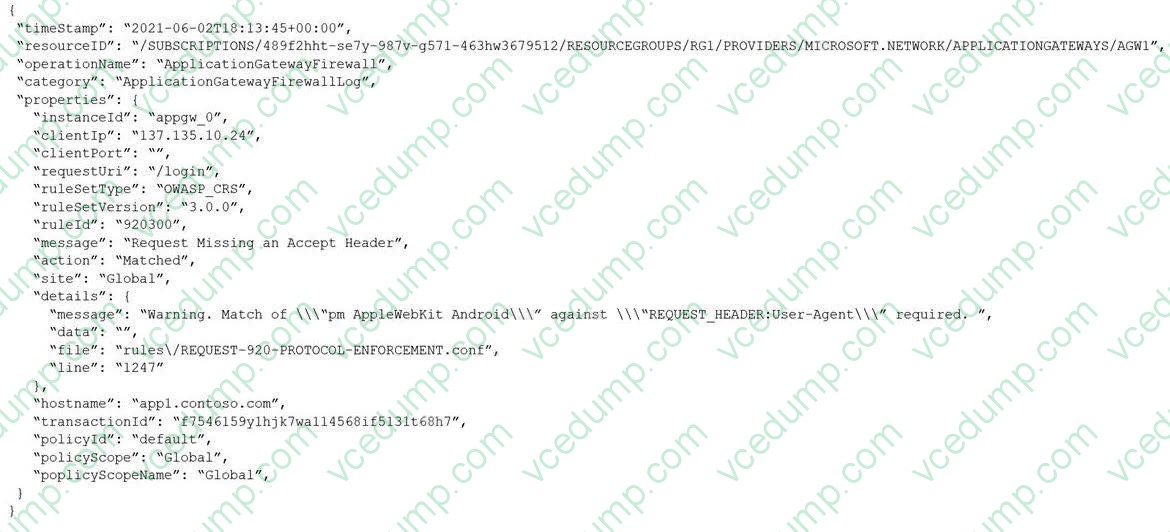
You need to ensure that the URL is accessible through the application gateway from any IP address.
Solution: You add a rewrite rule for the host header.
Does this meet the goal?
A. Yes
B. No
Related Exams:
-
62-193
Technology Literacy for Educators -
70-243
Administering and Deploying System Center 2012 Configuration Manager -
70-355
Universal Windows Platform – App Data, Services, and Coding Patterns -
77-420
Excel 2013 -
77-427
Excel 2013 Expert Part One -
77-725
Word 2016 Core Document Creation, Collaboration and Communication -
77-726
Word 2016 Expert Creating Documents for Effective Communication -
77-727
Excel 2016 Core Data Analysis, Manipulation, and Presentation -
77-728
Excel 2016 Expert: Interpreting Data for Insights -
77-731
Outlook 2016 Core Communication, Collaboration and Email Skills
Tips on How to Prepare for the Exams
Nowadays, the certification exams become more and more important and required by more and more enterprises when applying for a job. But how to prepare for the exam effectively? How to prepare for the exam in a short time with less efforts? How to get a ideal result and how to find the most reliable resources? Here on Vcedump.com, you will find all the answers. Vcedump.com provide not only Microsoft exam questions, answers and explanations but also complete assistance on your exam preparation and certification application. If you are confused on your AZ-700 exam preparations and Microsoft certification application, do not hesitate to visit our Vcedump.com to find your solutions here.