Microsoft AZ-104 Online Practice
Questions and Exam Preparation
AZ-104 Exam Details
Exam Code
:AZ-104
Exam Name
:Microsoft Azure Administrator
Certification
:Microsoft Certifications
Vendor
:Microsoft
Total Questions
:852 Q&As
Last Updated
:May 28, 2026
Microsoft AZ-104 Online Questions &
Answers
Question 501:
You have an Azure subscription that contains 10 network security groups (NSGs), 10 virtual machines, and a Log Analytics workspace named Workspace1. Each NSG is connected to a virtual machine.
You need to configure an Azure Monitor Network Insights alert that will be triggered when suspicious network traffic is detected.
What should you do first?
A. Deploy Connection Monitor. B. Configure data collection endpoints. C. Configure a private link. D. Configure NSG flow logs.
Azure Monitor Network Insights detections for suspicious network traffic rely on visibility into network flows. **NSG flow logs** provide the underlying traffic records (accepted/denied flows) from NSGs to a storage account/Log Analytics pipeline that Network Watcher and Network Insights can analyze. Therefore, the first prerequisite is to **enable/configure NSG flow logs**.
Why other selections are not correct:
- Deploy Connection Monitor: Measures reachability/latency between endpoints; it does not provide NSG-level flow visibility for suspicious traffic detections.
- Configure data collection endpoints: Used with Azure Monitor Agent scenarios; not the prerequisite for NSG-based flow analysis.
- Configure a private link: Connectivity/private access feature; unrelated to generating flow telemetry.
1. NSG flow logs https://learn.microsoft.com/en-us/azure/network-watcher/network-watcher-nsg-flow-logging-overview Modified: Unable to locate date modified Date Access: 01/24/2026
2. Traffic Analytics (built on NSG flow logs) https://learn.microsoft.com/en-us/azure/network-watcher/traffic-analytics Modified: Unable to locate date modified Date Access: 01/24/2026
-------------------------------------------------------------------------------- Microsoft Exam Tips:
5 Monitor and maintain Azure resources (10?5%) |__ 5.1 Monitor resources in Azure |__ 5.1.6 Use Azure Network Watcher and Connection Monitor
Question 502:
You need to meet the user requirement for Admin1.
What should you do?
A. From the Subscriptions blade, select the subscription, and then modify the Properties. B. From the Subscriptions blade, select the subscription, and then modify the Access control (IAM) settings. C. From the Azure Active Directory blade, modify the Properties. D. From the Azure Active Directory blade, modify the Groups.
A. From the Subscriptions blade, select the subscription, and then modify the Properties.
Explanation
Scenario:
1. Designate a new user named Admin1 as the service admin for the Azure subscription.
2. Admin1 must receive email alerts regarding service outages.
Follow these steps to change the Service Administrator in the Azure portal.
1. Make sure your scenario is supported by checking the limitations for changing the Service Administrator.
2. Sign in to the Azure portal as the Account Administrator.
3. Open Cost Management + Billing and select a subscription.
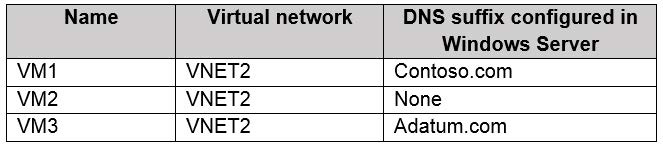
You have an Azure subscription. The subscription contains virtual machines that run Windows Server 2016 and are configured as shown in the following table.
You create a public Azure DNS zone named adatum.com and a private Azure DNS zone named contoso.com.
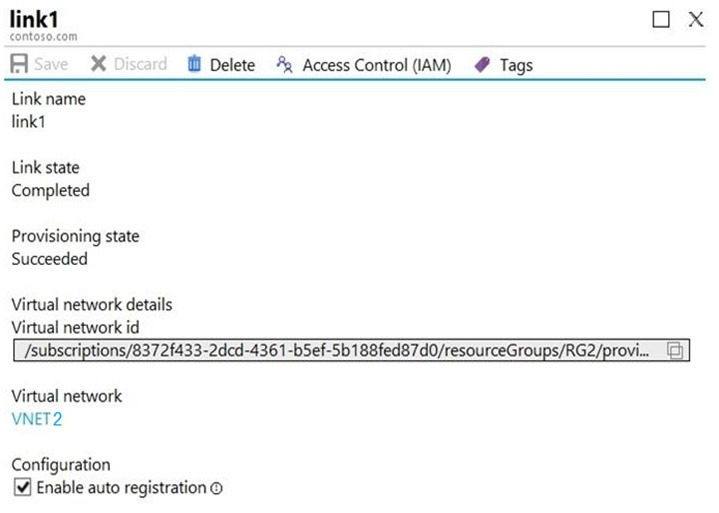
You create a virtual network link for contoso.com as shown in the following exhibit.
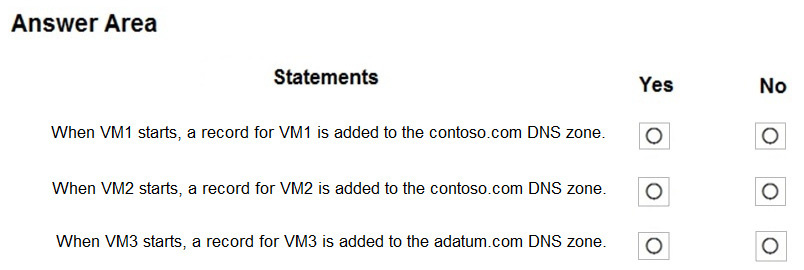
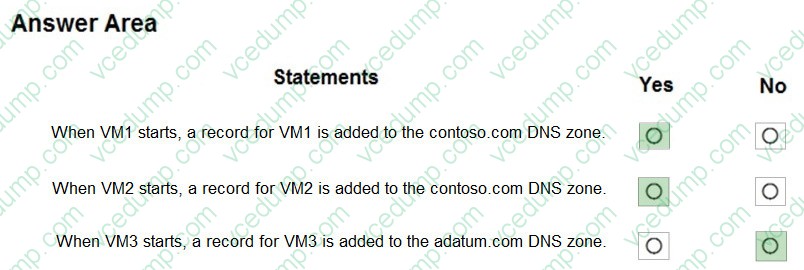
For each of the following statements, select Yes if the statement is true. Otherwise, select No.
Box 1: Yes
Box 2: Yes
Box 3: No
Setup highlights:
- You created a "public" DNS zone (adatum.com).
- You created a "private" DNS zone (contoso.com).
- You linked "contoso.com (private)" to "VNET2" with "auto registration enabled".
Implications:
- Auto-registration registers VMs in the linked VNet into the "private DNS zone name" (contoso.com).
- It does not auto-register into a "public" DNS zone.
Therefore:
- Box 1 (Yes): VM1 will auto-register in contoso.com.
- Box 2 (Yes): VM2 will auto-register in contoso.com.
- Box 3 (No): VM3 will not auto-register into adatum.com (public). If VM3 auto-registers anywhere here, it would be into contoso.com.
Why the other options are not correct:
- “No” for Box 1 or Box 2 would only be true if auto-registration weren’t enabled on the VNet link.
- “Yes” for Box 3 incorrectly assumes public DNS zones support auto-registration from VNets.
Microsoft Exam Tips:
- Auto-registration happens only in "Private DNS zones" and only for VNets linked with auto-registration enabled.
- Don’t be distracted by “DNS suffix configured in Windows Server” - Private DNS auto-registration behavior is driven by the VNet link settings.
Summary:
This question tested private DNS auto-registration and the fact that public DNS zones don’t support VNet auto-registration.
AZ-104 Exam Objective Hierarchy:
4.0 - Implement and manage virtual networking (15–20%) |__ 4.3 - Configure name resolution and load balancing |__ |__ 4.3.1 - Configure Azure DNS
Question 504:
You have a public load balancer that balances ports 80 and 443 across three virtual machines named VM1, VM2, and VM3.
You need to direct all the Remote Desktop Protocol (RDP) connections to VM3 only.
What should you configure?
A. a load balancing rule B. a new public load balancer for VM3 C. an inbound NAT rule D. a frontend IP configuration
- You already have a public load balancer distributing ports 80 and 443 across VM1/VM2/VM3 (that implies load balancing rules for 80/443).
- RDP is a management connection (TCP/3389) that you want to direct to a single VM (VM3) specifically.
- An inbound NAT rule is the Load Balancer feature used to map a specific frontend port on the public IP (for example, 50001) to a backend VM's port 3389. This allows you to target VM3 only for RDP while leaving the web load balancing rules intact. (1)
Why the other options are incorrect:
- a load balancing rule Load balancing rules distribute traffic across multiple backend instances. That is the opposite of "RDP to VM3 only."
- a new public load balancer for VM3 You do not need a second load balancer just to target a single VM for RDP. NAT rules are designed for this.
- a frontend IP configuration A frontend IP configuration is required by the load balancer, but changing/adding it does not by itself create the port mapping behavior needed for RDP-to-one-VM.
References:
1. Inbound NAT rules in Azure Load Balancer https://learn.microsoft.com/en-us/azure/load-balancer/load-balancer-inbound-nat-rules Date Modified: 2026-01-08 Date Accessed: 01/25/2026
Microsoft Exam Tips:
- If the question says "connect to ONE specific backend VM," think "Inbound NAT rule."
- If it says "distribute traffic," think "Load balancing rule."
Summary:
- Azure Load Balancer inbound NAT rules for targeted management access (RDP/SSH) to a single VM.
AZ-104 Exam Objective Hierarchy:
4.0 Implement and manage virtual networking (15?0%) |__ 4.3 Configure name resolution and load balancing |__ 4.3.2 Configure an internal or public load balancer
Question 505:
Note: This question is part of a series of questions that present the same scenario. Each question in the series contains a unique solution that might meet the stated goals. Some question sets might have more than one correct solution, while others might not have a correct solution.
After you answer a question in this section, you will NOT be able to return to it. As a result, these questions will not appear in the review screen.
You have an Azure virtual machine named VM1 that runs Windows Server 2016.
You need to create an alert in Azure when more than two error events are logged to the System event log on VM1 within an hour.
Solution: You create an event subscription on VM1. You create an alert in Azure Monitor and specify VM1 as the source
To alert on Windows System event log entries, Azure Monitor must collect the event log data (commonly via Azure Monitor Agent into a Log Analytics workspace) and then you create a log-based alert rule (log search / scheduled query) that queries for error events within the time window. Creating a Windows "event subscription" on the VM is not the same as collecting logs into Azure Monitor, and by itself does not provide Azure Monitor with the event data required for the alert condition. Azure Monitor alerts can trigger on log data only if that data is ingested into the Azure Monitor data platform. :contentReference[oaicite:20]{index=20}
Why the other selection is not correct:
- Yes:
The proposed approach does not ensure Azure Monitor is receiving and querying the Windows System event log data.
References:
1. Monitor virtual machines with Azure Monitor: Alerts (alerting depends on data collected, typically via Azure Monitor Agent) https://learn.microsoft.com/en-us/azure/azure-monitor/vm/monitor-virtual-machine-alerts Date Modified: 05/21/2025 :contentReference[oaicite:21]{index=21} Date Access: 01/24/2026 2. Overview of Azure Monitor alerts (alerts can be based on log data in Azure Monitor) https://learn.microsoft.com/en-us/azure/azure-monitor/alerts/alerts-overview Date Modified: 05/19/2025 :contentReference[oaicite:22]{index=22} Date Access: 01/24/2026 3. Types of Azure Monitor alerts (log search / log-based alert types) https://learn.microsoft.com/en-us/azure/azure-monitor/alerts/alerts-types Date Modified: 11/18/2025 :contentReference[oaicite:23]{index=23} Date Access: 01/24/2026
---------------------------------------------------------------------------------------------------- Microsoft Exam Tips:
- If the condition references OS-level logs (Windows Event Logs), first confirm the logs are being ingested into Azure Monitor/Log Analytics.
- "Alert on logs" typically implies a log query alert (scheduled query) rather than an activity log alert.
Summary:
The solution does not properly ingest/query Windows event logs in Azure Monitor to create the required alert.
5.0 Monitor and maintain Azure resources (10?5%) | |__ 5.1 Monitor resources in Azure
| |__ 5.1.4 Set up alert rules, action groups, and alert processing rules
Question 506:
DRAG DROP
You onboard 10 Azure virtual machines to Azure Automation State Configuration.
You need to use Azure Automation State Configuration to manage the ongoing consistency of the virtual machine configurations.
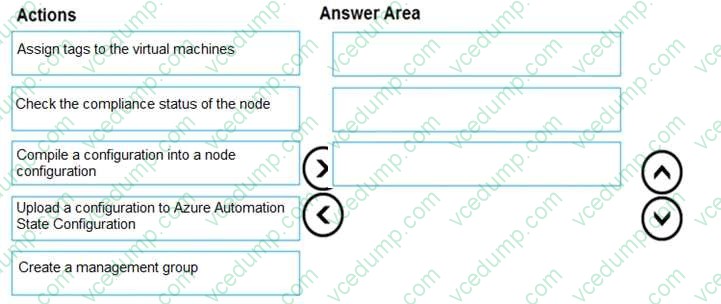
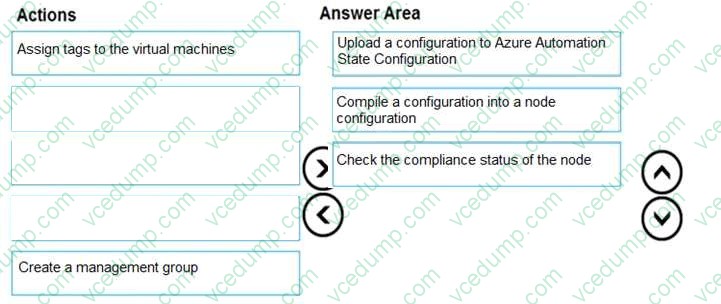
Which three actions should you perform in sequence? To answer, move the appropriate actions from the list of actions to the answer area and arrange them in the correct order.
NOTE: More than one order of answer choices is correct. You will receive credit for any of the correct orders you select.
Select and Place:
Box 1: Upload a configuration to Azure Automation State Configuration
Box 2: Compile a configuration into a node configuration
Box 3: Check the compliance status of the node
Explanation:
Azure Automation State Configuration (DSC) follows a publish/compile/assess lifecycle:
1) Upload a configuration:
You first import/upload the DSC configuration (the authoring artifact) into State Configuration.
2) Compile into a node configuration:
Compilation produces a node configuration (MOF) that can be assigned and evaluated by nodes.
3) Check compliance:
After assignment/application cycles run, nodes report their compliance state, which you then review.
References:
1. Compile DSC configurations in Azure Automation State Configuration (Microsoft Learn) https://learn.microsoft.com/en-us/azure/automation/automation-dsc-compile Date Accessed: 01/26/2026 Last Updated: 11/17/2025
2. Azure Automation State Configuration overview (Microsoft Learn) https://learn.microsoft.com/en-us/azure/automation/automation-dsc-overview Date Accessed: 01/26/2026 Last Updated: 11/17/2025
3. Integrate Azure Automation State Configuration with Azure Monitor Logs (Microsoft Learn) https://learn.microsoft.com/en-us/azure/automation/automation-dsc-diagnostics Date Accessed: 01/26/2026 Last Updated: 11/17/2025
Microsoft Exam Tips:
- “Configuration” (authoring) ≠ “Node configuration” (compiled MOF). If you see “compile,” it’s almost always after upload/import.
- Compliance is a reporting outcome, so it logically comes after compilation/assignment.
Summary:
DSC workflow in Azure Automation: upload configuration --> compile to node configuration --> validate compliance reporting.
AZ-104 Exam Objective Hierarchy:
3.0 Deploy and manage Azure compute resources (20–25%) └─ 3.2 Create and configure virtual machines
Question 507:
You have an Azure subscription.
You plan to deploy an Azure Kubernetes Services (AKS) cluster to support an app named APP1. On-premises clients connect to App1 by using the IP address of the pod.
For the AKS cluster, you need to choose a network type that will support App1.
What should you choose?
A. Azure Private Link B. Hybrid Connection endpoints C. Kubened D. Azure Container Networking Interface (CNI)
Azure CNI assigns pod IPs from the virtual network (subnet) address space, which makes pod IPs routable within the VNet and over connected networks (for example, via VPN/ExpressRoute). Since the requirement states on-premises clients connect to the app using the pod IP address, you need pod IPs that are directly routable from on-prem-this is the classic exam reason to choose Azure CNI.
Why other selections are not correct:
- Kubenet: Pods use an overlay network; pod IPs are generally not directly routable from outside the cluster without additional routing/NAT.
- Azure Private Link / Hybrid Connection endpoints: Not the AKS pod networking model required to make pod IPs directly reachable.
1. AKS networking concepts (Azure CNI vs kubenet) https://learn.microsoft.com/en-us/azure/aks/concepts-network Date Modified: Unable to locate date modified Date Accessed: 01/25/2026
-------------------------------------------------------------------------------- Microsoft Exam Tips:
- If the question says "clients connect using pod IP," the intended answer is commonly Azure CNI.
- Kubenet often appears when you want simpler IP consumption (pods not consuming subnet IPs).
4.0 Implement and manage virtual networking (15?0%) |__ 4.1 Configure and manage virtual networks in Azure |__ 4.1.1 Create and configure virtual networks and subnets works
Question 508:
Note: This question is part of a series of questions that present the same scenario. Each question in the series contains a unique solution that might meet the stated goals. Some question sets might have more than one correct solution, while others might not have a correct solution.
After you answer a question in this section, you will NOT be able to return to it. As a result, these questions will not appear in the review screen.
You have an Azure virtual machine named VM1. VM1 was deployed by using a custom Azure Resource Manager template named ARM1.json.
You receive a notification that VM1 will be affected by maintenance.
You need to move VM1 to a different host immediately.
Solution: From the Overview blade, you move the virtual machine to a different subscription.
Moving a VM to a different subscription changes the administrative boundary (billing/management scope). It does not guarantee that the VM is moved to a different host immediately to address an imminent maintenance impact. The correct action for host relocation is Redeploy; therefore, moving the VM to another subscription does not meet the goal. (1)
Why the other selection is incorrect:
- Yes: This is incorrect because subscription moves are management-scope changes, not a host-migration action intended to immediately relocate the VM's host. (1)
1. Redeploy Windows virtual machine to new Azure node (Redeploy is the host-move action) https://learn.microsoft.com/en-us/troubleshoot/azure/virtual-machines/windows/redeploy-to-new-node-windows Date Modified: Unable to locate date modified Date Accessed: 01/25/2026
3.0 Deploy and manage Azure compute resources (20?5%) |__ 3.2 Create and configure virtual machines |__ 3.2.3 Move a virtual machine to another resource group, subscription, or region
Question 509:
HOTSPOT
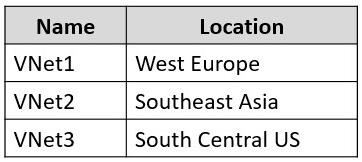
You have an Azure subscription that contains the virtual networks shown in the following table.
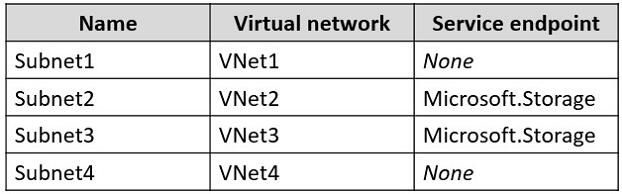
The subscription contains the subnets shown in the following table.
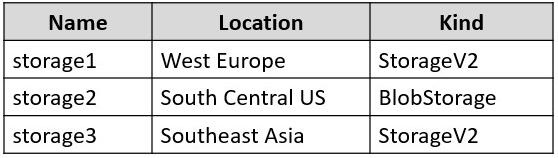
The subscription contains the storage accounts shown in the following table.
You create a service endpoint policy named Policy1 in the South Central US Azure region to allow connectivity to all the storage accounts in the subscription.
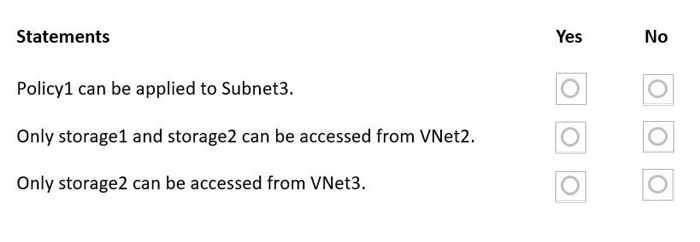
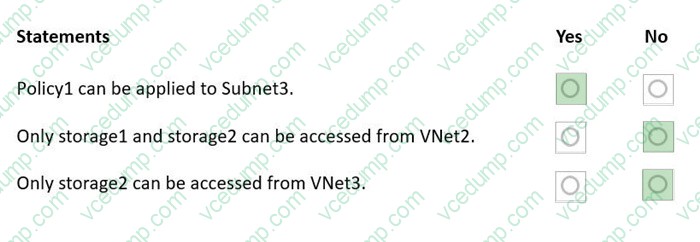
For each of the following statements, select Yes if the statement is true. Otherwise, select No.
NOTE: Each correct selection is worth one point.
1) Policy1 can be applied to Subnet3. -> Yes
2) Only storage1 and storage2 can be accessed from VNet2. -> No
3) Only storage2 can be accessed from VNet3. -> No
Why:
- Service endpoint policies apply to "subnets that already have service endpoints enabled" (Subnet3 has Microsoft.Storage).
- A service endpoint policy’s "scope is global" (Azure role-based) but the policy itself must be "created in the same region as the virtual network" where it’s used; Subnet3 is in the VNet located in South Central US, and Policy1 is created in South Central US --> can apply.
- If the policy is defined to allow connectivity to "all storage accounts in the subscription", then access is not limited to “only storage2” or “only storage1 and storage2”; it would allow storage1, storage2, and storage3 (even across regions), subject to the allow-list.
AZ-104 Exam Objective Hierarchy
2.0 Implement and manage storage (15–20%) |__2.1 Configure access to storage |__|__2.1.1 Configure Azure Storage firewalls and virtual networks 4.0 Implement and manage virtual networking (15–20%) |__4.2 Configure secure access to virtual networks |__|__4.2.4 Configure service endpoints for Azure platform as a service (PaaS)
Question 510:
Note: The question is included in a number of questions that depicts the identical set-up. However, every question has a distinctive result. Establish if the solution satisfies the requirements.
Your company has a Microsoft SQL Server Always On availability group configured on their Azure virtual machines (VMs).
You need to configure an Azure internal load balancer as a listener for the availability group.
Enabling Floating IP (direct server return) is a common requirement for certain SQL Server Always On availability group listener configurations behind an Azure load balancer.
This setting helps ensure the return traffic path and failover behavior align with the listener design. Therefore, this meets the goal.
References:
1. Microsoft Learn. "Configure a load balancer for SQL Server Always On availability groups on Azure VMs." https://learn.microsoft.com/en-us/azure/azure-sql/virtual-machines/windows/availability-group-load-balancer-portal-configure.
Accessed 2026-01-25.
2. Microsoft Learn. "Floating IP (direct server return) in Azure Load Balancer." https://learn.microsoft.com/en-us/azure/load-balancer/load-balancer-floating-ip. Accessed 2026-01-25.
Microsoft Exam Tips:
- "SQL Always On + Azure LB" is a recurring exam pattern. Floating IP is often the differentiator between correct/incorrect solutions.
Summary:
Using Floating IP with an Azure internal load balancer for SQL AG listeners.
AZ-104 Exam Objective Hierarchy:
4.0 Implement and manage virtual networking (15?0%) |__ 4.3 Configure name resolution and load balancing |__ 4.3.2 Configure an internal or public load balancer
Nowadays, the certification exams become more and more important and required by more and more
enterprises when applying for a job. But how to prepare for the exam effectively? How to prepare
for the exam in a short time with less efforts? How to get a ideal result and how to find the
most reliable resources? Here on Vcedump.com, you will find all the answers.
Vcedump.com provide not only Microsoft exam questions,
answers and explanations but also complete assistance on your exam preparation and certification
application. If you are confused on your AZ-104 exam preparations
and Microsoft certification application, do not hesitate to visit our
Vcedump.com to find your solutions here.