AZ-104 Real Exam Questions

Microsoft Azure Administrator

852 questions available · Page 1 of 86

Updated Exam DumpsVerified AnswersPass Guarantee

Get Complete Exam Dumps
Question 1 Hotspot

HOTSPOT

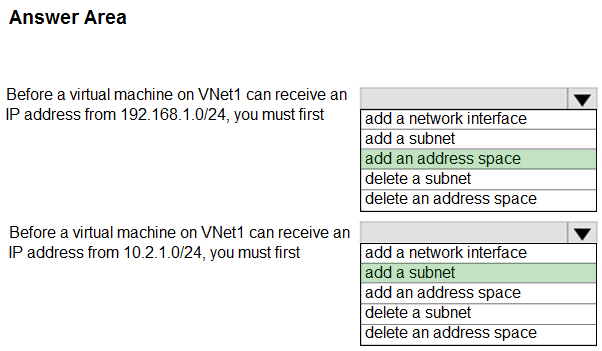
You have a virtual network named VNet1 that has the configuration shown in the following exhibit.
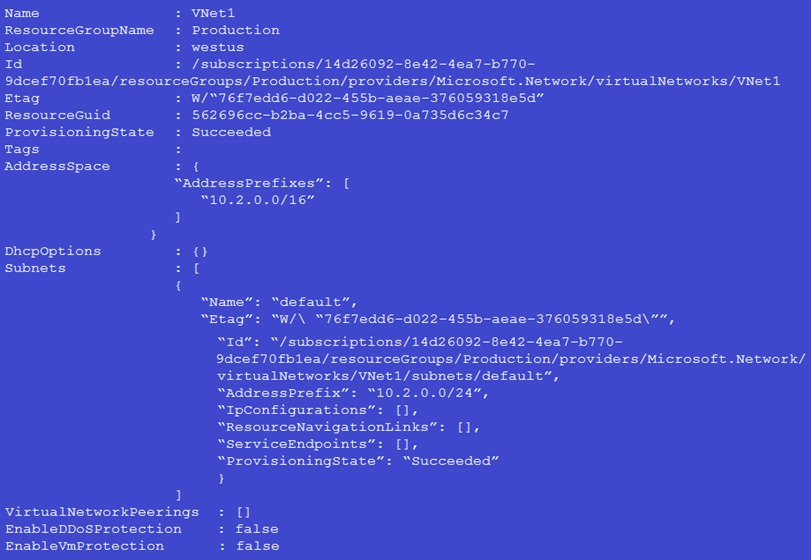
Use the drop-down menus to select the answer choice that completes each statement based on the information presented in the graphic.

NOTE: Each correct selection is worth one point.
Question diagram
Show answer and explanation
Correct answer diagram
Explanation
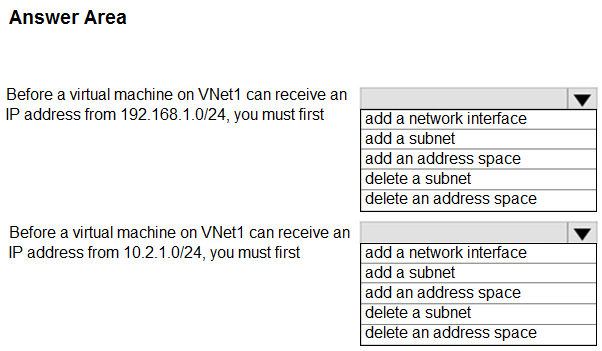
{Dropdown 1}: add an address space
{Dropdown 2}: add a subnet

Why this is correct:
- A VM can only receive IP addresses from subnets that exist inside a VNet's address space.
- To use 192.168.1.0/24, VNet1 must first include that prefix in its address space --> add an address
space.
- To use 10.2.1.0/24, the VNet address space (10.2.0.0/16) already covers that range, but you still need a subnet with that prefix --> add a subnet.

Why the other options are not correct:
- "Add a subnet" for 192.168.1.0/24 is invalid until the VNet address space includes 192.168.1.0/24.
- "Add an address space" for 10.2.1.0/24 is unnecessary because 10.2.0.0/16 already includes
10.2.1.0/24.

Microsoft Exam Tips:
- If the requested prefix is outside the VNet's address space, you must add address space before you can add any subnet using it.

Summary:
- Hot Area Tracking (delta): Attempted +1 | Correct +1 | Incorrect +0 | Skipped +0
- Mismatch/Duplicate Tracking (delta): Mismatch +0 | Duplicate +0

AZ-104 Exam Objective Hierarchy
4.0 - Implement and manage virtual networking (15-20%) 4.1 - Configure and manage virtual networks in Azure 4.1.1 - Create and configure virtual networks and subnets
Question 2 Single choice

Note: This question is part of a series of questions that present the same scenario. Each question in the series contains a unique solution that might meet the stated goals. Some question sets might have more than one correct solution, while others might not have a correct solution.

After you answer a question in this section, you will NOT be able to return to it. As a result, these questions will not appear in the review screen.

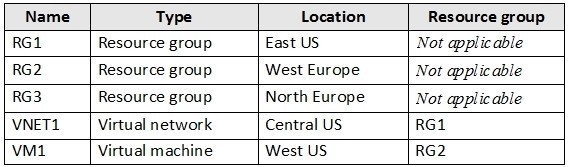
You have an Azure subscription named Subscription1 that contains the resources shown in the following table.

VM1 connects to a virtual network named VNET2 by using a network interface named NIC1.

You need to create a new network interface named NIC2 for VM1.

Solution: You create NIC2 in RG1 and West US.

Does this meet the goal?

  1. A

    Yes

  2. B

    No

Show answer and explanation

Correct answer: A

Explanation

Yes

The solution is: "Create NIC2 in RG1 and West US."

This meets the goal because:
- A network interface (NIC) must be created in the same Azure region as the virtual machine it will attach to. VM1 is in West US, so creating NIC2 in West US is valid.
- A resource group's "location" does not restrict the locations of resources inside it. You can create a West US NIC in RG1 even if RG1's metadata location is East US.
- A NIC can be in a different resource group than the VM, as long as it's in the same subscription and the VM can reference/attach it.

Therefore, creating NIC2 in RG1 (resource container) and West US (required region) can satisfy the requirement.

Microsoft Exam Tips:
- Region rule: NIC and VM must be in the same region for attachment.
- Resource group "location" is commonly a distractor-RG location does not force the resource location.
- Cross-RG attachment is permitted; think "same subscription + same region + correct dependencies," not
"same RG."

Summary:
This question tests Azure networking and resource organization concepts: NIC region constraints versus resource group location metadata and cross-resource-group attachment.

AZ-104 Exam Objective Alignment (Hierarchy) 4.0 Implement and manage virtual networking 4.1 Configure and manage virtual networks in Azure 4.1.1 Create and configure virtual networks and subnets
Question 3 Single choice

You create a private endpoint for an Azure SQL Database in VNetA.

You also create a private DNS zone named privatelink.database.windows.net and link it to VNetA.

You peer VNetA with VNetB. Virtual machines in VNetB must resolve the SQL Database FQDN to the
private endpoint IP address.

  1. A

    Create a public DNS A record for the SQL Database name that points to the private endpoint IP

  2. B

    Link the private DNS zone to VNetB

  3. C

    Create an NSG rule that allows UDP 53 from VNetB to VNetA

  4. D

    Enable Azure DNS proxy on the virtual network gateway in VNetA

Show answer and explanation

Correct answer: B

Explanation

Link the private DNS zone to VNetB

Private endpoint name resolution is normally handled through a corresponding Private DNS zone (for example, privatelink.database.windows.net). Any virtual network that must resolve the private endpoint FQDN to the private IP must have the private DNS zone linked to that VNet. Linking the zone to VNetB enables VMs in VNetB to resolve the SQL Database FQDN to the private endpoint IP, even when VNets are peered.

Why the other selections are incorrect: Create a public DNS A record for the SQL Database name that points to the private endpoint IP: This exposes a private IP in public DNS and does not follow private endpoint DNS integration patterns.
Create an NSG rule that allows UDP 53 from VNetB to VNetA: NSGs do not provide DNS name resolution;
the core requirement is correct DNS zone linking/records.
Enable Azure DNS proxy on the virtual network gateway in VNetA: DNS proxy is not the standard requirement for private endpoint DNS; the expected control is the private DNS zone link (and appropriate
DNS forwarders if using custom DNS).

Microsoft Exam Tips:
- Private Endpoint DNS questions usually reduce to: create/associate the Private DNS zone and link it to every VNet that needs resolution.
- VNet peering alone does not automatically "share" Private DNS zone links.

Summary:
Private endpoint DNS resolution across peered VNets using Private DNS zone links.

AZ-104 Exam Objective Hierarchy:
4.0 Configure and manage virtual networking 4.3 Configure name resolution and load balancing 4.3.1 Configure Azure DNS (best fit)

Question 4 Multiple choice

You have an Azure subscription that contains a storage account named storageacct1234 and two users named User1 and User2.

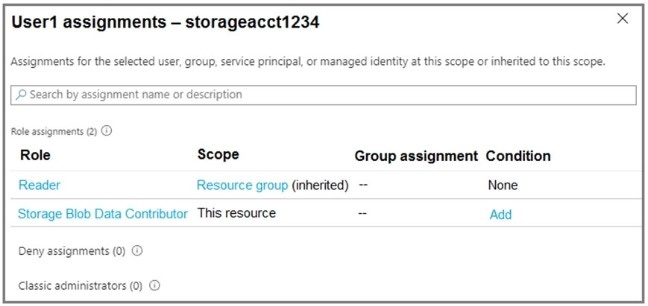
You assign User1 the roles shown in the following exhibit.

Which two actions can User1 perform? Each correct answer presents a complete solution.

NOTE: Each correct selection is worth one point.

  1. A

    Modify the firewall of storageacct1234.

  2. B

    View blob data in storageacct1234.

  3. C

    View file shares in storageacct1234.

  4. D

    Upload blob data to storageacct1234.

  5. E

    Assign roles to User2 for storageacct1234.

Show answer and explanation

Correct answers: B, D

Explanation

View blob data in storageacct1234.
Upload blob data to storageacct1234.

User1 has:
- Reader (management plane) at the resource group scope (inherited), which allows viewing resource metadata but not changing configuration.
- Storage Blob Data Contributor at the storage account scope ("This resource"), which grants read/write access to blob data (data plane), including listing/reading blobs and uploading/writing blobs. Therefore, User1 can view blob data and upload blob data.

Why the other options are not correct:
- Modify the firewall of storageacct1234: requires configuration write permissions (Contributor/Storage
Account Contributor), not Reader.
- View file shares in storageacct1234: Azure Files is a different data plane; Blob Data Contributor does not grant Azure Files share access.
- Assign roles to User2 for storageacct1234: requires role assignment permissions (Owner or User Access
Administrator).

Microsoft Exam Tips:
- Know the split: management plane RBAC (Reader/Contributor) vs data plane roles (Storage Blob Data
Contributor).
- "Blob data" permissions come from data roles, not Storage Account keys.

Summary:
Covers Azure RBAC role scopes and Storage Blob data-plane permissions.

AZ-104 Exam Objective Hierarchy:
1.0 Manage Azure identities and governance 1.2 Manage access to Azure resources 1.2.1 Manage built-in Azure roles

Question 5 Single choice

You have an Azure subscription that contains 10 virtual machines on a virtual network.

You need to create a graph visualization to display the traffic flow between the virtual machines.

What should you do from Azure Monitor?

  1. A

    From Activity log, use quick insights.

  2. B

    From Metrics, create a chart.

  3. C

    From Logs, create a new query.

  4. D

    From Workbooks, create a workbook.

Show answer and explanation

Correct answer: C

Explanation

From Logs, create a new query.

Azure Monitor Logs (Log Analytics) is the appropriate place to query and shape telemetry data (for example, flow logs/connection telemetry) and then visualize it. Creating a query from Logs is the "data retrieval and shaping" step that enables charting/graph visualization of traffic patterns.

Why the other choices are not correct:
- From Activity log, use quick insights:
Activity Log is for control-plane events (create/update/delete), not VM-to-VM traffic flows.
- From Metrics, create a chart:
Metrics are time-series numeric data; they are not well-suited to "traffic flow between VMs" visualization that depends on connection/flow records.
- From Workbooks, create a workbook:

Workbooks are excellent for dashboards, but you still need the underlying Logs query to produce the traffic-flow dataset.

Microsoft Exam Tips:
- AZ-104: For "flow/traffic" style questions, first decide whether you need control-plane logs (Activity Log) or data-plane telemetry (Logs).
- If the answer mentions "graph visualization," verify that the option provides the query layer (Logs) or the
dashboard layer (Workbooks).

Summary:
Using Azure Monitor Logs to query traffic/flow telemetry as the basis for graph/visualizations.

AZ-104 Exam Objective Hierarchy:
5 Monitor and maintain Azure resources 5.1 Monitor resources in Azure 5.1.3 Query and analyze logs in Azure Monitor

Question 6 Hotspot

HOTSPOT

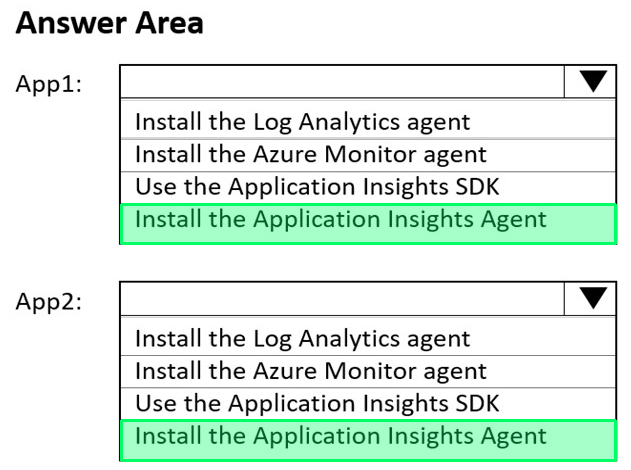
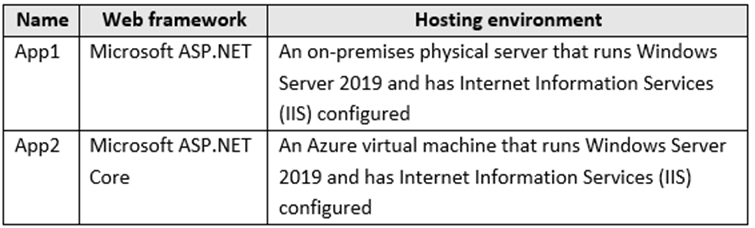
You have the web apps shown in the following table.

You need to monitor the performance and usage of the apps by using Azure Application Insights. The solution must minimize modifications to the application code.

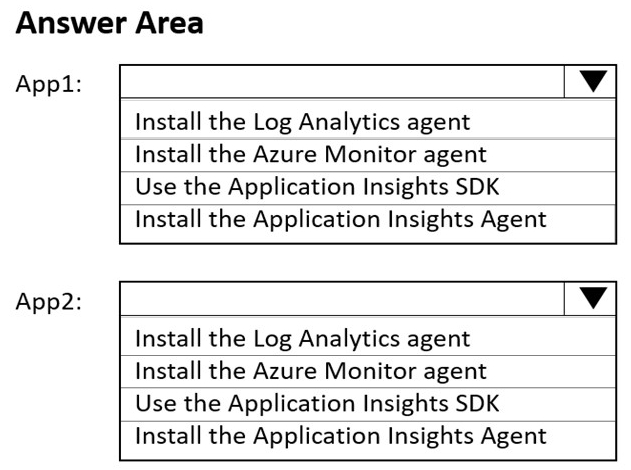
What should you do on each app? To answer, select the appropriate options in the answer area.

NOTE: Each correct selection is worth one point.

stem image

Question diagram
Show answer and explanation
Correct answer diagram
Explanation

App1: Install Application Insights Agent
App2: Install Application Insights Agent

Why this is correct:
- Both apps run on IIS on Windows Server VMs. The Application Insights Agent provides automatic/ instrumentation without requiring code changes and is the appropriate installation choice for IIS-hosted applications on VMs.

Why the other options are incorrect:
- App Service-specific enablement steps don't apply because these are not App Service apps.
- SDK-only approaches may require code changes, which the requirement prohibits.

Exam Tips:
- "No code changes" + "IIS on VM" + "Application Insights" --> Application Insights Agent.

AZ-104 Exam Objective Hierarchy
5.0 Monitor and back up Azure resources (10-15%) 5.1 Monitor resources by using Azure Monitor
5.1.5 Configure Application Insights

Question 7 Hotspot

HOTSPOT

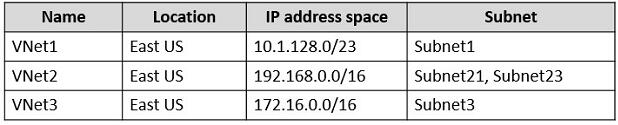
You have an Azure subscription that contains the virtual networks shown in the following table.

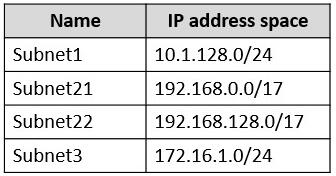
The subnets have the IP address spaces shown in the following table.

You plan to create a container app named contapp1 in the East US Azure region.

You need to create a container app environment named con-env1 that meets the following requirements:
1. Uses its own virtual network.
2. Uses its own subnet.
3. Is connected to the smallest possible subnet.

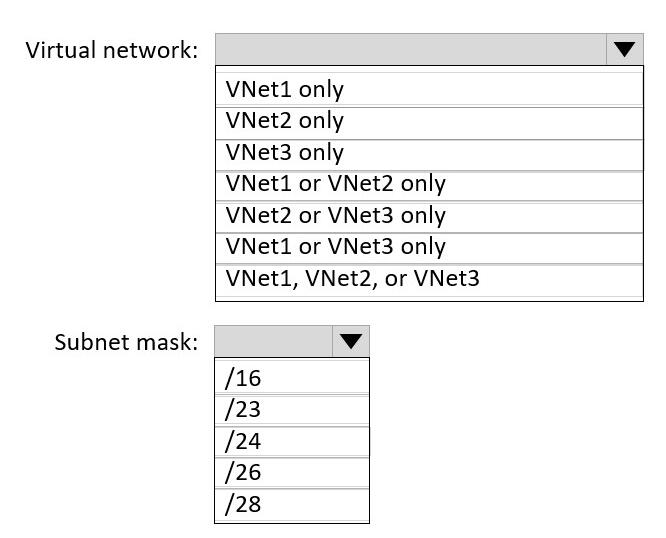
To which virtual networks can you connect con-env1, and which subnet mask should you use? To answer, select the appropriate options in the answer area.

NOTE: Each correct selection is worth one point.

Question diagram
Show answer and explanation
Correct answer diagram
Explanation

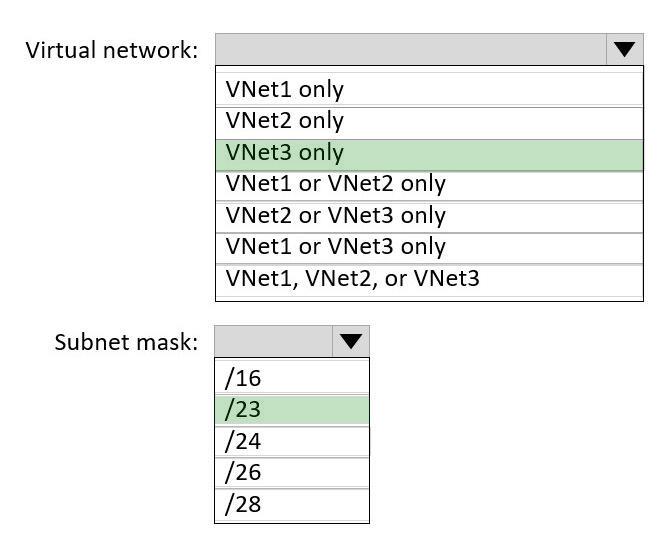
- Virtual network: VNet3 only
- Subnet mask: /23

Why (concise)
- Azure Container Apps VNet integration requires a dedicated subnet, and /23 is the minimum subnet size for VNet integration (per Microsoft Learn).
- VNet1 can't host a /23 subnet because its entire address space is only /23 and Subnet1 already
consumes /24 (leaving only /24 blocks).
- VNet2 can't host a /23 subnet because its /16 is already fully allocated to two /17 subnets.
- VNet3 (/16) has sufficient free space to carve out a new /23 subnet.

AZ-104 Exam Objective Hierarchy
3.0 Deploy and manage Azure compute resources (20-25%) 3.3 Provision and manage containers in the Azure portal 3.3.3 Provision a container by using Azure Container Apps 4.0 Implement and manage virtual networking (15-20%) 4.1 Configure and manage virtual networks in Azure 4.1.1 Create and configure virtual networks and subnets
4.1.5 Troubleshoot network connectivity

Question 8 Single choice

You have a registered DNS domain named contoso.com.

You create a public Azure DNS zone named contoso.com.

You need to ensure that records created in the contoso.com zone are resolvable from the internet.

What should you do?

  1. A

    Create NS records in contoso.com.

  2. B

    Modify the SOA record in the DNS domain registrar.

  3. C

    Create the SOA record in contoso.com.

  4. D

    Modify the NS records in the DNS domain registrar.

Show answer and explanation

Correct answer: D

Explanation

Modify the NS records in the DNS domain registrar

When you create a public Azure DNS zone (contoso.com), records in that zone are only resolvable from the Internet after the domain is delegated to Azure DNS.

Delegation is done at the domain registrar by updating the domain's NS records to the Azure DNS name servers assigned to the zone. Without updating registrar NS records, public resolvers will continue using the prior authoritative name servers and won't find the records in Azure DNS.

Why the other options are not correct:
- Create NS records in contoso.com (zone): Delegation must occur at the registrar; adding NS records inside the zone does not change who is authoritative for the domain on the Internet.
- Modify the SOA record in the registrar / Create the SOA record in the zone: SOA does not delegate
authority; NS delegation does.

Microsoft Exam Tips:
- "Publicly resolvable" + "created DNS zone" almost always implies "update NS at the registrar."
- NS records in the registrar control the authoritative DNS hosting.

Summary:
Public DNS delegation to Azure DNS requires updating NS records at the registrar.

AZ-104 Exam Objective Hierarchy:
4.0 Implement and manage virtual networking 4.3 Configure name resolution and load balancing
4.3.1 Configure Azure DNS

Question 9 Single choice

Note: This question is part of a series of questions that present the same scenario. Each question in the series contains a unique solution that might meet the stated goals. Some question sets might have more than one correct solution, while others might not have a correct solution.

After you answer a question in this section, you will NOT be able to return to it. As a result, these questions will not appear in the review screen.

You have an Azure virtual machine named VM1 that runs Windows Server 2016.

You need to create an alert in Azure when more than two error events are logged to the System event log on VM1 within an hour.

Solution: You create an event subscription on VM1.
You create an alert in Azure Monitor and specify VM1 as the source Does this meet the goal?

  1. A

    Yes

  2. B

    No

Show answer and explanation

Correct answer: B

Explanation

No

To alert on Windows System event log entries, Azure Monitor must collect the event log data (commonly via Azure Monitor Agent into a Log Analytics workspace) and then you create a log-based alert rule (log search / scheduled query) that queries for error events within the time window. Creating a Windows "event subscription" on the VM is not the same as collecting logs into Azure Monitor, and by itself does not provide Azure Monitor with the event data required for the alert condition. Azure Monitor alerts can trigger on log data only if that data is ingested into the Azure Monitor data platform. :contentReference[oaicite:20]
{index=20}

Why the other selection is not correct:
- Yes:
The proposed approach does not ensure Azure Monitor is receiving and querying the Windows System
event log data.

Microsoft Exam Tips:
- If the condition references OS-level logs (Windows Event Logs), first confirm the logs are being ingested into Azure Monitor/Log Analytics.
- "Alert on logs" typically implies a log query alert (scheduled query) rather than an activity log alert.

Summary:
The solution does not properly ingest/query Windows event logs in Azure Monitor to create the required alert.

AZ-104 Exam Objective Hierarchy:
5.0 Monitor and maintain Azure resources 5.1 Monitor resources in Azure 5.1.4 Set up alert rules, action groups, and alert processing rules

Question 10 Hotspot

HOTSPOT

You have an Azure subscription that contains multiple resource groups.

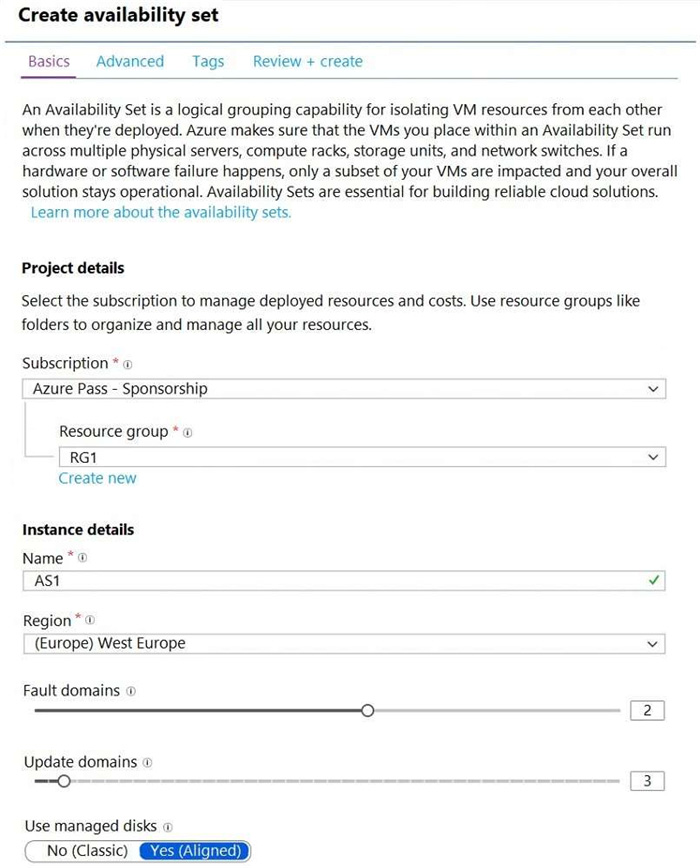
You create an availability set as shown in the following exhibit.

You deploy 10 virtual machines to AS1.

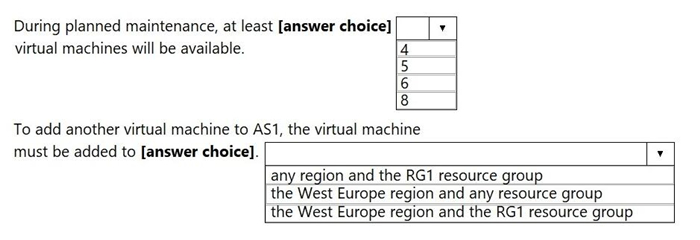
Use the drop-down menus to select the answer choice that completes each statement based on the information presented in the graphic.

NOTE: Each correct selection is worth one point.

Question diagram
Show answer and explanation
Correct answer diagram
Explanation

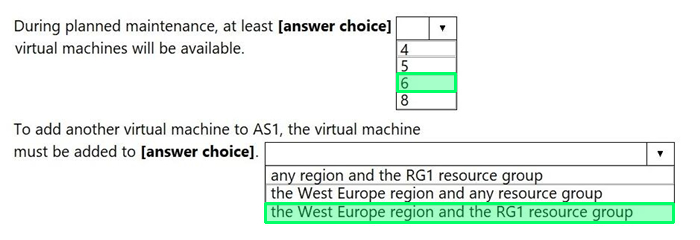
During planned maintenance, at least: 6 virtual machines will be available
To add another VM to AS1, the VM must be added to: West Europe region and RG1 resource group

Why this is correct:
- Availability sets distribute VMs across update domains; during planned maintenance, only one update domain is updated at a time, leaving the remaining VMs available. Based on the distribution shown, the minimum remaining available count is 6.
- A VM must be in the same region and the same resource group to be added to an existing availability set.

Why the other options are incorrect:
- If you assume maintenance affects multiple update domains at once, you undercount availability.
- You cannot add a VM from a different region (or different RG) into an existing availability set.

Exam Tips:
- Availability set membership is fixed to region + resource group at creation.

AZ-104 Exam Objective Hierarchy
3.0 Deploy and manage Azure compute resources (20-25%) 3.2 Create and configure virtual machines 3.2.6 Configure availability zones and sets