Microsoft AZ-104 Online Practice
Questions and Exam Preparation
AZ-104 Exam Details
Exam Code
:AZ-104
Exam Name
:Microsoft Azure Administrator
Certification
:Microsoft Certifications
Vendor
:Microsoft
Total Questions
:852 Q&As
Last Updated
:May 28, 2026
Microsoft AZ-104 Online Questions &
Answers
Question 411:
HOTSPOT
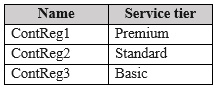
You have an Azure subscription that has the Azure container registries shown in the following table.
You plan to use ACR Tasks and configure private endpoint connections.
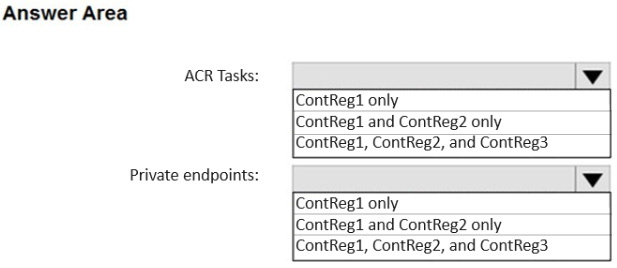
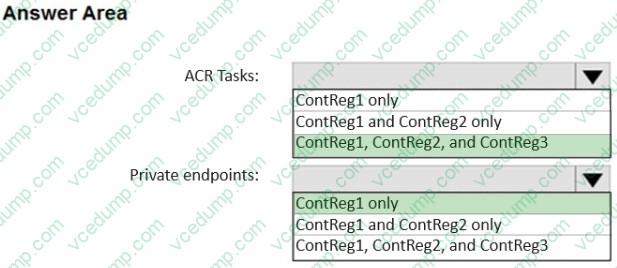
Which container registries support ACR Tasks and private endpoints? To answer, select the appropriate options in the answer area.
NOTE: Each correct selection is worth one point.
ACR Tasks: ContReg1, ContReg2, and ContReg3
Private endpoints: ContReg1 only
Azure Container Registry (ACR) Tasks are a registry feature used to build, run, and maintain container images. In typical exam logic, Tasks are available across registry tiers.
Private endpoints (Private Link) for Azure Container Registry are supported only for the Premium SKU. The table shows ContReg1 is Premium, while ContReg2 is Standard and ContReg3 is Basic. Therefore, only ContReg1 supports private endpoints.
3.0 Deploy and manage Azure compute resources (20–25%) |__3.3 Provision and manage containers in the Azure portal |__|__3.3.1 Create and manage an Azure container registry 4.0 Implement and manage virtual networking (15–20%) |__4.2 Configure secure access to virtual networks |__|__4.2.5 Configure private endpoints for Azure PaaS
Question 412:
Note: This question is part of a series of questions that present the same scenario. Each question in the series contains a unique solution that might meet the stated goals. Some question sets might have more than one correct solution, while others might not have a correct solution.
After you answer a question in this section, you will NOT be able to return to it. As a result, these questions will not appear in the review screen.
You have an Azure Directory (Azure AD) tenant named Adatum and an Azure Subscription named Subscription1. Adatum contains a group named Developers. Subscription1 contains a resource group named Dev.
You need to provide the Developers group with the ability to create Azure logic apps in the Dev resource group.
Solution: On Subscription1, you assign the DevTest Labs User role to the Developers group.
Does this meet the goal?
A. Yes B. No
B. No
No
The proposed solution assigns the DevTest Labs User role to the Developers group at the Subscription1 scope. This does not meet the goal because:
DevTest Labs User is a role designed specifically for Azure DevTest Labs scenarios (primarily around managing and using lab VMs and lab resources). Its permissions focus on DevTest Labs and related VM operations, not on creating and managing Azure Logic Apps.
Creating an Azure Logic App requires permissions on the Microsoft.Logic resource provider (Logic Apps). The DevTest Labs User role definition does not grant Logic Apps management permissions, so it will not allow creating Logic Apps in the Dev resource group.
To meet the requirement (“create Azure logic apps in the Dev resource group”), you would typically assign a role such as Contributor or a Logic Apps–specific contributor role at the Dev resource group scope (or narrower), depending on the required level of access.
Exam Tips:
Role-name trap: If a role name contains a service name (for example, “DevTest Labs User”), assume it is narrowly scoped to that service unless proven otherwise by the role definition.
Match the resource provider: “Create Logic Apps” implies permissions to manage Logic Apps resources (Microsoft.Logic). If the role’s actions list does not include that provider, it will not satisfy the requirement.
Scope is tested (AZ-104): Even if a role has the correct permissions, you must assign it at the correct scope (the Dev resource group is the requirement boundary). Subscription scope is broader than necessary and is often a distractor.
Summary:
Azure RBAC built-in roles
Understanding role purpose and permissions (DevTest Labs User vs. resource creation roles)
Aligning permissions to the correct resource provider (Logic Apps)
Choosing the correct RBAC scope (resource group vs. subscription)
AZ-104 Exam Objective Alignment (Hierarchy)
1.0 Manage Azure identities and governance (20–25%) └── 1.2 Manage access to Azure resources └── 1.2.2 Assign roles at different scopes
Question 413:
You have an Azure virtual machine named VM1.
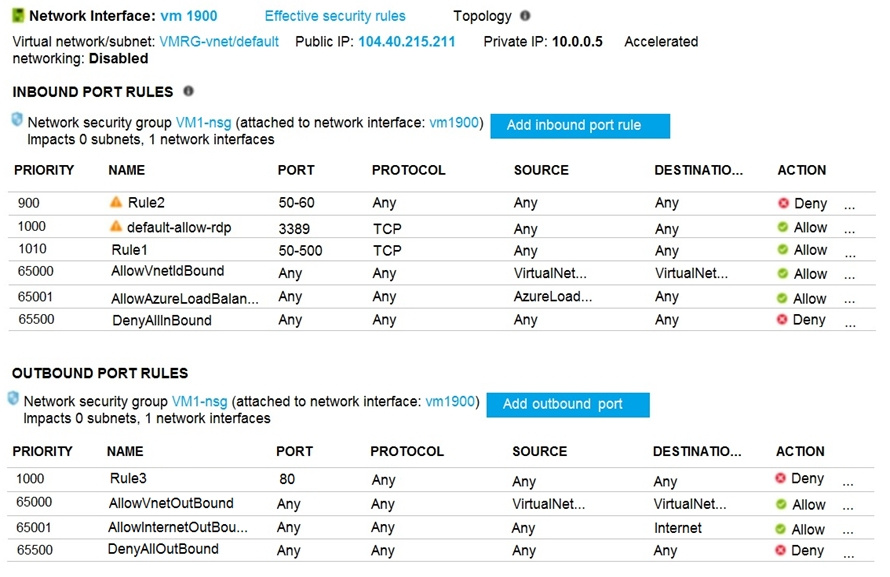
The network interface for VM1 is configured as shown in the exhibit. (Click the Exhibit tab.)
You deploy a web server on VM1, and then created a secure website that is accessible by using the HTTPS protocol. VM1 is used as a web server only.
You need to ensure that users can connect to the website from the internet.
What should you do?
A. Modify the action of Rule1. B. Change the priority of Rule6 to 100. C. For Rule4, change the protocol from UDP to Any. D. For Rule5, change the Action to Allow and change the priority to 401.
D. For Rule5, change the Action to Allow and change the priority to 401.
Explanation
Missing Firewall Rules
Question 414:
HOTSPOT
You have an Azure subscription.
You plan to create a role definition to meet the following requirements:
1. Users must be able to view the configuration data of a storage account.
2. Users must be able to perform all actions on a virtual network.
3. The solution must use the principle of least privilege.
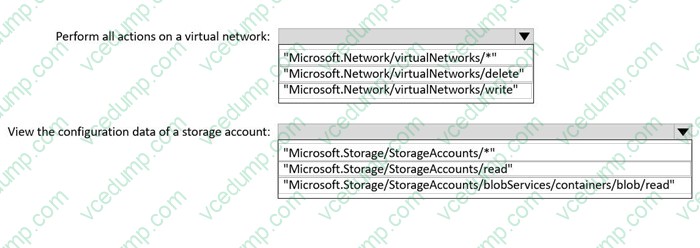
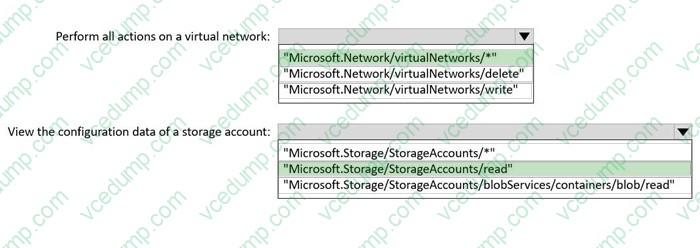
What should you include in the role definition for each requirement? To answer, select the appropriate options in the answer area.
NOTE: Each correct selection is worth one point.
Verified Answer (matches the highlighted key):
- Perform all actions on a virtual network: Microsoft.Network/virtualNetworks/*
- View the configuration data of a storage account: Microsoft.Storage/storageAccounts/read
Why this is correct:
- Azure RBAC “Actions” strings use the resource provider + resource type + action. The wildcard (*) grants all actions that match the string, while “read” grants read (GET) operations only.
- “Microsoft.Network/virtualNetworks/*” satisfies “perform all actions” on the VNet resource type (least privilege vs. broader Microsoft.Network/*).
- “Microsoft.Storage/storageAccounts/read” satisfies “view configuration” (read-only) for the storage account control plane.
Why the other dropdown options are not selected (conceptually):
- Any “…/read” option for virtual networks would fail “perform all actions…”.
- Any wildcard option broader than virtualNetworks (e.g., Microsoft.Network/*) violates least privilege.
- Any “…/write” or wildcard option for storage accounts grants more than “view configuration”.
Exam Tip:
- For “view/read-only,” look for “*/read”. For “manage everything in this resource type,” use “resourceType/*” (not the entire provider).
Website verification (freshness):
- Accessed: 2026-01-29
- Microsoft Learn - Understand Azure role definitions (Last updated on 2025-04-10): https://learn.microsoft.com/en-us/azure/role-based-access-control/role-definitions
- Microsoft Learn - Azure custom roles (Last updated on 2025-04-04): https://learn.microsoft.com/en-us/azure/role-based-access-control/custom-roles
References (APA):
- Microsoft Learn. (2025-04-10). Understand Azure role definitions - Azure RBAC. https://learn.microsoft.com/en-us/azure/role-based-access-control/role-definitions
Use XPath to filter Windows System events in the DCR.
AZ-104 Exam Objective Hierarchy:
5 Monitor and maintain Azure resources | |__ 5.1 Monitor resources in Azure | |__ 5.1.2 Configure log settings in Azure Monitor
Question 416:
DRAG DROP
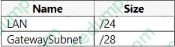
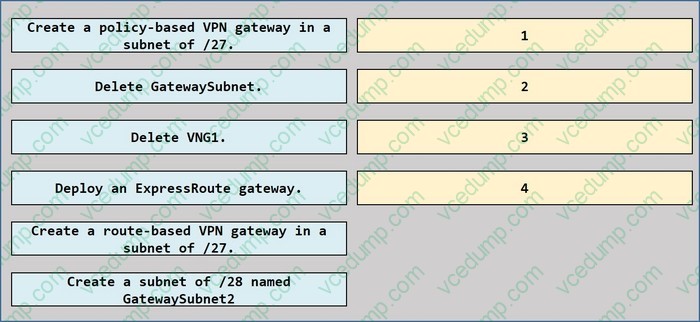
You have an Azure subscription that contains a virtual network named VNET1. VNET1 contains the subnets shown in the following table.
VNET1 contains a virtual network gateway named VNG1 that uses policy-based routing and has a single Site-to-Site VPN connection to an on-premises datacenter.
You need to Implement ExpressRoute, The solution must include a Site-to-Site VPN as a backup.
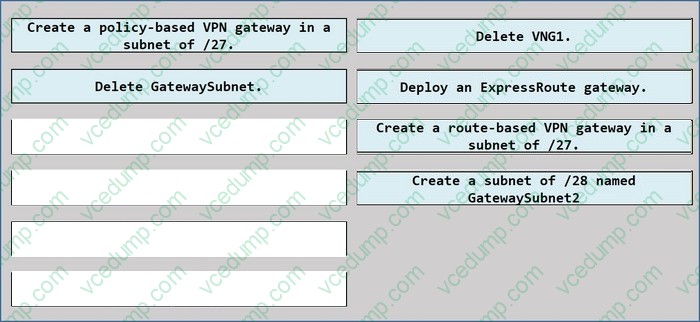
Which four actions should you perform in sequence? To answer, move the appropriate actions from the list of actions to the answer area and arrange them in the correct order.
Select and Place:
Box 1:
Delete VNG1.
Box 2:
Create a route-based VPN gateway in a subnet of /27.
Box 3:
Deploy an ExpressRoute gateway.
Box 4:
No additional action required (GatewaySubnet is already /27; after recreating the VPN gateway as route-based, you can add the ExpressRoute gateway for coexistence).
Explanation:
Goal: Implement ExpressRoute, while keeping Site-to-Site VPN as a backup.
Key technical constraints from Microsoft:
- **Only route-based VPN gateway is supported** for ExpressRoute/VPN coexistence.
- The gateway subnet must be **/27 or shorter** for coexistence scenarios.
- The gateway subnet must be named **GatewaySubnet** (you can’t use a differently named “gateway subnet” for a virtual network gateway).
Given the starting state: VNET1 already has GatewaySubnet **/27**, but the existing gateway (VNG1) uses **policy-based routing**. Therefore:
1) Delete the existing policy-based VPN gateway (VNG1).
2) Recreate it as a **route-based** VPN gateway (in the /27 GatewaySubnet).
3) Add the **ExpressRoute gateway** so both gateways can coexist and the VPN provides a failover path for ExpressRoute.
References:
1. Configure ExpressRoute and Site-to-Site coexisting connections using the Azure portal (limits: route-based only; subnet size /27 or shorter).
https://learn.microsoft.com/en-us/azure/expressroute/how-to-configure-coexisting-gateway-portal Last Updated: 02/02/2025 Date Accessed: 01/26/2026
2. Azure VPN Gateway FAQ (Gateway subnet must be named GatewaySubnet).
https://learn.microsoft.com/en-us/azure/vpn-gateway/vpn-gateway-vpn-faq Last Updated: Unable to determine from page excerpt Date Accessed: 01/26/2026
3. Configure a VNet-to-VNet VPN connection - Azure portal (explicitly: requires a subnet named GatewaySubnet).
Last Updated: 06/30/2025 Date Accessed: 01/26/2026
Microsoft Exam Tips:
- ExpressRoute/VPN coexistence requires **route-based** VPN gateway (policy-based is a common distractor).
- Memorize: Virtual network gateway subnet name must be **GatewaySubnet**; don’t invent variants.
Summary:
Migrating from policy-based S2S VPN to route-based and adding an ExpressRoute gateway for coexistence/failover.
AZ-104 Exam Objective Hierarchy 4.0 Implement and manage virtual networking (15–20%) └─ 4.2 Configure secure access to virtual networks
Question 417:
Note: This question is part of a series of questions that present the same scenario. Each question in the series contains a unique solution that might meet the stated goals. Some question sets might have more than one correct solution, while others might not have a correct solution.
After you answer a question in this section, you will NOT be able to return to it. As a result, these questions will not appear in the review screen.
You have an app named App1 that is installed on two Azure virtual machines named VM1 and VM2. Connections to App1 are managed by using an Azure Load Balancer.
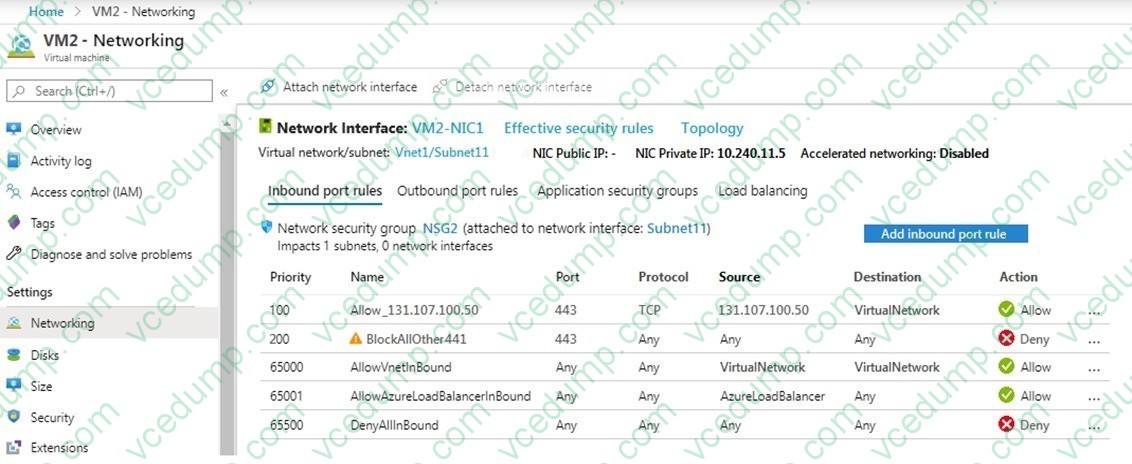
The effective network security configurations for VM2 are shown in the following exhibit.
You discover that connections to App1 from 131.107.100.50 over TCP port 443 fail.
You verify that the Load Balancer rules are configured correctly.
You need to ensure that connections to App1 can be established successfully from 131.107.100.50 over TCP port 443.
Solution: You modify the priority of the Allow_131.107.100.50 inbound security rule.
The goal is to ensure the connection from **131.107.100.50 over TCP 443** succeeds.
Changing only the **priority** of the allow rule is not a reliable fix here because:
- The allow rule is already positioned to be evaluated before the default deny (and typically before broad denies, depending on the existing priority ordering).
- If the issue is caused by rule matching (scope/source/destination) or another blocking rule, changing priority alone may not resolve it.
- In the exhibit, the "Allow_131.107.100.50" rule already has a higher-precedence priority than the broad deny rule shown (lower number), so changing priority is unnecessary and can even introduce risk if adjusted incorrectly.
Why "Yes" is incorrect:
- Priority changes do not inherently correct a rule match problem; and in this case the allow rule is already ahead of the competing deny rule.
1. Network security group (NSG) overview (rule priority and evaluation) https://learn.microsoft.com/en-us/azure/virtual-network/network-security-groups-overview Date Modified: Unable to locate date modified Date Accessed: 01/25/2026
---------------------------------------------------------------------------------------------------- Microsoft Exam Tips:
- If an allow rule is already higher precedence than a deny rule, "change priority" is usually a distractor.
- Always validate both **priority** and **match criteria** (source/destination/service tag).
4.0 Implement and manage virtual networking (15?0%) | |__ 4.2 Configure secure access to virtual networks | |__ 4.2.2 Evaluate effective security rules in NSGs
Question 418:
Note: This question is part of a series of questions that present the same scenario. Each question in the series contains a unique solution that might meet the stated goals. Some questions sets might have more than one correct solution, while others might not have a correct solution.
After you answer a question in this section, you will NOT be able to return to it. As a result, these questions will not appear in the review screen.
You deploy an Azure Kubernetes Service (AKS) cluster named AKS1.
- The proposed solution says: "From Azure Cloud Shell, you run az aks."
- Running "az aks" by itself is not an action that applies a Kubernetes manifest. To deploy YAML, you must use kubectl (for example, kubectl apply -f <file>) or use an az aks subcommand that actually invokes kubectl/apply (the solution as stated does not). Therefore, the proposed action does not meet the goal. (1) Why the other choice is incorrect:
- Yes "Yes" would only be true if the solution explicitly applied the manifest (for example, "kubectl apply -f deployment.yaml") after obtaining credentials/setting context.
References:
1. Quickstart: Deploy an Azure Kubernetes Service (AKS) cluster using Azure PowerShell (shows deploying via kubectl apply -f) https://learn.microsoft.com/en-us/azure/aks/learn/quick-kubernetes-deploy-powershell Date Modified: Unable to locate date modified (page returned an authorization notice in this view) Date Accessed: 01/25/2026
Microsoft Exam Tips:
- For AKS "deploy YAML" questions, look for "kubectl apply -f". If it's missing, the solution is usually incomplete.
Summary:
- AKS deployment requires applying Kubernetes manifests (kubectl apply), not merely referencing az aks generically.
AZ-104 Exam Objective Hierarchy:
3.0 Deploy and manage Azure compute resources (20?5%) |__ 3.3 Provision and manage containers in the Azure portal
Question 419:
HOTSPOT
You have an Azure subscription named Subscription1. Subscription1 contains a virtual machine named VM1.
You install and configure a web server and a DNS server on VM1.
VM1 has the effective network security rules shown in the following exhibit:
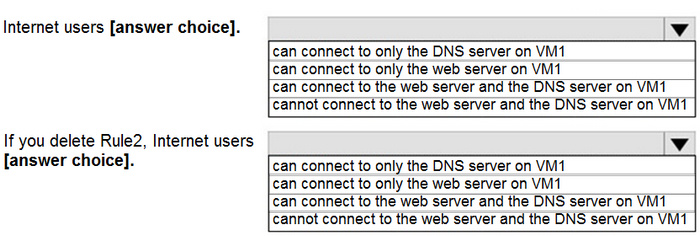
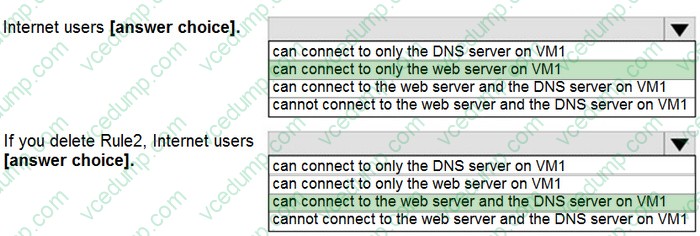
Use the drop-down menus to select the answer choice that completes each statement based on the information presented in the graphic.
NOTE: Each correct selection is worth one point.
{Dropdown 1}: can connect to only the web server on VM1
{Dropdown 2}: can connect to the web server and the DNS server on VM1
Why this is correct:
- VM1 hosts:
- Web server (HTTP) on TCP 80
- DNS server on port 53 (UDP/TCP)
- The effective inbound NSG rules show an allow rule that covers both 80 and 53, but a higher-priority deny rule (Rule2) blocks ports in a range that includes DNS (53).
- Result now: HTTP (80) is allowed, DNS (53) is denied --> internet users can reach only the web server.
- If you delete Rule2, the deny is removed, so the allow rule is effective for DNS (53) as well.
- Result after deletion: both HTTP and DNS are allowed --> internet users can reach the web server and the DNS server.
Why the other options are not correct:
- “DNS only” is incorrect because HTTP is still permitted by the allow rule that includes TCP 80.
- “Cannot connect to either” is incorrect because TCP 80 is permitted by the allow rule and is not blocked by Rule2.
- “DNS and web both” is incorrect in the current state because Rule2 blocks DNS (53) before the allow rule can apply.
Microsoft Exam Tips
- In NSGs, always evaluate by: (1) direction, (2) priority order, (3) first-match wins. A single higher-priority deny can “mask” a broader allow.
Summary
- Hot Area Tracking (delta): Attempted +1 | Correct +1 | Incorrect +0 | Skipped +0
4.0 - Implement and manage virtual networking (15–20%) |__ 4.2 - Configure secure access to virtual networks |__ |__ 4.2.2 - Evaluate effective security rules in NSGs
Question 420:
You need to define a custom domain name for Azure AD to support the planned infrastructure.
Which domain name should you use?
A. Join the client computers in the Miami office to Azure AD. B. Add http://autologon.microsoftazuread-sso.com to the intranet zone of each client computer in the Miami office. C. Allow inbound TCP port 8080 to the domain controllers in the Miami office. D. Install Azure AD Connect on a server in the Miami office and enable Pass-through Authentication E. Install the Active Directory Federation Services (AD FS) role on a domain controller in the Miami office.
B. Add http://autologon.microsoftazuread-sso.com to the intranet zone of each client computer in the Miami office. D. Install Azure AD Connect on a server in the Miami office and enable Pass-through Authentication
Explanation
Correct selections (letters omitted)
- Add http://autologon.microsoftazuread-sso.com to the intranet zone of each client computer in the Miami office.
- Install Microsoft Entra Connect on a server in the Miami office and enable Pass-through Authentication.
Why these are correct (proof) Microsoft Entra Seamless single sign-on (Seamless SSO) is enabled through Microsoft Entra Connect and works with Password Hash Synchronization or Pass-through Authentication. For domain-joined devices, Microsoft also recommends adding the Seamless SSO endpoint (autologon.microsoftazuread-sso.com) to the browser intranet zone-commonly applied via Group Policy.
AZ-104 Exam Objective Hierarchy (branch path) 1.0 Manage Azure identities and governance |__1.1 Manage Microsoft Entra users and groups |__|__1.1.2 Manage user and group properties
References (APA; last updated + accessed) Quickstart: Microsoft Entra seamless single sign-on. (Last updated 2025-04-09). Retrieved 2026-01-31 from https://learn.microsoft.com/en-us/entra/identity/hybrid/connect/how-to-connect-sso-quick-start Microsoft Entra seamless single sign-on: how to enable. (Last updated 2025-06-23). Retrieved 2026-01-31 from https://learn.microsoft.com/en-us/entra/identity/hybrid/connect/how-to-connect-sso
Nowadays, the certification exams become more and more important and required by more and more
enterprises when applying for a job. But how to prepare for the exam effectively? How to prepare
for the exam in a short time with less efforts? How to get a ideal result and how to find the
most reliable resources? Here on Vcedump.com, you will find all the answers.
Vcedump.com provide not only Microsoft exam questions,
answers and explanations but also complete assistance on your exam preparation and certification
application. If you are confused on your AZ-104 exam preparations
and Microsoft certification application, do not hesitate to visit our
Vcedump.com to find your solutions here.