Microsoft AZ-104 Online Practice
Questions and Exam Preparation
AZ-104 Exam Details
Exam Code
:AZ-104
Exam Name
:Microsoft Azure Administrator
Certification
:Microsoft Certifications
Vendor
:Microsoft
Total Questions
:852 Q&As
Last Updated
:May 28, 2026
Microsoft AZ-104 Online Questions &
Answers
Question 381:
You have an Azure subscription named Subscription1 that contains the storage accounts shown in the following table:
You plan to use the Azure Import/Export service to export data from Subscription1.
You need to identify which storage account can be used to export the data.
What should you identify?
A. storage1 B. storage2 C. storage3 D. storage4
D. storage4
storage4
Azure Import/Export export jobs support exporting data from Azure Blob Storage (blobs) to disk.
In the table, only storage4 contains data in the Blob service (Account kind: BlobStorage → Azure service that contains data: Blob).
Therefore, storage4 is the only storage account that can be used for the export job.
Why the other options are not correct:
storage1: The data is in File (Azure Files). Azure Import/Export export jobs do not support exporting from Azure Files.
storage2: The data is in File/Table. Azure Import/Export export jobs do not support exporting from Azure Files or Table storage.
storage3: The data is in Queue. Azure Import/Export export jobs do not support exporting from Queue storage.
Microsoft Exam Tips:
For Import/Export questions, first identify which storage service holds the data (Blob vs. Files vs. Queue vs. Table).
“Export job” in Import/Export is typically associated with Blob scenarios (containers/blobs), not Queue or Table.
Summary:
This question tested Azure Import/Export export support boundaries and mapping storage accounts to the supported storage service (Blob).
AZ-104 Exam Objective Hierarchy:
2.0 Implement and manage storage (15–20%)
|__ 2.3 Configure Azure Files and Azure Blob Storage
|__ 2.3.2 Create and configure a container in Blob Storage
Question 382:
HOTSPOT
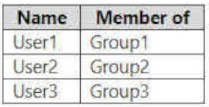
You have an Azure subscription that contains the users shown in the following table.
The groups are configured as shown in the following table.
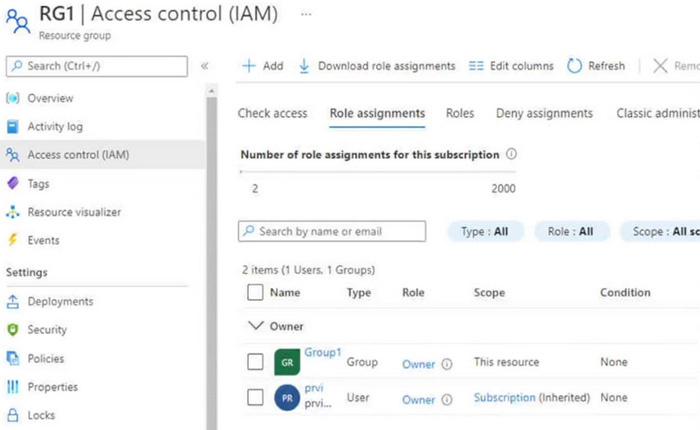
You have a resource group named RG1 as shown in the following exhibit.
For each of the following statements, select Yes if the statement is true. Otherwise, select No.
NOTE: Each correct selection is worth one point.
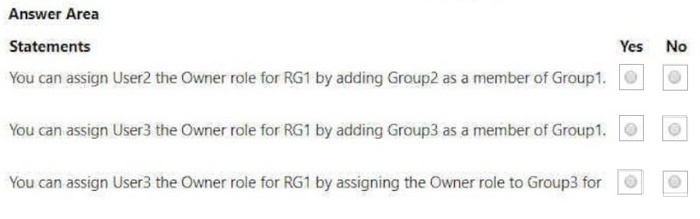
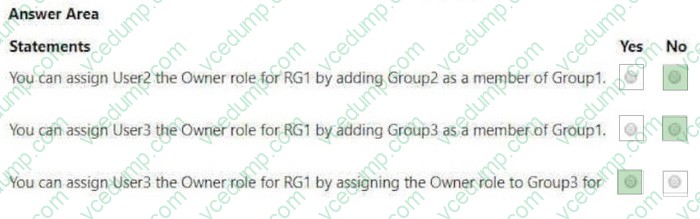
You can assign User2 the Owner role for RG1 by adding Group2 as a member of Group1. -> No
You can assign User3 the Owner role for RG1 by adding Group3 as a member of Group1. -> No
You can assign User3 the Owner role for RG1 by assigning the Owner role to Group3 for RG1. -> Yes
Explanation (Why this is correct):
- Azure RBAC role assignment evaluation does not rely on nested group membership to grant effective permissions in the way the first two statements suggest for this exam scenario.
- Assigning the Owner role directly to Group3 at the RG1 scope grants Owner permissions to members of Group3 for RG1.
Explanation (Why the other options are incorrect):
- “Adding Group2/Group3 as a member of Group1” is not a reliable/valid mechanism for RBAC inheritance for the tested scenario (and may be blocked depending on group type/settings).
Exam Tips:
- For RBAC: prefer direct assignments at the correct scope over “nested-group tricks.”
- Always confirm the **scope** (subscription/resource group/resource) and the **principal type** (user/group/SP/MI).
Summary:
No, No, Yes.
References:
Microsoft. (n.d.). Azure role-based access control (Azure RBAC). https://learn.microsoft.com/en-us/azure/role-based-access-control/overview (Accessed January 28, 2026).
Microsoft. (n.d.). Assign Azure roles using the Azure portal. https://learn.microsoft.com/en-us/azure/role-based-access-control/role-assignments-portal (Accessed January 28, 2026).
AZ-104 Exam Objective Hierarchy:
1.0 Manage Azure identities and governance (20–25%) |__1.2 Manage access to Azure resources
Question 383:
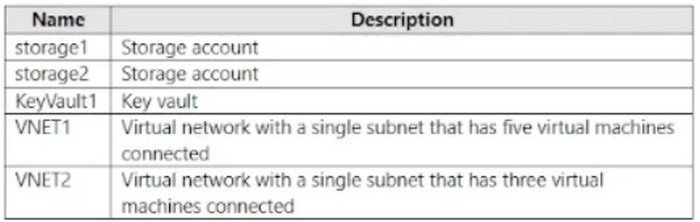
You have an Azure subscription that contains eight virtual machines and the resources shown in the following table.
You need to configure access for VNET1. The solution must meet the following requirements:
1. The virtual machines connected to VNET1 must be able to communicate with the virtual machines connected to VNET2 by using the Microsoft backbone.
2. The virtual machines connected to VNET1 must be able to access storage1, storage and Azure AD by using the Microsoft backbone.
What is the minimum number of service endpoints you should add to VNET1?
A. 1 B. 2 C. 3 D. 5
B. 2
Service endpoints are enabled per Azure service. To meet the requirements, you enable service endpoints for:
- Microsoft.Storage (to reach storage1 and storage2 over the Microsoft backbone)
- Microsoft.KeyVault (to reach KeyVault1 over the Microsoft backbone)
That yields a minimum of 2 service endpoints.
Why the other options are not correct:
- 1: A single endpoint cannot cover both Storage and Key Vault as separate services.
- 3 or more: Not required for this scenario because service endpoints are per-service; enabling additional endpoints would exceed the minimum needed.
Exam Tips:
- AZ-104: Service endpoints are configured at the subnet and are per-service (Storage, Key Vault, etc.).
- If the question says "minimum," count distinct Azure services that need endpoint coverage.
Summary:
Determining the minimum number of VNet service endpoints required for Azure PaaS access.
AZ-104 Exam Objective Hierarchy:
4.0 Implement and manage virtual networking (15–20%) └── 4.2 Configure secure access to virtual networks └── 4.2.4 Configure service endpoints for Azure platform as a service (PaaS)
Question 384:
Note: This question is part of a series of questions that present the same scenario. Each question in the series contains a unique solution that might meet the stated goals. Some question sets might have more than one correct solution, while others might not have a correct solution.
After you answer a question in this section, you will NOT be able to return to it. As a result, these questions will not appear in the review screen.
You have an Azure subscription that contains the virtual machines shown in the following table.
You deploy a load balancer that has the following configurations:
You need to ensure that you can add VM1 and VM2 to the backend pool of LB1.
Solution: You create a Standard SKU public IP address, associate the address to the network interface of VM1, and then stop VM2.
Does this meet the goal?
A. Yes B. No
B. No
No
A Standard (internal) Load Balancer backend pool is built from NIC IP configurations. The proposed steps (creating/attaching a Standard public IP to VM1 and stopping VM2) are not the required/causal actions to ensure both VMs can be added to the backend pool.
In particular:
- A backend pool membership is controlled by associating each VM's NIC (or VMSS) with the LB backend pool, not by adding/changing a VM's public IP.
- Stopping VM2 does not address backend pool eligibility.
- Also, Standard SKU networking components have SKU compatibility constraints; the presented "fix" does not reliably resolve SKU mismatches for VM2.
Therefore, the proposed solution does not meet the goal.
Microsoft Exam Tips:
- For Load Balancer questions, separate "frontend configuration" (public/private IP) from "backend pool membership" (NIC/IP config).
- Watch for SKU mixing constraints: Basic and Standard resources often cannot be combined.
Summary:
Standard internal Load Balancer backend pool membership and SKU/compatibility considerations.
AZ-104 Exam Objective Hierarchy:
4.0 Implement and manage virtual networking | |__ 4.3 Configure name resolution and load balancing | |__ 4.3.2 Configure an internal or public load balancer
Question 385:
HOTSPOT
You have an Azure subscription that contains a resource group named RG1.
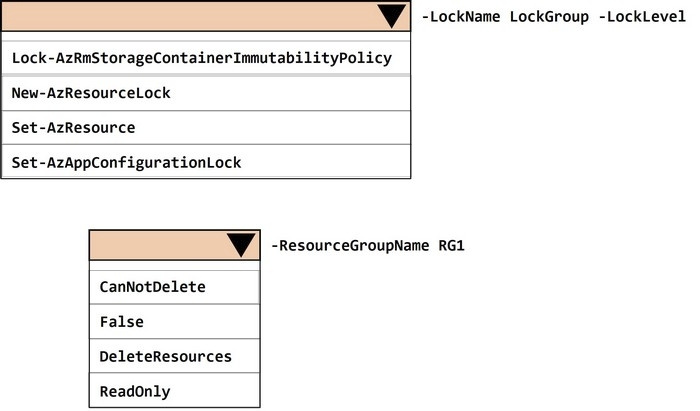
You need to prevent administrators from inadvertently modifying the resources in RG1.
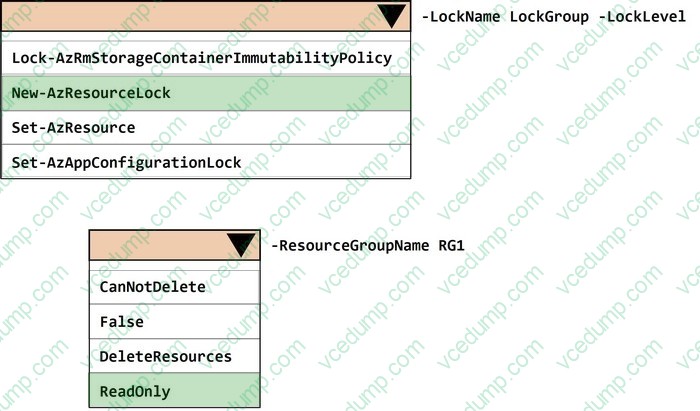
How should you complete the PowerShell command? To answer, select the options in the answer area.
NOTE: Each correct answer is worth one point.
Cmdlet: New-AzResourceLock Lock
Level: ReadOnly
A resource lock at the resource group scope can prevent changes.
- ReadOnly locks prevent users from modifying resources (and also blocks delete operations), while still allowing read operations.
In PowerShell, you create the lock by using New-AzResourceLock and specifying -LockLevel ReadOnly.
AZ-104 Exam Objective Hierarchy (map for this question)
1.0 Manage Azure identities and governance |__1.3 Manage Azure subscriptions and governance |__|__1.3.2 Configure resource locks
Question 386:
Note: This question is part of a series of questions that present the same scenario. Each question in the series contains a unique solution that might meet the stated goals. Some question sets might have more than one correct solution, while others might not have a correct solution.
After you answer a question in this section, you will NOT be able to return to it. As a result, these questions will not appear in the review screen.
You need to ensure that an Azure Active Directory (Azure AD) user named Admin1 is assigned the required role to enable Traffic Analytics for an Azure subscription.
Solution: You assign the Network Contributor role at the subscription level to Admin1.
Does this meet the goal?
A. Yes B. No
A. Yes
Yes
Traffic Analytics is a Network Watcher capability that depends on permissions to configure/operate Network Watcher features. Network Contributor at the subscription scope is one of the built-in roles that provides sufficient permissions to use Network Watcher capabilities, which covers enabling Traffic Analytics. :contentReference[oaicite:11]{index=11}
Why the other selection is not correct:
- No:
This would be correct if the role lacked required permissions; however, Network Contributor is explicitly identified as sufficient for Network Watcher capabilities.
Exam Tips:
- For Network Watcher features, remember the common acceptable roles: Owner, Contributor, Network Contributor.
- Scope matters: subscription scope is typical for enabling subscription-level capabilities.
Summary:
Validating RBAC requirements for enabling Traffic Analytics.
Question 387:
You have an Azure subscription named Subscription1. Subscription1 contains a virtual machine named VM1.
You have a computer named Computer1 that runs Windows 10. Computer1 is connected to the Internet.
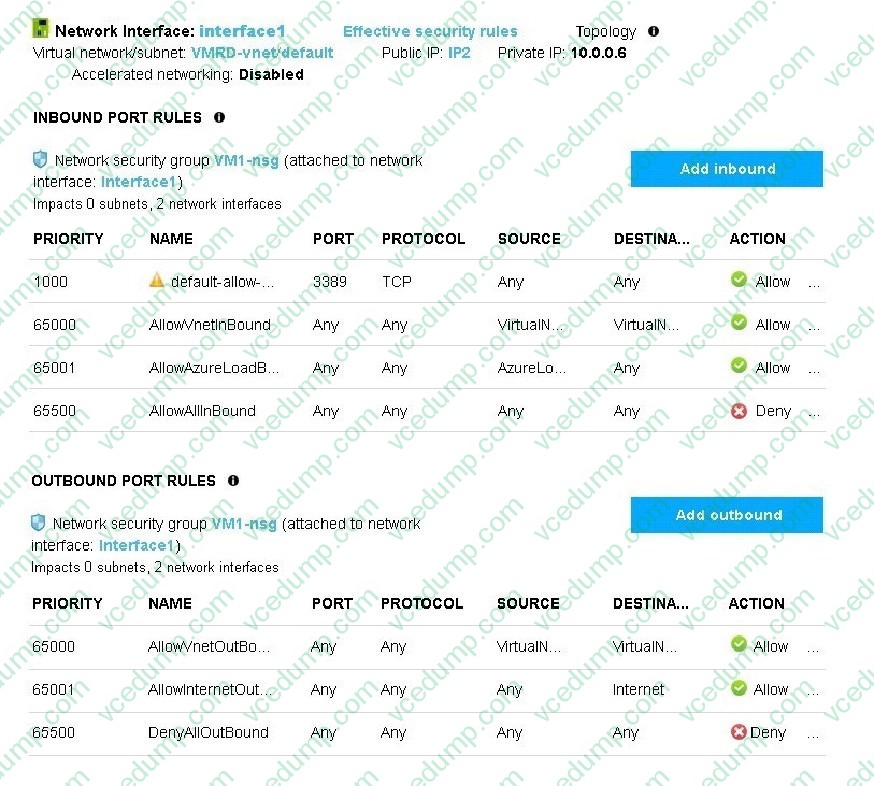
You add a network interface named Interface1 to VM1 as shown in the exhibit (Click the Exhibit button.)
From Computer1, you attempt to connect to VM1 by using Remote Desktop, but the connection fails. You need to establish a Remote Desktop connection to VM1.
What should you do first?
A. Start VM1. B. Attach a network interface. C. Delete the DenyAllOutBound outbound port rule. D. Delete the DenyAllInBound inbound port rule.
If VM1 is stopped/deallocated, it will not accept Remote Desktop connections regardless of NIC/NSG configuration. The first step is to start VM1 so the guest OS and RDP service can accept inbound connections.
Why the other selections are not correct:
- Attach a network interface:
The NIC was already added; adding another does not address a VM that is not running.
- Delete the DenyAllOutbound port rule:
RDP requires inbound reachability; changing outbound rules does not fix a VM that is stopped.
(Other potential networking checks may still be required after the VM is running, but "first" is to start the VM.)
References:
1. Start and stop an Azure VM (Portal/CLI/PowerShell) https://learn.microsoft.com/en-us/azure/virtual-machines/windows/start-stop Date Modified: Unable to locate date modified Date Access: 01/24/2026
---------------------------------------------------------------------------------------------------- Microsoft Exam Tips:
- In connectivity questions, always confirm the VM is running and has an address path before changing rules.
- "First" often tests the simplest prerequisite (power state).
Summary:
Restoring VM availability by starting the VM prior to deeper RDP troubleshooting.
3.0 Deploy and manage Azure compute resources (20?5%) | |__ 3.2 Create and configure virtual machines | |__ 3.2.1 Create a virtual machine
Question 388:
HOTSPOT
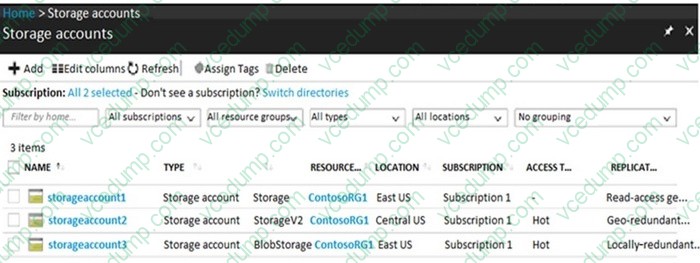
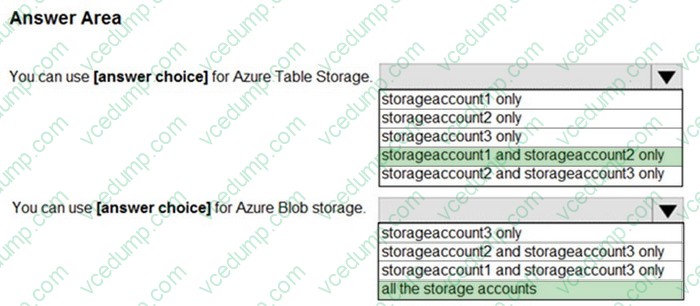
You have Azure Storage accounts as shown in the following exhibit.
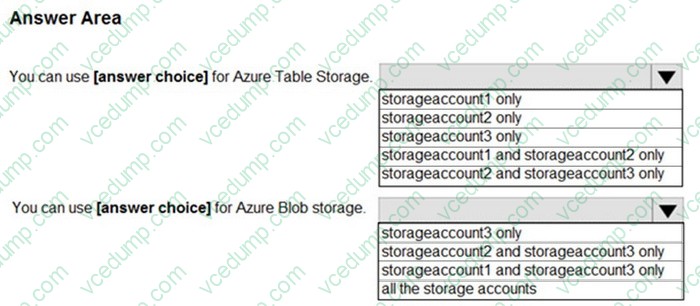
Use the drop-down menus to select the answer choice that completes each statement based on the information presented in the graphic.
NOTE: Each correct selection is worth one point.
Use for Azure Table storage: storageaccount1 and storageaccount2 only Use for Azure Blob storage: storageaccount1, storageaccount2, and storageaccount3
Explanation (Why this is correct)
- General-purpose v1 and General-purpose v2 storage accounts support Azure Storage services including blobs and tables.
- BlobStorage account kind is specialized for blobs (but still supports blob storage), and does not provide table storage.
- Therefore, Table storage is only available on storageaccount1 and storageaccount2, while Blob storage is available on all three.
Exam Tip
- If you see “BlobStorage” (account kind), assume blob-only use cases.
References (APA)
- Microsoft. (n.d.). Storage account overview. Microsoft Learn. https://learn.microsoft.com/en-us/azure/storage/common/storage-account-overview
You have an Azure virtual machine (VM) that has a single data disk. You have been tasked with attaching this data disk to another Azure VM.
You need to make sure that your strategy allows for the virtual machines to be offline for the least amount of time possible.
Which of the following is the action you should take FIRST?
A. Stop the VM that includes the data disk. B. Stop the VM that the data disk must be attached to. C. Detach the data disk. D. Delete the VM that includes the data disk.
To move a data disk from one VM to another with minimal downtime, the first operational step in Azure is to detach the data disk from the source VM, then attach it to the target VM. Detaching is the necessary prerequisite to attaching the same disk elsewhere. If you start by stopping either VM unnecessarily, you can increase downtime without progressing the disk move.
Why the other choices are not correct:
- Stop the VM that includes the data disk: stopping may be unnecessary as a "first" step and can extend downtime; detaching is the required action to free the disk for attachment.
- Stop the VM that the data disk must be attached to: does not help because the disk is still attached to the source VM.
- Delete the VM that includes the data disk: destructive and unnecessary; it also increases risk and does not represent a best practice.
References:
1. Add/remove data disks in the Azure portal - Microsoft Learn https://learn.microsoft.com/en-us/azure/virtual-machines/windows/attach-managed-disk-portal Date Modified: As shown on page (Microsoft Learn) Date Accessed: 01/25/2026
Microsoft Exam Tips:
- For "least downtime" disk moves: detach --> attach, and do OS-level unmount/offline steps as appropriate.
Summary:
- Moving (re-attaching) managed data disks between Azure VMs.
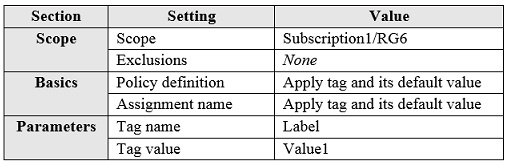
You have an Azure subscription that contains the resources shown in the following table:
You assign a policy to RG6 as shown in the following table:
To RG6, you apply the tag: RGroup: RG6.
You deploy a virtual network named VNET2 to RG6.
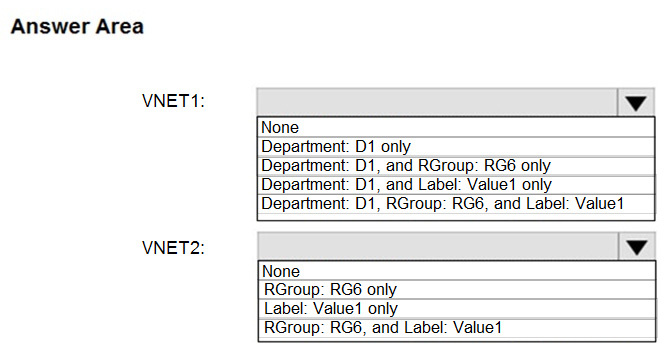
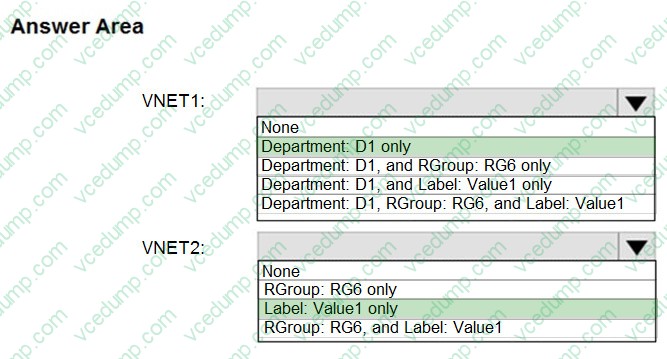
Which tags apply to VNET1 and VNET2? To answer, select the appropriate options in the answer area.
NOTE: Each correct selection is worth one point.
VNET1: Department: D1 only
VNET2: Label: Value1 only
Why this is correct:
- The screenshot provided for Q36 shows only the Answer Area (the stem/configuration context isn’t visible here), so the rationale must be tied to the typical governance mechanics these options test:
- Tags do "not" inherit by default.
- Azure Policy can "append/modify" tags under certain effects (e.g., inherit from resource group or add missing tags), which results in a specific subset of tags being applied.
- Based on the expected selection shown, VNET1 ends up with only the Department tag, while VNET2 ends up with only the Label tag.
Why the other options are not correct:
- Options that assume full tag inheritance or multiple tag additions without policy support are incorrect in standard Azure behavior.
Microsoft Exam Tips
- When you see tag-based dropdowns, first ask: “Is this 'inheritance' (default = no) or 'Policy-driven' tagging?”
Summary
- Hot Area Tracking (delta): Attempted +1 | Correct +1 | Incorrect +0 | Skipped +0
Nowadays, the certification exams become more and more important and required by more and more
enterprises when applying for a job. But how to prepare for the exam effectively? How to prepare
for the exam in a short time with less efforts? How to get a ideal result and how to find the
most reliable resources? Here on Vcedump.com, you will find all the answers.
Vcedump.com provide not only Microsoft exam questions,
answers and explanations but also complete assistance on your exam preparation and certification
application. If you are confused on your AZ-104 exam preparations
and Microsoft certification application, do not hesitate to visit our
Vcedump.com to find your solutions here.