DRAG DROP
A team is deploying a new version of a customer scoring model to a production online endpoint in Azure Machine Learning.
The team must minimize risk by gradually introducing the new model version and ensuring that traffic can be reverted immediately if issues occur.
You need to roll out the new model according to the requirements.
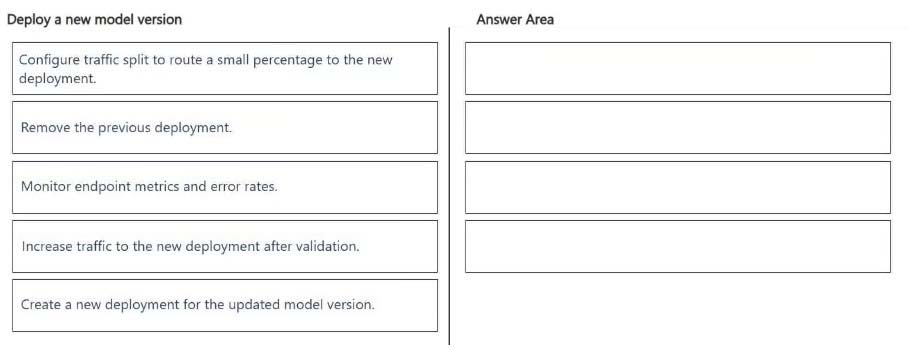
Which four actions should you perform in sequence? To answer, move the appropriate actions from the list of actions to the answer area and arrange them in the correct order.
Show answer and explanation
To safely deploy your new customer scoring model with minimal risk, you should use Azure Machine Learning managed online endpoints with a blue-green deployment strategy. This allows you to test the new model (green) alongside the old model (blue) and route traffic gradually.
Here is the step-by-step process to execute this rollout.
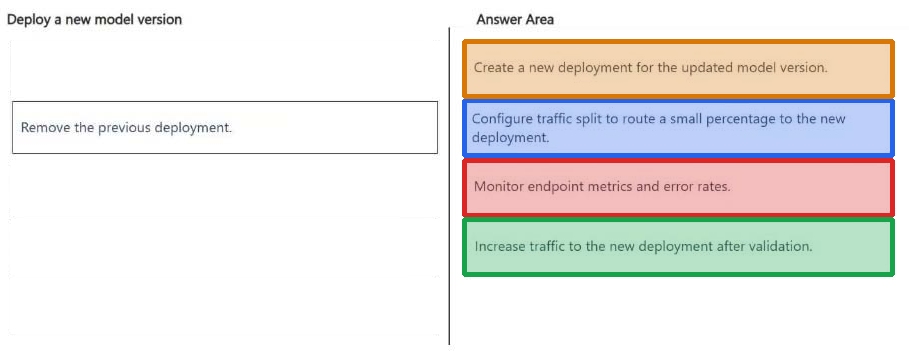
Step 1: Create a New Deployment for the updated model version.
1. Create a New Deployment under the Existing Endpoint Do not overwrite your current production deployment. Instead, deploy the new model version as a separate deployment within the same managed online endpoint.
Keep the existing deployment (e.g., blue-deployment) running at 100% traffic.
Create the new deployment (e.g., green-deployment) with the new model version.
Set the initial traffic allocation for the new deployment to 0%.
2. Test the New Deployment in Isolation [Step not in this question] Before exposing real customers to the new model, test its stability and performance in the production environment. Send test scoring requests directly to the green-deployment. Use the X-MS-Routing-Override: green-deployment HTTP header in your SDK or REST requests to bypass the traffic split and target the new model directly. Verify that the data schema, latency, and prediction outputs match your expectations.
Step 2: Configure traffic split to route a small percentage to the new deployment.
3. Gradually Shift Traffic (Canary Testing) Once internal testing passes, begin introducing real production traffic to the new model in phases.
3a. Update the endpoint's traffic configuration to route a small percentage (e.g., 10%) to green-deployment. [Step 2]
Step 3: Monitor endpoint metrics and error rates. 3b) Monitor system metrics closely, looking for spikes in HTTP 4xx/5xx errors, timeouts, or unusual scoring distributions. [Step 3]
Step 4: Increase traffic to the new deployment after validation 3c) If performance remains stable over a designated observation period, incrementally increase the traffic (e.g., to 30%, 50%, then 100%). [Step 4]
Further future actions outside the context of the question:
4. Monitor App Insights and MetricsAzure ML integrates natively with Azure Monitor and Application Insights. Track these critical metrics during the shift:CPU/Memory Utilization: Ensure the new model does not exhaust container resources.
Model Latency: Compare the response times of the new deployment against the old one.
Tracking Token/Feature Drift: Ensure the live customer data matches the model's expected input feature distribution.
5. Instant Rollback Plan If the new model causes errors, triggers high latency, or skews customer scores, you can revert traffic immediately. Update the endpoint traffic settings to route 100% of traffic back to the original blue-deployment.
Set the green-deployment traffic to 0%.This configuration change takes effect almost instantly, isolating the faulty model without any downtime for your users.
Keep the green-deployment alive at 0% traffic while you pull the logs to investigate the root cause, then delete it once fixed.
Incorrect:
[Remove the previous deployment] A step further in the future.
References:
https://chandras4bigdata.medium.com/mlops-interview-and-study-guide-489d13ff82fa