9A0-351 Exam Details

  • Exam Code
    :9A0-351
  • Exam Name
    :Adobe Illustrator CC Recertification Exam
  • Certification
    :Adobe Certifications
  • Vendor
    :Adobe
  • Total Questions
    :51 Q&As
  • Last Updated
    :

Adobe 9A0-351 Online Questions & Answers

  • Question 1:

    You have created a symbol and have added several instances of it to the artboard. You want to make an edit to the symbol and update all instances of the symbol. What are two ways this be achieved? (Choose two).

    A. Double-click on the symbol instance with one of the symbolism tools.
    B. Double-click on the symbol instance with the Direct Selection tool.
    C. Select an instance of the symbol, choose Object > Expand, and edit the symbol.
    D. Double-click on the symbol instance with the Selection tool.
    E. Right-click on a symbol instance and choose Isolate Selected Group.

  • Question 2:

    You are attempting to convert an object from spot color to RGB using Edit Colors but Convert to RGB is dimmed (you cannot select it). What must you do first to allow Edit Colors to convert to RGB?

    A. Delete the spot color swatches in the Swatches Panel.
    B. Choose Edit > Assign Profile.
    C. Choose File > Document Color Mode > RGB.
    D. Choose Edit > Edit Colors > Convert to CMYK first.

  • Question 3:

    You print a document with gradients and it has a banding issue. What can you do to lessen the banding?

    A. Change the blending mode or opacity of the gradient.
    B. Use only gradients blending less than three colors.
    C. Rasterize your gradient during printing.
    D. Expand your gradient into a gradient mesh.

  • Question 4:

    You are printing a document with multiple artboards. What will happen if "Ignore Artboards" is enabled?

    A. Only the selected artboard will print.
    B. None of the artboards will print.
    C. All artboards will print on a single page.
    D. Each art board will print on separate pages.

  • Question 5:

    Click the Exhibit tab to see the exhibit.
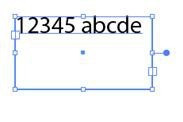
    Which option lets you expand the height and width of the selected text without changing the size of the container?

    A. A
    B. B
    C. C
    D. D

  • Question 6:

    You have added a perspective grid to your document. You create some text and move it onto one of the planes of the grid, but notice that the text is no longer editable. Which technique allows you to apply text to a perspective grid but keeps the text editable?

    A. Convert the text to a compound path and move the compound path to the perspective grid.
    B. Convert the text to a symbol and move the symbol to the perspective grid,
    C. Create the text as an area type object and move it to the perspective grid.
    D. Use an OpenType font for the text and, move it to the perspective grid.

  • Question 7:

    Which symbolism tool allows you to change the stacking order of symbol instances?

    A. Symbol Shifter
    B. Symbol Scruncher
    C. Symbol Sizer
    D. Symbol Spinner

  • Question 8:

    You have generated CSS in your design, and in the CSS Properties Panel you want to paste one character style's CSS code into a web design application. How should you transfer the code?

    A. Right+click on a style and choose Export Options from the context menu.
    B. Right+click on a style and choose Generate CSS from the context menu.
    C. Select a style, then click the Export Selected CSS button.
    D. Select a style, then click the Copy Selected Style button.

  • Question 9:

    You want to make specific areas of an object partially or completely transparent based on the gray values of a second object placed in front. How should you set up the two objects?

    A. Select both objects and choose Object > Compound Path > Make.
    B. Group the two objects and choose Object > Clipping Mask > Make.
    C. Select the object in front and apply the Overlay blending mode.
    D. Draw or paste the second object into the first object's opacity mask.

  • Question 10:

    You have created 10 circles and you would like them to be distributed across the entire width of the artboard. You select the circles and click the Horizontal Distribute Center button in the Align panel but nothing happens. What changes would you make to fix the problem?

    A. Choose Align to Selection from the Align To pop-up menu in the Align panel.
    B. Choose Align to Artboard from the Align To pop-up menu in the Align panel.
    C. After selecting all the objects, click the artboard to set the key object.
    D. Enter the page width in the Distribute Spacing field.

Tips on How to Prepare for the Exams

Nowadays, the certification exams become more and more important and required by more and more enterprises when applying for a job. But how to prepare for the exam effectively? How to prepare for the exam in a short time with less efforts? How to get a ideal result and how to find the most reliable resources? Here on Vcedump.com, you will find all the answers. Vcedump.com provide not only Adobe exam questions, answers and explanations but also complete assistance on your exam preparation and certification application. If you are confused on your 9A0-351 exam preparations and Adobe certification application, do not hesitate to visit our Vcedump.com to find your solutions here.