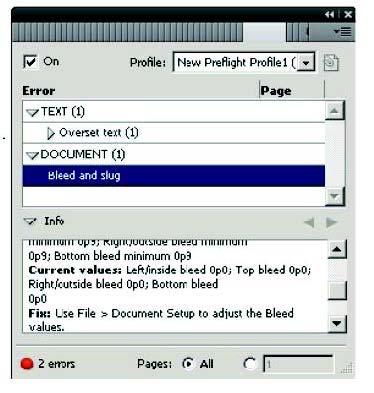
To view document errors, double click to expand the Document menu and to view information about specific errors such as in the above scenario the Bleed and slug error, click the error in question. appear in the Info pane at the bottom of the Preflight panel along with suggestions to fix the error as shown in the figure given below:

Answer: C is incorrect. Although the Info pane at the bottom of the Preflight panel contains the description of the error and the solution to fix that problem, if you double Click to expand the Document menu in the Preflight panel and then click the Info pane, it will not show the document error because this is not the right way to see the description of the error. Answer: A is incorrect. If you double Click to expand the Document menu and then click on the red dot in the lower-right corner of the Preflight panel, nothing will happen.
Answer: D is incorrect. If you click on the icon in the Preflight panel, it will embed the selected profile.