9A0-040 Exam Details
-
Exam Code
:9A0-040 -
Exam Name
:Adobe Premiere Pro ACE Exam -
Certification
:Adobe Certifications -
Vendor
:Adobe -
Total Questions
:126 Q&As -
Last Updated
:Dec 08, 2021
Adobe 9A0-040 Online Questions & Answers
-
Question 71:
Which roll/crawl option specifies the number of frames that will play before the title begins?
A. Pre-Roll
B. Post-Roll
C. Ease-In
D. Ease-Out -
Question 72:
Where does a saved static title created in the Adobe Title Designer automatically appear?
A. at the current time in the Timeline
B. in the active bin in the Project window
C. at the end of the currently selected clip in the Timeline
D. in a separate file that needs to be imported to the current project -
Question 73:
Which set of options in the Transcode Settings dialog box of the Adobe Media Encoder will allow you to store information about the media?
A. Metadata
B. Audience
C. Multiplexer
D. Bitrate Encoding -
Question 74:
Which statement about a static title created in the Adobe Title Designer is true?
A. The title is saved with a .ppj file extension.
B. Logos added to a static title cannot be resized.
C. You must apply transparency to a title before bringing it into the timeline.
D. If you are creating a static title in content for the Web or for a CD, the safe title and safe action zones do not apply since you can see the entire video. -
Question 75:
You are working in the Adobe Title Designer. You want your title to begin off screen, roll from the bottom to the top, and finish off screen. What should you do?
A. Create your text. Choose Title > Roll/Crawl Options and check Roll From Bottom to Top.
B. Create your text. Right-click the text box and choose Roll From Bottom to Top, and check Start Off Screen and End Off Screen.
C. Create your text. Right-click the text box and choose Transform > Roll/Crawl Options and check Start Off Screen and End Off Screen.
D. Select Roll from the Title Type pop up menu. Create your text. Choose Title > Roll/Crawl Options and check Start Off Screen and End Off Screen. -
Question 76:
Under which circumstance should you choose Audio Units in the Source view menu?
A. To create a 1kHz tone for use in a video leader.
B. To display each track of a stereo clip separately.
C. To make an audio waveform appear in the Source view.
D. To set the Source view's time ruler to audio samples, so you can set sample-based In and Out points. -
Question 77:
Click the Exhibit button.
You are exporting the timeline using the Adobe Media Encoder as shown in the exhibit. What effect will decreasing the bitrate from 8.00 to 5.00 have?
A. Reduce the file size of the exported file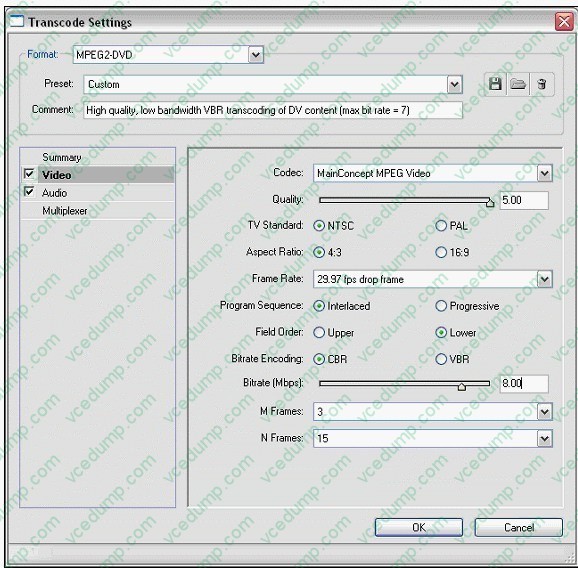
B. Reduce the frame rate of the exported file
C. Reduce the frame size of the exported file
D. Reduce the number of fields in the exported file -
Question 78:
How do you increase the volume of a clip?
A. boost the gain on your audio card
B. re-conform the audio and re-place the clip in the timeline
C. select Meter Inputs Only from the Audio Mixer palette menu
D. select a clip and then choose Clip > Audio Options > Audio Gain -
Question 79:
You want to advance five frames by using the playback controls in the Monitor window. What should you do?
A. click the Step Forward button
B. Shift-click the Step Forward button
C. Alt-click the Step Forward button
D. Control-click the Step Forward button -
Question 80:
When would you choose an option from the Audio Display Format pop-up box in the General submenu of the Project Settings dialog box?
A. to change the time division for the current project
B. to change how all sequences display time in the timeline
C. to change the time division for the audio track(s) in all sequences
D. to change how the currently selected sequence displays time in the timeline
Related Exams:
-
9A0-019
Adobe Photoshop 6.0 Product Proficiency -
9A0-042
Acrobat 7.0 Prowith Adobe LiveCycle Designer ACE Exam -
9A0-043
Adobe Illustrator CS 2 ACE -
9A0-044
Adobe Photoshop CS 2 ACE Exam -
9A0-045
Adobe InDesign CS 2 ACE Exam -
9A0-046
Adobe GoLive CS2 ACE Exam -
9A0-055
Adobe InDesign CS3 ACE Exam -
9A0-056
Adobe Dreamweaver CS3 ACE Exam -
9A0-057
Adobe Illustrator CS3 ACE Exam -
9A0-058
Adobe Flash CS3 ACE Exam
Tips on How to Prepare for the Exams
Nowadays, the certification exams become more and more important and required by more and more enterprises when applying for a job. But how to prepare for the exam effectively? How to prepare for the exam in a short time with less efforts? How to get a ideal result and how to find the most reliable resources? Here on Vcedump.com, you will find all the answers. Vcedump.com provide not only Adobe exam questions, answers and explanations but also complete assistance on your exam preparation and certification application. If you are confused on your 9A0-040 exam preparations and Adobe certification application, do not hesitate to visit our Vcedump.com to find your solutions here.