9A0-040 Exam Details
-
Exam Code
:9A0-040 -
Exam Name
:Adobe Premiere Pro ACE Exam -
Certification
:Adobe Certifications -
Vendor
:Adobe -
Total Questions
:126 Q&As -
Last Updated
:Dec 08, 2021
Adobe 9A0-040 Online Questions & Answers
-
Question 91:
You want to know where in your video frame you can display a title that will NOT be cut off when viewed on a video monitor. Which setting in the Monitor window should you use?
A. Output
B. Safe Margins
C. Set In and Out Points
D. Set Unnumbered Marker -
Question 92:
What is the default crossfade between two audio tracks when you choose Sequence > Add Audio Transition?
A. Invert
B. Highpass
C. Constant Gain
D. Constant Power -
Question 93:
Click the Exhibit button.
What happens if you position the cursor over the edit point of the transition graphic as shown in the exibit, and then drag the cursor left or right?
A. A ripple edit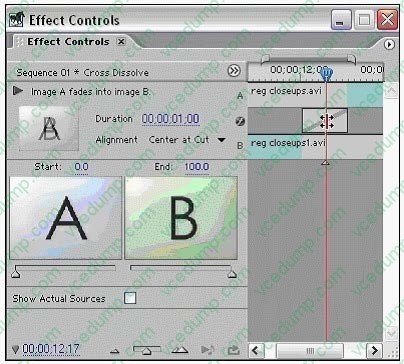
B. A rolling edit
C. Change the transition position
D. Change the transition duration -
Question 94:
Click the Exhibit button.
You are exporting the timeline using the Adobe Media Encoder as shown in the exhibit. What effect will happen if you decrease the quality from 5 to 3 have?
A. Increase the quality of the exported file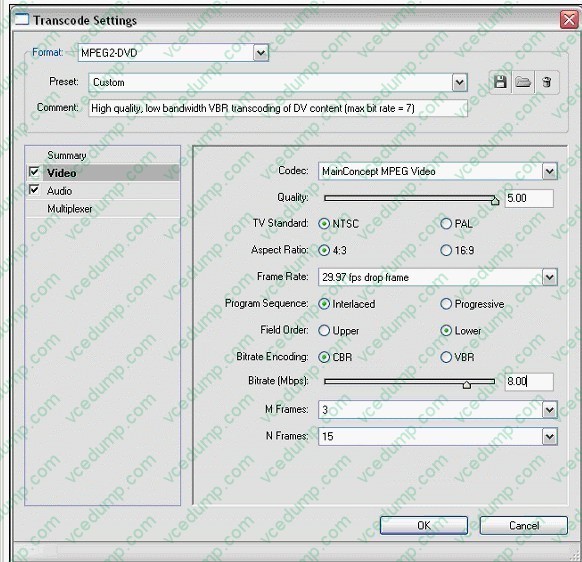
B. Reduce the interlacing of the exported file
C. Reduce the time it takes to encode the file
D. Increase the time it takes to encode the file -
Question 95:
Which statement about audio sample rate in the Capture submenu of the Project Settings dialog box is true?
A. Resampling the audio will not affect the quality of the audio.
B. Higher rates generally provide better audio quality than lower rates.
C. Setting a different rate from the original audio will take less time for processing.
D. Audio should be captured at a lower rate than the final rate in the finished project. -
Question 96:
You want to add an additional keyframe directly to a clip on the timeline. You select the clip and set it to Show Keyframes for the filter you want to add a keyframe to. Which tool should you use to add a new keyframe to the clip?
A. left click the clip with the Pen tool
B. left click the clip with the Selection tool
C. Ctrl+left click the clip with the Pen tool
D. Ctrl+left click the clip with the Selection tool -
Question 97:
You want to create transparency based on light or dark areas in your image. Which key should you use?
A. Luma Key
B. Multiply Key
C. Chroma Key
D. Difference Key -
Question 98:
Which statement about locking a video track in the timeline is true?
A. The locked track is not exported.
B. The associated audio track is also locked.
C. The locked track becomes the target track.
D. The locked track is not shifted when performing insert edits. -
Question 99:
In which three situations should you choose the Automate to Sequence command in the Project window? (Choose three.)
A. To place clips on the timeline with your default effects and transitions applied
B. To automatically place transitions between clips that are already on the timeline
C. To automatically place the selected clips into the timeline at unnumbered markers.
D. To quickly assemble a rough cut in the timeline based on the sort order of the project bin.
E. To automatically place the selected clips into the gaps between clips already on the timeline.
F. To automatically place the selected clips into the timeline using the default transition between clips. -
Question 100:
You want to export your sequence to an NTSC DV movie for use in future NTSC DV projects. Which video options should you choose in the Export Movie Settings dialog box?
A. 720 x 480 Frame Size; No Fields (Progressive Scan); 15 fps Non Drop-Frame Timecode; Square Pixels (1.0).
B. 320 x 240 Frame Size; No Fields (Progressive Scan); 15 fps Non Drop-Frame Timecode; Square Pixels (1.0).
C. 720 x 480 Frame Size; Lower Fields First; 29.97 fps Drop Frame Timecode; D1/DV NTSC (0.9) Pixel Aspect Ratio.
D. 720 x 486 Frame Size; Lower Fields First; 29.97 fps Drop Frame Timecode; D1/DV NTSC (0.9) Pixel Aspect Ratio.
Related Exams:
-
9A0-019
Adobe Photoshop 6.0 Product Proficiency -
9A0-042
Acrobat 7.0 Prowith Adobe LiveCycle Designer ACE Exam -
9A0-043
Adobe Illustrator CS 2 ACE -
9A0-044
Adobe Photoshop CS 2 ACE Exam -
9A0-045
Adobe InDesign CS 2 ACE Exam -
9A0-046
Adobe GoLive CS2 ACE Exam -
9A0-055
Adobe InDesign CS3 ACE Exam -
9A0-056
Adobe Dreamweaver CS3 ACE Exam -
9A0-057
Adobe Illustrator CS3 ACE Exam -
9A0-058
Adobe Flash CS3 ACE Exam
Tips on How to Prepare for the Exams
Nowadays, the certification exams become more and more important and required by more and more enterprises when applying for a job. But how to prepare for the exam effectively? How to prepare for the exam in a short time with less efforts? How to get a ideal result and how to find the most reliable resources? Here on Vcedump.com, you will find all the answers. Vcedump.com provide not only Adobe exam questions, answers and explanations but also complete assistance on your exam preparation and certification application. If you are confused on your 9A0-040 exam preparations and Adobe certification application, do not hesitate to visit our Vcedump.com to find your solutions here.