9A0-040 Exam Details
-
Exam Code
:9A0-040 -
Exam Name
:Adobe Premiere Pro ACE Exam -
Certification
:Adobe Certifications -
Vendor
:Adobe -
Total Questions
:126 Q&As -
Last Updated
:Dec 08, 2021
Adobe 9A0-040 Online Questions & Answers
-
Question 21:
You want text in a title to follow a circular path. What should you do?
A. Draw the path with the Path Type tool, then start typing to add the text
B. Draw the path with the Ellipse tool, then add the text using the Type tool.
C. Draw the path with the Ellipse tool, then add the text using the Path Type tool
D. Draw the path with the Path Type tool, then click on the path a second time with the Path Type tool, and then start typing to add the text -
Question 22:
You are dragging the shuttle slider in the Monitor window to the left. What happens as you move the slider further to the left?
A. The clip plays forward going faster as you drag further to the left.
B. The clip plays forward going slower as you drag further to the left.
C. The clip plays backwards going faster as you drag further to the left.
D. The clip plays backwards going slower as you drag further to the left. -
Question 23:
Click the Exhibit Button.
You want to use the alpha channel from Clip B on Video Track 2 to define the transparency of Clip A on Video Track 1.
What should you do?
A. Add the Alpha Matte Key Video Effect to Clip B.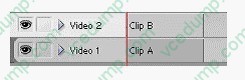
B. Right-click Clip A and select Define Alpha Channel; then, select Clip B.
C. Add the Image Matte Key Video Effect to Clip A and select Clip B as the Matte Image.
D. Add the Track Matte Key Video Effect to Clip A and choose Video Track 2 as your matte. -
Question 24:
Which audio processing step occurs first when you import a project?
A. Premiere Pro applies effects to clips.
B. Premiere Pro processes track settings such as prefade effects, prefade sends, mute, etc.
C. Premiere Pro conforms its audio to the audio settings specified in the New Project dialog box.
D. Premiere Pro applies gain adjustments applied to clips by using the command Clip > Audio Options > Audio Gain. -
Question 25:
Which portion of the timeline is represented in the Effect Controls window?
A. The duration of the timeline
B. The duration of the selected clip on the timeline
C. The duration of the work area set on the timeline
D. The duration of the active sequence on the timeline -
Question 26:
You want to adjust the edit point between two clips in your timeline. You do NOT want to adjust the total length of the sequence. Which editing tool or button should you use?
A. Extract button
B. Ripple Edit tool
C. Rolling Edit tool
D. Insert Edit button -
Question 27:
You want to import CD audio into your project. What should you do?
A. Choose File > Capture and select CD Audio Device from the Device Control pop up menu.
B. Import the CDA file into your project and choose Clip > Audio > Conform to Project Settings.
C. Choose File > Capture > CD Audio, and select Current Project Settings in the Conform Audio dialog box.
D. Use a third party application to first convert the CD Audio to a supported format, and then import the audio clip -
Question 28:
You are working on your sequence and realize that you chose the wrong preset when you started the project. The audio sample rate of your project is 32kHz, but the sample rate of your source media audio is 48kHz. You do NOT want to downsample your audio. What should you do?
A. Continue working, but make sure to export the project at 48kHz.
B. Nest the sequence in a new sequence that uses the proper sample rate.
C. change the audio sample rate to 48kHz in the General panel of the Project Settings dialog box,
D. Start a new project with the 48kHz setting and import the sequence you were working on into that project. -
Question 29:
You want to create transparency based on light or dark areas in your image. Which key should you use?
A. Luma Key
B. Multiply Key
C. Chroma Key
D. Difference Key -
Question 30:
You want to change the appearance of thumbnails in a sequence window. What should you do?
A. choose Sequence > Preferences and select an option
B. Alt-click the header area of the track to toggle between track display options
C. choose Timeline window options from the Timeline window menu and select an option for track display
D. click the triangle next to the name of the track to expand the track, click the Set Display Style button for the track and select an option
Related Exams:
-
9A0-019
Adobe Photoshop 6.0 Product Proficiency -
9A0-042
Acrobat 7.0 Prowith Adobe LiveCycle Designer ACE Exam -
9A0-043
Adobe Illustrator CS 2 ACE -
9A0-044
Adobe Photoshop CS 2 ACE Exam -
9A0-045
Adobe InDesign CS 2 ACE Exam -
9A0-046
Adobe GoLive CS2 ACE Exam -
9A0-055
Adobe InDesign CS3 ACE Exam -
9A0-056
Adobe Dreamweaver CS3 ACE Exam -
9A0-057
Adobe Illustrator CS3 ACE Exam -
9A0-058
Adobe Flash CS3 ACE Exam
Tips on How to Prepare for the Exams
Nowadays, the certification exams become more and more important and required by more and more enterprises when applying for a job. But how to prepare for the exam effectively? How to prepare for the exam in a short time with less efforts? How to get a ideal result and how to find the most reliable resources? Here on Vcedump.com, you will find all the answers. Vcedump.com provide not only Adobe exam questions, answers and explanations but also complete assistance on your exam preparation and certification application. If you are confused on your 9A0-040 exam preparations and Adobe certification application, do not hesitate to visit our Vcedump.com to find your solutions here.