9A0-040 Exam Details
-
Exam Code
:9A0-040 -
Exam Name
:Adobe Premiere Pro ACE Exam -
Certification
:Adobe Certifications -
Vendor
:Adobe -
Total Questions
:126 Q&As -
Last Updated
:Dec 08, 2021
Adobe 9A0-040 Online Questions & Answers
-
Question 41:
Click the Exhibit button.
You are exporting the timeline using the Adobe Media Encoder as shown in the exhibit. What effect will decreasing the bitrate from 8.00 to 5.00 have?
A. Reduce the file size of the exported file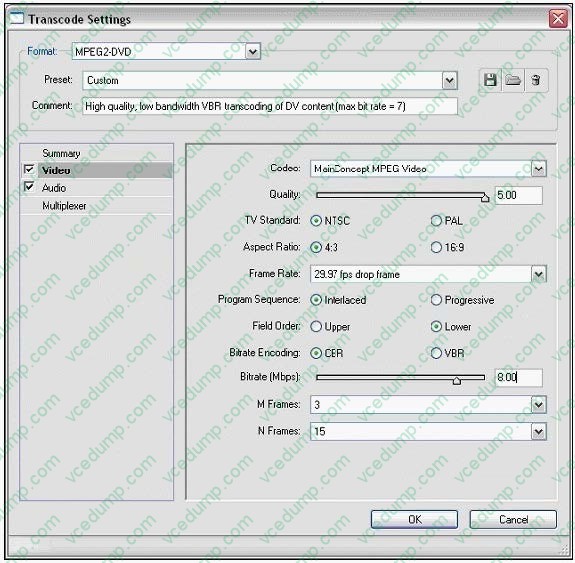
B. Reduce the frame rate of the exported file
C. Reduce the frame size of the exported file
D. Reduce the number of fields in the exported file -
Question 42:
What happens when you attempt to drag an audio clip (including audio linked to video) to an audio track of a different channel type?
A. Premiere Pro automatically generates or removes audio channels in the clip to match the audio track's channel type.
B. A dialog box box appears, prompting you to resolve the problem by choosing another target track, or creating a compatible target track.
C. The clip is added to the track; however, Premiere Pro ignores or distributes audio channels in the clip according to the audio track's channel type.
D. The audio clip (or audio component of a linked clip) automatically shifts to the next compatible audio track; if no such track exists, then an audio track of the appropriate channel type is created automatically. -
Question 43:
For which type of project would it be acceptable to ignore or turn off the Title Safe function in the Title Designer?
A. a project that will be output for web streaming
B. a project that will be used for PAL broadcast TV
C. a project that will be used for NTSC broadcast TV
D. a project where color safe levels are not important -
Question 44:
You want to import an Adobe Photoshop image that contains blending modes while preserving the appearance of the image. What should you do?
A. Import the Photoshop image as a sequence.
B. Import the Photoshop image as a series of stills.
C. Import the Photoshop image as a single file, and choose the top layer in the Layer Options of the Import Layered File dialog box.
D. Import the Photoshop image as a single file, and select Merged Layers in the Layer Options section of the Import Layered File dialog box. -
Question 45:
You have copied a set of keyframes in the Effects Controls window. Where will the copied keyframes initially appear when you paste them in a second clip?
A. In the selected properties in the destination clip's effect. The earliest keyframe appears at the current time, and the other keyframes follow in relative order
B. In the corresponding property in the destination clip's effect. The earliest keyframe appears at the current time, and the other keyframes follow in relative order.
C. In the selected properties in the destination clip's effect. The earliest keyframe appears at the beginning of the clip, and the other keyframes follow in relative order.
D. In the corresponding property in the destination clip's effect. The earliest keyframe appears at the beginning of the clip, and the other keyframes follow in relative order. -
Question 46:
Which action can be performed while using the Capture window and playing back a tape for viewing or capture?
A. Changing the scratch disk.
B. Logging clips to a batch list.
C. Entering information about the next clip.
D. Changing the folder where clips are logged. -
Question 47:
You are working with a sequence that will be exported to a movie for streaming Web playback. Which three encoding formats should you choose? (Choose three)
A. MPEG2
B. MPEG1
C. RealMedia
D. QuickTime
E. Microsoft DV
F. Windows Media -
Question 48:
Which audio processing step occurs first when you import a project?
A. Premiere Pro applies effects to clips.
B. Premiere Pro processes track settings such as prefade effects, prefade sends, mute, etc.
C. Premiere Pro conforms its audio to the audio settings specified in the New Project dialog box.
D. Premiere Pro applies gain adjustments applied to clips by using the command Clip > Audio Options > Audio Gain. -
Question 49:
Which options in the Export Movies dialog box will allow you to open and edit the original project from within another Adobe Premiere Pro project or from another application that supports the command.?
A. File Type set to Targa and Embedding Options set to Project
B. File Type set to QuickTime and Embedding Options set to None
C. File Type set to Animated GIF and Embedding Options set to None
D. File Type set to Microsoft AVI and Embedding Options set to Project -
Question 50:
You want a title to fade in over a clip. What should you do?
A. select the clip in the timeline, then set opacity keyframes in the Effects window
B. select the title in the timeline, then set opacity keyframes in the Effects window
C. select the clip in the timeline, then set opacity keyframes in the Effects Control window
D. select the title in the timeline, then set opacity keyframes in the Effects Control window
Related Exams:
-
9A0-019
Adobe Photoshop 6.0 Product Proficiency -
9A0-042
Acrobat 7.0 Prowith Adobe LiveCycle Designer ACE Exam -
9A0-043
Adobe Illustrator CS 2 ACE -
9A0-044
Adobe Photoshop CS 2 ACE Exam -
9A0-045
Adobe InDesign CS 2 ACE Exam -
9A0-046
Adobe GoLive CS2 ACE Exam -
9A0-055
Adobe InDesign CS3 ACE Exam -
9A0-056
Adobe Dreamweaver CS3 ACE Exam -
9A0-057
Adobe Illustrator CS3 ACE Exam -
9A0-058
Adobe Flash CS3 ACE Exam
Tips on How to Prepare for the Exams
Nowadays, the certification exams become more and more important and required by more and more enterprises when applying for a job. But how to prepare for the exam effectively? How to prepare for the exam in a short time with less efforts? How to get a ideal result and how to find the most reliable resources? Here on Vcedump.com, you will find all the answers. Vcedump.com provide not only Adobe exam questions, answers and explanations but also complete assistance on your exam preparation and certification application. If you are confused on your 9A0-040 exam preparations and Adobe certification application, do not hesitate to visit our Vcedump.com to find your solutions here.