70-779 Exam Details
-
Exam Code
:70-779 -
Exam Name
:Analyzing and Visualizing Data with Microsoft Excel -
Certification
:Microsoft Certifications -
Vendor
:Microsoft -
Total Questions
:115 Q&As -
Last Updated
:Jan 31, 2022
Microsoft 70-779 Online Questions & Answers
-
Question 11:
Note: This question is part of a series of questions that present the same scenario. Each question in the series contains a unique solution that might meet the stated goals. Some question sets might have more than one correct solution, while
others might not have a correct solution.
After you answer a question in this section, you will NOT be able to return to it. As a result, these questions will not appear in the review screen.
You have a query named Query1 that retrieves the user information from two Excel files. One of the Excel files does not contain location information. A sample of the data retrieved by the query is shown in the following table.
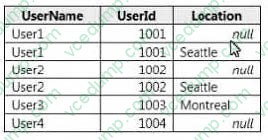
You need to ensure that values in UserName are unique. The solution must ensure that the locations are retained. A sample of desired output is shown in the following table.
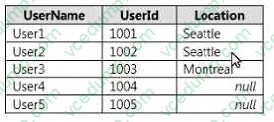
Solution: You use the Group By function to group the rows by UserName and you specify output columns for UserID and Location by using the Max operation. Does this meet the goal?
A. Yes
B. No -
Question 12:
You create an Excel workbook named SalesResults.xlsx. You create a workbook query that connects to a Microsoft SQL Server database and loads data to the data model. You create a PivotTable and a PivotChart.
You plan to share SalesResults.xlsx to several users outside of your organization.
You need to ensure that the users can see the PivotTable and the PivotChart when they open the file. The data in the model must be removed.
What should you do?
A. Run the Document Inspector.
B. Save the workbook as an Excel Binary Workbook (.xlsb).
C. From Query Editor, open the Data Source Settings and delete the credentials.
D. Modify the source of the query. -
Question 13:
Note: This question is part of a series of questions that present the same scenario. Each question in the series contains a unique solution that might meet the stated goals. Some question sets might have more than one
correct solution, while others might not have a correct solution.
After you answer a question in this section, you will NOT be able to return to it. As a result, these questions will not appear in the review screen.
You have an Excel workbook that contains a table named Table1. A sample of the data in Table1 is shown in the following table.
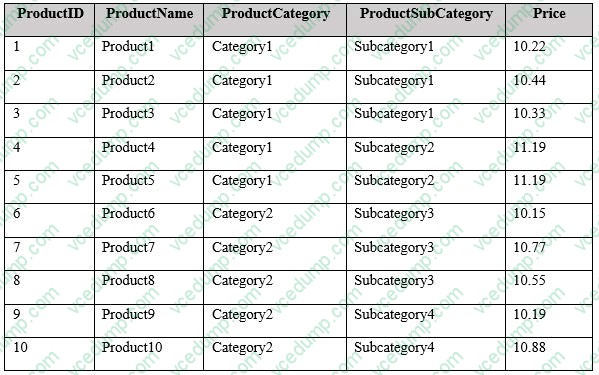
You need to create a PivotTable in PowerPivot as shown in the exhibit. (Click the Exhibit button.)
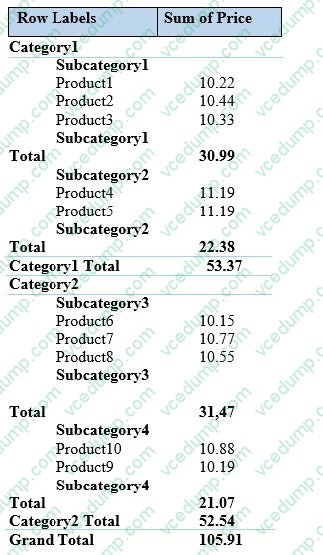
Solution: You create a hierarchy named Products that contains ProductCategory, ProductSubCategory, and ProductName. You add a PivotTable. You drag Products to the Rows field. You drag Price to the Values field. Does this meet the goal?
A. Yes
B. No -
Question 14:
You are building a KPI.
You need to configure the KPI to display a red icon when the sales from a month is less than nine percent of the sales from the last 12 months.
What should you use to define the target value?
A. an absolute value
B. a calculated column
C. a calculated field
D. a measure -
Question 15:
DRAG DROP
Note: This question is part of a series of questions that use the same scenario. For your convenience, the scenario is repeated in each question. Each question presents a different goal and answer choices, but the text of thescenario is the same in each question in this series.
Start of repeated scenario.
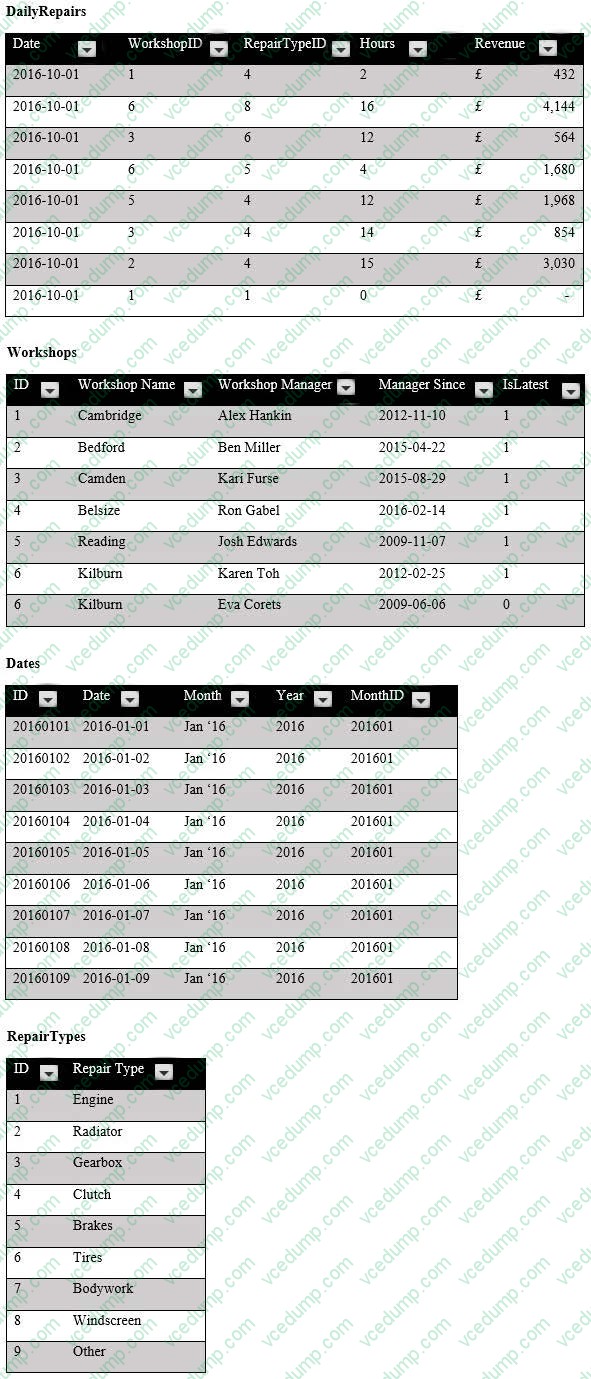
You are creating reports for a car repair company. You have four datasets in Excel spreadsheets. Four workbook queries load the datasets to a data model. A sample of the data is shown in the Data Sample exhibit. (Click the Exhibit button.) Data Sample exhibit:
The data model is shown in the Data Model exhibit. (Click the Exhibit button.)
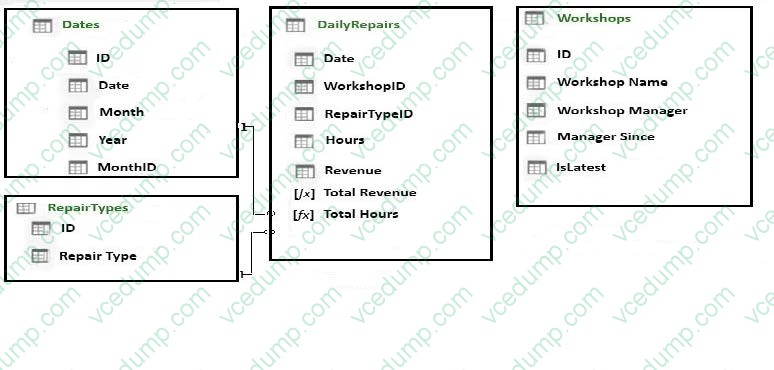
The tables in the model contain the following data:

DailyRepairs has a log of hours and revenue for each day, workshop, and repair type. Every day, a log entry is created for each workshop, even if no hours or revenue are recorded for that day. Total Hours and Total Revenue column.
Workshops have a list of all the workshops and the current and previous workshop managers. The format of the Workshop Manager column is always Firstname Lastname. A value of 1 in the IsLatest column indicates that the workshop manager listed in the record is the current workshop manager.
RepairTypes has a list of all the repair types
Dates has a list of dates from 2015 to 2018
End of repeated scenario.
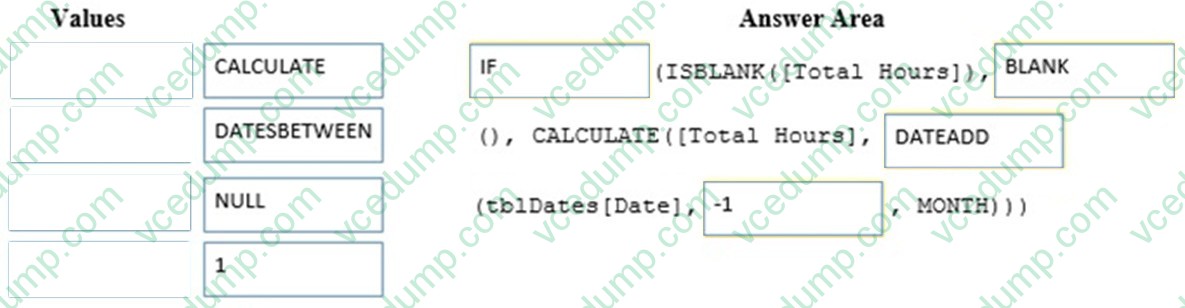
You need to create a PivotChart that displays the month, the hours of the month, and the hours of the previous month, as shown in the following exhibit.
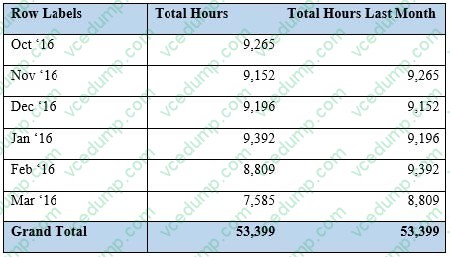
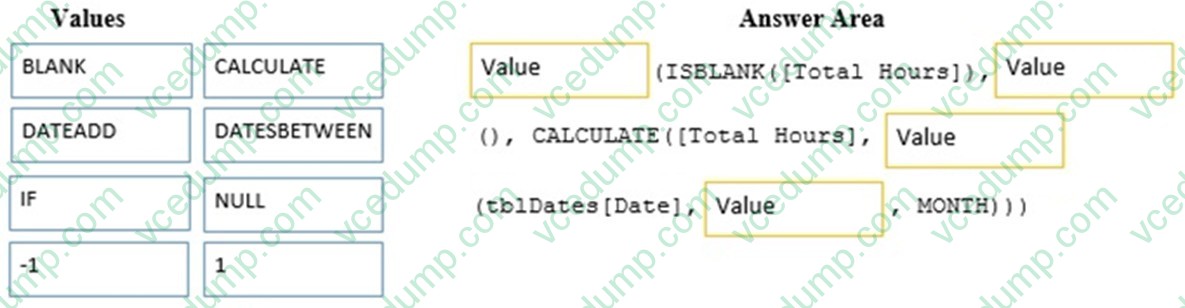
Which DAX formula should you use for the Total Hours Last Month measure? To answer, drag the appropriate fields to the correct targets. Each value may be used once, more than once, or not at all. You may need to drag the split bar
between panes or scroll to view content.
NOTE: Each correct selection is worth one point.
Select and Place:
-
Question 16:
You open C:\Data\Data,xlsx m Excel.
When you attempt to publish the file to Microsoft Power BI, you receive the following error message: "We couldn't publish to Power BI. Make sure your workbook is saved as an Excel file (.xlsx or .xlsm) and is not password protected.*
You need to ensure that you can publish the file to Power BI.
What should you do first?
A. Decrypt the workbook.
B. Disable iterative calculation for the workbook.
C. Copy the file to a network share.
D. Add a digital signature to the workbook. -
Question 17:
You have a table that contains data relating to exam candidates and their associated scores.
You need to visualize the exam data by separating the data into quartiles. The visualization must display the mean score and must identify any outliers.
Which type of chart should you use?
A. line
B. histogram
C. pie
D. box and whisker -
Question 18:
You have an Excel workbook that has the following two workbook queries:
A query named consultants that retrieves a table named Consultants_Contact from a Microsoft SQL Server database
A query named employees that retrieves a table named Employee_Contact from a Microsoft Azure SQL database
Both tables have the same columns.
You need to combine all the data from Consultants and Employees into one table.
Which command should you use?
A. Transpose
B. Merge Queries
C. Append Queries
D. Combine Binaries -
Question 19:
You have the following table.
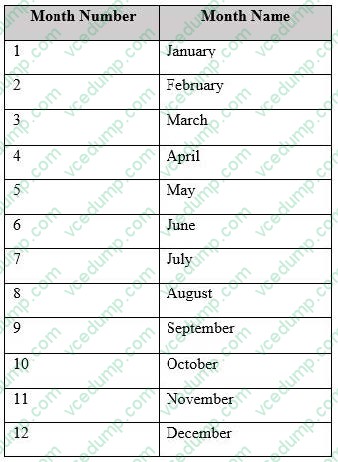
You plan to use [Month Name] as the axis in a PivotChart.
You need to ensure that whenever [Month Name] is used in a chart, the months are displayed chronologically be default.
What should you do?
A. Sort the [Month Name] column by [Month Name].
B. Change the Data Type of [Month Name] to Date.
C. Sort the [Month Name] column by [Month Name].
D. Add a calculated column named [ID] that use the [Month Name] and [Month Number] DAX formula -
Question 20:
You have an Excel workbook that contains a table named Sales.
You add Sales to the Power Pivot model.
You need to set a column named TransactionID as the row identifier for the Sales table.
What should you do?
A. From Power Pivot, modify the Table Behavior setting.
B. From Query Editor, add an index column.
C. From Query Editor, modify the Data Type.
D. From Power Pivot, modify the Default Field Set.
Related Exams:
-
62-193
Technology Literacy for Educators -
70-243
Administering and Deploying System Center 2012 Configuration Manager -
70-355
Universal Windows Platform – App Data, Services, and Coding Patterns -
77-420
Excel 2013 -
77-427
Excel 2013 Expert Part One -
77-725
Word 2016 Core Document Creation, Collaboration and Communication -
77-726
Word 2016 Expert Creating Documents for Effective Communication -
77-727
Excel 2016 Core Data Analysis, Manipulation, and Presentation -
77-728
Excel 2016 Expert: Interpreting Data for Insights -
77-731
Outlook 2016 Core Communication, Collaboration and Email Skills
Tips on How to Prepare for the Exams
Nowadays, the certification exams become more and more important and required by more and more enterprises when applying for a job. But how to prepare for the exam effectively? How to prepare for the exam in a short time with less efforts? How to get a ideal result and how to find the most reliable resources? Here on Vcedump.com, you will find all the answers. Vcedump.com provide not only Microsoft exam questions, answers and explanations but also complete assistance on your exam preparation and certification application. If you are confused on your 70-779 exam preparations and Microsoft certification application, do not hesitate to visit our Vcedump.com to find your solutions here.