70-735 Exam Details
-
Exam Code
:70-735 -
Exam Name
:OEM Manufacturing and Deployment for Windows 10 -
Certification
:Microsoft Certifications -
Vendor
:Microsoft -
Total Questions
:63 Q&As -
Last Updated
:Dec 09, 2021
Microsoft 70-735 Online Questions & Answers
-
Question 31:
HOTSPOT
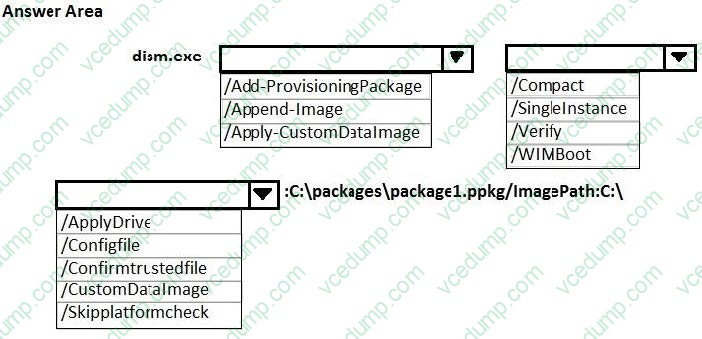
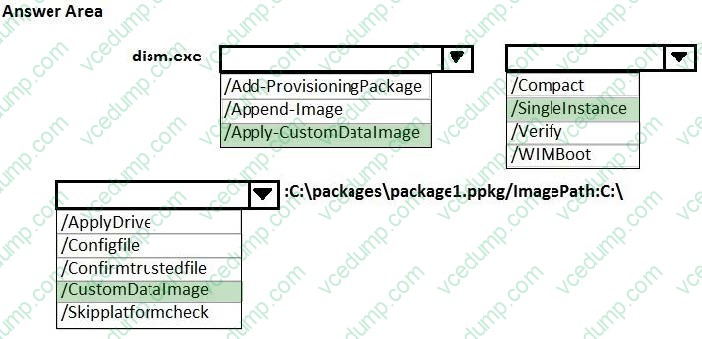
You have a reference computer that runs Windows 10. The computer contains a provisioning package named Package1.ppkg. Package1.ppkg is located in C:\Packages\.
You plan to create an image of the reference computer.
You run sysprep.exe on the computer, and then you start the computer by using Windows Preinstallation Environment (Windows PE).
You need to ensure that the image uses the least amount of disk space possible.
How should you complete the command? To answer, select the appropriate options in the answer area.
NOTE: Each correct selection is worth one point.
Hot Area:
-
Question 32:
You have a computer named Computer1 that runs Windows 10.
On Computer1, you have a DVD that contains the installation source files of Windows 10 Pro.
You open Windows System Image Manager as shown in the exhibit. (Click the Exhibit tab.)
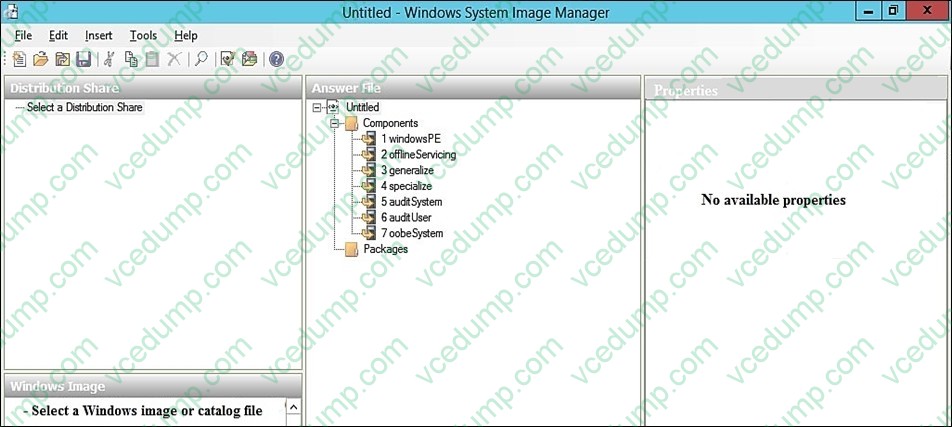
You need to configure the answer file for Windows 10 by using Windows System Image Manager (Windows SIM). What should you do first?
A. Copy the installation files for Windows 10 to a hard disk.
B. Create a catalog file (.clg).
C. Select a distribution share.
D. Select an image of Windows 10. -
Question 33:
Note: This question is part of a series of questions that use the same or similar answer choices. An answer choice may be correct for more than one question in the series. Each question is independent of the other questions in this series.
Information and details provided in a question apply only to that question.
You have a computer named Computer1 that runs Windows 10. Computer1 has the Windows Assessment and Deployment Kit (Windows ADK) installed.
You create the working directories for the customization of a Windows Preinstallation Environment (Windows PE) image.
You need to add scripting support to Windows PE.
What should you do first?
A. Mount the Install.wim file.
B. Mount the Boot.wim file.
C. Modify the Winpeshl.ini file.
D. Create an answer file.
E. Modify the Windows.ini file.
F. Create a provisioning package.
G. Load a catalog file (.clg).
H. Create a cabinet file (.cab). -
Question 34:
DRAG DROP
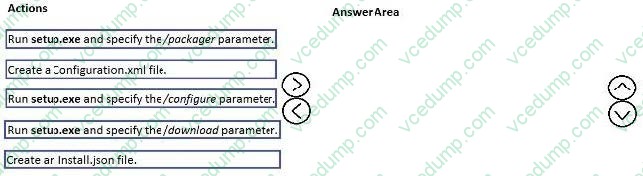
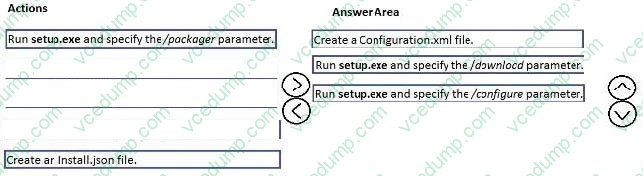
You are creating an image of Windows 10 for a new model of computers that will have Microsoft Office 2016 installed.
You install the Office Deployment Tool.
You need to install Office 2016. The solution must install Microsoft Word and Excel without installing any other Office applications.
Which three actions should you perform in sequence? To answer, move the appropriate actions from the list of actions to the answer area and arrange them in the correct order.
Select and Place:
-
Question 35:
You have a reference image of the 64-bit version of Windows 10. The reference image contains an application named App1. You need to ensure that App1 is pinned to the Start menu.
Which tool or tools should you use to apply the custom Start layout to the image?
A. image.exe and Windows Preinstallation Environment (Windows PE)
B. dism.exe and File Explorer
C. Microsoft Application Compatibility Toolkit (ACT)
D. Windows System Image Manager (Windows SIM) -
Question 36:
You have an image of Windows 10 named Image1.wim. Image1.wim contains a Windows Recovery Environment (Windows RE) image.
You need to add a driver to Windows RE.
Which tool or cmdlet should you use?
A. Windows Imaging and Configuration Designer (Windows ICD)
B. Windows System Image Manager (Windows SIM)
C. dism.exe
D. Add-AppxProvisionedPackage -
Question 37:
DRAG DROP
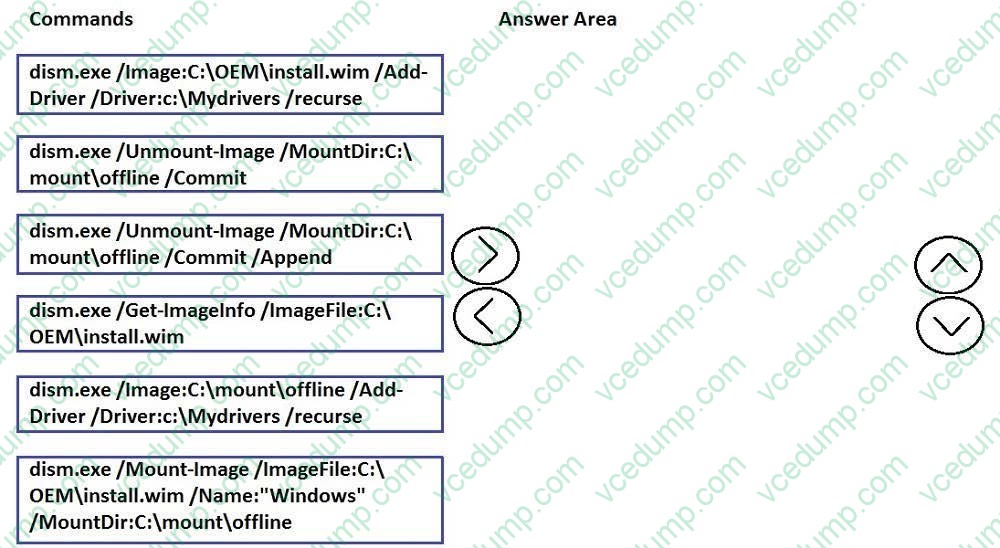
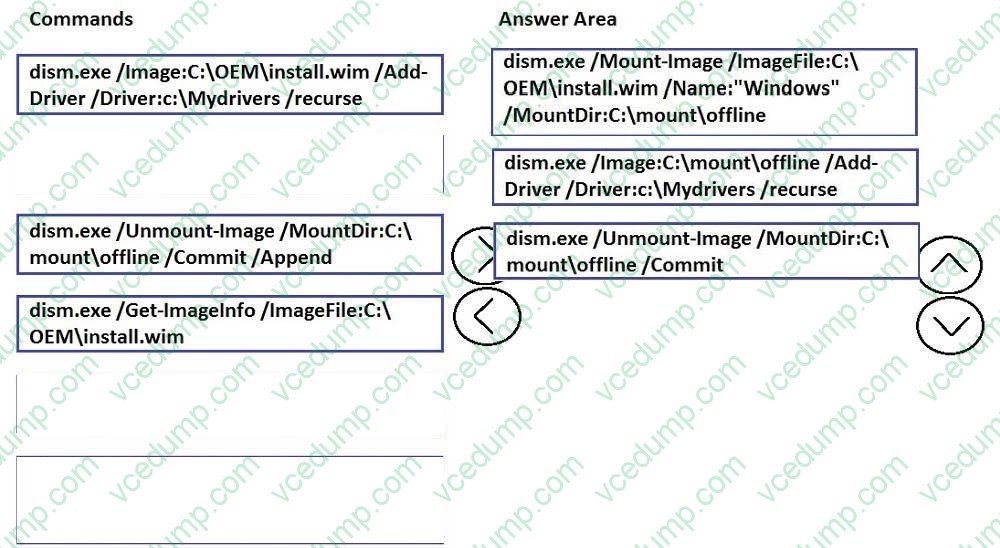
You are building an image of Windows 10 for a new computer model. The computer uses specific out-of-box device drivers.
The Windows 10 image is stored in C:\OEM\Install.wim. Install.wim contains only one image named Windows.
The drivers are stored in the C:\Mydrivers folder on your management computer. The drivers are stored in the INF format.
You need to add the drivers to a new image in the Install.wim file.
Which three commands should you run in sequence? To answer, move the appropriate commands from the list of commands to the answer area and arrange them in the correct order.
Select and Place:
-
Question 38:
Note: This question is part of a series of questions that use the same or similar answer choices. An answer choice may be correct for more than one question in the series. Each question is independent of the other questions in this series.
Information and details provided in a question apply only to that question.
You have a custom image of Windows 10.
You need to deploy the image to a computer.
Which parameter should you specify when you run dism.exe?
A. /Add-Capability
B. /Add-Driver
C. /Add-Package
D. /Add-ProvisionedAppxPackage
E. /Apply-CustomDataImage
F. /Apply-Image
G. /Apply-Unattend
H. /Export-Image -
Question 39:
HOTSPOT
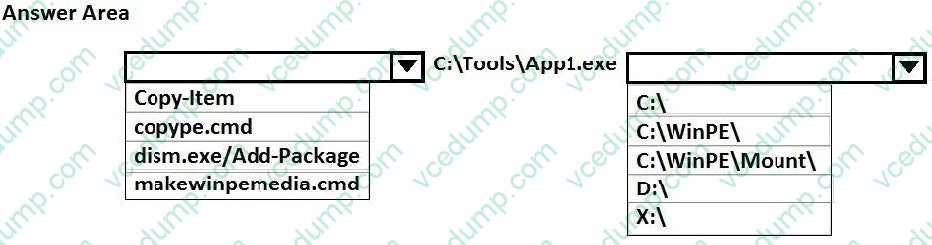
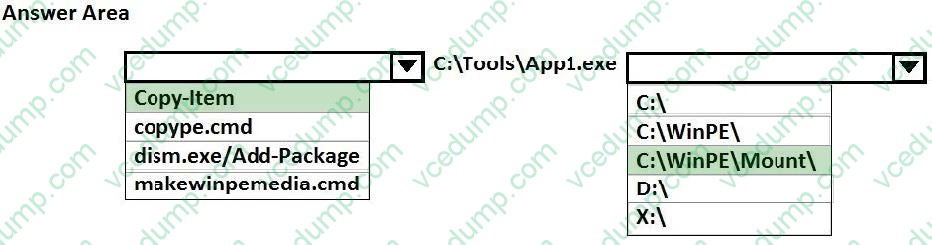
You are building a Windows Preinstallation Environment (Windows PE) image on a computer named Computer1.
You have an executable file named App1.exe in the C:\Tools\folder. App1.exe is a command line tool that can be run in Windows PE.
You run the following commands on Computer1.
copype.cmd amd64 C:\WinPE
dism.exe/Mount-Image/ImageFile:c:\WinPE\media\sources\boot.wim/index:1/MountDir:C:\WinPE\Mount
You need to ensure that you can run App1.exe from Windows PE. App1.exe must be in the root of X: when Windows PE starts.
Which command should you run? To answer, select the appropriate options in the answer area.
NOTE: Each correct selection is worth one point.
Hot Area:
-
Question 40:
Note: This question is part of a series of questions that use the same or similar answer choices. An answer choice may be correct for more than one question in the series. Each question is independent of the other questions in this series. Information and details provided in a question apply only to that question.
You have an image of Windows 10 that you plan to deploy to a new computer.
You need to apply a Universal Windows Platform (UWP) app to the image.
Which parameter should you specify when you run dism.exe?
A. /Add-Capability
B. /Add-Driver
C. /Add-Package
D. /Add-ProvisionedAppxPackage
E. /Apply-CustomDataImage
F. /Apply-Image
G. /Apply-Unattend
H. /Export-Image
Related Exams:
-
62-193
Technology Literacy for Educators -
70-243
Administering and Deploying System Center 2012 Configuration Manager -
70-355
Universal Windows Platform – App Data, Services, and Coding Patterns -
77-420
Excel 2013 -
77-427
Excel 2013 Expert Part One -
77-725
Word 2016 Core Document Creation, Collaboration and Communication -
77-726
Word 2016 Expert Creating Documents for Effective Communication -
77-727
Excel 2016 Core Data Analysis, Manipulation, and Presentation -
77-728
Excel 2016 Expert: Interpreting Data for Insights -
77-731
Outlook 2016 Core Communication, Collaboration and Email Skills
Tips on How to Prepare for the Exams
Nowadays, the certification exams become more and more important and required by more and more enterprises when applying for a job. But how to prepare for the exam effectively? How to prepare for the exam in a short time with less efforts? How to get a ideal result and how to find the most reliable resources? Here on Vcedump.com, you will find all the answers. Vcedump.com provide not only Microsoft exam questions, answers and explanations but also complete assistance on your exam preparation and certification application. If you are confused on your 70-735 exam preparations and Microsoft certification application, do not hesitate to visit our Vcedump.com to find your solutions here.