70-698 Exam Details
-
Exam Code
:70-698 -
Exam Name
:Installing and Configuring Windows 10 -
Certification
:Microsoft Certifications -
Vendor
:Microsoft -
Total Questions
:181 Q&As -
Last Updated
:Dec 07, 2021
Microsoft 70-698 Online Questions & Answers
-
Question 51:
Note: This question is part of a series of questions that use the same scenario. For your convenience, the scenario is repeated in each question. Each question presents a different goal and answer choices, but the text of the scenario is exactly the same in each question in this series.

Your network contains a single Active Directory domain named adatum.com.
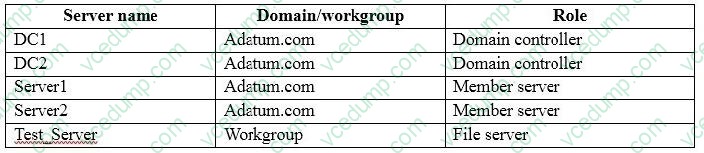
The network contains five servers configured as shown in the following table:
All of the servers run Windows Server 2012 R2.
Test_Server has a shared folder named ShareA. Only local users have permissions to ShareA.
The network contains a mainframe computer that is administered by using the Telnet protocol.
The domain contains four client computers configured as shown in the following table:
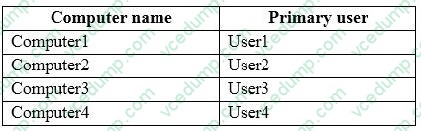
All of the client computers run the 64-bit version of Windows. User3 frequently accesses ShareA. Remote Desktop is enabled on Computer4. Your company identifies the following requirements.
A. Windows Process Activation Service (WAS)
B. Embedded BootExperience
C. Isolated User Mode
D. Windows Identity Foundation 3.5
E. Hyper-V Hypervisor -
Question 52:
Note: This question is part of a series of questions that use the same scenario. For your convenience, the scenario is repeated in each question. Each question presents a different goal and answer choices, but the text of the scenario is
exactly the same in each question in this series.
Start of repeated scenario
Your network contains a single Active Directory domain named contoso.com. All computers are members of the domain and run the 64-bit version of Windows 10 Enterprise.
On a test computer named Computer_Test1, you pin several company-specific applications in a group named Contoso Apps, and then you export the start menu layout to a file named contoso.xml.
You install Client Hyper-V on a computer named Computer6.
You identity the following requirements.
A. a Wi-Fi adapter
B. a Bluetooth adapter
C. an HDMI port
D. a MiniDisplayPort connector -
Question 53:
Note: This question is part of a series of questions that use the same scenario. For your convenience, the scenario is repeated in each question. Each question presents a different goal and answer choices, but the text of the scenario is exactly the same in each question in this series.
Your network contains a single Active Directory domain named adatum.com.
The network contains five servers configured as shown in the following table:
All of the servers run Windows Server 2012 R2.
Test_Server has a shared folder named ShareA. Only local users have permissions to ShareA.
The network contains a mainframe computer that is administered by using the Telnet protocol.
The domain contains four client computers configured as shown in the following table:
All of the client computers run the 64-bit version of Windows. User3 frequently accesses ShareA. Remote Desktop is enabled on Computer4. Your company identifies the following requirements.
A. the Get-Credential cmdlet
B. Credential Manager
C. Authorization Manager
D. Active Directory Users and Computers -
Question 54:
HOTSPOT
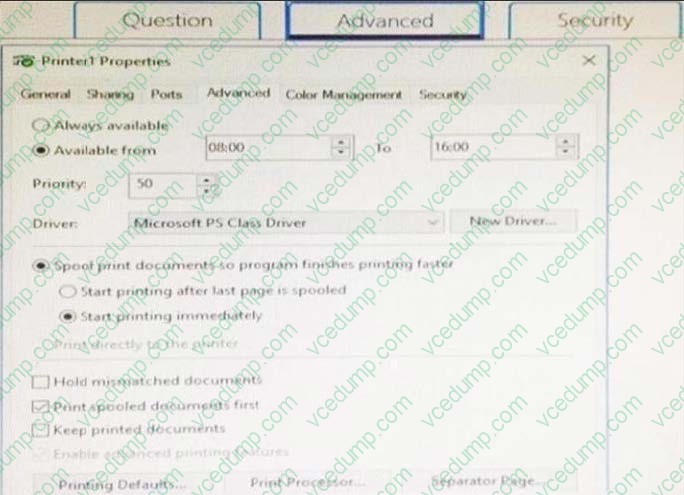
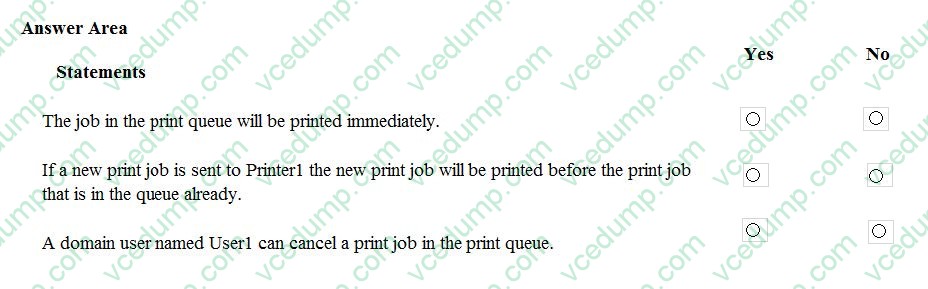
You have a computer that has a shared printer named Printer1. The Advanced settings for Printer1 are configured as shown in the Advanced exhibit. (Click the Advanced button.)
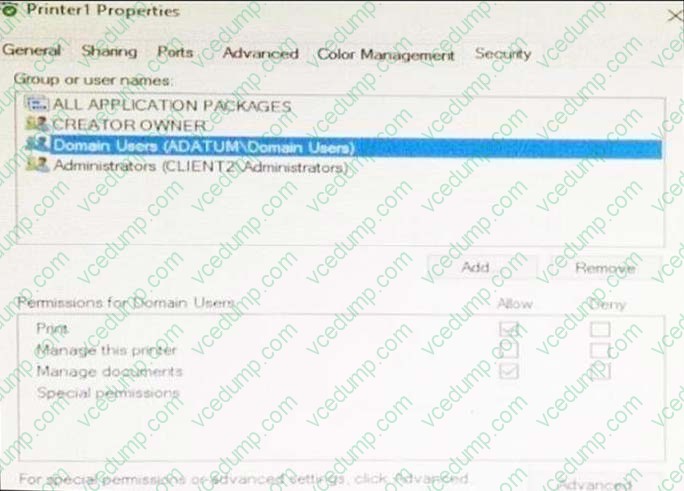
The Security settings for Printer1 are configured as shown in the Security exhibit. (Click the Security button.)
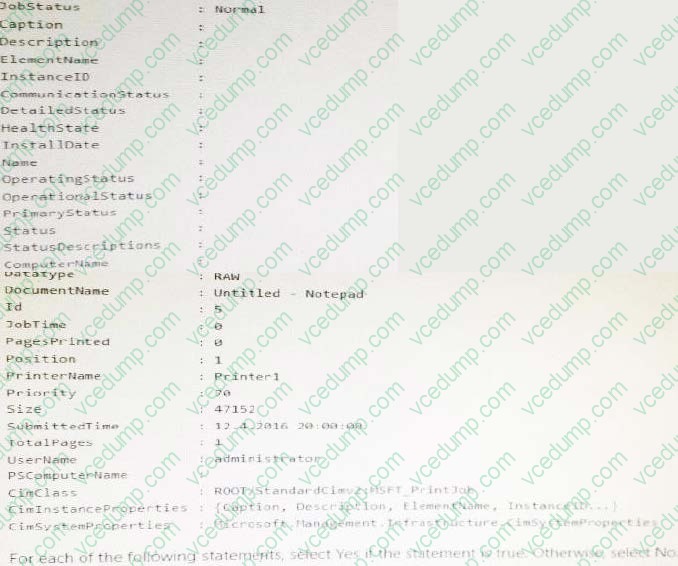
You run the Get-PrintJob cmdlet and you receive the following output:
Hot Area:
-
Question 55:
Note: This question is part of a series of questions that present the same scenario. Each question in the series contains a unique solution that might meet the stated goals. Some question sets might have more than one correct solution, while
others might not have a correct solution.
After you answer a question in this scenario, you will NOT be able to return to it. As a result, these questions will not appear in the review screen.
You are the administrator for a company. All devices run Windows 10 Enterprise and are members of the Adatum.com domain. All drives on the devices are formatted with the NTFS file system and have the default permissions assigned. You
have a device which is used by multiple users and stores information for a specific project. The project team members are members of a group named ProjectX.
The system is also used by other people that are not members of the ProjectX team. All files for ProjectX are stored in a folder with the path E:\ProjectX.
You have the following requirements:
*Only members of the ProjectX group must have all permissions on the folder and all of the files in it.
*ProjectX members should not be granted any specific rights to any other folders.
You need to meet the requirements.
Solution: You disable inheritance on the E:\ProjectX with the remove option. You assign the Full Control permission to the Adatum\ProjectX group.
Does the solution meet the goal?
A. Yes
B. No -
Question 56:
Your network contains a single Active Directory domain. The domain contains a laptop named Compute1 I that runs Windows 10.
A user named User1 uses Computer1. Computer1 connects to two shared printers named Printer1 and Printer2.
Printer1 is located at the office and Pnnter2 is located at the home of User1.
User1 frequently reports that when attempting to print, the default printer is set to Printer2.
You need to ensure that Printer1 is the default printer always.
What should you do?
A. Add Printer 2 to a home group.
B. Disable Let Windows manage my default printer.
C. Change the priority of Printer1 to 1.
D. Change the priority of Printer2 to 1. -
Question 57:
You have a computer named Computer1 that runs the 64-bit version of Windows 10 Pro.
You obtain a new driver for a device installed on Computer1. The driver is not digitally signed.
You need to test the installation of the driver on Computer1.
What should you do first?
A. Run dism.exe and specify the /Add-Driver and /Force-Unsigned parameters.
B. From User Configuration in Group Policy, configure the Driver Installation settings.
C. Restart Computer1 by using the advanced startupoptions.
D. From Computer Configuration in Group Policy, configure the Driver Installation settings. -
Question 58:
In this section, you will see one or more sets of questions with the same scenario and problem. Each question presents a unique solution to the problem, and you must determine whether the solution meets the stated goals. Any of the
solutions might solve the problem. It is also possible that none of the solutions solve the problem.
Once you answer a question in this section, you will NOT be able to return to it. As a result, these questions will not appear in the review screen.
Note: This question is part of a series of questions that present the same scenario. Each question in the series contains a unique solution. Determine whether the solution meets the stated goals.
Your network contains a single Active Directory domain named contoso.com. The domain contains two computers named Computer1 and Computer2.
A user named User1 is a member of the local Administrators group on Computer1 and Computer2.
User1 fails to access the Event Viewer logs on Computer2 from Computer1. User1 can connect to Computer2 remotely by using Computer Management.
You need to ensure that User1 can use Event Viewer on Computer1 to remotely view the Event Viewer logs on Computer2.
Solution: You run winrm quickconfig on Computer2.
Does this meet the goal?
A. Yes
B. No -
Question 59:
Note: This question is part of a series of questions that use the same set of answer choices. Each answer choice may be used once, more than once, or not at all.
You have a computer named Computer1.
Computer1 has a virtual hard disk (VHD) named Disk1.vhdx. Disk1.vhdx has an NTFS partition, which is visible in File Explorer as drive E.
You need to provision Windows 10 on Disk1.vhdx.
What should you run?
A. Add-WindowsImage
B. bcdboot.exe
C. bcdedit.exe
D. bootcfg.exe
E. bootim.exe
F. bootsect.exe
G. Gdiskpart.exe
H. Expand-WindowsImage -
Question 60:
In this section, you will see one or more sets of questions with the same scenario and problem. Each question presents a unique solution to the problem, and you must determine whether the solution meets the stated goals. Any of the
solutions might solve the problem. It is also possible that none of the solutions solve the problem.
Once you answer a question in this section, you will NOT be able to return to it. As a result, these questions will not appear in the review screen.
Note: This question is part of a series of questions that present the same scenario. Each question in the series contains a unique solution. Determine whether the solution meets the stated goals.
Your network contains a single Active Directory domain named contoso.com. The domain contains two computers named Computer1 and Computer2.
A user named User1 is a member of the local Administrators group on Computer1 and Computer2.
User1 fails to access the Event Viewer logs on Computer2 from Computer1. User1 can connect to Computer2 remotely by using Computer Management.
You need to ensure that User1 can use Event Viewer on Computer1 to remotely view the Event Viewer logs on Computer2.
Solution: You run Enable-PSRemoting on Computer1.
Does this meet the goal?
A. Yes
B. No
Related Exams:
-
62-193
Technology Literacy for Educators -
70-243
Administering and Deploying System Center 2012 Configuration Manager -
70-355
Universal Windows Platform – App Data, Services, and Coding Patterns -
77-420
Excel 2013 -
77-427
Excel 2013 Expert Part One -
77-725
Word 2016 Core Document Creation, Collaboration and Communication -
77-726
Word 2016 Expert Creating Documents for Effective Communication -
77-727
Excel 2016 Core Data Analysis, Manipulation, and Presentation -
77-728
Excel 2016 Expert: Interpreting Data for Insights -
77-731
Outlook 2016 Core Communication, Collaboration and Email Skills
Tips on How to Prepare for the Exams
Nowadays, the certification exams become more and more important and required by more and more enterprises when applying for a job. But how to prepare for the exam effectively? How to prepare for the exam in a short time with less efforts? How to get a ideal result and how to find the most reliable resources? Here on Vcedump.com, you will find all the answers. Vcedump.com provide not only Microsoft exam questions, answers and explanations but also complete assistance on your exam preparation and certification application. If you are confused on your 70-698 exam preparations and Microsoft certification application, do not hesitate to visit our Vcedump.com to find your solutions here.