70-698 Exam Details
-
Exam Code
:70-698 -
Exam Name
:Installing and Configuring Windows 10 -
Certification
:Microsoft Certifications -
Vendor
:Microsoft -
Total Questions
:181 Q&As -
Last Updated
:Dec 07, 2021
Microsoft 70-698 Online Questions & Answers
-
Question 121:
Note: This question is part of a series of questions that use the same scenario. For your convenience, the scenario is repeated in each question. Each question presents a different goal and answer choices, but the text of the scenario is exactly the same in each question in this series.

Your network contains a single Active Directory domain named adatum.com.
The network contains five servers configured as shown in the following table:
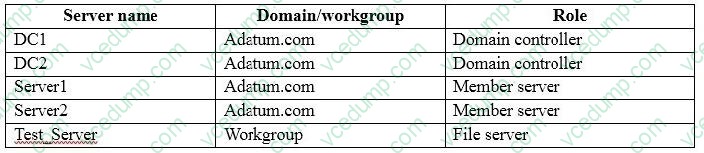
All of the servers run Windows Server 2012 R2.
Test_Server has a shared folder named ShareA. Only local users have permissions to ShareA.
The network contains a mainframe computer that is administered by using the Telnet protocol.
The domain contains four client computers configured as shown in the following table:
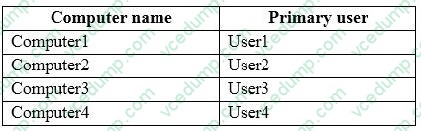
All of the client computers run the 64-bit version of Windows. User3 frequently accesses ShareA. Remote Desktop is enabled on Computer4.
Your company identifies the following requirements.
A. User Account Control Settings
B. Credential Manager
C. Security Options in the Computer Configuration of the Local Computer Policy.
D. Security Settings in the User Computer of the Local Computer Policy. -
Question 122:
Note: This question is part of a series of questions that use the same set of answer choices. Each answer choice may be used once, more than once, or not at all.
Your network contains a single Active Directory domain. The domain contains computers that run Windows 10 Enterprise.
The computers are configured as shown in the following table:

When User1 works remotely, the user fails to access shared folders on the corporate network.
When User 2 and User3 work remotely, they successfully connect to the shared folders on the corporate network.
You need to ensure that User1 can connect to the shared folders without user interaction.
What should you do?
A. Click Turn on password protected sharing.
B. Disable Network Discovery.
C. Modify the Profile settings of an incoming firewall rule.
D. Run the Add-VpnConnectionTriggerApplication cmdlet.
E. Run the New-NetFirewallRule cmdlet and specify the -Direction Outbound parameter.
F. Run the Ncw-VpnConnection cmdlet.
G. Run the Set-NetConnectionProfile cmdlet.
H. Run the Set-VPNConnection cmdlet -
Question 123:
You have a computer named Computer1 that runs Windows 10.
Computer1 has two volumes named C and D. Volume C is formatted NTFS and volume D is formatted exFAT.
You need to ensure that you can recover files stored in D:\Data.
What should you use?
A. System Restore points
B. File History
C. wbadmin.exe
D. Backup and Restore (Windows 7) -
Question 124:
Your network contains a single Active Directory domain named contoso.com. The domain contains a computer named Computer1. You have five users configured as shown in the following table: Which two users can add a Microsoft account to their Windows account, and then sign in to Cumputer1 by using the Microsoft account?
A. User1
B. User2
C. User3
D. User4
E. User5 -
Question 125:
Note: This question is part of a series of questions that use the same set of answer choices. Each answer choice may be used once, more than once, or not at all.
Your network contains a single Active Directory domain. The domain contains a VPN server that supports all of the VPN protocols.
You have mobile devices that run Windows 10 and have VPN connection to the VPN server.
You need to ensure that when users work remotely and Connect to the VPN, only traffic for the corporate network is sent through the VPN server.
What should you do?
A. Click Turn on password protected sharing.
B. Disable Network Discovery.
C. Modify the Profile settings of an incoming firewall rule.
D. Run the Add-VpnConnectionTriggerApplication cmdlet.
E. Run the New-NetFirewallRule cmdlet and specify the-Direction Outbound parameter.
F. Run the New-VpnConnection cmdlet.
G. Run the Set-NetConnectionProfile cmdlet.
H. Run the Set-VPNConnection cmdlet. -
Question 126:
You have a computer that runs Windows 10 Enterprise that has a local group policy as shown in the following graphic.
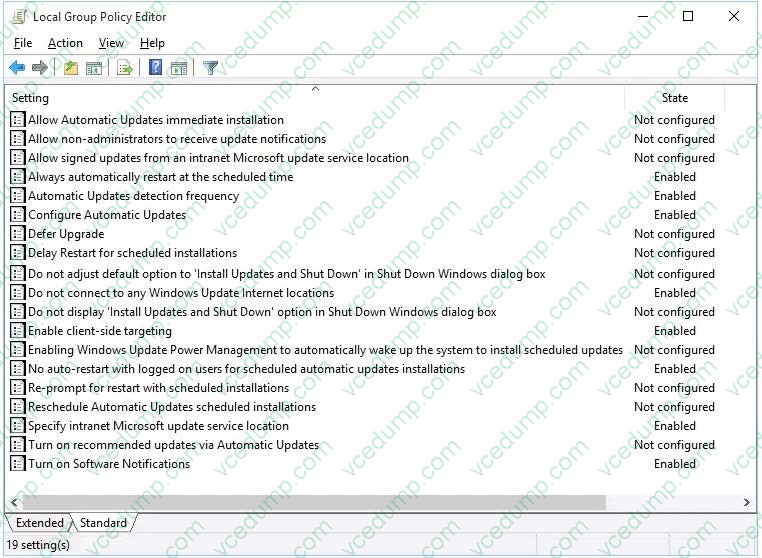
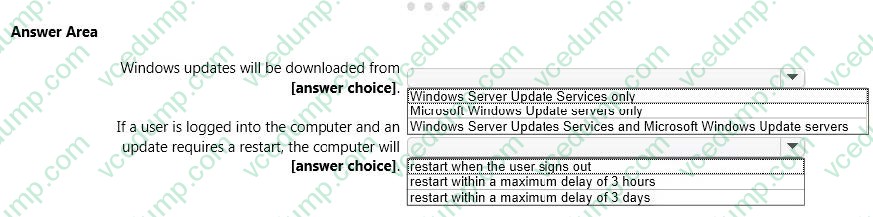
Use the drop-down menus to select the answer choice that completes each statement based on the information presented in the graphic. NOTE: Each correct selection is worth one point.
Hot Area:
-
Question 127:
Note: This question is part of a series of questions that use the same set of answer choices. Each answer choice may be used once, more than once, or not at all. You have a computer named Computer1 that has storage configured as shown in the following table.
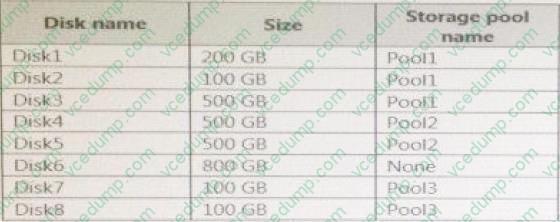
Pool1 contains a storage space named Space1 that is 300 GB. Pool3 contains a storage space named Space2 that is 100 GB. Pool2 is empty. Disk8 fails. You add a new disk named Disk9 to Pool3. You need to remove Disk8 from Pool3.
What should you use?
A. Add-PhysicalDisk
B. Diskpart
C. New-VirtualDisk
D. Remove-PhysicalDisk
E. Resize-VirtualDisk
F. Set-StoragePool
G. Subst
H. Update-Disk -
Question 128:
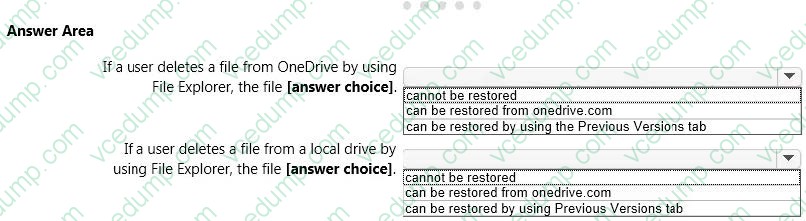
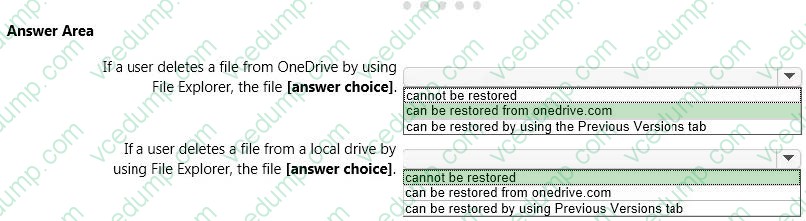
You have a standalone computer that runs Windows 10 Enterprise. The computer is configured to automatically back up files by using File History. The user of the computer uses the OneDrive desktop app to sync files. The Previous Versions settings from the local group policy of the computer are shown in the following graphic.
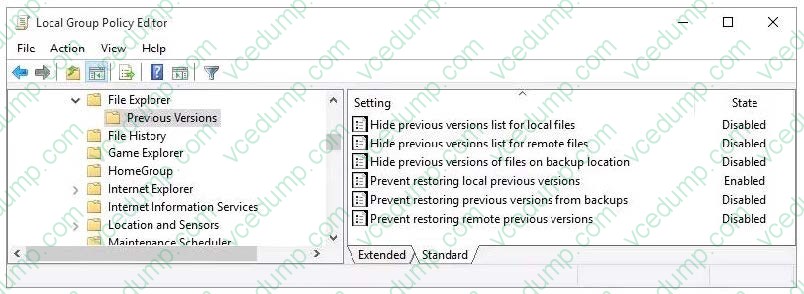
Use the drop-down menus to select the answer choice that completes each statement based on the information presented in the graphic. NOTE: Each correct selection is worth one point.
Hot Area:
-
Question 129:
Note: This question is part of a series of questions that use the same scenario. For your convenience, the scenario is repeated in each question. Each question presents a different goal and answer choices, but the text of the scenario is exactly the same in each question in this series.
Your network contains a single Active Directory domain named adatum.com.
The network contains five servers configured as shown in the following table:
All of the servers run Windows Server 2012 R2.
Test_Server has a shared folder named ShareA. Only local users have permissions to ShareA.
The network contains a mainframe computer that is administered by using the Telnet protocol.
The domain contains four client computers configured as shown in the following table:
All of the client computers run the 64-bit version of Windows. User3 frequently accesses ShareA. Remote Desktop is enabled on Computer4. Your company identifies the following requirements.
A. Run tlntadmn.exe
B. Install a Windows feature.
C. Modify themembership of the TelnetClients group.
D. Configure Windows Firewall. -
Question 130:
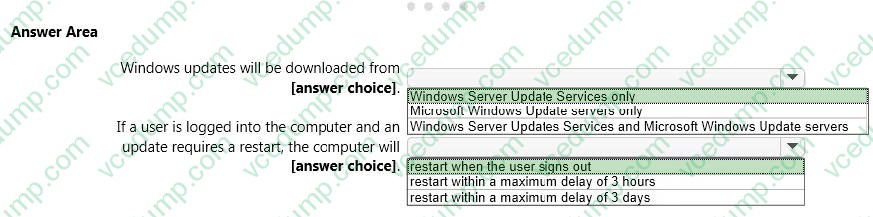
Note: This question is part of a series of questions that use the same scenario. For your convenience, the scenario is repeated in each question. Each question presents a different goal and answer choices, but the text of the scenario is exactly the same in each question in this series.
Your network contains a single Active Directory domain named adatum.com.
The network contains five servers configured as shown in the following table:
All of the servers run Windows Server 2012 R2.
Test_Server has a shared folder named ShareA. Only local users have permissions to ShareA.
The network contains a mainframe computer that is administered by using the Telnet protocol.
The domain contains four client computers configured as shown in the following table:
All of the client computers run the 64-bit version of Windows. User3 frequently accesses ShareA. Remote Desktop is enabled on Computer4. Your company identifies the following requirements.
A. BCD Edit
B. Device Manager
C. Bootcfg
D. System Properties
Related Exams:
-
62-193
Technology Literacy for Educators -
70-243
Administering and Deploying System Center 2012 Configuration Manager -
70-355
Universal Windows Platform – App Data, Services, and Coding Patterns -
77-420
Excel 2013 -
77-427
Excel 2013 Expert Part One -
77-725
Word 2016 Core Document Creation, Collaboration and Communication -
77-726
Word 2016 Expert Creating Documents for Effective Communication -
77-727
Excel 2016 Core Data Analysis, Manipulation, and Presentation -
77-728
Excel 2016 Expert: Interpreting Data for Insights -
77-731
Outlook 2016 Core Communication, Collaboration and Email Skills
Tips on How to Prepare for the Exams
Nowadays, the certification exams become more and more important and required by more and more enterprises when applying for a job. But how to prepare for the exam effectively? How to prepare for the exam in a short time with less efforts? How to get a ideal result and how to find the most reliable resources? Here on Vcedump.com, you will find all the answers. Vcedump.com provide not only Microsoft exam questions, answers and explanations but also complete assistance on your exam preparation and certification application. If you are confused on your 70-698 exam preparations and Microsoft certification application, do not hesitate to visit our Vcedump.com to find your solutions here.