70-686 Exam Details
-
Exam Code
:70-686 -
Exam Name
:Windows 7, Enterprise Desktop Administrator -
Certification
:Microsoft Certifications -
Vendor
:Microsoft -
Total Questions
:184 Q&As -
Last Updated
:Apr 12, 2020
Microsoft 70-686 Online Questions & Answers
-
Question 101:
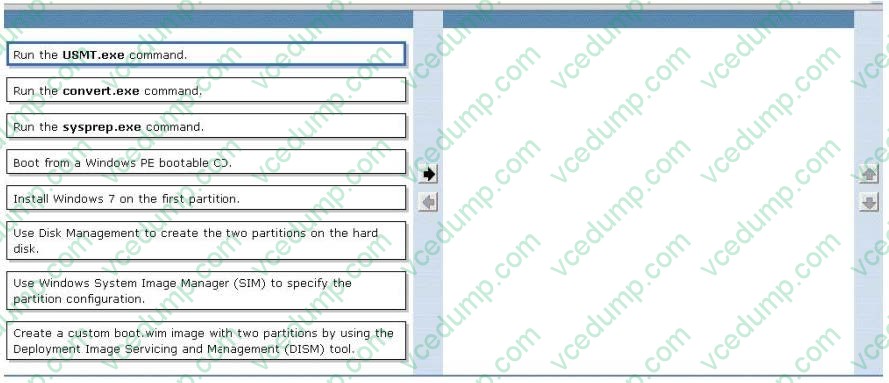
You are planning to deploy Windows 7 Enterprise to all of your company's client computers. You have the following requirements:
-
Create two custom partitions on each client computer's hard disk, one for the operating system and the other for data.
-
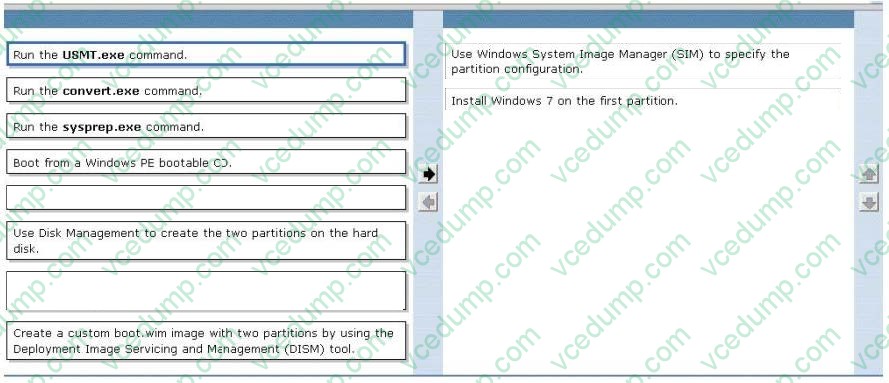
Automatically create the partitions during Windows Setup. You need to design an image that meets the requirements. Which two actions should you perform in sequence? (To answer, move the appropriate actions from the list of actions to the answer area and arrange them in the correct order)
Select and Place:
-
Question 102:
Your company plans to upgrade all client computers to Windows 7.
The company uses a custom line-of-business application. The application contains sensitive data. The application will not run on Windows 7
You establish that Microsoft Enterprise Desktop Virtualization (MED-V) is the appropriate technology to allow your organization to continue to use the application.
You need to ensure that the virtual machine (VM) images that contain sensitive data can be used only when the user is connected to the MED-V server.
What should you do?
A. Using MED-V TrimTransfer technology, deploy the VM image over the network
B. In the MED-V console, configure the MED-V workspace to prevent offline operation
C. Use BitLocker Drive Encryption to encrypt the drive on which the VM image is stored
D. Using Microsoft System Center Configuration Manager, deploy the VM image to an image store directory -
Question 103:
You plan to upgrade Windows Vista to Windows 7 on a computer named Computer01. You run ScanState and store the results on a remote computer at \\Server01\mystore. After the ScanState command completes, a user customizes a
profile and adds mission-critical data.
You attempt to run ScanState again but it fails.
You need to overwrite Computer01's existing information on Server01.
Which command line options should you use to execute the ScanState command? (Choose all that apply.)
A. /efsxopyraw
B. /v:13
C. \\Server01\mystore
D. /o -
Question 104:
Your network has 1,000 client computers that run Windows XP. You are planning to deploy Windows 7.
You plan to use the Microsoft Deployment Toolkit Lite Touch Installation deployment method to deploy the Windows 7 image.
You have the following requirements:
You need to design a deployment strategy that meets the requirements.
What should you do?
A. Configure multicast transmission on the deployment point.
B. Configure unicast transmission on the deployment point.
C. Distribute the image by using Background Intelligent Transfer Service (BITS).
D. Compress the contents of the distribution folder. -
Question 105:
Users with newly deployed Windows 7 computers see a security prompt when they attempt to upload documents to the company's intranet site.
You need to suppress the prompt without creating a security risk for the company.
What should you do? (Choose all that apply).
A. Modify the GPO to set https://intranet.company.com with a value of 1 in the Site to Zone Assignment List.
B. Modify the default Windows 7 image to add the Internet Explorer Enhanced Security Configuration component.
C. Modify the default Windows 7 image to change the default Internet Explorer security level to Medium Low.
D. Modify the default Windows 7 image to disable the Internet Explorer Automatically Detect Intranet Network setting.
E. Create a GPO and link it to the root of the domain.
F. Modify the GPO to set the web server's NEtBIOS name with a value of 2 in the Site to Zone Assignment List. -
Question 106:
Your company has client computers that run Windows XP Professional.
You are planning to install Windows 7 Enterprise on the existing client computers.
You need to design a user state migration strategy that minimizes network bandwidth and server use when user data is being migrated.
What should you do?
A. Use the Refresh Computer method and a hard-link migration store.
B. Use the Refresh Computer method and a compressed migration store.
C. Use the Replace Computer method and a hard-link migration store.
D. Use the Replace Computer method and a compressed migration store. -
Question 107:
You need to manage Windows 7 and Microsoft Office 2010 license keys for the VDI pool automatically. What should you do? (Choose all that apply.)
A. Install the Remote Desktop Licensing role service.
B. Install a ConfigMgr primary site server.
C. Install a MAK proxy server.
D. Install the Office 2010 KMS Host License Pack.
E. Activate the KMS host with the Office 2010 KMS key.
F. Install Volume Activation Management Tool 2.0.
G. Install a server core installation of Windows Server 2008 R2 Standard and add the AD DS role.
H. Activate the server with a MAK key.
I. Activate the server with a KMS key. -
Question 108:
Your company has 1,000 Windows XP computers. You plan to migrate these computers to Windows 7.
You need to detect compatibility issues that can occur during the installation and configuration process for a specific application.
Which tool should you use?
A. Windows Compatibility Evaluator
B. Setup Analysis Tool
C. Inventory Collector
D. Update Compatibility Evaluator -
Question 109:
Your network has a single domain with 1,000 client computers that run Windows 7. Users frequently copy data from their computers to removable drives. You need to ensure that data that is copied to removable drives is protected. What should you do?
A. Use Encrypting File System (EFS)
B. Enable Trusted Platform Module (TPM) hardware on all client computers
C. Use Active Directory Rights Management Services
D. Configure a Group Policy to enforce the use of BitLocker To Go -
Question 110:
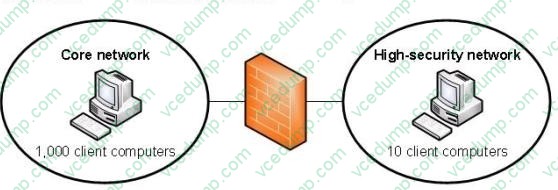
Your company has two network segments. The core network segment is where centralized management is performed. The high-security network segment is an isolated network. A firewall between the core network segment and the high-security network segment limits network communication between the segments.
These network segments are shown in the following diagram.
Your company plans to deploy Windows 7 to all client computers.
You need to manage activation for client computers that are located in the high-security network segment.
What should you do?
A. Deploy the Key Management Service (KMS) in the core network segment.
B. Deploy the Key Management Service (KMS) in the high-security network segment.
C. Install the Volume Activation Management Tool (VAMT) in the core network segment.
D. Install the Volume Activation Management Tool (VAMT) in the high-security network segment.
Related Exams:
-
62-193
Technology Literacy for Educators -
70-243
Administering and Deploying System Center 2012 Configuration Manager -
70-355
Universal Windows Platform – App Data, Services, and Coding Patterns -
77-420
Excel 2013 -
77-427
Excel 2013 Expert Part One -
77-725
Word 2016 Core Document Creation, Collaboration and Communication -
77-726
Word 2016 Expert Creating Documents for Effective Communication -
77-727
Excel 2016 Core Data Analysis, Manipulation, and Presentation -
77-728
Excel 2016 Expert: Interpreting Data for Insights -
77-731
Outlook 2016 Core Communication, Collaboration and Email Skills
Tips on How to Prepare for the Exams
Nowadays, the certification exams become more and more important and required by more and more enterprises when applying for a job. But how to prepare for the exam effectively? How to prepare for the exam in a short time with less efforts? How to get a ideal result and how to find the most reliable resources? Here on Vcedump.com, you will find all the answers. Vcedump.com provide not only Microsoft exam questions, answers and explanations but also complete assistance on your exam preparation and certification application. If you are confused on your 70-686 exam preparations and Microsoft certification application, do not hesitate to visit our Vcedump.com to find your solutions here.