70-686 Exam Details
-
Exam Code
:70-686 -
Exam Name
:Windows 7, Enterprise Desktop Administrator -
Certification
:Microsoft Certifications -
Vendor
:Microsoft -
Total Questions
:184 Q&As -
Last Updated
:Apr 12, 2020
Microsoft 70-686 Online Questions & Answers
-
Question 171:
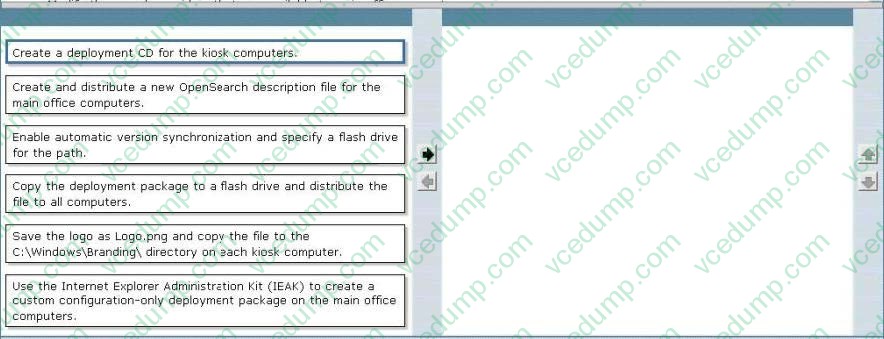
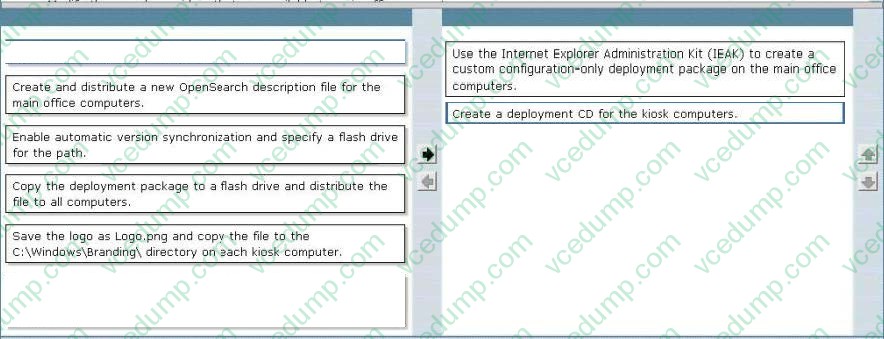
A company has 1,000 computers in the main office and 20 computers in store kiosks. All the computers run Windows 7 Enterprise. The kiosk computers do not have network connections.
The company brands the Microsoft Internet Explorer program window on all computers by displaying the company logo at the left end of the title bar. The company changes its logo.
You have the following requirements:
Display the new logo on the Internet Explorer program window title bar on the main office computers and the kiosk computers.
Modify the search providers that are available to main office computers.
You need to define Internet Explorer settings to support the requirements.
Which two actions should you perform in sequence? (To answer, move the appropriate actions from the list of actions to the answer area and arrange them in the correct order.)
Select and Place:
-
Question 172:
Your company has client computers that run Windows Vista. The company plans to upgrade the Windows Vista computers to Windows 7. The current configuration of all client computers in your company is based on a common Windows
Vista image. Some branch offices use WAN connections to connect to the main office.
You have the following requirements:
Transfer all user data from the original Windows Vista installation to the new Windows 7 installation.
Use the least amount of bandwidth while transferring the user data. Support the same migration strategy for all offices.
You need to design a user state migration strategy that supports the requirements.
What should you do?
A. Use the Deployment Image Servicing and Management (DISM) tool.
B. Use the User State Migration Tool (USMT) and a hard-link migration store.
C. Use Windows PE to perform an offline migration.
D. Use the multicast feature of Windows Deployment Services (WDS). -
Question 173:
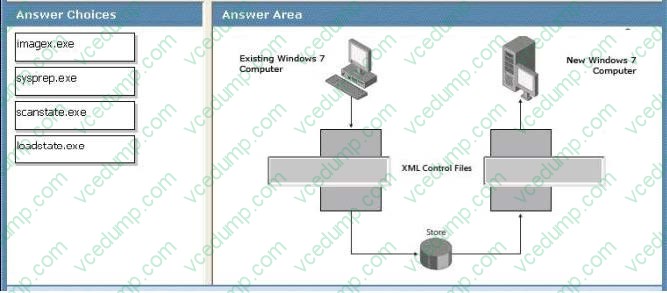
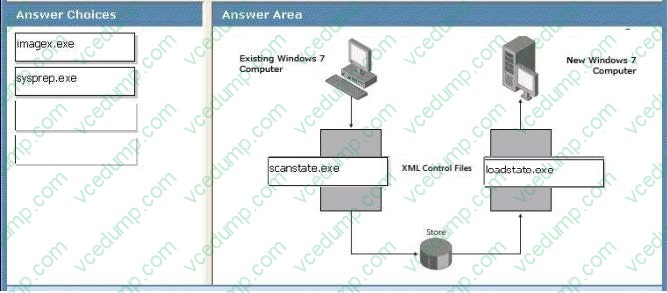
You are managing data migration from an existing Windows 7 computer to a new Windows 7 computer. You need to migrate user and application data from the existing computer to the new computer. Which command should you run on the existing and new computers? (To answer, drag the appropriate commands to the correct location in the work area.)
Select and Place:
-
Question 174:
You create and test a Windows 7 image that supports all existing client computer hardware in the company. User settings must be preserved during migrations to Windows 7. You need to deploy the new image to all office locations by using the Zero Touch Installation methodology. What should you recommend? (Choose all that apply.)
A. Enable a DHCP helper address on the routers for each remote office.
B. Enable network boot functionality on all client computers at the remote locations.
C. Deploy and configure Microsoft System Center Configuration Manager (ConfigMgr).
D. Deploy and configure Microsoft System Center Operations Manager (OppMgr).
E. Create a task sequence that enables local administrators to select their local office.
F. Create a User State Migration Tool configuration file and include it in the deployment. -
Question 175:
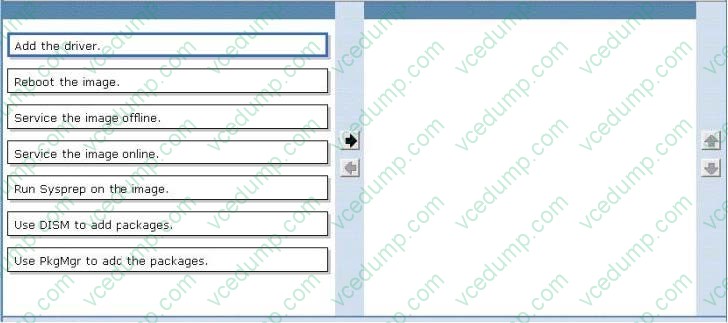
You are updating the corporate image to add drivers to support a new device.
You need to meet company requirements for updating images.
Which two actions should you perform in sequence? (To answer, move the appropriate actions from the list of actions to the answer area and arrange them in the correct order.)
Select and Place:
-
Question 176:
Your company uses Windows Update to download and install security updates on client computers.
When Microsoft releases a security update, you have the following requirements:
You need to select the appropriate tool to detect application-compatibility issues.
What should you do?
A. Use the Inventory Collector
B. Use the Setup Analysis Tool
C. Use the Update Compatibility Evaluator.
D. Use the Windows Compatibility Evaluator -
Question 177:
When a user attempts to connect to a server named Server1 by using Remote Desktop Connection (RDC), he receives the following error message.
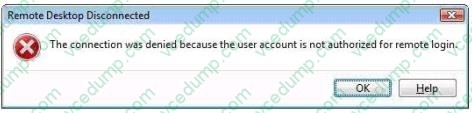
You need to assign the least amount of privilege to the user to ensure that he can connect to Server1 by using RDC. To which group should you add the user?
A. Add the user to the Power Users group on Server1.
B. Add the user to the Remote Desktop Users group on Server1.
C. Add the user to the domain Windows Authorization Access group.
D. Add the user to the domain Remote Desktop Users group -
Question 178:
Your company has a custom Web application that uses a self-signed SSL certificate. The company has an internal certification authority (CA) and uses autoenrollment. When external users attempt to start the Web application, Internet Explorer displays an error message that recommends closing the Web page rather than continuing to the application. You need to ensure that Internet Explorer does not display the error message. What should you do?
A. Install the current certificate into the personal store on each client computer. Add the applications URL to the Trusted Sites zone in Internet Explorer.
B. Install the current certificate into the computer store on each client computer.
C. Purchase and install a commercial certificate on the CA server. Ensure that users trust the issuing CA.
D. Issue a root certificate from the internal CA on the external users computers. -
Question 179:
You are planning a Windows 7 deployment infrastructure.
You have the following requirements:
You need to design an infrastructure that meets the requirements.
Which deployment method should you recommend?
A. Microsoft Deployment Toolkit (MDT) 2010
B. Microsoft Deployment Toolkit (MDT) 2008
C. Windows Deployment Services in Windows Server 2008 R2
D. Deployment Image Servicing and Management (DISM) -
Question 180:
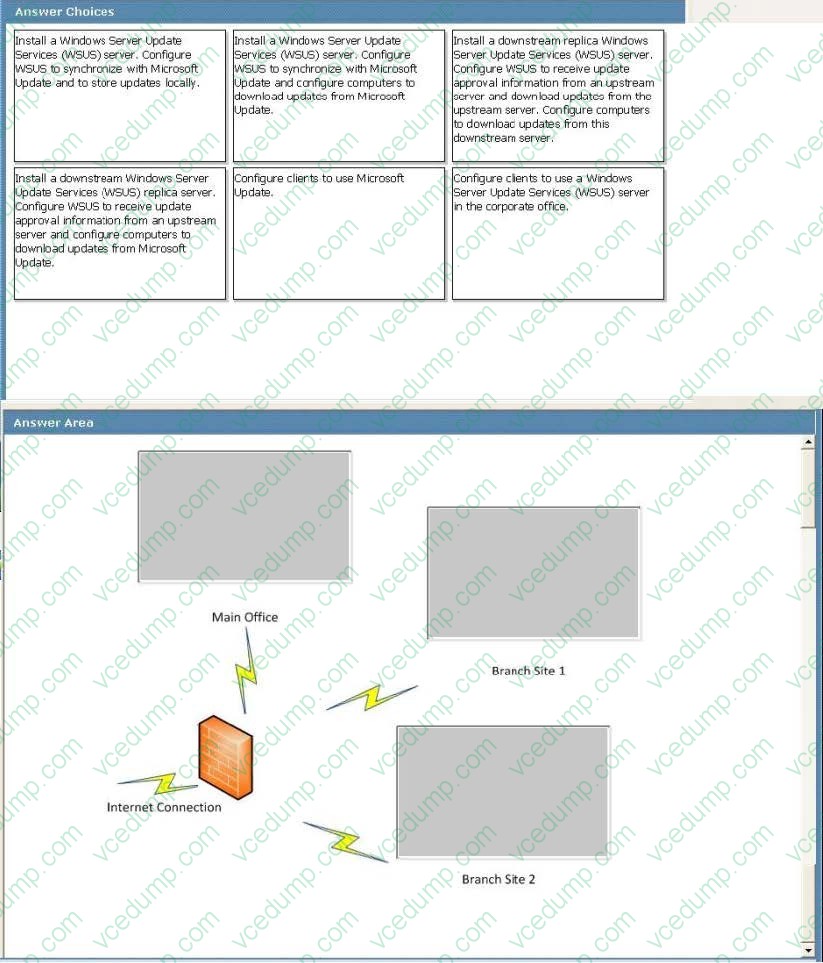
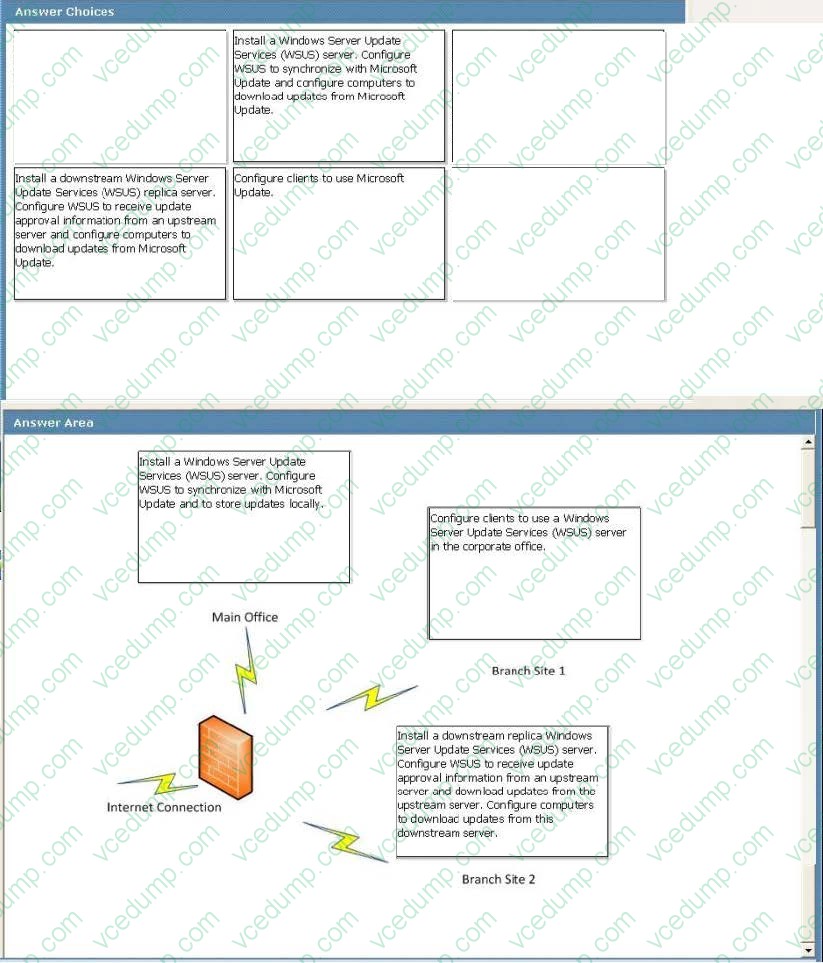
A company has a main office and two branch offices named Branch Site 1 and Branch Site 2. The main office has a server that runs Windows Server 2008 R2. Branch Site 2 also has a server that runs Windows Server 2008 R2. The branch offices do not have direct access to the Internet.
Windows 7 Enterprise is installed on all client computers. A diagram of the network is shown in the exhibit.
Corporate policy dictates that all updates must be approved by the IT department before being deployed.
Using the hardware configuration shown in the exhibit, you need to design a Windows Update strategy to meet the following goals:
What should you recommend? (To answer, drag the appropriate answer to the correct location or locations in the work area.)
Select and Place:

Related Exams:
-
62-193
Technology Literacy for Educators -
70-243
Administering and Deploying System Center 2012 Configuration Manager -
70-355
Universal Windows Platform – App Data, Services, and Coding Patterns -
77-420
Excel 2013 -
77-427
Excel 2013 Expert Part One -
77-725
Word 2016 Core Document Creation, Collaboration and Communication -
77-726
Word 2016 Expert Creating Documents for Effective Communication -
77-727
Excel 2016 Core Data Analysis, Manipulation, and Presentation -
77-728
Excel 2016 Expert: Interpreting Data for Insights -
77-731
Outlook 2016 Core Communication, Collaboration and Email Skills
Tips on How to Prepare for the Exams
Nowadays, the certification exams become more and more important and required by more and more enterprises when applying for a job. But how to prepare for the exam effectively? How to prepare for the exam in a short time with less efforts? How to get a ideal result and how to find the most reliable resources? Here on Vcedump.com, you will find all the answers. Vcedump.com provide not only Microsoft exam questions, answers and explanations but also complete assistance on your exam preparation and certification application. If you are confused on your 70-686 exam preparations and Microsoft certification application, do not hesitate to visit our Vcedump.com to find your solutions here.