70-682 Exam Details
-
Exam Code
:70-682 -
Exam Name
:Pro. Upgrading to Windows 7 MCITP Enterprise Desktop Support Technician -
Certification
:Microsoft Certifications -
Vendor
:Microsoft -
Total Questions
:240 Q&As -
Last Updated
:Feb 07, 2022
Microsoft 70-682 Online Questions & Answers
-
Question 41:
You work as a desktop technician at ABC.com. The ABC.com network consists of a single Active Directory domain named ABC.com. All servers on the network run Windows Server 2008. All client computers run Windows 7 Enterprise.
You receive a call from a user named Mia Hamm reporting that she is unable to log on to her computer.
When you attempt to log on to her computer, you receive the following error message:
""The system cannot log you on to the domain because the systems computer account in its primary domain is missing or the password on that account is incorrect."
You open Active Directory Users and Computers and discover that the domain computer account for Mia's computer is missing.
How can you enable Mia to log on to her computer?
A. Create a new computer in Active Directory for Mia's computer.
B. Add Mia's computer to a workgroup then rejoin it to the domain.
C. Add a host record in DNS for Mia's computer.
D. Create a new user account in Active Directory for Mia. Instruct Mia to log in using the new account. -
Question 42:
All client computers on your company network run Windows 7. A computer is unable to connect to network resources. The configuration of the computer is as shown in the following table. You need to ensure that the computer is able to connect to network resources. What should you do?
A. Change the IP address to 131.107.3.254.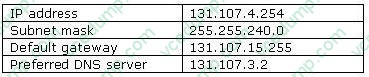
B. Change the subnet mask to 255.255.248.0.
C. Change the default gateway to 131.107.0.1.
D. Change the preferred DNS server to 131.107.3.1. -
Question 43:
You have a computer that runs Windows 7. Multiple users log on to your computer. You enable auditing on a folder stored on your computer. You need to ensure that each access to the folder is logged. What should you do?
A. Start the Problem Steps Recorder.
B. From Event Viewer, modify the properties of the Security log.
C. From the local Group Policy, configure the Audit object access setting.
D. From the local Group Policy, configure the Audit directory service Access setting. -
Question 44:
You have a computer that runs Windows 7. Multiple users log on to the computer. The computer has five removable devices. You need to ensure that users can only access removable devices that have been previously installed on the computer. What should you modify in the Local Group Policy?
A. Enable the Prevent redirection of USB devices setting.
B. Enable the Prevent installation of removable devices setting.
C. Disable the WPD Devices. Deny read access setting.
D. Disable the Allow administrators to override Device Installation Restriction policies setting. -
Question 45:
You work as a desktop technician at ABC.com. The ABC.com network consists of a single Active Directory domain named ABC.com. All servers on the network run Windows Server 2008. All client computers run Windows 7 Enterprise.
You use a desktop computer named ABC-Tech01 to perform your day-to-day administrative tasks.
You have a Virtual Hard Disk (VHD) that has Windows 7 Ultimate installed. You want to start ABC-Tech01 from the Virtual Hard Disk to view the extra features of Windows 7 Ultimate.
How can you boot ABC-Tech01 to the VHD?
A. Run Diskpart.exe and mount the VHD.
B. Make the VHD the active partition using Disk Management.
C. Run ImageX and mount the VHD.
D. Run ImageX and apply the VHD.
E. Modify the Boot Manager settings in Bcdedit.exe. -
Question 46:
Your company has a main office and a branch office. The network contains an Active Directory forest. All users on the network access the Internet from their computers. The company hires a temporary employee who has his own portable computer. The employee connects his portable computer to the network. When the employee attempts to join the computer to the domain, the connection fails. A help desk technician reports the following about the employee. He has a domain user account.His computer can access Internet Web sites.His computer can contact domain controllers by using the domain controllers IP addresses. You need to ensure that the employees computer can join the domain. The solution must ensure that the computer can access resources on the Internet. What should you do?
A. Modify the time zone for the computer.
B. Modify the IPv4 settings on the computer.
C. Create an A record for the computer in an internal DNS zone.
D. Request that an administrator create a prestaged computer account in the domain. -
Question 47:
Multiple users report that their Windows 7 computers take longer to start than when their computers were first installed. A help desk technician reports that the problem is related to installed applications. You need to recommend a solution that identifies the applications that run during the startup process. What should you recommend?
A. Event Forwarding
B. MSConfig.exe
C. Problem Steps Recorder
D. Reliability Monitor -
Question 48:
This question is the first in a series of questions that all present the same scenario. For your convenience, the scenario is repeated in each question. Each question presents a different goal and answer choices, but the text of the scenario is exactly the same in each question in this series. Start of repeated scenarioYou are an enterprise desktop support technician for Fabrikam, Inc. Active Directory InformationThe company has a main office and a branch office. The main office hosts all of the companys servers. The main office connects to the branch office by using a WAN link. The network contains a single Active Directory domain that has 500 users. The domain contains three domain controllers and an enterprise root certification authority (CA). All servers run Windows Server 2008 R2. All user accounts are in an organizational unit (OU) named Employees. The computer accounts for all desktop computers are in an OU named Desktops. The computer accounts for all portable computers are in an OU named Laptops. A startup script is deployed to all computers by using Group Policy objects (GPOs). Client ConfigurationsAll client computers run Windows 7 Enterprise. All users have desktop computers. All computers are members of the domain. All desktop computers use wired connections to connect to the network. All portable computers use wireless connections to connect to the network. The wireless network is secured by using EAP-TLS. Company policy states that all client computers must be configured by using DHCP. The company has an internal Web site. The Web site is configured to use SSL encryption and to require client certificates. All company users can access the internal Web site. End of repeated scenario The company hires a new desktop support technician. The technician is added to the Administrators group on all client computers and the DHCP Users group on all DHCP servers. The new technician reports that the DHCP snap-in is unavailable on his computer. You need to ensure that the technician can view the configurations of the DHCP servers. What should you do?
A. Instruct the technician to customize the Start menu to display the administrative tools.
B. Instruct the technician to install Remote Server Administration Tools (RSAT) and to modify the Windows Features.
C. Request that the technician be added to the Server Operators group in Active Directory.
D. Request that the technician be added to the Network Configuration Operators group in Active Directory and modify the Windows Features. -
Question 49:
You have a development network that you use for testing purposes. The development network contains an Active Directory domain. Users have computers that run Windows 7. The users have several virtual machines that run Windows 7. The virtual machines are joined to Active Directory. Several users report that when they discard changes on the virtual machines, and then attempt to log on to the machines, they sometimes receive the following error message. You need to prevent this error from recurring. What should you do?
A. Create a Password Setting object (PSO) in Active Directory.
B. Modify the security settings by using a Group Policy object (GPO).
C. On the virtual machines, create a password reset disk.
D. On the virtual machines, modify the User Account Control (UAC) settings. -
Question 50:
Start of repeated scenarioYou are an enterprise desktop support technician for Margies Travel. Margies Travel is a company that specializes in booking travel for large corporations. The company has a main office in New York and operates a call center in New York and a call center in Los Angeles. The company has 1,000 employees. Active Directory ConfigurationThe network contains an Active Directory forest named margiestravel.com. The functional level of the forest is Windows Server 2008 R2. The Active Directory sites are configured as shown in the following table. All sites connect to each other by using high- speed WAN links. Server ConfigurationThe relevant servers are configured as shown in the following table. Security ConfigurationThe relevant security settings for the domain are configured as shown in the following table. The relevant network policies on the NPS servers and the RRAS servers are configured as shown in the following table. All wireless access points are configured to use 802.1X and RADIUS authentication. All RADIUS authentication requests are sent to NPAS1 and NPAS2. User InformationAll client computers run Windows 7 Professional. Sales staff is located in the main office and uses portable computers. All portable computers are members of the MargiesTravel\Wireless group. Application ConfigurationCall center staff uses a custom application to book airline tickets. The application is packaged as an MSI file and is signed by using a code signing certificate that was issued by CA3. The application is published by using Group Policies. End of repeated scenario At 08.00 on a Tuesday morning, an administrator in Site 3 takes DC3 offline to update the server. Users in Site 3 report that they cannot log on to their computers. The users receive the following error message. Your account has time restrictions that prevent you from logging on at this time. Please try again later. You need to ensure that all users can log on to their computers when DC3 is offline for maintenance. Your solution must adhere to the corporate security policies. What should you do?
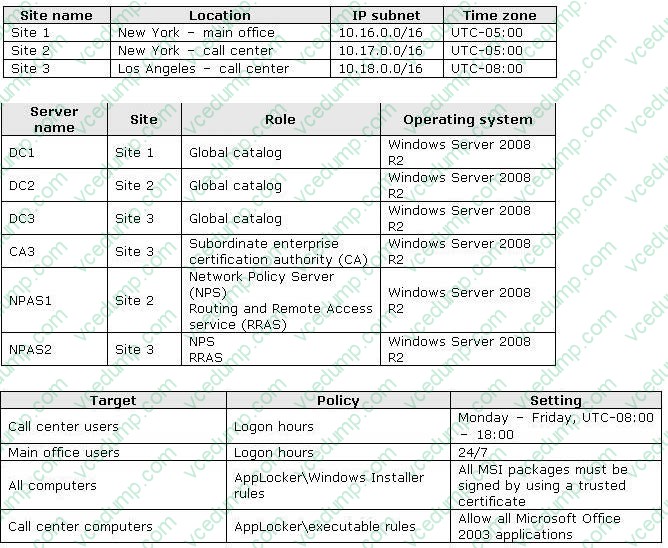
A. Modify the logon hours for all users in Site 3.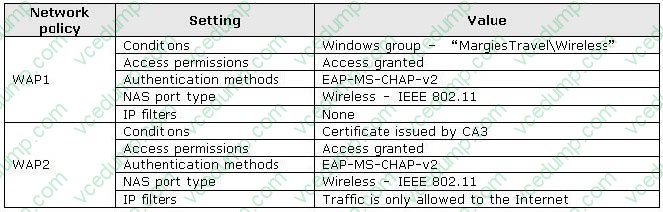
B. Change the time zone settings for all client computers in Site 3 to UTC-05.00.
C. Request that a second domain controller be deployed in Site 3.
D. Request that the time zone settings for DC1 and DC2 be changed to UTC-08.00.
Related Exams:
-
62-193
Technology Literacy for Educators -
70-243
Administering and Deploying System Center 2012 Configuration Manager -
70-355
Universal Windows Platform – App Data, Services, and Coding Patterns -
77-420
Excel 2013 -
77-427
Excel 2013 Expert Part One -
77-725
Word 2016 Core Document Creation, Collaboration and Communication -
77-726
Word 2016 Expert Creating Documents for Effective Communication -
77-727
Excel 2016 Core Data Analysis, Manipulation, and Presentation -
77-728
Excel 2016 Expert: Interpreting Data for Insights -
77-731
Outlook 2016 Core Communication, Collaboration and Email Skills
Tips on How to Prepare for the Exams
Nowadays, the certification exams become more and more important and required by more and more enterprises when applying for a job. But how to prepare for the exam effectively? How to prepare for the exam in a short time with less efforts? How to get a ideal result and how to find the most reliable resources? Here on Vcedump.com, you will find all the answers. Vcedump.com provide not only Microsoft exam questions, answers and explanations but also complete assistance on your exam preparation and certification application. If you are confused on your 70-682 exam preparations and Microsoft certification application, do not hesitate to visit our Vcedump.com to find your solutions here.