70-682 Exam Details
-
Exam Code
:70-682 -
Exam Name
:Pro. Upgrading to Windows 7 MCITP Enterprise Desktop Support Technician -
Certification
:Microsoft Certifications -
Vendor
:Microsoft -
Total Questions
:240 Q&As -
Last Updated
:Feb 07, 2022
Microsoft 70-682 Online Questions & Answers
-
Question 31:
Your network consists of an Active Directory domain and a DirectAccess infrastructure. You install Windows 7 on a new portable computer and join the computer to the domain. You need to ensure that the computer can establish DirectAccess connections. What should you do?
A. Install a computer certificate.
B. Create a new network connection.
C. Enable the Network Discovery firewall exception.
D. Add the computer account to the Network Configuration Operators group. -
Question 32:
Your network has a main office and a branch office. The branch office has five client computers that run Windows 7. All client computers are configured to use BranchCache. At the branch office, a computer named Computer1 is experiencing performance issues. You need to temporarily prevent all computers from retrieving cached content from Computer1. What should you do on Computer1?
A. At the command prompt, run Netsh branchcache flush.
B. At the command prompt, run Netsh branchcache dump.
C. Modify the Configure BranchCache for network files Group Policy setting.
D. Modify the Set percentage of disk space used for client computer cache Group Policy setting. -
Question 33:
You work as a desktop technician at ABC.com. The ABC.com network consists of a single Active Directory domain named ABC.com. All servers on the network run Windows Server 2008. All client computers run Windows 7 Professional.
ABC.com contains a Development department. The Development department users create custom software applications for use by ABC.com staff and customers.
The developers create a custom application named ABC-App1. All ABC.com domain users require ABC- App1 to be installed on their computers.
ABC.com company security policy states that domain users must not have administrative rights on their computers. To comply with this security policy, all user accounts are members of the Domain Users group only.
A user named Mia Hamm attempts to install ABC-App1. The installation fails and displays an error message saying administrative rights are required to install the application.
How can you install the application using the least amount of administrative effort whilst complying with the company security policy?
A. Log in to each client computer with an administrative account and install the application.
B. Deploy a Group Policy Object (GPO) that publishes the application.
C. Disable User Account Control on the client computers.
D. Instruct the users to right click on the application installer and select "Run as Administrator". -
Question 34:
You work as a desktop technician at ABC.com. The ABC.com network consists of a single Active Directory domain named ABC.com. All servers on the network run Windows Server 2008. All client computers run Windows 7 Enterprise.
You use a desktop computer named ABC-Tech01 to perform your day-to-day administrative tasks. You connect to network file servers and other client computers using Remote Desktop Connections.
The network contains a file server named ABC-File01. ABC-File01 hosts multiple shared folders which are accessed by company users in all ABC.com company departments.
When you connect to ABC-File01 using a Remote Desktop connection, the desktop from ABC-File01 is displayed.
How can you prevent the desktop of ABC-File01 being displayed when you connect to it using a Remote Desktop connection?
A. Modify the Remote Desktop Connection options on ABC-File01.
B. Modify the Remote Desktop Connection options on ABC-Tech01
C. Modify the Display settings on ABC-File01.
D. Modify the Display settings on ABC-Tech01. -
Question 35:
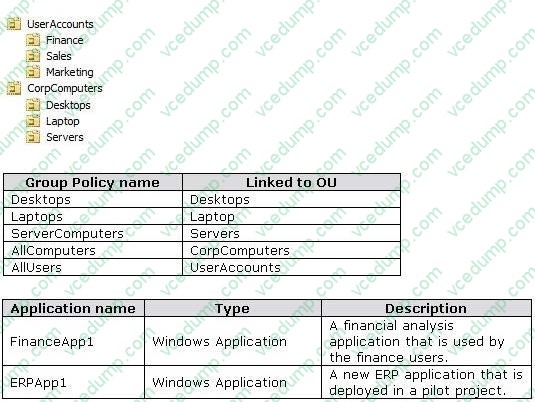
11g wireless access point. All wireless access points are configured to use Radius01 for authentication. Active Directory ConfigurationThe network contains one Active Directory domain named consolidatedmessenger.com. The relevant organizational unit structure is shown in the following diagram. The relevant Group Policy objects (GPOs) in the domain are configured as shown in the following table. Applications The relevant applications on the network are shown in the following table. Server Configuration The relevant servers are configured as shown in the following table. Client Configuration Each office has 500 desktop computers that run Windows 7 Enterprise. There are 250 mobile users that travel regularly between all three offices. The mobile users have laptop computers that run Windows 7 Enterprise. To prevent the spread of malware, the company restricts the use of USB devices and only allows the use of approved USB storage devices. PrintersThe marketing group has several printers that are shared on File01. A shared printer name Printer1 is a high-performance, black-and-white printer. A
shared printer named Printer2 is a high-definition, photo-quality, color printer. Printer2 should only be used to print marketing brochures. End of repeated scenario The Office1 network link is brought offline for emergency maintenance. Users in Office2 and Office3 report that they cannot connect to the wireless network. You need to recommend changes to ensure that users in all offices can connect to the wireless network if a WAN link fails. What should you recommend?
A. that redundant DHCP scopes be created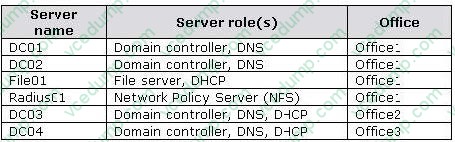
B. that additional RADIUS servers be deployed
C. that universal group caching be implemented
D. that additional default gateways be configured -
Question 36:
Your company has a main office and a branch office. The network contains a single Active Directory domain. All computers are members of the domain. Five users in the branch office report that their Windows 7 computer is slow when it runs multiple applications. From your computer, you need to identify the application that uses the most processor on the computers. Which tool should you use?
A. Performance Monitor
B. Reliability Monitor
C. Resource Monitor
D. System Information -
Question 37:
Your network contains an Intrasite Automatic Tunnel Addressing Protocol (ISATAP) router. You run Ipconfig as shown in the exhibit. (Click the Exhibit button.) Other users on the network receive an IPv6 address for ISATAP. You need to ensure that your computer receives an IPv6 address for ISATAP. What should you do?
A. Run Ipconfig /renew6.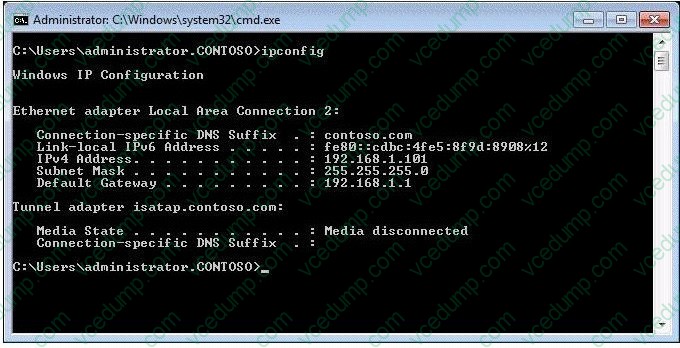
B. Run Ipconfig /setclassid6.
C. Start the Net.TCP Port Sharing service.
D. Start the Internet Protocol Helper (IP Helper) service. -
Question 38:
Your network has a main office and a branch office. The branch office has computers that run Windows 7. A network administrator enables BranchCache in the main office. You run Netsh on your computer as shown in the exhibit. (Click the Exhibit button.) You need to ensure that other computers in the branch office can access the cached content on your computer. What should you do?
The safer , easier way to help you pass any IT exams.
A. Turn on Internet Information Services (IIS).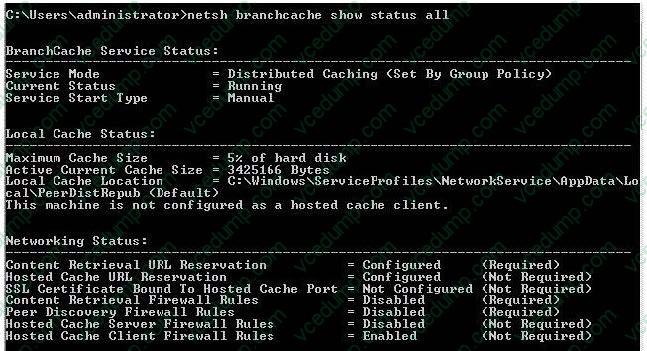
B. Configure the computer as a hosted cache client.
C. Configure the BranchCache service to start automatically.
D. Modify the Windows Firewall with Advanced Security rules. -
Question 39:
You work as a desktop technician at ABC.com. The network consists of a single Active Directory domain named ABC.com. All servers on the network run Windows Server 2008.
All client computers run Windows 7 Enterprise.
You receive reports from users that their computers now take longer to start up than they used to. As part of your troubleshooting process, you need to determine what applications run when the computer starts.
How would you determine what applications run when a computer starts?
A. Run Task Manager and look at the Applications tab.
B. Run MSConfig and look at the Startup tab.
C. Run Services.msc and look at the startup properties of the services.
D. Open a command prompt and run the NET START command. -
Question 40:
Start of repeated scenarioYou are an enterprise desktop support technician for Fabrikam, Inc. Active Directory InformationThe company has a main office and a branch office. The main office hosts all of the companys servers. The main office connects to the branch office by using a WAN link. The network contains a single Active Directory domain that has 500 users. The domain contains three domain controllers and an enterprise root certification authority (CA). All servers run Windows Server 2008 R2. All Changed with the DEMO VERSION of CAD-KAS PDF-Editor (http://www.cadkas.com). user accounts are in an organizational unit (OU) named Employees. The computer accounts for all desktop computers are in an OU named Desktops. The computer accounts for all portable computers are in an OU named Laptops. A startup script is deployed to all computers by using Group Policy objects (GPOs). Client ConfigurationsAll client computers run Windows 7 Enterprise. All users have desktop computers. All computers are members of the domain. All desktop computers use wired connections to connect to the network. All portable computers use wireless connections to connect to the network. The wireless network is secured by using EAP-TLS. Company policy states that all client computers must be configured by using DHCP. The company has an internal Web site. The Web site is configured to use SSL encryption and to require client certificates. All company users can access the internal Web site. End of repeated scenario The help desk reports that all newly installed desktop computers cannot access the companys file server. The help desk sends you the screen capture shown in the exhibit. (Click the Exhibit button.) You need to resolve the network connectivity issue. The solution must adhere to the company policy. What should you instruct help desk to do?
A. Modify the network configuration and define the IPv4 default gateway.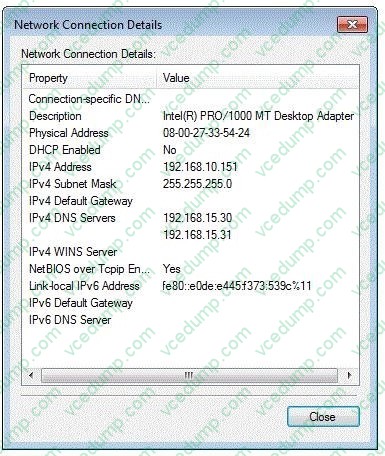
B. Modify Windows Firewall and enable File and Printer Sharing in the public profile.
C. Modify Windows Firewall and enable File and Printer Sharing in the domain profile.
D. Modify the network configuration to automatically obtain an IP address and a DNS server address.
Related Exams:
-
62-193
Technology Literacy for Educators -
70-243
Administering and Deploying System Center 2012 Configuration Manager -
70-355
Universal Windows Platform – App Data, Services, and Coding Patterns -
77-420
Excel 2013 -
77-427
Excel 2013 Expert Part One -
77-725
Word 2016 Core Document Creation, Collaboration and Communication -
77-726
Word 2016 Expert Creating Documents for Effective Communication -
77-727
Excel 2016 Core Data Analysis, Manipulation, and Presentation -
77-728
Excel 2016 Expert: Interpreting Data for Insights -
77-731
Outlook 2016 Core Communication, Collaboration and Email Skills
Tips on How to Prepare for the Exams
Nowadays, the certification exams become more and more important and required by more and more enterprises when applying for a job. But how to prepare for the exam effectively? How to prepare for the exam in a short time with less efforts? How to get a ideal result and how to find the most reliable resources? Here on Vcedump.com, you will find all the answers. Vcedump.com provide not only Microsoft exam questions, answers and explanations but also complete assistance on your exam preparation and certification application. If you are confused on your 70-682 exam preparations and Microsoft certification application, do not hesitate to visit our Vcedump.com to find your solutions here.