70-649 Exam Details
-
Exam Code
:70-649 -
Exam Name
:TS: Upgrading Your MCSE on Windows Server 2003 to Windows Server 2008, Technology Specialist -
Certification
:Microsoft Certifications -
Vendor
:Microsoft -
Total Questions
:303 Q&As -
Last Updated
:Dec 16, 2021
Microsoft 70-649 Online Questions & Answers
-
Question 51:
Your company has a main office and a branch office. The branch office contains a read- only domain controller named RODC1.
You need to ensure that a user named Admin1 can install updates on RODC1. The solution must prevent Admin1 from logging on to other domain controllers.
What should you do?
A. Run ntdsutil.exe and use the Roles option.
B. Run dsmgmt.exe and use the Local Roles option.
C. From Active Directory Sites and Services, modify the NTDS Site Settings.
D. From Active Directory Users and Computers, add the user to the Server Operators group. -
Question 52:
Your network contains a server named Server1 that runs a Server Core installation of Windows Server 2008 R2 Service Pack 1 (SP1) Standard.
You have a performance counter log on Server1.
You need to convert the performance counter log to a comma separated value (CSV) file.
Which tool should you use?
A. Perfmon
B. Typeper
C. Relog
D. Logman -
Question 53:
Your network consists of a single Active Directory domain. All servers run Windows Server 2008 R2. You have a server named Server1 that hosts shared documents. Users report extremely slow response times when they try to open the shared documents on Server1.
You log on to Server1 and observe real-time data indicating that the processor is operating at 100 percent of capacity.
You need to gather additional data to diagnose the cause of the problem. What should you do?
A. In Event viewer, open and review the application log for Performance events.
B. In Resource Monitor, use the Resource view to see the percentage of processor capacity used by each application.
C. In Performance Monitor, create performance counter alert that will be triggered when processor usage exceeds 80 percent for more than five minutes on Server1.
D. In the Performance Monitor console, create a counter log to track processor usage. -
Question 54:
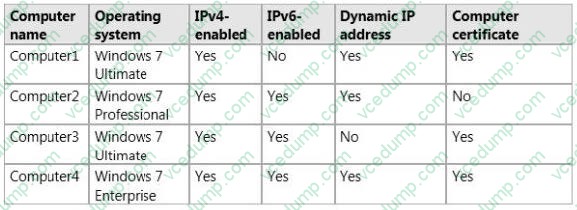
Your network contains an Active Directory domain. The domain contains four client computers. The client computers are configured as shown in the following table.
Your company plans to implement DirectAccess.
You need to identify which client computers can use DirectAccess.
Which client computers should you identify? (Each correct answer presents part of the solution. Choose two.)
A. Computer2
B. Computer3
C. Computer4
D. Computer1 -
Question 55:
Your network contains an Active directory domain named fabrikam.com. The domain contains a Web server named Web1 that runs Windows Server 2008 R2.
You install the FTP Server role service on Web 1.
You need to manage the FTP server settings on Web 1.
Which tool should you use?
A. Services
B. Internet Information Services (IIS) 6.0 Manager
C. FTP
D. Internet Information Services (IIS) Manager -
Question 56:
You need to capture the HTTP traffic to and from a server every day between 09:00 and
10:00.
What should you do?
A. Create a scheduled task that runs the Netsh tool.
B. Create a scheduled task that runs the Nmcap tool.
C. From Network Monitor, configure the General options.
D. From Network Monitor, configure the Capture options. -
Question 57:
Your network contains an Active Directory domain.
Your company provides VPN access for multiple organizations.
You need to configure Network Policy Server (NPS) to forward authentication requests to the appropriate organization.
What should you configure on the NPS server?
A. Group Policy preferences
B. health policies
C. remediation server groups
D. IKEv2 client connections
E. the RADIUS Accounting accounting provider
F. system health validators (SHVs)
G. the Windows Authentication authentication provider
H. connection request policies
I. the Windows Accounting accounting provider
J. the RADIUS Authentication authentication provider -
Question 58:
Active Directory Rights Management Services (AD RMS) is deployed on your network.
You need to configure AD RMS to use Kerberos authentication.
Which two actions should you perform? (Each correct answer presents part of the solution.
Choose two.)
A. Register a service principal name (SPN) for AD RMS.
B. Register a service connection point (SCP) for AD RMS.
C. Configure the identity setting of the _DRMSAppPool1 application pool.
D. Configure the useAppPoolCredentials attribute in the Internet Information Services (IIS) metabase. -
Question 59:
Your network contains a server named Server1 that has two volumes named C and D.
You add a new volume.
You need to ensure that you can access data on the new volume by using the path D:\data.
What should you do?
A. From Disk Management, create a volume mount point.
B. At the command prompt, run the dism.exe command and specify the /moant-wim parameter.
C. From Disk Management, attach a virtual hard disk (VHD).
D. At the command prompt, run the diskraid.exe command and specify the /v parameter. -
Question 60:
Your network contains a Network Load Balancing (NLB) cluster named NLB01. NLB01 contains two servers named Node1 and Node2 that run Windows Server 2008 R2. Node1 and Node2 are configured as shown in the following table.
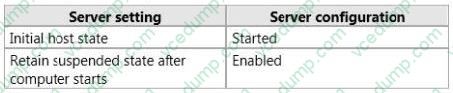
You need to install Windows updates on Node1 to meet the following requirements:
Prevent new connections to Node1 while the updates are installed. Provide connected users with the ability to complete their session on Node1 before the updates are installed.
What should you do first?
A. From Network Load Balancing Manager, right-click Model and click Drainstop.
B. From Network Load Balancing Manager, right-click Node1 and click Suspend.
C. From the Services console, right-click Workstation and click Pause.
D. From the Services console, right-click Server and click Pause.
Related Exams:
-
62-193
Technology Literacy for Educators -
70-243
Administering and Deploying System Center 2012 Configuration Manager -
70-355
Universal Windows Platform – App Data, Services, and Coding Patterns -
77-420
Excel 2013 -
77-427
Excel 2013 Expert Part One -
77-725
Word 2016 Core Document Creation, Collaboration and Communication -
77-726
Word 2016 Expert Creating Documents for Effective Communication -
77-727
Excel 2016 Core Data Analysis, Manipulation, and Presentation -
77-728
Excel 2016 Expert: Interpreting Data for Insights -
77-731
Outlook 2016 Core Communication, Collaboration and Email Skills
Tips on How to Prepare for the Exams
Nowadays, the certification exams become more and more important and required by more and more enterprises when applying for a job. But how to prepare for the exam effectively? How to prepare for the exam in a short time with less efforts? How to get a ideal result and how to find the most reliable resources? Here on Vcedump.com, you will find all the answers. Vcedump.com provide not only Microsoft exam questions, answers and explanations but also complete assistance on your exam preparation and certification application. If you are confused on your 70-649 exam preparations and Microsoft certification application, do not hesitate to visit our Vcedump.com to find your solutions here.