70-649 Exam Details
-
Exam Code
:70-649 -
Exam Name
:TS: Upgrading Your MCSE on Windows Server 2003 to Windows Server 2008, Technology Specialist -
Certification
:Microsoft Certifications -
Vendor
:Microsoft -
Total Questions
:303 Q&As -
Last Updated
:Dec 16, 2021
Microsoft 70-649 Online Questions & Answers
-
Question 31:
Your network contains a server named Server1 that runs Windows Server 2008 R2. You need to configure Server1 as a Key Management Service (KMS) host. What should you do first?
A. From the Server Manager console, run the Add Features Wizard and install the Windows Process Activation Service.
B. At the command prompt, run slmgr.vbs and specify the/ipk option.
C. At the command prompt, run slmgr.vbs and specify the/dli option.
D. From the Server Manager console, run the Add Features wizard and install the online Responder Tools. -
Question 32:
Your network contains a server named Server1.contoso.com. Server1 is located on the internal network.
You have a client computer named Computer1 that runs Windows 7. Computer1 is located on a public network that is connected to the Internet. Computer1 is enabled for DirectAccess.
You need to verify whether Computer1 can resolve Server1 by using DirectAccess.
Which command should you run on Computer1?
A. netsh.exe dnsclient show state
B. nslookup.exeServer1.contoso.com
C. ping.exeServer1.contoso.com
D. nbtstat.exe -a Server1.contoso.com -
Question 33:
Your company has a main office and a branch office.
The network contains an Active Directory domain.
The main office contains a writable domain controller named Dc1. The branch office contains a read-only domain controller (RODC) named DC2.
You discover that the password of an administrator named Admin1 is cached on DC2.
You need to prevent Admin1's password from being cached on DC2.
What should you do?
A. Create a Password Setting object (PSO).
B. Modify the properties of DC2's computer account.
C. Modify the properties of the domain.
D. Modify the NTDS Site Settings. -
Question 34:
Your network contains an Active Directory forest. The forest contains a member server named Server1 that runs Windows Server 2008 R2. You need to configure Server1 as a network address translation (NAT) server. Which server role, role service, or feature should you install?
A. windows System Resource Manager (WSRM)
B. Simple TCP/IP services Wireless LAN Service
C. Connection Manager Administration Kit (CMAK)
D. Routing and Remote Access service (RRAS)
E. Group Policy Management
F. File Server Resource Manager (FSRM)
G. Services for Network File System (NFS)
H. Network Load Balancing (NLB)
I. Windows Server Update Services (WSUS)
J. Health Registration Authority (HRA) -
Question 35:
Your network contains an Active Directory forest named contoso.com. The forest contains two domains named contoso.com and child.contoso.com.
The contoso.com domain contains a server named Server1. Server1 has the Network Policy and Access Services (NPAS) server role installed.
You need to ensure that Server1 can read the dial-in properties of user accounts in the child.contoso.com domain.
Which tool should you use?
A. Authorization Manager
B. Netdom
C. Netsh
D. Active Directory Sites and Services -
Question 36:
Your network contains a domain controller named Server1 and a server named Server2. Server2 has the Windows Deployment Services (WDS) server role installed.
You open the Windows Deployment Services console and see several pending devices.
You right-click one of the devices and click Name and Approve.
You enter the computer name and receive the following error message: "The parameter is incorrect."
You need to ensure that you can create new computer accounts and update existing computer accounts.
What should you do?
A. Assign the Server1 computer account permissions to the Computers container.
B. Assign the Server2 computer account permissions to the Computers container.
C. From Windows Deployment Services, change the Computer Account Location settings.
D. From Windows Deployment Services, change the PXE Response Policy to Respond only to known client computers. -
Question 37:
Your network contains a server named Server1 that has the Remote Desktop Session Host (RD Session Host) role service installed. You enable Plug and Play device redirection for Server1 by using a Group Policy.
You verify that the Group Policy is applied to Server1.
From a client computer, you configure Remote Desktop Connection as shown in the exhibit. (Click the Exhibit button.)
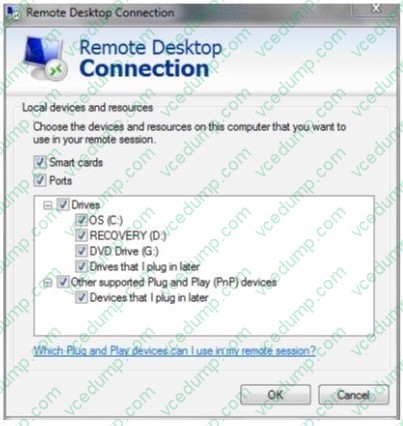
You discover that when you establish a Remote Desktop session to Server1, Plug and Play devices are not redirected.
You need to ensure that Plug and Play devices are redirected during Remote Desktop sessions to Server1.
What should you do? (Each correct answer presents part of the solution. Choose two.)
A. On Server1, modify the Sessions settings of the RDP-Tcp Properties.
B. On Server1, install the Desktop Experience feature.
C. From the client computer, modify the Experience settings of Remote Desktop Connection.
D. On Server1, install the Quality Windows Audio Video Experience feature.
E. On Server1, modify the Client Settings of the RDP-Tcp Properties. -
Question 38:
Your network contains two servers that have the Remote Desktop Web Access (RD Web Access) role service installed. Each server hosts three different RemoteApp programs.
You deploy a new server that has the Remote Desktop Connection Broker (RD Connection Broker) role service installed.
Users report that when they connect to one of the RD Web Access servers, they see only three applications.
You need to ensure that the users see all six RemoteApp programs when they connect to an RD Web Access server.
Which two actions should you perform? (Each correct answer present part of the solution.
Choose two.)
A. FromRemoteApp Manager, configure the RD Gateway Settings
B. FromRemoteApp Manager, configure the Digital Signature Settings.
C. From Remote Desktop Connection Manager, add RemoteApp sources.
D. From Remote Desktop Connection Manager, add RD Web Access servers. -
Question 39:
Your network contains three servers. The servers are configured as shown in the following table.
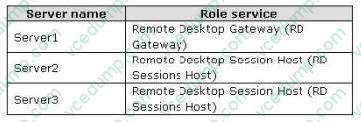
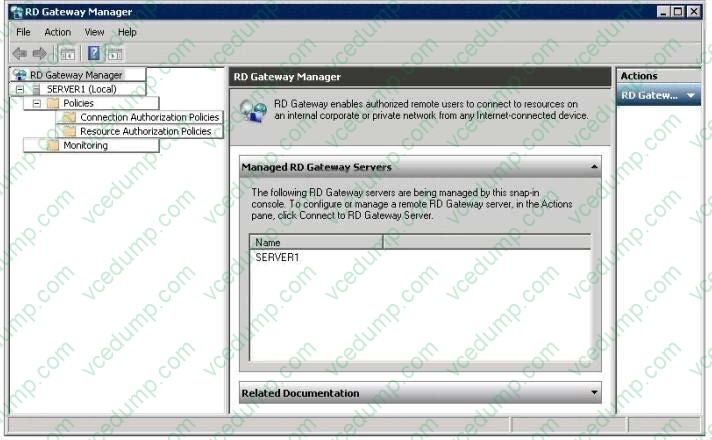
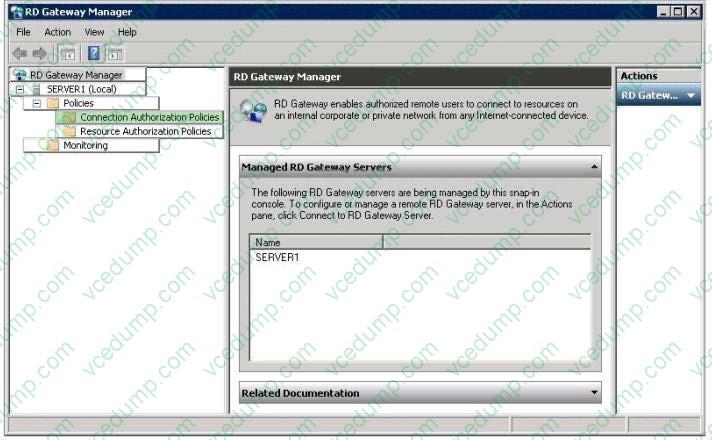
You need to allow only certain users to establish Remote Desktop connections through the RD Gateway server. Which node from RD Gateway Manager should you use to achieve this task? To answer, select the appropriate node in the answer area.
Hot Area:
-
Question 40:
Your network contains three servers.
The servers are configured as shown in the following table:
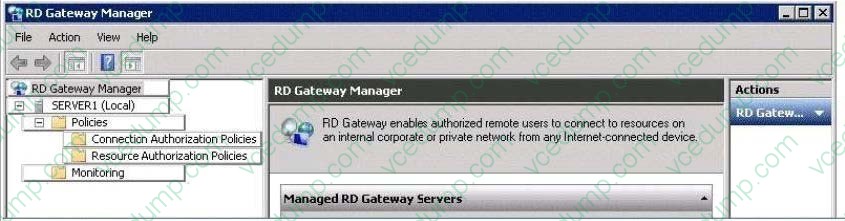
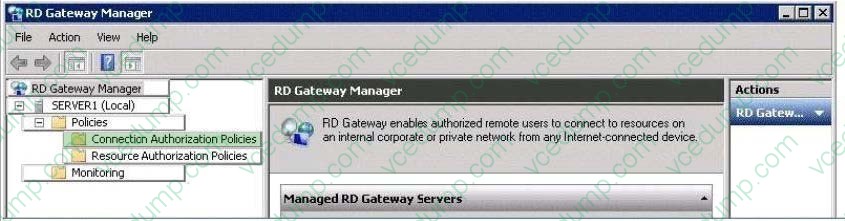
You need to configure Server1 to use Network Access Protection (NAP) for all client connections.
Which node from RD Gateway Manager should you use to make this configuration?
To answer, select the appropriate node in the answer area.
Hot Area:
Related Exams:
-
62-193
Technology Literacy for Educators -
70-243
Administering and Deploying System Center 2012 Configuration Manager -
70-355
Universal Windows Platform – App Data, Services, and Coding Patterns -
77-420
Excel 2013 -
77-427
Excel 2013 Expert Part One -
77-725
Word 2016 Core Document Creation, Collaboration and Communication -
77-726
Word 2016 Expert Creating Documents for Effective Communication -
77-727
Excel 2016 Core Data Analysis, Manipulation, and Presentation -
77-728
Excel 2016 Expert: Interpreting Data for Insights -
77-731
Outlook 2016 Core Communication, Collaboration and Email Skills
Tips on How to Prepare for the Exams
Nowadays, the certification exams become more and more important and required by more and more enterprises when applying for a job. But how to prepare for the exam effectively? How to prepare for the exam in a short time with less efforts? How to get a ideal result and how to find the most reliable resources? Here on Vcedump.com, you will find all the answers. Vcedump.com provide not only Microsoft exam questions, answers and explanations but also complete assistance on your exam preparation and certification application. If you are confused on your 70-649 exam preparations and Microsoft certification application, do not hesitate to visit our Vcedump.com to find your solutions here.