70-649 Exam Details
-
Exam Code
:70-649 -
Exam Name
:TS: Upgrading Your MCSE on Windows Server 2003 to Windows Server 2008, Technology Specialist -
Certification
:Microsoft Certifications -
Vendor
:Microsoft -
Total Questions
:303 Q&As -
Last Updated
:Dec 16, 2021
Microsoft 70-649 Online Questions & Answers
-
Question 181:
Your network contains two Active Directory forests named contoso.com and fabrikam.com.
You have a standalone Network Policy Server (NPS) named NPS1.
You have a VPN server named VPN1. VPN1 is configured as a RADIUS client to NPS1.
You need to ensure that users from both forests can establish VPN connections by using their own domain accounts.
What should you do?
A. On NPS1, configure remediation server groups.
B. On NPS1, configure connection request policies.
C. On VPN1, modify the DNS suffix search order.
D. On VPN1, modify the IKEv2 Client connection controls. -
Question 182:
Your network contains a single Active Directory domain. The domain contains a server named Server1 that runs Windows Server 2008 IC
Server1 has an SCSI host bus adapter that connects to an iSCSI target.
You install an additional iSCSI host bus adapter on Server1.
You need to ensure that Server1 can access the iSCSI target if a host bus adapter fails.
What should you do first?
A. Install the Internet Storage Name Server (iSNS) feature.
B. Bridge the iSCSI host bus adapters.
C. Install the Multipath I/O feature.
D. At the command prompt, run mpclairn.exe -I -m 6. -
Question 183:
Your network contains an Active Directory domain. The domain contains a server named Server1. Server1 runs Windows Server 2008 R2.
You need to mount an Active Directory Lightweight Directory Services (AD LDS) snapshot from Server1.
What should you do?
A. Run Idp.exe and use the Bind option.
B. Run diskpart.exe and use the Attach option.
C. Run dsdbutil.exe and use the snapshot option.
D. Run imagex.exe and specify the /mount parameter. -
Question 184:
You manage 20 servers that run Windows Server 2008 R2. The Remote Desktop Services server role and the Windows System Resource Manager (WSRM) feature are installed on all the servers.
You create and configure a resource-allocation policy that has the required custom settings on a server named TS01.
You need to configure the WSRM settings on all the servers to match the WSRM settings on TS01.
What should you do?
A. Use the Windows Backup tool to back up only the System State data on TS01. Use the Windows Backup tool to restore the System State data on each server.
B. Use the WSRM console on each server to enable the Accounting function. Configure the Remote WSRM accounting option to TS01 on each server.
C. Use the WSRM console on TS01 to export the WSRM information to a shared folder. Use the WSRM console to import the WSRM information from the shared folder.
D. Use the regedit tool to export the HKLM\SYSTEM\CurrentControlSet\Services\WSRM registry key on TS01 to a shared folder. On each server, delete this registry key and use the regedit tool to import the registry key from the shared folder. -
Question 185:
Your network contains a DNS server named DN51 that runs Windows Server 2008 R2.
You need to be notified by e-mail if the DNS service logs errors or warnings. The solution must minimize the number of e-mail notifications you receive.
What should you do?
A. Select the DNS Server log from Event Viewer and attach a task to the log.
B. Run the Configure a DNS Server Wizard.
C. Create a custom view from Event Viewer and attach a task to the custom view.
D. Create an alert in Performance Monitor. -
Question 186:
You need to create a RemoteApp and Desktop Connection configuration (.wcx) file. Which tool should you use?
A. Remote Desktop Gateway Manager
B. RemoteApp Manager
C. Remote Desktop Connection Manager
D. Remote Desktop Session Host Configuration -
Question 187:
Your network contains a server named Server1 that runs Windows Server 2008 R2. Server1 has the Windows Deployment Services (WDS) server role installed. You need to create a multicast session to deploy a virtual hard disk (VHD). Which tool should you use?
A. the Windows Deployment Services console
B. Wdsmcast
C. Wdsutil
D. Windows System Image Manager (SIM) -
Question 188:
Your network contains an Active Directory domain named contoso.com. Contoso.com contains three servers. The servers are configured as shown in the following table.
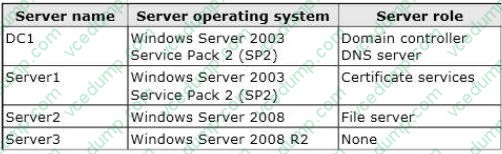
You plan to give users access to the file shares on Server2 by using DirectAccess.
You need to ensure that you can deploy DirectAccess on Server3.
What should you do?
A. Upgrade DC1 to Windows Server 2008 R2.
B. Add a static IPv6 address to DC1.
C. Add a static IPv6 address to Server2.
D. Upgrade Server2 to Windows Server 2008 R2. -
Question 189:
Your network contains a server named Server1 that runs Windows Server 2008 R2. The network for Server1 is configured as shown in the table.
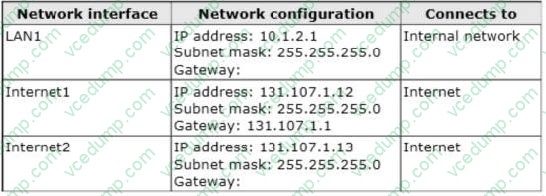
You plan to deploy DirectAccess on Server1.
You need to configure the network interfaces on Server1 to support DirectAccess.
What should you do?
A. Remove the IP address of 131.107.1.13 from Internet2, and then add the address to LAN1.
B. Add the IP address of 10.1.2.2 to LAN1.
C. Remove the IP of address 131.107.1.13 from Internet2, and then add the address to Internet1.
D. Add the default gateway of 131.107.1.1 to Internet2. -
Question 190:
Your network contains a server that has the Remote Desktop Session Host (RD Session Host) role service installed.
You need to increase the bandwidth that is allocated for printing and for file transfers between the RD Session Host server and the Remote Desktop clients.
What should you do?
A. On the server, modify the RDP-Tcp settings.
B. On the server, modify the FlowControlChannelBandwidth registry setting.
C. On the clients, modify the FlowControlDisplayBandwidth registry setting.
D. On the clients, modify the Local Resources settings of the Remote Desktop connections.
Related Exams:
-
62-193
Technology Literacy for Educators -
70-243
Administering and Deploying System Center 2012 Configuration Manager -
70-355
Universal Windows Platform – App Data, Services, and Coding Patterns -
77-420
Excel 2013 -
77-427
Excel 2013 Expert Part One -
77-725
Word 2016 Core Document Creation, Collaboration and Communication -
77-726
Word 2016 Expert Creating Documents for Effective Communication -
77-727
Excel 2016 Core Data Analysis, Manipulation, and Presentation -
77-728
Excel 2016 Expert: Interpreting Data for Insights -
77-731
Outlook 2016 Core Communication, Collaboration and Email Skills
Tips on How to Prepare for the Exams
Nowadays, the certification exams become more and more important and required by more and more enterprises when applying for a job. But how to prepare for the exam effectively? How to prepare for the exam in a short time with less efforts? How to get a ideal result and how to find the most reliable resources? Here on Vcedump.com, you will find all the answers. Vcedump.com provide not only Microsoft exam questions, answers and explanations but also complete assistance on your exam preparation and certification application. If you are confused on your 70-649 exam preparations and Microsoft certification application, do not hesitate to visit our Vcedump.com to find your solutions here.