70-642 Exam Details
-
Exam Code
:70-642 -
Exam Name
:TS: Windows Server 2008 Network Infrastructure -
Certification
:Microsoft Certifications -
Vendor
:Microsoft -
Total Questions
:405 Q&As -
Last Updated
:Dec 08, 2021
Microsoft 70-642 Online Questions & Answers
-
Question 271:
Your network contains two servers named Server1 and Server2. Server1 and Server2 run the Server Core installation of Windows Server 2008 R2.
You need to duplicate the Windows Firewall configurations from Server1 to Server2.
What should you use?
A. the Get-Item and the Set-Item cmdlets
B. the Get-Service and the Set-Service cmdlets
C. the Netsh tool
D. the Sconfig tool -
Question 272:
Your network contains an Active Directory forest named fabrikam.com. The forest contains a DNS server named Server1. You need to configure Server1 to resolve single-label names. What should you do?
A. Create a DNS zone named GlobalNames. Run dnscmd.exe and specify the Config parameter.
B. Create a DNS zone named GlobalNames. Run dnscmd.exe and specify the CreateDirectoryPartition parameter.
C. Create a DNS zone named RootNames. Run dnscmd.exe and specify the CreateDirectoryPartition parameter.
D. Create a DNS zone named RootNames. Run dnscmd.exe and specify the Config parameter. -
Question 273:
Your network contains a Distributed File System (DFS) target folder named Folder1 that contains 100 GB of data.
You plan to create a new DFS replica of Folder1 on a server named Server2. You need to prestage the data in Folder1 on Server2. The solution must ensure that the amount of initial DFS replication traffic is minimized.
Which tool should you use to prestage the Folder1 data?
A. Dfscmd
B. Dfsrmig
C. Dfsutil
D. Wbadmin -
Question 274:
Your company has a server that runs Windows Server 2008 R2. You have a new application that locates remote resources by name. The new application requires IPv6.
You need to ensure that the application can locate remote resources by using IPv6.
What should you do?
A. Create a new Pointer (PTR) DNS record.
B. Create a new Quad-A (AAAA) DNS record.
C. Create a new Signature (SIG) DNS record.
D. Create a new Route Through (RT) DNS record. -
Question 275:
Your network contains an Active Directory domain. All domain controlloers run Windows Server 2008 R2.
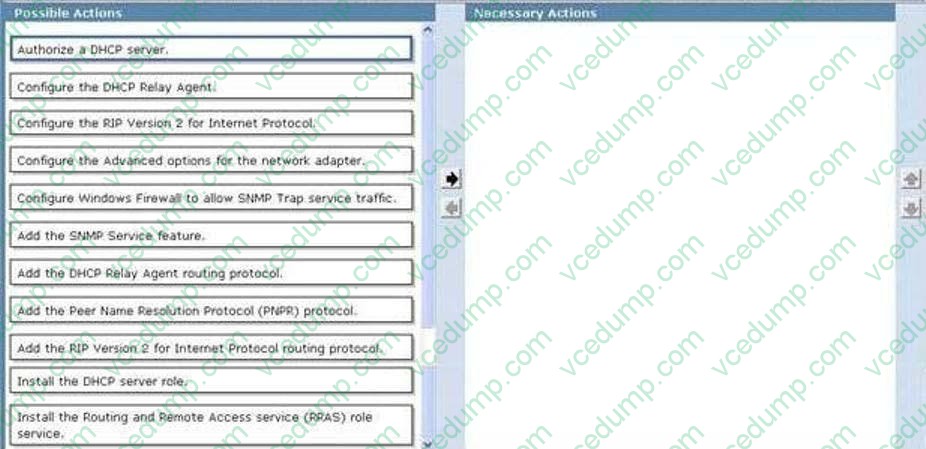
The network contains a DHCP server named Server1 on a subnet named Subnet1. You implement a new subnet named Subnet2. Subnet2 contains a server named Server2.
On Server1, you create a DHCP scope for Subnet2.
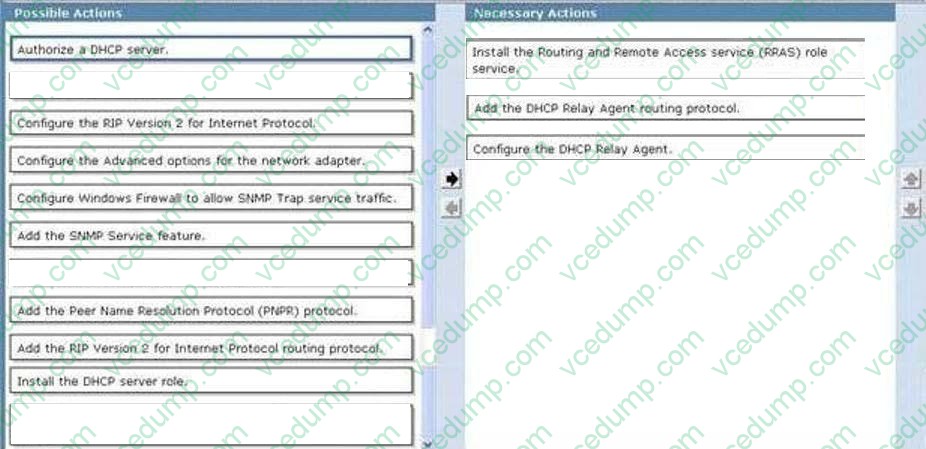
You need to configure Server2 to ensure that the client computers on Subnet2 can receive IP addresses from Server1.
What should you do?
To answer, move the appropriate actions from the Possible Actions list to the Necessary Actions area and arrange them in the correct order.
Select and Place:
-
Question 276:
Your network contains a computer named Computer1 that runs Windows 7. You need to verify if Computer1 has active DirectAccess connections to the network.
What should you do?
A. From Network Connections, right-click the active network connection, and then click Status.
B. From Network Connections, select the active network connection, and then click Diagnose this connection.
C. From Windows Firewall with Advanced Security, click Monitoring, and then click Connection Security Rules.
D. From Windows Firewall with Advanced Security, click Monitoring, click Security Associations, and then click Main Mode. -
Question 277:
Your company is implementing Network Access Protection (NAP) with DHCP enforcement. You need to define which network resources non-compliant client computers can access. What should you configure?
A. remediation server groups
B. health policies
C. connection request policies
D. system health validators (SHVs) -
Question 278:
Your network contains a server named Server1 that has the Routing role service installed. Server1 has two network connections. One network connection connects to the internal network. The other network connection connects to the Internet.
All network connections connected to the internal network use private IP addresses. You install a Web server named Web1. Web1 hosts a secured Web site that only allows connections over TCP port 8281. Web1 is connected to the internal network.
You need to ensure that the secure Web site can be accessed from the Internet. What should you do from the Routing and Remote Access console?
A. Configure Routing Information Protocol (RIP), and then activate authentication on the RIP interface.
B. Configure Routing Information Protocol (RIP), and then configure the incoming packet protocol settings on the RIP interface.
C. Configure Network Address Translation (NAT), and then add a new service to the NAT interface.
D. Configure Network Address Translation (NAT), and then enable the Secure Web Server (HTTPS) service on the NAT interface. -
Question 279:
Your company has a main office and two branch offices that are connected by WAN links. The main office runs the DNS Server service on three domain controllers. The zone for your domain is configured as an Active Directory-integrated zone.
Each branch office has a single member server that hosts a secondary zone for the domain. The DNS servers in the branch offices use the main office DNS server as the DNS Master server for the zone. You need to minimize DNS zone transfer traffic over the WAN links.
What should you do?
A. Decrease the Retry Interval setting in the Start of Authority (SOA) record for the zone.
B. Decrease the Refresh Interval setting in the Start of Authority (SOA) record for the zone.
C. Increase the Refresh Interval setting in the Start of Authority (SOA) record for the zone.
D. Disable the netmask ordering option in the properties of the DNS Master server for the zone. -
Question 280:
Your company has a server named Server1 that runs Windows Server 2008 R2. The Windows Server Backup feature is installed on Server1.
Server1 fails. You install a new server named Server2 that runs Windows Server 2008 R2. You need to restore the company's Windows SharePoint Services (WSS) site to Server2.
What should you do?
A. Use Wbadmin to restore the system state from backup.
B. Run Wbadmin with the Get Versions option. Install WSS.
C. Run Wbadmin with the Start Recovery option. Install WSS.
D. Use Wbadmin to restore the application and the sites from backup.
Related Exams:
-
62-193
Technology Literacy for Educators -
70-243
Administering and Deploying System Center 2012 Configuration Manager -
70-355
Universal Windows Platform – App Data, Services, and Coding Patterns -
77-420
Excel 2013 -
77-427
Excel 2013 Expert Part One -
77-725
Word 2016 Core Document Creation, Collaboration and Communication -
77-726
Word 2016 Expert Creating Documents for Effective Communication -
77-727
Excel 2016 Core Data Analysis, Manipulation, and Presentation -
77-728
Excel 2016 Expert: Interpreting Data for Insights -
77-731
Outlook 2016 Core Communication, Collaboration and Email Skills
Tips on How to Prepare for the Exams
Nowadays, the certification exams become more and more important and required by more and more enterprises when applying for a job. But how to prepare for the exam effectively? How to prepare for the exam in a short time with less efforts? How to get a ideal result and how to find the most reliable resources? Here on Vcedump.com, you will find all the answers. Vcedump.com provide not only Microsoft exam questions, answers and explanations but also complete assistance on your exam preparation and certification application. If you are confused on your 70-642 exam preparations and Microsoft certification application, do not hesitate to visit our Vcedump.com to find your solutions here.