70-642 Exam Details
-
Exam Code
:70-642 -
Exam Name
:TS: Windows Server 2008 Network Infrastructure -
Certification
:Microsoft Certifications -
Vendor
:Microsoft -
Total Questions
:405 Q&As -
Last Updated
:Dec 08, 2021
Microsoft 70-642 Online Questions & Answers
-
Question 1:
Your network contains an Active Directory domain named contoso.com. The domain contains two domain controllers named DC1 and DC2. The service location (SRV) records for both of the domain controllers have default values.
An SRV record for DC1 is shown in the exhibit. (Click the Exhibit button.)
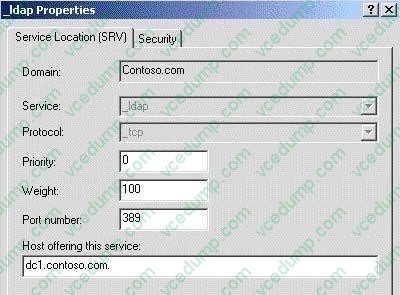
You need to modify the SRV records to ensure that DC2 is contacted for authentication only when DC1 is unavailable.
What should you do?
A. Increase the weight value of the SRV records for DC2.
B. Increase the weight value of the SRV records for DC1.
C. Increase the priority value of the SRV records for DC1.
D. Increase the priority value of the SRV records for DC2. -
Question 2:
Your network contains a server named Server1. You plan to deploy the Windows Server update Services (WSUS) server role on Server1.
You need to minimize the amount of disk space used to store updates on Server1.
What should you do on Server1?
A. Disable Quality of Service (QoS).
B. Enable Quality of Service (QoS).
C. Disable express installation files.
D. Enable express installation files. -
Question 3:
Your network contains an Active Directory domain named contoso.com. The domain contains a server named Server1 that has Microsoft SQL Server 2008 R2 installed. You need to configure the Windows Firewall on Server1 to allow client computers access to the SQL Server installation.
Which port or ports should you allow through Windows Firewall?
A. TCP 1433
B. TCP 587 and UDP 587
C. UDP 67 and UDP 68
D. TCP 53 and UDP 53
E. TCP 546 and TCP 547
F. UDP 546 and UDP 547
G. TCP 636
H. UDP 1433
I. TCP 995
J. UDP 995 -
Question 4:
Your network contains a server named Server1.
An administrator named Admin1 installs the Windows Server Update Services (WSUS) server role on Server1. You open the Windows Server Update Services console and view the Products and Classifications options as shown in the
exhibit. (Click the Exhibit button.)
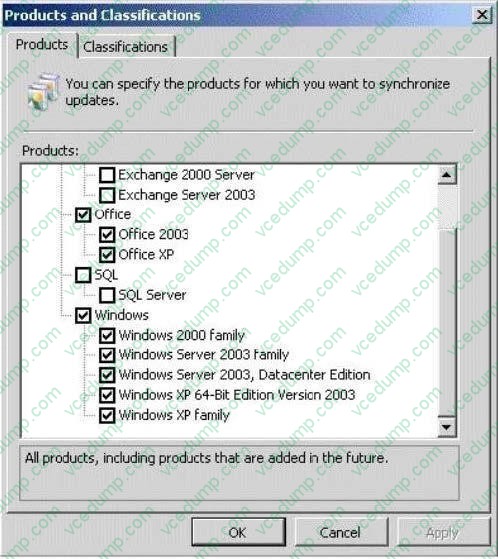
You need to ensure that you can select updates for Windows Server 2008 R2 Service Pack 1 (SP1) from the Products and Classifications options.
What should you do?
A. Add your user account to the WSUS Administrators group.
B. Synchronize Server1 to the Microsoft Update servers.
C. Configure a server that runs Windows Server 2008 R2 SP1 to download updates from Server1.
D. Restart the Update Services service. -
Question 5:
You have a file server that runs Windows Server 2008 R2.
You configure quotas on the server.
You need to view each user's quota usage on a per folder basis.
What should you do?
A. From File Server Resource Manager, create a File Screen.
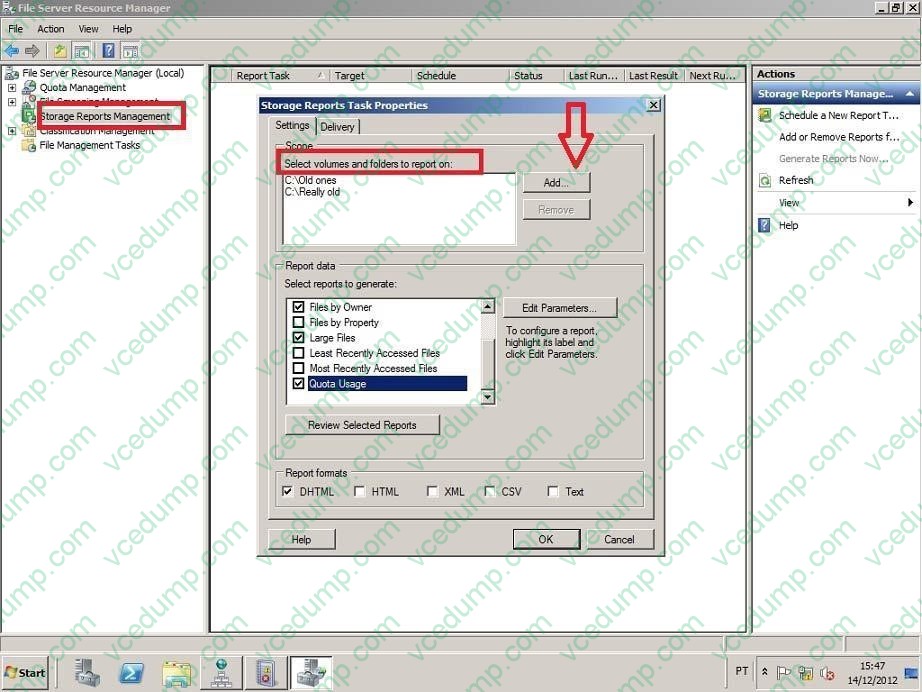
B. From File Server Resource Manager, create a Storage Management report.
C. From the command prompt, run dirquota.exe quota list.
D. From the properties of each volume, review the Quota Entries list. -
Question 6:
Your network contains an Active Directory domain named fabrikam.com. The domain contains a DNS server named Server1. Server1 hosts the DNS zone for fabrikam.com.
You have a client computer named Computer1 that runs Windows 7. You need to ensure that, from Computer1, you can enumerate all of the records in the fabrikam.com DNS zone.
What should you modify?
A. the forwarders of Server1
B. the root hints of Server1
C. the security settings of the fabrikam.com DNS zone
D. the zone transfer settings of the fabrikam.com DNS zone -
Question 7:
Your company uses DHCP to lease IPv4 addresses to computers at the main office. A WAN link connects the main office to a branch office. All computers in the branch office are configured with static IP addresses. The branch office does not use DHCP and uses a different subnet. You need to ensure that the portable computers can connect to network resources at the main office and the branch office.
How should you configure each portable computer?
A. Use a static IPv4 address in the range used at the branch office.
B. Use an alternate configuration that contains a static IP address in the range used at the main office.
C. Use the address that was assigned by the DHCP server as a static IP address.
D. Use an alternate configuration that contains a static IP address in the range used at the branch office. -
Question 8:
Your network contains a Windows Server Update Services (WSUS) server named Server1. Server1 provides updates to client computers in two sites named Site1 and Site2. A WSUS computer group named Group1 is configured for automatic approval.
You need to ensure that new client computers in Site2 are automatically added to Group1.
Which two actions should you perform? (Each correct answer presents part of the solution. Choose two.)
A. Create a new automatic approval update rule.
B. Modify the Computers Options in the Update Services console.
C. Modify the Automatic Approvals options in the Update Services console.
D. Configure a Group Policy object (GPO) that enables client-side targeting. -
Question 9:
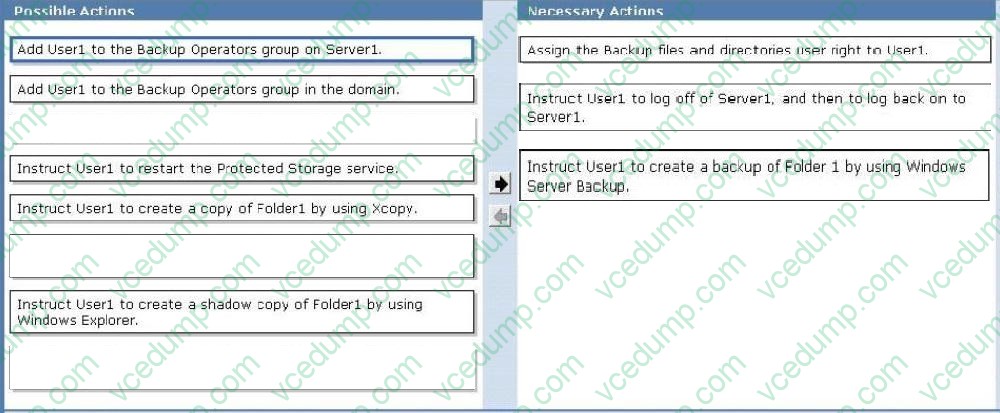
Your network contains an Active Directory domain. The domain contains a server named Server1 that runs Windows Server 2008 R2.
Server1 contains a folder named Folder1. A domain user named User1 does not have NTFS Read permission for Folder1.
You need User1 to create a backup copy of Folder1. User1 must NOT be able to restore the backup copy on Server1. What should you do?
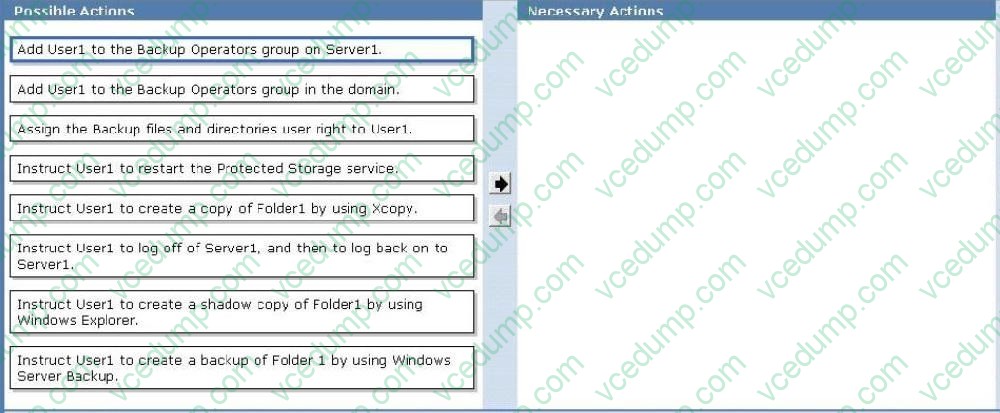
To answer, move the appropriate actions from the Possible Actions list to the Necessary Actions area and arrange them in the correct order.
Select and Place:
-
Question 10:
You need to ensure that only the members of the Power Users group and the members of the Administrators group can view the events in the System log. Which tools should you use?
A. Wecutil
B. Event Viewer
C. Cacls
D. Wevtutil
Related Exams:
-
62-193
Technology Literacy for Educators -
70-243
Administering and Deploying System Center 2012 Configuration Manager -
70-355
Universal Windows Platform – App Data, Services, and Coding Patterns -
77-420
Excel 2013 -
77-427
Excel 2013 Expert Part One -
77-725
Word 2016 Core Document Creation, Collaboration and Communication -
77-726
Word 2016 Expert Creating Documents for Effective Communication -
77-727
Excel 2016 Core Data Analysis, Manipulation, and Presentation -
77-728
Excel 2016 Expert: Interpreting Data for Insights -
77-731
Outlook 2016 Core Communication, Collaboration and Email Skills
Tips on How to Prepare for the Exams
Nowadays, the certification exams become more and more important and required by more and more enterprises when applying for a job. But how to prepare for the exam effectively? How to prepare for the exam in a short time with less efforts? How to get a ideal result and how to find the most reliable resources? Here on Vcedump.com, you will find all the answers. Vcedump.com provide not only Microsoft exam questions, answers and explanations but also complete assistance on your exam preparation and certification application. If you are confused on your 70-642 exam preparations and Microsoft certification application, do not hesitate to visit our Vcedump.com to find your solutions here.