70-640 Exam Details
-
Exam Code
:70-640 -
Exam Name
:TS: Windows Server 2008 Active Directory Configuring -
Certification
:Microsoft Certifications -
Vendor
:Microsoft -
Total Questions
:631 Q&As -
Last Updated
:Dec 15, 2021
Microsoft 70-640 Online Questions & Answers
-
Question 511:
Your network contains an Active Directory domain named contoso.com.
Contoso.com contains a server named Server2.
You open the System properties on Server2 as shown in the exhibit. (Click the Exhibit button.)
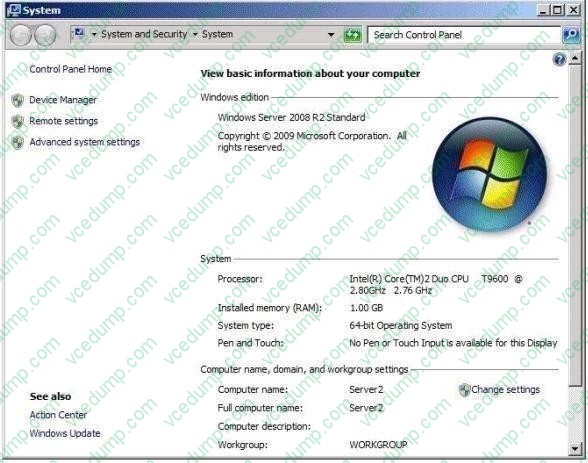
When you attempt to configure Server2 as an enterprise subordinate certification authority (CA), you discover that the enterprise subordinate CA option is unavailable.
You need to configure Server2 as an enterprise subordinate CA.
What should you do first?
A. Upgrade Server2 to Windows Server 2008 R2 Enterprise.
B. Log in as an administrator and run Server Manager.
C. Import the root CA certificate.
D. Join Server2 to the domain. -
Question 512:
You are an administrator at ABC.com. Company has a network of 5 member servers acting as file servers. It has an Active Directory domain.
You have installed a software application on the servers. As soon as the application is installed, one of the member servers shuts down itself. To trace and rectify the problem, you create a Group Policy Object (GPO).
You need to change the domain security settings to trace the shutdowns and identify the cause of it.
What should you do to perform this task?
A. Link the GPO to the domain and enable System Events option
B. Link the GPO to the domain and enable Audit Object Access option
C. Link the GPO to the Domain Controllers and enable Audit Object Access option
D. Link the GPO to the Domain Controllers and enable Audit Process tracking option
E. Perform all of the above actions -
Question 513:
Your network contains an Active Directory domain. The domain contains two sites named Site1 and Site2. Site1 contains four domain controllers. Site2 contains a read-only domain controller (RODC).
You add a user named User1 to the Allowed RODC Password Replication Group. The WAN link between Site1 and Site2 fails. User1 restarts his computer and reports that he is unable to log on to the domain.
The WAN link is restored and User1 reports that he is able to log on to the domain.
You need to prevent the problem from reoccurring if the WAN link fails.
What should you do?
A. Create a Password Settings object (PSO) and link the PSO to User1's user account.
B. Create a Password Settings object (PSO) and link the PSO to the Domain Users group.
C. Add the computer account of the RODC to the Allowed RODC Password Replication Group.
D. Add the computer account of User1's computer to the Allowed RODC Password Replication Group. -
Question 514:
Your company has an Active Directory domain named contoso.com. FS1 is a member server in contoso.com.
You add a second network interface card, NIC2, to FS1 and connect NIC2 to a subnet that contains computers in a DNS domain named fabrikam.com.
Fabrikam.com has a DHCP server and a DNS server.
Users in fabrikam.com are unable to resolve FS1 by using DNS.
You need to ensure that FS1 has an A record in the fabrikam.com DNS zone.
What are two possible ways to achieve this goal? (Each correct answer presents a complete solution. Choose two.)
A. Configure the DHCP server in fabrikam.com with the scope option 044 WINS/NBNS Servers.
B. Configure the DHCP server in fabrikam.com by setting the scope option 015 DNS Domain Name to the domain name fabrikam.com.
C. Configure NIC2 by configuring the Append these DNS suffixes (in order): option.
D. Configure NIC2 by configuring the Use this connection's DNS suffix in DNS registration option.
E. Configure the DHCP server in contoso.com by setting the scope option 015 DNS Domain Name to the domain name fabrikam.com. -
Question 515:
You need to identify all failed logon attempts on the domain controllers.
What should you do?
A. View the Netlogon.log file.
B. View the Security tab on the domain controller computer object.
C. Run Event Viewer.
D. Run the Security and Configuration Wizard. -
Question 516:
Your company hires 10 new employees.
You want the new employees to connect to the main office through a VPN connection. You create new user accounts and grant the new employees they Allow Read and Allow Execute permissions to shared resources in the main office.
The new employees are unable to access shared resources in the main office.
You need to ensure that users are able to establish a VPN connection to the main office.
What should you do?
A. Grant the new employees the Allow Access Dial-in permission.
B. Grant the new employees the Allow Full control permission.
C. Add the new employees to the Remote Desktop Users security group.
D. Add the new employees to the Windows Authorization Access security group. -
Question 517:
Your network contains an Active Directory forest named contoso.com.
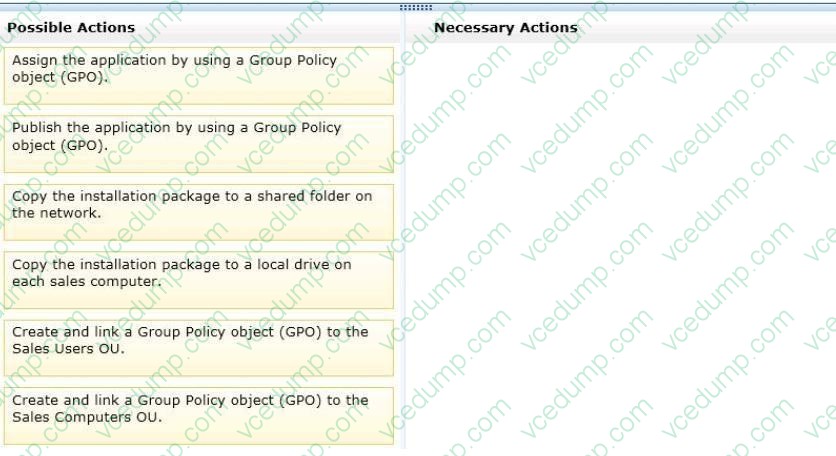
All client computers used by the sales department are in an organizational unit (OU) named Sales Computers. All user accounts for the sales department are in an OU named Sales Users.
You purchase a new application.
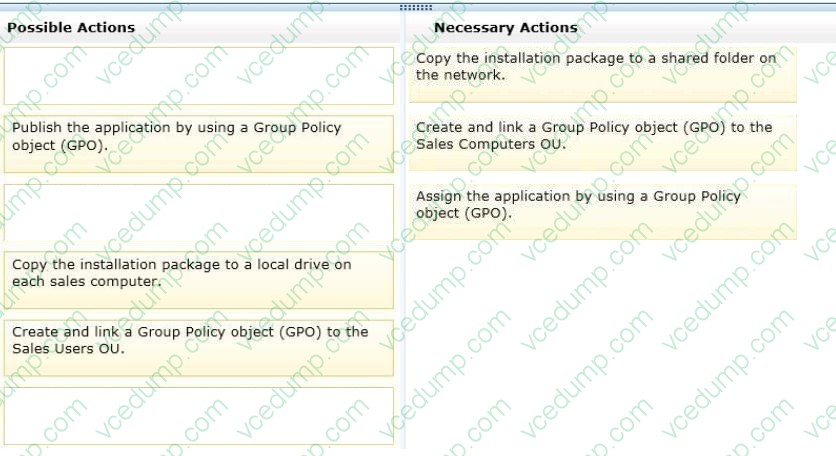
You need to ensure that every user in the domain who logs on to a sales department computer can use the application. The application must only be available from the sales department computers.
What should you do? To answer, move the appropriate actions from the Possible Actions list to the Necessary Actions area and arrange them in the correct order.
Select and Place:
-
Question 518:
Your network contains an Active Directory domain named contoso.com. You have an organizational unit (OU) named Sales and an OU named Engineering. You have a Group Policy object (GPO) linked to the domain. The GPO is used to deploy a number of software packages.
You need to ensure that the GPO is applied only to client computers that have sufficient free disk space.
What should you do?
A. Modify the Group Policy permissions.
B. Enable block inheritance.
C. Configure the link order.
D. Enable loopback processing in merge mode.
E. Enable loopback processing in replace mode.
F. Configure WMI filtering.
G. Configure Restricted Groups.
H. Configure Group Policy Preferences.
I. Link the GPO to the Sales OU.
J. Link the GPO to the Engineering OU. -
Question 519:
You have a domain controller that runs Windows Server 2008 R2 and is configured as a DNS server.
You need to record all inbound DNS queries to the server.
What should you configure in the DNS Manager console?
A. Enable debug logging.
B. Enable automatic testing for simple queries.
C. Configure event logging to log errors and warnings.
D. Enable automatic testing for recursive queries. -
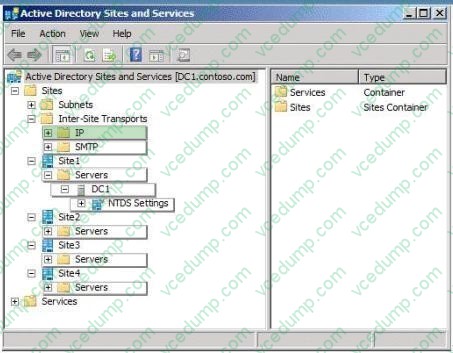
Question 520:
Your network contains an Active Directory domain.
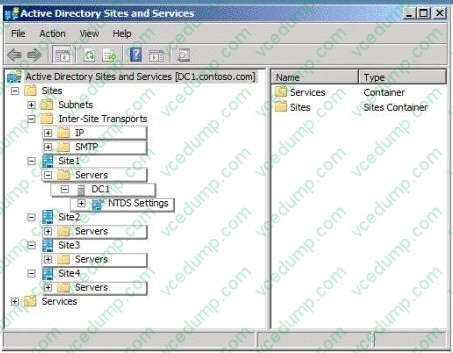
You need to create a new site link between two sites named Site1 and Site3. The site link must support the replication of domain objects.
Under which node in Active Directory Sites and Services should you create the site link? To answer, select the appropriate node in the answer area.
Hot Area:
Related Exams:
-
62-193
Technology Literacy for Educators -
70-243
Administering and Deploying System Center 2012 Configuration Manager -
70-355
Universal Windows Platform – App Data, Services, and Coding Patterns -
77-420
Excel 2013 -
77-427
Excel 2013 Expert Part One -
77-725
Word 2016 Core Document Creation, Collaboration and Communication -
77-726
Word 2016 Expert Creating Documents for Effective Communication -
77-727
Excel 2016 Core Data Analysis, Manipulation, and Presentation -
77-728
Excel 2016 Expert: Interpreting Data for Insights -
77-731
Outlook 2016 Core Communication, Collaboration and Email Skills
Tips on How to Prepare for the Exams
Nowadays, the certification exams become more and more important and required by more and more enterprises when applying for a job. But how to prepare for the exam effectively? How to prepare for the exam in a short time with less efforts? How to get a ideal result and how to find the most reliable resources? Here on Vcedump.com, you will find all the answers. Vcedump.com provide not only Microsoft exam questions, answers and explanations but also complete assistance on your exam preparation and certification application. If you are confused on your 70-640 exam preparations and Microsoft certification application, do not hesitate to visit our Vcedump.com to find your solutions here.