70-640 Exam Details
-
Exam Code
:70-640 -
Exam Name
:TS: Windows Server 2008 Active Directory Configuring -
Certification
:Microsoft Certifications -
Vendor
:Microsoft -
Total Questions
:631 Q&As -
Last Updated
:Dec 15, 2021
Microsoft 70-640 Online Questions & Answers
-
Question 321:
A company has an Active Directory forest. You plan to install an offline Enterprise root certification authority (CA) on a server named CA1. CA1 is a member of the PerimeterNetwork workgroup and is attached to a hardware security module for private key storage.
You attempt to add the Active Directory Certificate Services (AD CS) server role to CA1. The Enterprise CA option is not available.
You need to install the AD CS server role as an Enterprise CA on CA1.
What should you do first?
A. Add the DNS Server server role to CA1.
B. Add the Web Server (IIS) server role and the AD CS server role to CA1.
C. Add the Active Directory Lightweight Directory Services (AD LDS) server role to CA1.
D. Join CA1 to the domain. -
Question 322:
You are the systems administrator for a medium-sized Active Directory domain. Currently, the environment supports many different domain controllers, some of which are running Windows NT 4 and others that are running Windows 2003 and Server 2008 R2.
When you are running domain controllers in this type of environment, which of the following types of groups can you not use? (Choose Two)
A. Universal security groups
B. Global groups
C. Domain local groups
D. Computer groups -
Question 323:
Company has a single domain network with Windows 2000, Windows 2003, and Windows 2008 servers. Client computers running Windows XP and Windows Vista. All domain controllers are running Windows server 2008.

You need to deploy Active Directory Rights Management System (AD RMS) to secure all documents, spreadsheets and to provide user authentication.
What do you need to configure, in order to complete the deployment of AD RMS?
A. Upgrade all client computers to Windows Vista. Install AD RMS on domain controller Company _DC1
B. Ensure that all Windows XP computers have the latest service pack and install the RMS client on all systems. Install AD RMS on domain controller Company _DC1
C. Upgrade all client computers to Windows Vista. Install AD RMS on Company _SRV5
D. Ensure that all Windows XP computers have the latest service pack and install the RMS client on all systems. Install AD RMS on domain controller Company _SRV5
E. None of the above -
Question 324:
Your network contains an Active Directory domain named contoso.com. All domain controllers run a Server Core installation of Windows Server 2008 R2.
You need to identify which domain controller holds the PDC emulator role.
Which tool should you run?
A. Get AdDomain
B. Query.exe
C. Netsh.exe
D. Search-AdAccount -
Question 325:
Your network contains an Active Directory forest named contoso.com. The functional level of the forest is Windows Server 2008 R2. You have four Active Directory sites. Each site has multiple Active Directory subnets.
You need to identify all of the authentication requests that originate from client computers that are not associated to an Active Directory subnet.
What should you use?
A. The System log
B. The %Systemroot%\Debug\Netsetup.log log file
C. The Authentication User Interface operational log
D. The %Systemroot%\Security\Logs\Winlogon.log log file -
Question 326:
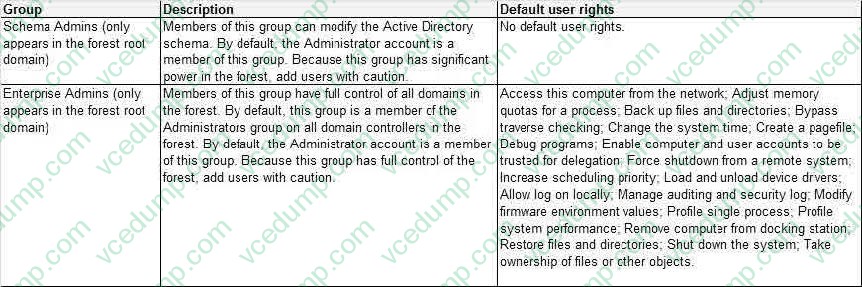
You are installing an application on a computer that runs Windows Server 2008 R2. During installation, the application will need to install new attributes and classes to the Active Directory database.
You need to ensure that you can install the application.
What should you do?
A. Change the functional level of the forest to Windows Server 2008 R2.
B. Log on by using an account that has Server Operator rights.
C. Log on by using an account that has Schema Administrator rights and the appropriate rights to install the application.
D. Log on by using an account that has the Enterprise Administrator rights and the appropriate rights to install the application. -
Question 327:
Your network contains an Active Directory domain. The domain contains an organizational unit (OU) named OU1. OU1 contains all managed service accounts in the domain.
You need to prevent the managed service accounts from being deleted accidentally from OU1.
Which cmdlet should you use?
A. Set-ADUser
B. Set-ADOrganizationalUnit
C. Set-ADServiceAccount
D. Set-ADObject -
Question 328:
Your company has an Active Directory domain named contoso.com. The company network has two DNS servers named DNS1 and DNS2.
The DNS servers are configured as shown in the following table.

Domain users, who are configured to use DNS2 as the preferred DNS server, are unable to connect to Internet Web sites.
You need to enable Internet name resolution for all client computers.
What should you do?
A. Update the list of root hints servers on DNS2.
B. Create a copy of the .(root) zone on DNS1.
C. Delete the .(root) zone from DNS2. Configure conditional forwarding on DNS2.
D. Update the Cache.dns file on DNS2. Configure conditional forwarding on DNS1. -
Question 329:
You have an enterprise subordinate certification authority (CA). The CA issues smart card logon certificates.
Users are required to log on to the domain by using a smart card.
Your company's corporate security policy states that when an employee resigns, his ability to log on to the network must be immediately revoked.
An employee resigns.
You need to immediately prevent the employee from logging on to the domain.
What should you do?
A. Revoke the employee's smart card certificate.
B. Disable the employee's Active Directory account.
C. Publish a new delta certificate revocation list (CRL).
D. Reset the password for the employee's Active Directory account. -
Question 330:
Active Directory Rights Management Services (AD RMS) is deployed on your network. Users who haveWindows Mobile 6 devices report that they cannot access documents that are protected by AD RMS.
You need to ensure that all users can access AD RMS protected content by using Windows Mobile 6 devices.
What should you do?
A. Modify the security of the ServerCertification.asmx file.
B. Modify the security of the MobileDeviceCertification.asmx file.
C. Enable anonymous authentication for the _wmcs virtual directory.
D. Enable anonymous authentication for the certification virtual directory.

Related Exams:
-
62-193
Technology Literacy for Educators -
70-243
Administering and Deploying System Center 2012 Configuration Manager -
70-355
Universal Windows Platform – App Data, Services, and Coding Patterns -
77-420
Excel 2013 -
77-427
Excel 2013 Expert Part One -
77-725
Word 2016 Core Document Creation, Collaboration and Communication -
77-726
Word 2016 Expert Creating Documents for Effective Communication -
77-727
Excel 2016 Core Data Analysis, Manipulation, and Presentation -
77-728
Excel 2016 Expert: Interpreting Data for Insights -
77-731
Outlook 2016 Core Communication, Collaboration and Email Skills
Tips on How to Prepare for the Exams
Nowadays, the certification exams become more and more important and required by more and more enterprises when applying for a job. But how to prepare for the exam effectively? How to prepare for the exam in a short time with less efforts? How to get a ideal result and how to find the most reliable resources? Here on Vcedump.com, you will find all the answers. Vcedump.com provide not only Microsoft exam questions, answers and explanations but also complete assistance on your exam preparation and certification application. If you are confused on your 70-640 exam preparations and Microsoft certification application, do not hesitate to visit our Vcedump.com to find your solutions here.