70-511 Exam Details
-
Exam Code
:70-511 -
Exam Name
:TS: Windows Applications Development with Microsoft .NET Framework 4 -
Certification
:Microsoft Certifications -
Vendor
:Microsoft -
Total Questions
:287 Q&As -
Last Updated
:Jan 26, 2022
Microsoft 70-511 Online Questions & Answers
-
Question 271:
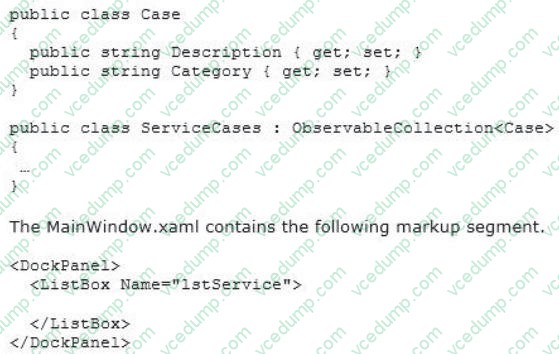
You are developing a Windows Presentation Foundation (WPF) application to display service cases by category in a ListBox. You create a class named Case with the properties Description and Category, as follows.
You bind to the IstService control a static resource named ServiceCases.
You need to ensure that the service cases are grouped by category.
What should you do in the MainWindow.xaml file?
A. Add the following markup segment to ListBox.Binding.
B. Add the following markup segment to DockPanel.Binding.
C. Add the following markup segment to CollectionViewSource.
D. Add the following markup segment to CollectionViewSource. -
Question 272:
You are developing a Windows Presentation Foundation (WPF) application. You need to use XAML to create a custom control that contains two Button controls. From which base class should you inherit?
A. FrameworkElement
B. UIElement
C. UserControl
D. Button -
Question 273:
You are developing a Windows Presentation Foundation (WPF) application. A user control responds to a click event. The click event handler sets the Handled property to true.
You need to ensure that a parent control responds to the event after the user control's handler executes. What should you do?
A. Programmatically add an event handler to the parent control and set the HandledEventsToo property to true.
B. Add a tunneling routed event handler to the parent control.
C. Add a bubbling routed event handler to the parent control.
D. Programmatically add an event handler to the parent control and set the HandledEventsToo property to false. -
Question 274:
You use Microsoft .NET Framework 4 to create a Windows Forms application.
You plan to use a Windows Presentation Foundation (WPF) control of the UserControl1 type hosted in an ElementHos1 control named elementHost1.
You write the following code segment. (Line numbers are included for reference only.) 01 Public Class UPFInUInforms 02 Public Sub WPFInWInforms() 03 InitializeComponent() 04 05 End Sub 06 Private Sub OnBackColorChange(ByVal sender As Object, ByVal propertyName As [String], ByVal value As Object) 07 Dim host As ElementHost = TryCast(sender, ElementHost) 08 Dim col As System.Drawing.Color = DirectCast(value, System.Drawing.Color) 09 Dim brush As New SolidColorBrush(System.Windows.Media.Color.FromRgb(col,R, col.G, col.B)) 10 Dim ucl As UserControll = TryCast(host.Child, UserControll) 11 ucl.Background = brush 12 End Sub 13 End Class
You need to ensure that the application changes the background color of the hosted control when the background color of the form changes.
Which code segment should you insert at line 04?
A. elementHostl.PropertyMap.Remove("BackColor") elementHost1.PropertyMap.Add("BackColor", New PropertyTranslator(OnBackColorChange))
B. elementHost1.PropertyMap.Remove("Background") elementHost1.PropertyMap.Add("Background", New PropertyTranslator(OnBackColorChange))
C. elementHostl.PropertyMap.Add("BackColor", New PropertyTranslator(OnBackColorChange)) elementHost1.PropertyMap.Apply("BackColor")
D. elementHostl.PropertyMap.Add("Background", New PropertyTranslator(OnBackColorChange)) elementHost1.PropertyMap.Apply("Background") -
Question 275:
You use Microsoft .NET Framework 4 to create a Windows Presentation Foundation (WPF) application.
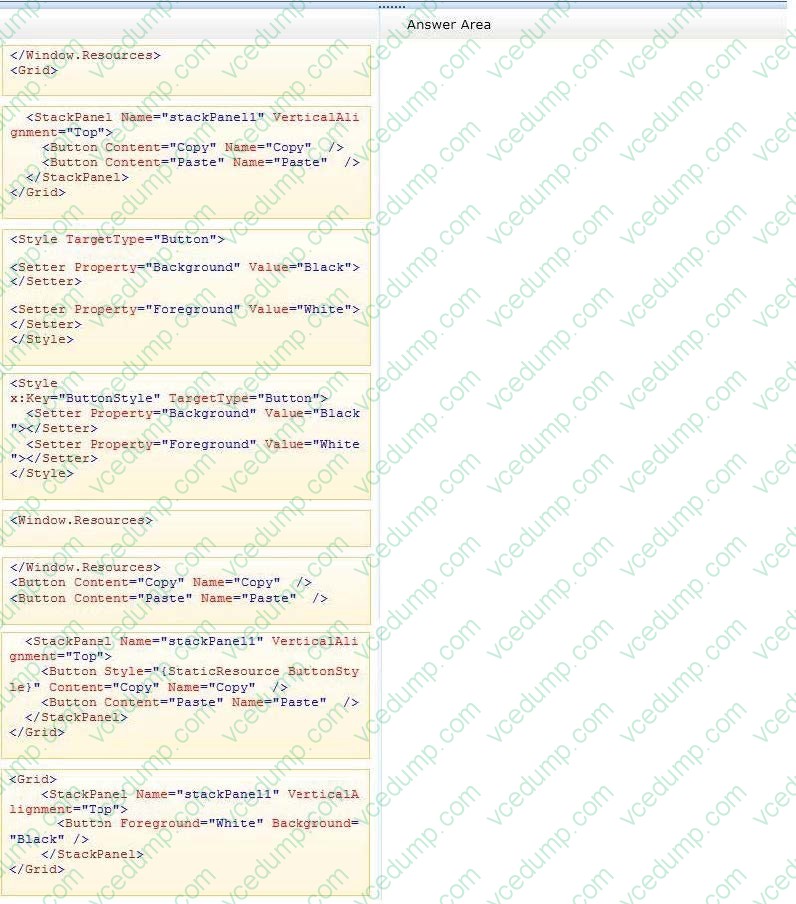
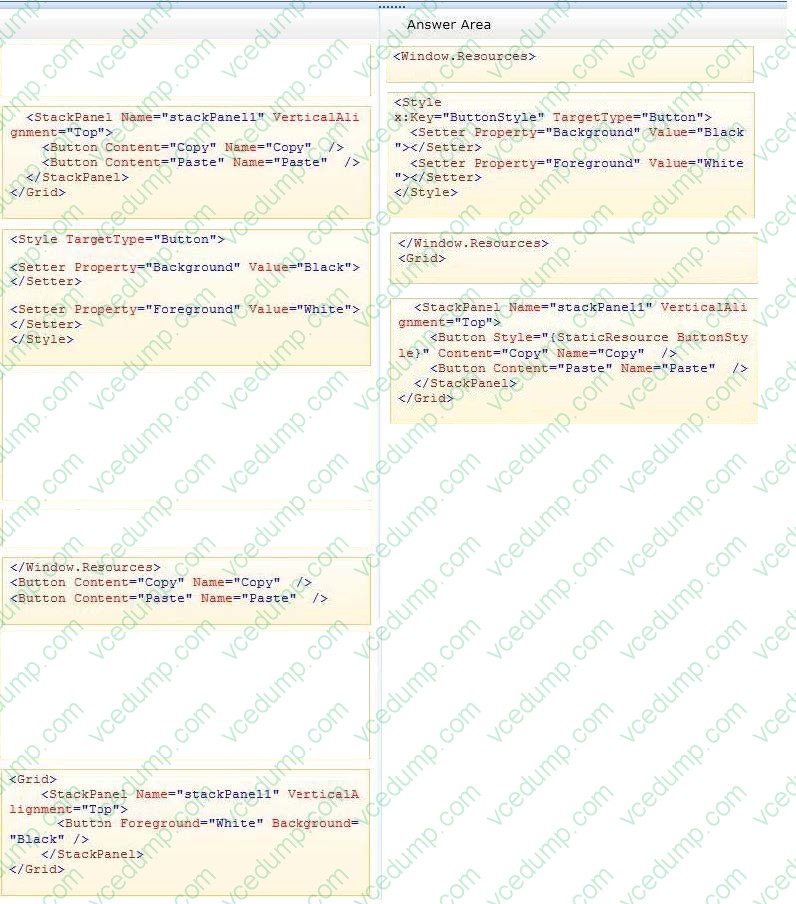
The application contains a window that has two buttons named Copy and Paste.
You need to ensure that the buttons have a black background color and white foreground color.
What should you do? (Develop the solution by selecting and ordering the required code snippets. You may not need all of the code snippets.)
Select and Place:
-
Question 276:
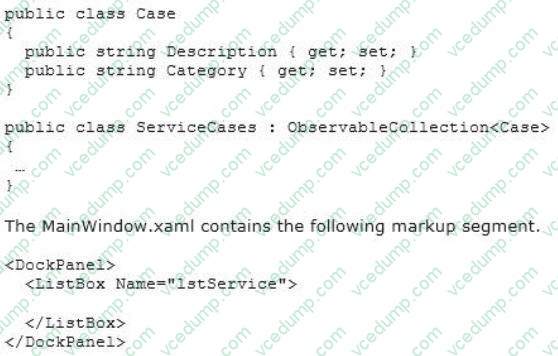
You are developing a Windows Presentation Foundation (WPF) application to display service cases by category in a ListBox You create a class named Case with the properties Description and Category, as follows.
You bind to the IstService control a static resource named ServiceCases.
You need to ensure that the service cases are grouped by category.
What should you do in the MainWindow.xaml file?
A. Add the following markup segment to ListBox.Binding.
B. Add the following markup segment to DockPanel.Binding.
C. Add the following markup segment to CollectionViewSource.
D. Add the following markup segment to CollectionViewSource. -
Question 277:
You are developing a Windows Presentation Foundation (WPF) application.
There is an issue in the display of Label. When you open the WPF Visualizer, you see the following information in the left-hand panel of the Visualizer.
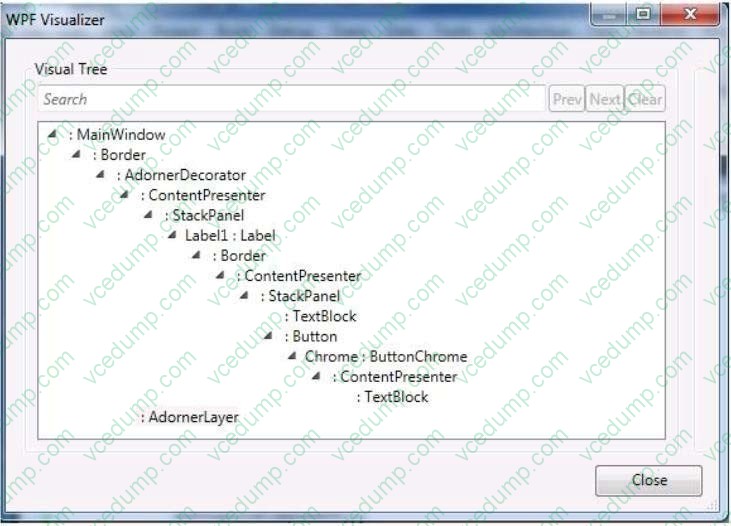
You need to identify the XAML markup for the Label control that caused the issue.
Which markup segment corresponds to the Label control?
A. Button Click="Button Clicks -
Question 278:
You are developing a Windows Presentation Foundation (WPF) application.
The application has an Image control.
You need to ensure that a portion of the image displays in a circle in the control.
What are two possible ways to achieve this goal? (Each correct answer presents a complete solution. Choose two.)
A. Add an Image.Clip element to the control. Use EllipseGeometry within Image.Clip.
B. Add an Ellipse element to the control. Use Ellipse.Stroke and ImageBrush with the image as ImageSource.
C. Add an Ellipse element to the control. Use Ellipse.Fill and ImageBrush with the image as ImageSource.
D. Add an Image.Clip element to the control. Use LineGeometry within Image.Clip. -
Question 279:
You are developing a Windows Presentation Foundation (WPF) application. The application contains the following markup.
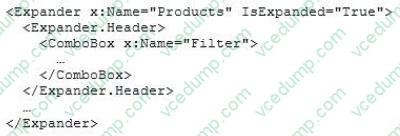
You need to ensure that the Filter combo box is hidden when the expander is collapsed.
What should you do?
A. Add the following DataTrtgger element to the Expander control.
B. Add the following DataTrigger element to the ComboBox control. DataTrigger Binding=" {Binding ElementName=Products, Path=isExpanded> "Value="False">
C. Add the following DataTrigger element to the ComboBox control.
D. Add the following DataTrigger element to the Expander control. -
Question 280:
You use Microsoft .NET Framework 4 to create a Windows Presentation Foundation (WPF) application. The application contains a window as shown in the following exhibit.
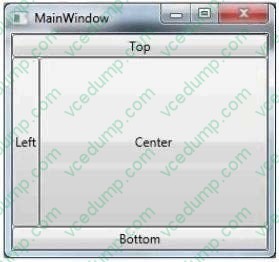
You need to define a DockPanel control that fits the window.
Which code fragment should you use?
Related Exams:
-
62-193
Technology Literacy for Educators -
70-243
Administering and Deploying System Center 2012 Configuration Manager -
70-355
Universal Windows Platform – App Data, Services, and Coding Patterns -
77-420
Excel 2013 -
77-427
Excel 2013 Expert Part One -
77-725
Word 2016 Core Document Creation, Collaboration and Communication -
77-726
Word 2016 Expert Creating Documents for Effective Communication -
77-727
Excel 2016 Core Data Analysis, Manipulation, and Presentation -
77-728
Excel 2016 Expert: Interpreting Data for Insights -
77-731
Outlook 2016 Core Communication, Collaboration and Email Skills
Tips on How to Prepare for the Exams
Nowadays, the certification exams become more and more important and required by more and more enterprises when applying for a job. But how to prepare for the exam effectively? How to prepare for the exam in a short time with less efforts? How to get a ideal result and how to find the most reliable resources? Here on Vcedump.com, you will find all the answers. Vcedump.com provide not only Microsoft exam questions, answers and explanations but also complete assistance on your exam preparation and certification application. If you are confused on your 70-511 exam preparations and Microsoft certification application, do not hesitate to visit our Vcedump.com to find your solutions here.