70-511 Exam Details
-
Exam Code
:70-511 -
Exam Name
:TS: Windows Applications Development with Microsoft .NET Framework 4 -
Certification
:Microsoft Certifications -
Vendor
:Microsoft -
Total Questions
:287 Q&As -
Last Updated
:Jan 26, 2022
Microsoft 70-511 Online Questions & Answers
-
Question 241:
You use Microsoft Visual Studio 2010 and Microsoft .NET Framework 4 to create a Windows Presentation Foundation (WPF) application. The application includes a function that is triggered by filling out a form and by clicking a button.
Currently, the application is tested manually.
You need to create an automated and iterative process to test the application.
What should you do?
A. use IntelliTrace.
B. Use UISpy.exe to extract the user interface (UI) Information. Then, use MSTest.exe.
C. Use classes in the System.Windows.Automation and System.Windows.Automation.Text namespaces.
D. Use the Action Recording methodology to record the user interface (UI) actions. Then, use MSTest.exe. -
Question 242:
You develop a Windows Presentation Foundation (WPF) application. The application runs on 64-bit machines only.
The application architects want to store application settings in the registry. The users do not have write access to these settings.
These application settings apply to everyone using the application. You need to read the application settings successfully from the registry.
Which code segment should you use?
A. RegistryKey ꞏOpenBaseKey{RegistryHive.LocalMachine, RegistryView.Registry64) ꞏOpenSubKey(@"Sofware\MyProgram") ꞏGetValue("ConnectionString") ;
B. RegistryKey ꞏOpenBaseKey(RegistryHive.CurrentUser, RegistryView.Registry64) ꞏCreateSubKey(@"Software\MyProgram") ꞏGetValue("ConnectionString");
C. RegiatryKey ꞏOpenBaseKey(RegistryHive.LocalMachine. RegistryView.Registry64) ꞏCreateSubKey(@"Software\MyProgram") ꞏGetValue("ConnectionString") ;
D. RegistryKey ꞏOpenBaseKey(RegistryHive.CurrentUser, RegistryView.Registry64) ꞏOpenSubKey(@"Software\MyProgram") ꞏGetValue("ConnectionString"); -
Question 243:
You use Microsoft .NET Framework 4 to create a Windows Presentation Foundation (WPF) application. The application uses the background worker process (BWP).
When the user clicks a button, the background worker executes a method named DoCalculations asynchronously.
You need to implement a progress bar on the user interface (UI) that Informs the user of the progress of DoCalculations.
Which two actions should you perform? (Each correct answer presents part of the solution. Choose two.)
A. Modify the Value property of the progress bar in DoCalculations.
B. Modify the Value property of the progress bar in the ProgressChanged event handler of the background worker.
C. Modify the Value property of the progress bar in the RunWorkerCompleted event handler of the background worker.
D. Call the ReportProgress method of the background worker in DoCalculations.
E. Call the ReportProgress method of the background worker in the DoWork event handler of the background worker. -
Question 244:
You use Microsoft .NET Framework 4 to create a Windows Presentation Foundation (WPF) application.
The application contains a set of Button controls.
You need to ensure that any button that contains no content is highlighted when the mouse pointer is located over it.
Which code fragment should you use?
A. " /> -
Question 245:
You are developing a Windows Presentation Foundation (WPF) application page. The page uses extensive graphics controls and animation that require absolute positioning.
You need to select a control to use as a container.
Which control should you select?
A. StackPanel
B. Canvas
C. DockPanel
D. Grid -
Question 246:
You are developing a Windows Forms application that contains a DataGridView control. The DataGridView is composed of several fields that capture the customer's name, address, and phone number.
You have been asked to provide data validation in a DataGridView to prevent users from leaving the name field if the name field is empty.
You need to ensure that users cannot tab out of the name field without entering data.
What should you do?
A. Validate the name field in the CellValidating event. Set e.Cancel - true if the name field is empty.
B. Validate the name field in the CellErrorTextChanged event. Get e.RowIndex if the name field is empty.
C. Validate the name field in the CellEnter event. Set the focus on the name field if the name field is empty.
D. Validate the name field in the CancelRowEdit event. Set the focus on the name field if the name field is empty. -
Question 247:
You use Microsoft .NET Framework 4 to create a Windows Presentation Foundation (WPF) application.
The application has multiple data entry windows. Each window contains controls that allow the user to type different addresses for shipping and mailing. All addresses have the same format.
You need to ensure that you can reuse the controls.
What should you create?
A. a user control
B. a data template
C. a control template
D. a control that inherits the Canvas class -
Question 248:
You are developing a Windows Presentation Foundation (WPF) application.
A UserControl named usercontroll contains the following controls.
You need to ensure that the content of the label displays "New Content!!!" programmatically from the code-behind of the application window that contains the UserControl.
Which code segment should you use?
A. Dim label = TryCast(userControl1.FindResource("label1"), Label) label.Content = "New Content!!!"
B. userControll.Content = "New Content!!!"
C. Dim dp As DependencyProperty = DependencyProperty.Register("label1", GetType(Label), GetType(Window), New PropertyMetadata("New Content!'!")) userControll.CoerceValue(dp)
D. Dim label = TryCast(userControll.FindName("label1"), Label) label.Content = "New Content!!!" -
Question 249:
You use Microsoft Visual Studio 2010 and Microsoft .NET Framework 4 to create a Windows Presentation Foundation (WPF) application.
You discover that when the application runs, a user control is not rendered correctly.
You need to find out the user interface (UI) element of the window that is causing the rendering problem.
What should you do?
A. Use the Local Window.
B. Use the WPF Visualizer.
C. Generate a trace log by using IntelliTrace.
D. Set a breakpoint at the control. Run the application. -
Question 250:
You are developing a Windows Presentation Foundation (WPF) application that displays pricing and inventory Information.
A list box's ItemsSource property has decimal and string types. Decimals represent price and strings represent messages such as "Discontinued"
The following markup is defined as follows. (Line numbers are included for reference only.)
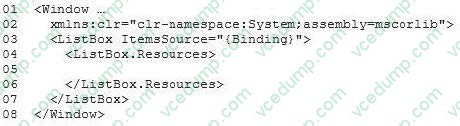
You need to ensure that data templates are used to format the strings without changes and the decimals as currency.
Which markup segment should you insert at line 05?
Related Exams:
-
62-193
Technology Literacy for Educators -
70-243
Administering and Deploying System Center 2012 Configuration Manager -
70-355
Universal Windows Platform – App Data, Services, and Coding Patterns -
77-420
Excel 2013 -
77-427
Excel 2013 Expert Part One -
77-725
Word 2016 Core Document Creation, Collaboration and Communication -
77-726
Word 2016 Expert Creating Documents for Effective Communication -
77-727
Excel 2016 Core Data Analysis, Manipulation, and Presentation -
77-728
Excel 2016 Expert: Interpreting Data for Insights -
77-731
Outlook 2016 Core Communication, Collaboration and Email Skills
Tips on How to Prepare for the Exams
Nowadays, the certification exams become more and more important and required by more and more enterprises when applying for a job. But how to prepare for the exam effectively? How to prepare for the exam in a short time with less efforts? How to get a ideal result and how to find the most reliable resources? Here on Vcedump.com, you will find all the answers. Vcedump.com provide not only Microsoft exam questions, answers and explanations but also complete assistance on your exam preparation and certification application. If you are confused on your 70-511 exam preparations and Microsoft certification application, do not hesitate to visit our Vcedump.com to find your solutions here.