70-511 Exam Details
-
Exam Code
:70-511 -
Exam Name
:TS: Windows Applications Development with Microsoft .NET Framework 4 -
Certification
:Microsoft Certifications -
Vendor
:Microsoft -
Total Questions
:287 Q&As -
Last Updated
:Jan 26, 2022
Microsoft 70-511 Online Questions & Answers
-
Question 191:
You use Microsoft .NET Framework 4 to create a Windows Presentation Foundation (WPF) application. You need to ensure that users can view content in a book-reading format that displays two pages at a time. Which control should you use?
A. FlowDocument
B. FlowDocumentReader
C. FlowDocumentPageViewer
D. FlowDocumentScrollViewer -
Question 192:
You use Microsoft .NET Framework 4 to create a Windows Presentation Foundation (WPF) application.
The application uses the drag-and-drop functionality. You need to identify which enumeration member must be used to meet the following requirements:

Ensure that the data from the drag source can be copied.
Ensure that the data from the drag source can be moved.
Ensure that the target can be scrolled while you are dragging. Which enumeration member should you identify?
A. DragAction.Cancel
B. DragAction.Drop
C. DragDropEffects.All
D. DragDropEffects.None -
Question 193:
You are developing a Windows Presentation Foundation (WPF) application. You use the following markup segment to add a Button control to the design surface of the MainWindow.xaml file.
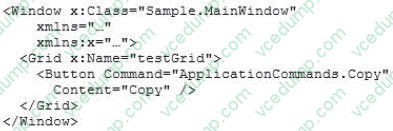
You add the following code segment to the code-behind file for HainWindow.
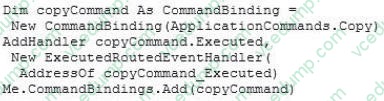
The application will be deployed in an environment that requires alternate key mappings. You need to remove the CTRL+ C input gesture and replace it with the ALT+ C input gesture. What should you do?
A. Option A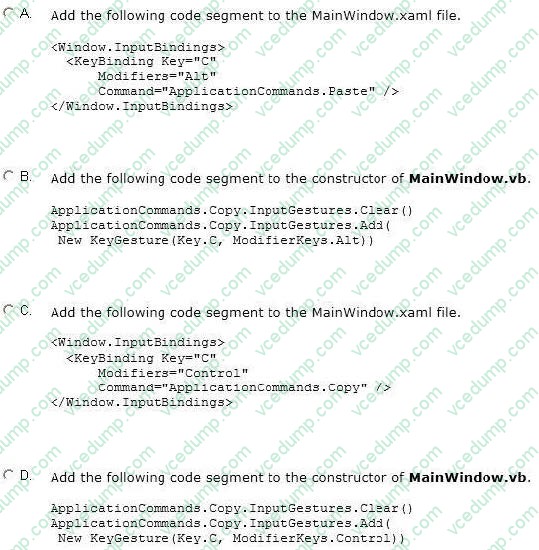
B. Option B
C. Option C
D. Option D -
Question 194:
You are developing a Windows Presentation Foundation (WPF) application. The application contains the following code in the code-behind file for an application window.
(Line numbers are included for reference only.)
01 Dim stack As StackPanel = New StackPanel()
02 Content = stack
03 For i As Integer = 0 To 9
04 Dim btn As Button = New Button ()
05 btn.Name = Convert.ToChar (Asc("A") + i) .ToString ()
06 btn.Content - btn.Name "says" "Click me1" 07
08 Next
You need to ensure that all of the Button controls that are defined in this code segment appear in the application window.
Which code segment should you insert at line 07?
A. stack.Children.Add (btn)
B. stack.Children.Insert (i + 1, btn)
C. Content = btn
D. Content = New Button () With {Name = (Asc("A") + i) .ToString(), . Content = (i and " says Click me'").ToString()} -
Question 195:
You are developing a Windows Presentation Foundation (WPF) application. The application uses a DockPanel control with its HorizontalAlignment property set to Left to divide the main window into three distinct columns. Each column is a panel that is responsible for the layout of its own controls.
You need to reverse the order of the columns.
What should you do?
A. Set the HorizontalAlignment property to Right on the DockPanel.
B. Set the LayoutTransform property to Identity on the DockPanel.
C. Set the DockPanel.Dock property to Right on each of the panels.
D. Set the FlowDirection property to RightToLeft on each of the panels. -
Question 196:
You use Microsoft .NET Framework 4 to create a Windows Presentation Foundation (WPF) application. You write the following code fragment. (Line numbers are included for reference only.)
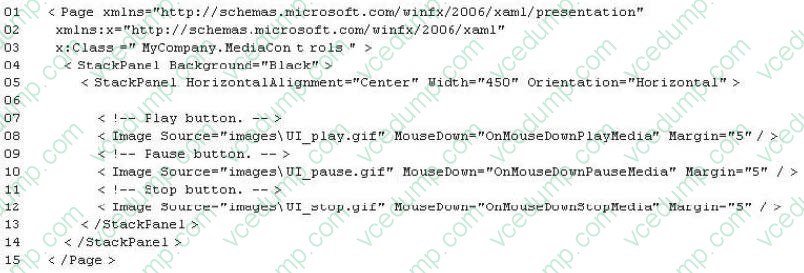
You need to ensure that a video file begins to play only when a user clicks Play. Which code fragment should you insert at line 06?
A. < MediaElement Source="media\ numbers.TJTOV" Name="myMediaElement" Width="450" Height="250" LoadedBehavior="Play" UnloadedBehavior="Stop" Stretch="Fill'>
B. < MediaElement Source="media\numbers.wmv" Name="myMediaElement" Width="450" Height="250" LoadedBehavior="Manual" UnloadedBehavior-"Stop" Stretch- Till"/>
C. < MediaPlayer Source="media\ numbers, umv" Naitie="myMediaElement" Width="450" Helght="250" LoadedBehavior="Play" UnloadedBehavior="Stop" Stretch="Fill"/ >
D. < MediaPlayer Source="media\numbers.wmv" Name="myMediaElement" Width="450" Height="250" LoadedBehavior="Manual" UnloadedBehavior="Stop" Stretch="Fill"/ > -
Question 197:
You are developing a Windows Presentation Foundation (WPF) application.
The application has several visual controls on a main page. You need to restyle all of the Ul-related elements on the main page at run time. Which class should you use to reference all these elements in a single call?
A. visualTreeHelper
B. LogicalTreeHelper
C. UIElement
D. ContentElement -
Question 198:
You use Microsoft .NET Framework 4 to create a Windows Presentation Foundation (WPF) application.
You want to localize the application to use the German locale settings.
You need to allow the ResourceManager class to retrieve a neutral German locale version of the text to be displayed in the user interface (UI).
Which file should you add to the project?
A. Resources.de.xml
B. Resources.de-DE.xml
C. Resources.de.resx
D. Resources.de-DE.resx -
Question 199:
You use Microsoft Visual Studio 2010 and Microsoft .NET Framework 4 to create a Windows Presentation Foundation (WPF) application.
You write the following code fragment to bind a customer object to several controls in a window.
When the application executes, you receive the following error message:
"System.Windows.Data Error: 35: BindingExpression path error: 'CustomerName' property not found on 'object' "Customer1 (HashCode=22613453).
BindingExpression:Path=CustomerNarne; DataItem='Customer' (HashCode=22613453);
target element is 'TextBox' (Name='textBoxl');
target property is 'Text' (type 'String')"
You need to identify the source of the error. What should you do?
A. Use a Trace object.
B. Use a Debug object.
C. Use the WPF Visualizer.
D. Use a PresentationTraceSources object. -
Question 200:
You are developing a Windows Presentation Foundation (WPF) application. You add several TextBox controls within a StackPanel control. You next add several Image controls within a second StackPanel control.
During testing, you discover that some of the textboxes do not appear in the proper layout. You need to quickly search for the textboxes and view their properties to identify which ones are incorrect.
What should you do?
A. Open the QuickWatch window and select the Text Visualizer.
B. Open the Locals window and select the WPF Tree Visualizer.
C. Open the Autos window and select the HTML Visualizer.
D. Open the Watch window and select the XML Visualizer.
Related Exams:
-
62-193
Technology Literacy for Educators -
70-243
Administering and Deploying System Center 2012 Configuration Manager -
70-355
Universal Windows Platform – App Data, Services, and Coding Patterns -
77-420
Excel 2013 -
77-427
Excel 2013 Expert Part One -
77-725
Word 2016 Core Document Creation, Collaboration and Communication -
77-726
Word 2016 Expert Creating Documents for Effective Communication -
77-727
Excel 2016 Core Data Analysis, Manipulation, and Presentation -
77-728
Excel 2016 Expert: Interpreting Data for Insights -
77-731
Outlook 2016 Core Communication, Collaboration and Email Skills
Tips on How to Prepare for the Exams
Nowadays, the certification exams become more and more important and required by more and more enterprises when applying for a job. But how to prepare for the exam effectively? How to prepare for the exam in a short time with less efforts? How to get a ideal result and how to find the most reliable resources? Here on Vcedump.com, you will find all the answers. Vcedump.com provide not only Microsoft exam questions, answers and explanations but also complete assistance on your exam preparation and certification application. If you are confused on your 70-511 exam preparations and Microsoft certification application, do not hesitate to visit our Vcedump.com to find your solutions here.