70-496 Exam Details
-
Exam Code
:70-496 -
Exam Name
:Administering Visual Studio Team Foundation Server 2012 -
Certification
:Microsoft Certifications -
Vendor
:Microsoft -
Total Questions
:97 Q&As -
Last Updated
:Dec 13, 2021
Microsoft 70-496 Online Questions & Answers
-
Question 21:
Your network environment includes a Microsoft Visual Studio Team Foundation Server (TFS) 2012 server. Your development team uses Visual Studio 2012.
You store specialized design files within your Visual Studio solution by using version control. These design files are stored in a proprietary binary format and use the filename extension .dzn.
You need to meet the following requirements:

Ensure that all developers can modify these design files.
Prevent multiple check-outs on all .dzn files.
Ensure that all other file types can be edited by multiple developers at the same time.
What should you do?
A. Within the Source Control Explorer, right-click each .dzn file and uncheck the Allow multiple check outs option.
B. Add a new file type for .dzn to the Team Project Source Control Settings and clear the Enable file merging and multiple check out checkbox.
C. Within the Visual Studio Options dialog box for Source Control, add the .dzn extension to the Prevent multiple check-outs for the following file types list in the Visual Studio Team Foundation server node.
D. Add a new file type for .dzn to the Team Project Collection Source Control Settings and clear the Enable file merging and multiple check out checkbox. -
Question 22:
Your network environment includes a multi-tier Microsoft Visual Studio Team Foundation Server (TFS) 2012 server implementation.
A member of the networking team changes the name of a user's computer. From the user's computer, you need to modify the existing workspace to reflect the new computer name.
What should you do?
A. Execute the following workspaces command to update the machine name: tf workspaces/updateCornputerName: /collection: http: //tea mserver: 8080/tfs/ DefaultCollection.
B. Create a new workspace. Replace the existing workspace with the new one by using the Manage Workspaces window in Source Control Explorer.
C. Execute the following workspace command to update the machine name: tf workspace /computer: / collection: http: //teamserver: 8080/ tfs/ DefaultCollection.
D. Open the existing workspace by using the Manage Workspaces window in Source Control Explorer. In the Computer field, enter the new machine name. -
Question 23:
Your network environment includes a Microsoft Visual Studio Team Foundation Server (TFS) 2012 server. Developers use Visual Studio 2012.
You recently copied your existing TFS environment onto a new set of servers on the same network.
You need to ensure that developers can continue connecting to the original TFS server.
What should you do?
A. Rename the new Team Project Collection to a unique name.
B. Run the ChangeServerID command on the new TFS environment.
C. Configure the Team Project Collections with the same name on the same network.
D. Run the ChangeServerID command on the original TFS environment. -
Question 24:
Your network environment includes a Microsoft Visual Studio Team Foundation Server (TFS) 2012 server. You have a development team named Devi that is already using the server.
You hire a second development team named Dev2.
You need to ensure that the development activities of Dev2 are completely isolated from those of Dev1.
What should you do?
A. Use the TFS Administration Console to create a new team project collection for Dev2.
B. Run the TFSConfiq collection /create [name] command.
C. Use the TFS Administration Console to branch a new team project collection for Dev2 from the one used by Dev1.
D. Use Visual Studio Team Explorer 2012 to create a new team project collection for Dev2. -
Question 25:
Your network environment includes a Microsoft Visual Studio Team Foundation Server (TFS) 2012 server installed at a main office.
A TFS Proxy is installed at the branch office with a default port number.
You need to access TFS from the branch office to add and manage work items.
What should you do?
A. Navigate to the Internet Options of your browser. In the LAN settings area, configure the name of the TFS proxy and enter the port number 8081.
B. Navigate to the Internet Options of your browser. In the LAN settings area, configure the name of the TFS proxy and enter the port number 8080.
C. In the Add/Remove Team Foundation Server dialog box within Visual Studio 2012, enter the name of the TFS server.
D. From the Source Control section of Visual Studio 2012, enter the name of the proxy server and port number 8081. -
Question 26:
Your network environment includes a Team Foundation Server (TFS) 2012 named TFS1 that contains two project collections named PC1 and PC2. A build server named Bi is configured with a build controller named C1 and an agent named
A1 that runs build definitions created in Pd.
A development team wants to create a gated check-in build definition on PC2.
You need to perform a supported infrastructure enhancement to run PC2 build definitions.
What should you do?
A. Add a new build server (B2). On the B2 build server, migrate controller C1 and install a new controller (C2) that connects to the PC2 project collection. On the Bi build server, configure a second build agent (A2) that uses the C2 controller.
B. Add a new build server (B2). On the B2 build server, install a build controller (C2) that connects to the PC2 project collection. On the B2 build server, configure a second build agent (A2) that uses the C2 controller.
C. On the Bi build server, configure the C1 controller to connect to project collections PC1 and PC2. On the Bi build server, update the Al agent to use controllers C1 and C2.
D. On the Bi build server, configure the C1 controller to connect to project collections PC1 and PC2. On the Bi build server, configure a second build agent (A2) that uses the C2 controller. -
Question 27:
Your network environment includes a Microsoft Visual Studio Team Foundation Server (TFS) 2012 server.
You create a new project using the default Visual Studio Scrum 2.0 template. You want to inform the product owner when a Product Backlog Item (PBI) is ready for testing.
You need to ensure that when the development of a PBI has been completed, the tester is able to change the state of the item to be Ready for Acceptance Testing. You need to achieve this goal without developing custom code.
What are two possible ways to accomplish this goal? (Each correct answer presents a complete solution. Choose two.)
A. Use the TFSFieldMapping command to map a new state for Product Backlog Item.
B. Use the Visual Studio Process Template editor to modify the Product Backlog Item template.
C. Write a Visual Studio Extension (VSIX) so developers can change the state in Visual Studio.
D. Modify the Product Backlog Item template XML and use the witadmin command to import the modified XML. -
Question 28:
Your network environment includes a Microsoft Visual Studio Team Foundation Server (TFS) 2012 server.
You are configuring a set of automated build servers for TFS that includes one build controller and four build servers, with TFS Build Agents installed on each. All build servers are configured with the same base set of software.
You have a software component that is licensed for a single build server and can be installed on only one build machine.
You need to configure a set of build definitions that rely on this software component to utilize the correct build machine.
What should you do?
A. Add the name of the software component and the name of the build agent it is installed on to the Installed Components list in the build controller properties. In the build definition, add the name of the software component to the Required Components list.
B. Add a tag to the build agent (indicating which machine has the software installed) and reference this tag in the Tags Filter setting for the build definition that uses the software.
C. Add a tag to the build agent (indicating which machine has the software installed) and reference this tag in the Name Filter setting for the build definition that uses the software.
D. Add the name of the software component to the Installed Components list in the build agent properties. In the build definition, add the name of the software component to the Required Components list. -
Question 29:
Your network environment includes a Microsoft Visual Studio Team Foundation Server 2012 (TFS) server that uses default ports for communication. Visual Studio 2012 has been installed on your computer recently.
You need to connect to the TFS server.
What are two possible options for entering Name or URL in the Connect to TFS dialog box? (Each correct answer presents a complete solution. Choose two.)
A. Tfs1
B. http: //tfs1: 8080/tfs
C. http: //tfs1: 8080
D. http: //tfs1 -
Question 30:
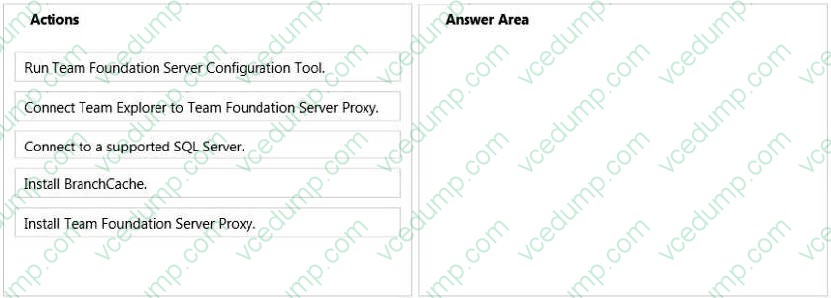
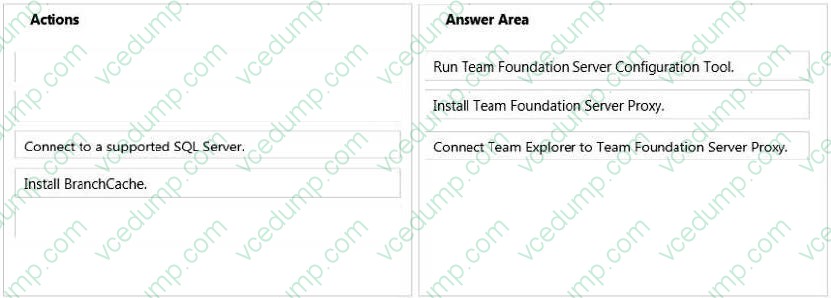
Several of your company programmers are at a remote location. They are sharing files with the main office.
Select and Place:
Related Exams:
-
62-193
Technology Literacy for Educators -
70-243
Administering and Deploying System Center 2012 Configuration Manager -
70-355
Universal Windows Platform – App Data, Services, and Coding Patterns -
77-420
Excel 2013 -
77-427
Excel 2013 Expert Part One -
77-725
Word 2016 Core Document Creation, Collaboration and Communication -
77-726
Word 2016 Expert Creating Documents for Effective Communication -
77-727
Excel 2016 Core Data Analysis, Manipulation, and Presentation -
77-728
Excel 2016 Expert: Interpreting Data for Insights -
77-731
Outlook 2016 Core Communication, Collaboration and Email Skills
Tips on How to Prepare for the Exams
Nowadays, the certification exams become more and more important and required by more and more enterprises when applying for a job. But how to prepare for the exam effectively? How to prepare for the exam in a short time with less efforts? How to get a ideal result and how to find the most reliable resources? Here on Vcedump.com, you will find all the answers. Vcedump.com provide not only Microsoft exam questions, answers and explanations but also complete assistance on your exam preparation and certification application. If you are confused on your 70-496 exam preparations and Microsoft certification application, do not hesitate to visit our Vcedump.com to find your solutions here.