70-496 Exam Details
-
Exam Code
:70-496 -
Exam Name
:Administering Visual Studio Team Foundation Server 2012 -
Certification
:Microsoft Certifications -
Vendor
:Microsoft -
Total Questions
:97 Q&As -
Last Updated
:Dec 13, 2021
Microsoft 70-496 Online Questions & Answers
-
Question 41:
Your network environment includes a Microsoft Visual Studio Team Foundation Server (TFS) 2012 server and a virtual test environment that uses Lab Management 2012 along with System Center Virtual Machine Manager (SCVMM) 2010.
You want to install a test virtual machine that is hosted within a lab environment.
You need to ensure that the test virtual machine can support all the features of Lab Management 2012.
Which component should you install on the test virtual machine?
A. Agents for Visual Studio 2012
B. Visual Studio Build Agent 2012
C. Visual Studio Test Agent 2012
D. Visual Studio Lab Agent 2012 -
Question 42:
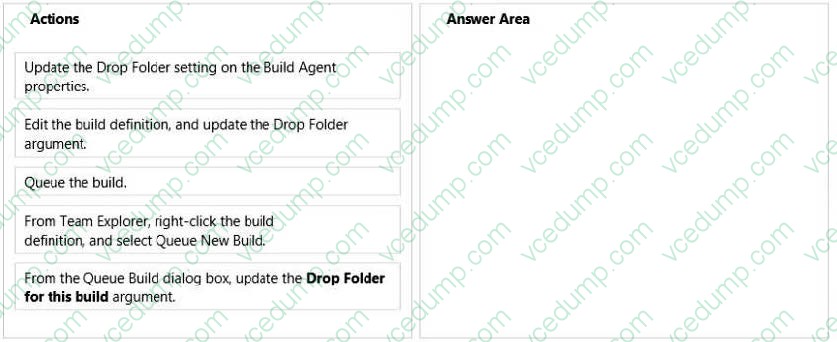
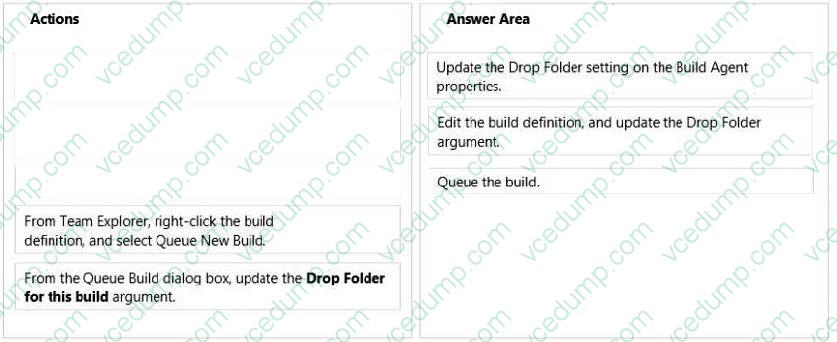
Your team uses Microsoft Visual Studio Team Foundation Server (TFS) to manage automated builds.
You want to change the drop location of a build definition during a single execution of the build.
All subsequent builds for that definition should use the drop location currently defined.
Which three actions should you perform in sequence? To answer, move the appropriate actions from the list of actions to the answer area and arrange them in the correct order.
Select and Place:
-
Question 43:
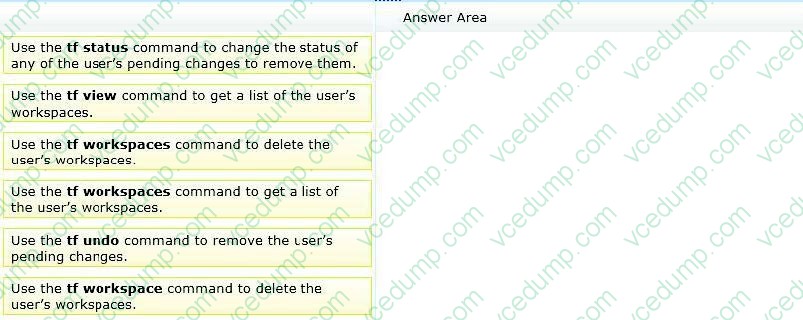
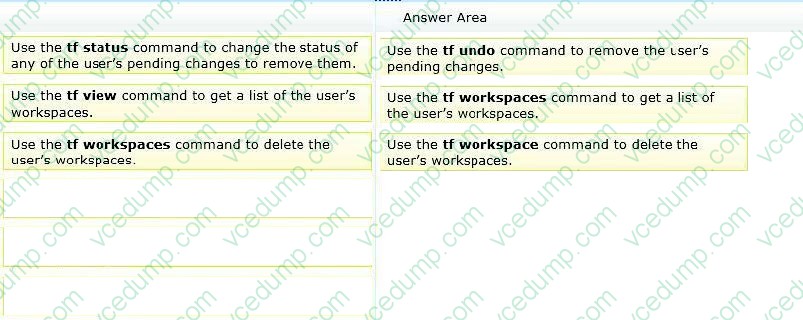
Your network environment includes a Microsoft Visual Studio Team Foundation Server (TFS) 2012 server.
A developer has left the company and still has files checked out. The developer's computer is no longer available to undo the checkouts.
You need to undo any checked-out files for the user. You also need to delete the user's workspace.
Select and Place:
-
Question 44:
Your network environment includes a Microsoft Visual Studio Team Foundation Server 2012 (TFS) server.
You build a multi-tiered application that contains the following tiers:

User Interface
Application Services
Integration Services
Database
You need to modify the item template to meet the following requirements:
When a bug is created, the testing team is able to identify the application tier.
You are able to produce a report of bugs by tier.
Which three actions should you perform? (Each correct answer presents part of the solution.Choose three.)
A. Add a control to the work item FORM. For type, select WorkltemClassificationControl.
B. Add a new FIELD called Custom.ApplicationTier Application Tier and configure its list of ALLOWEDVALUES LISTITEMS to be: User Interface Application Services Integration Services Database
C. Add a control to the work item FORM. For type, select FieldControl.
D. Add the attribute reportable^Dimension to the FIELD definition.
E. Add the attribute reportable = Measure to FIELD definition. -
Question 45:
Your network environment includes the following:
Multi-tier Microsoft Visual Studio Team Foundation Server (TFS) 2012 server environment with HTTPS/ SSL configuration
Microsoft Exchange Server 2010 with SMTP listening on Port 587, requiring SSL and allowing open relay
You want to be able to inform team members about changes to projects, work items, and builds.
You need to configure email notifications for TFS 2012 using the least amount of administrative effort.
What you should do?
A. Log on to the application-tier server. From the TFS Administration Console, enable Email Alert Settings by entering the 5MW Server and the From address, and then editing the Advanced SMTP Settings.
B. Install and configure SMTP Service by using IIS Manager on the TFS Server. Log on to the application-tier server. From the SharePoint Central Administration website, configure outgoing email settings.
C. From the Command prompt, run the command TFSConfiq ConfigureMail /FrornEmailAddress: tfsadmin?contoso.com / SmtpHost: SMTPSVR1 /Port: 58] / SSL.
D. Install and configure SMTP Service by using IIS Manager on the TFS Server. Configure the TFS Email Alert Setting to use SMTP Service. Configure the SMTP Service to send mail to Exchange by using port 587 and SSL. -
Question 46:
Your network environment includes a Microsoft Visual Studio Team Foundation Server (TFS) 2012 server named TFS1. SharePoint and Reporting Services components are also installed and configured for TFS on the same server.
You need to be able to access the SharePoint Project Portal from the TFS server by using the following URL: http: //tfs.fabrikam.com.
What should you do?
A. From the TFS Administration Console, edit the SharePoint Web Application URL.
B. From Visual Studio Team Explorer, edit the portal settings.
C. Run the TFSC0nfIg.exe SharePointportal command.
D. From the SharePoint Central Administration website, configure the Alternate Access Mappings. -
Question 47:
Your network environment includes a Microsoft Visual Studio Team Foundation Server (TFS) 2012 server and a virtual test infrastructure that uses Lab Manager 2012 and System Center Virtual Machine Manager (SCVMM) 2010.
A new Hyper-V based virtual test environment is added to your network environment with its own SCVMM server.
You need to reconfigure TFS to use the new SCVMM instance.
What should you do?
A. Run the TFS[.abContig.exe command.
B. Use the TFS Administration Console.
C. Use the Visual Studio Test Controller Configuration Tool.
D. Use Microsoft Test Manager (MTM) in Lab Center mode. -
Question 48:
Your network environment includes a Microsoft Visual Studio Team Foundation Server (TFS) server.
You are performing capacity planning for three teams of developers. Each team is developing a different software module. Developers belong to only one team.
You need to ensure that team members can edit only the work items of the module on which they are working.
What should you do?
A. Create three teams under the Team Project for team members of three modules. On the Security tab of the team give Edit work items in this node permission to that team for the corresponding area. Deny that permission to other two teams.
B. Create three TFS groups at the Team Project level for team members of three modules. Create three areas for the three modules. For each area, on the Permissions tab of the groups, give Edit work items in this node permission to the group corresponding to that area. Deny that permission to other two groups.
C. Create one TFS group at the Team Project level for the team members of the three modules. Create three areas for the three modules. For each area, give Edit work items in this node permission to the group.
D. Create three teams under the Team Project for team members of three modules. For each area corresponding to the team, give Edit work items in this node permission to that team. Deny that permission to other two teams. -
Question 49:
Your network environment includes a Microsoft Visual Studio Team Foundation Server (TFS) 2012 server and a test environment that is based on non-Hyper-V- based virtualized machines.
You need to be able to run tests on all the test machines.
Which two actions should you perform? (Each correct answer presents part of the solution.Choose two.)
A. Install System Center Virtual Machine Manager (SCVMM) 2010.
B. Use Microsoft Test Manager (MTM) to create a new standard environment.
C. Manually install the Agents for Visual Studio 2012 on the virtualization server.
D. From Microsoft Test Manager (MTM), create a new System Center Virtual Machine Manager- (SCVMM-) based environment and select the virtual machines hosted on the non- Hyper-V-based virtualization server.
E. Install a Visual Studio 2012 test controller. -
Question 50:
Your client's network environment includes a Microsoft Visual Studio Team Foundation Server (TFS) 2012 server installed at its main office.
The network administrator at a remote office reports high WAN utilization. Users at the remote office report slow response times when downloading source code.
You need to minimize WAN utilization and improve the response times for downloading source code.
What should you do?
A. Install TFS Server at the remote site and set up database synchronization between the existing TFS Server and the remote site.
B. Install and configure TFS Proxy at the remote site. Point the TFS Proxy to the TFS server and point Team Explorer to the TFS Proxy.
C. Install and configure IIS caching. Point Team Explorer to the IIS server.
D. Install TFS Proxy at the remote site. Configure TFS Proxy to point to the TFS Server and configure each user's Visual Studio Source Control to use the proxy server for file downloads.
Related Exams:
-
62-193
Technology Literacy for Educators -
70-243
Administering and Deploying System Center 2012 Configuration Manager -
70-355
Universal Windows Platform – App Data, Services, and Coding Patterns -
77-420
Excel 2013 -
77-427
Excel 2013 Expert Part One -
77-725
Word 2016 Core Document Creation, Collaboration and Communication -
77-726
Word 2016 Expert Creating Documents for Effective Communication -
77-727
Excel 2016 Core Data Analysis, Manipulation, and Presentation -
77-728
Excel 2016 Expert: Interpreting Data for Insights -
77-731
Outlook 2016 Core Communication, Collaboration and Email Skills
Tips on How to Prepare for the Exams
Nowadays, the certification exams become more and more important and required by more and more enterprises when applying for a job. But how to prepare for the exam effectively? How to prepare for the exam in a short time with less efforts? How to get a ideal result and how to find the most reliable resources? Here on Vcedump.com, you will find all the answers. Vcedump.com provide not only Microsoft exam questions, answers and explanations but also complete assistance on your exam preparation and certification application. If you are confused on your 70-496 exam preparations and Microsoft certification application, do not hesitate to visit our Vcedump.com to find your solutions here.