70-417 Exam Details
-
Exam Code
:70-417 -
Exam Name
:Upgrading Your Skills to MCSA Windows Server 2012 -
Certification
:Microsoft Certifications -
Vendor
:Microsoft -
Total Questions
:711 Q&As -
Last Updated
:Feb 03, 2022
Microsoft 70-417 Online Questions & Answers
-
Question 451:
You have a Hyper-V host named Server1 that runs Windows Server 2012 R2.
Server1 hosts several virtual machines. Each virtual machine has two network adapters. Server1 contains several virtual switches.
On Server1, you create a NIC team that has two network adapters.
You discover that the NIC team is set to Static Teaming mode.
You need to modify the NIC teaming mode to Switch Independent.
Which cmdlet should you use?
A. Set-VMSwitch
B. Set-NetLbfoTeam
C. Set-NetLbfoTeamNic
D. Set-VMNetworkAdapter -
Question 452:
Your role of Network Administrator at ABC.com includes the management of the Active Directory Domain Services (AD DS) domain named ABC.com. The network includes servers that run Windows Server 2012. The network includes a Windows Server 2012 server named ABC-AppSrv1. ABC-AppSrv1 runs a custom line-of-business (LOB) application used by all company users. You need to determine the amount of network bandwidth used by the LOB application on ABCAppSrv1.
You create a custom Data Collector Set (DCS).
How should you configure the DCS?
A. You should configure the DCS to monitor Performance Counters.
B. You should configure the DCS to monitor Event Trace Data.
C. You should configure the DCS to monitor WDAC Diagnostics.
D. You should configure the DCS to monitor System Configuration Information. -
Question 453:
A network technician installs Windows Server 2012 Standard on a server named Server1.
A corporate policy states that all servers must run Windows Server 2012 Enterprise.
You need to ensure that Server1 complies with the corporate policy.
You want to achieve this goal by using the minimum amount of administrative effort.
What should you perform?
A. offline servicing by using Dism
B. an upgrade installation of Windows Server 2012
C. a clean installation of Windows Server 2012
D. online servicing by using Dism -
Question 454:
DRAG DROP Your network contains an Active Directory domain named contoso.com. The domain contains two servers named Server1 and Server3. The network contains a standalone server named Server2. All servers run Windows Server 2012 R2. The servers are configured as shown in the following table.
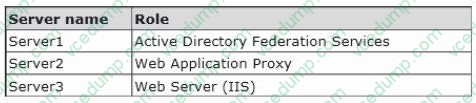
Server3 hosts an application named App1. App1 is accessible internally by using the URL https://app1.contoso.com. App1 only supports Integrated Windows authentication.
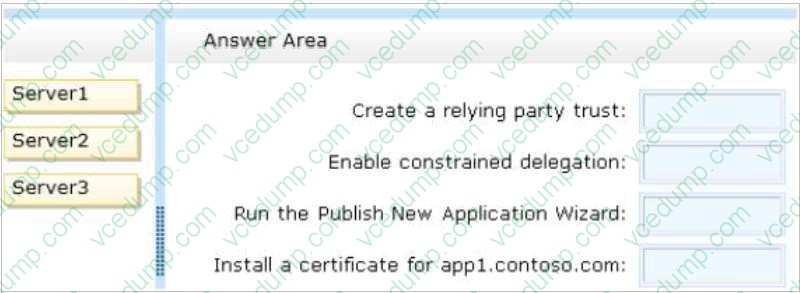
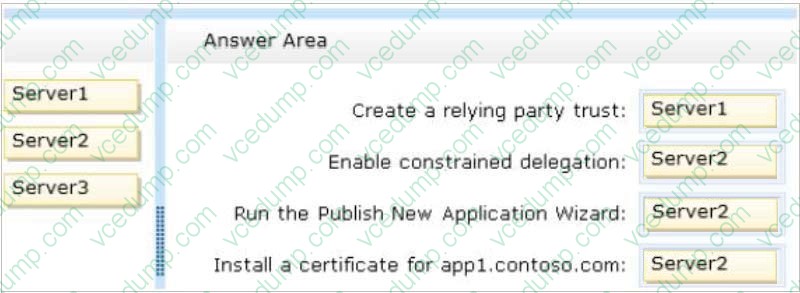
You need to ensure that all users from the Internet are pre-authenticated before they can access App1.
What should you do? To answer, drag the appropriate servers to the correct actions. Each server may be used once, more than once, or not at all. You may need to drag the split bar between panes or scroll to view content.
Select and Place:
-
Question 455:
You have a server named Server1 that runs Windows Server 2012 R2. You need to create a script that will create and mount a virtual hard disk. Which tool should you use?
A. vdsldr.exe
B. diskpart.exe
C. fsutil.exe
D. vds.exe -
Question 456:
Your network contains two servers named Server1 and Server2 that run Windows Server 2012 R2. Server1 and Server2 have the Hyper-V server role installed. Server1 and Server2 are configured as Hyper-V replicas of each other.
Server2 hosts a virtual machine named VM5. VM5 is replicated to Server1.
You need to verily whether the replica of VM5 on Server1 is functional. The solution must ensure that VM5 remains accessible to clients.
What should you do from Hyper-V Manager?
A. On Server1, execute a Planned Failover.
B. On Server1, execute a Test Failover.
C. On Server2, execute a Planned Failover.
D. On Server2, execute a Test Failover. -
Question 457:
You have a server named Server1 that runs Windows Server 2012 R2.
You plan to enable Hyper-V Network Virtualization on Server1.
You need to install the Windows Network Virtualization Filter Driver on Server1.
Which Windows PowerShell cmdlet should you run?
A. Set-NetVirtualizationGlobal
B. Enable-NetAdapterBinding
C. Add - WindowsFeature
D. Set-NetAdapterVmq -
Question 458:
Your network contains an Active Directory domain named contoso.com. The domain contains two servers named Server1 and Server2. Both servers have the IP Address Management (IPAM) Server feature installed.
You have a support technician named Tech1. Tech1 is a member of the IPAM Administrators group on Server1 and Server2.
You need to ensure that Tech1 can use Server Manager on Server1 to manage IPAM on Server2.
To which group on Server2 should you add Tech1?
A. WinRMRemoteWMIUsers_
B. IPAM MSM Administrators
C. Remote Management Users
D. IPAM Administrators -
Question 459:
Your network contains an Active Directory domain named contoso.com. All servers run Windows Server 2012 R2.
Client computers run either Windows 7 or Windows 8. All of the client computers have an application named App1 installed.
The domain contains a Group Policy object (GPO) named GPO1 that is applied to all of the client computers.
You need to add a system variable named App1Data to all of the client computers.
Which Group Policy preference should you configure?
A. Ini Files
B. Data Sources
C. Services
D. Environment -
Question 460:
Your network contains an Active Directory domain named contoso.com. The domain contains three servers named Server1, Server2, and Server3.
You create a server group named ServerGroup1.
You discover the error message shown in the following exhibit. (Click the Exhibit button.)
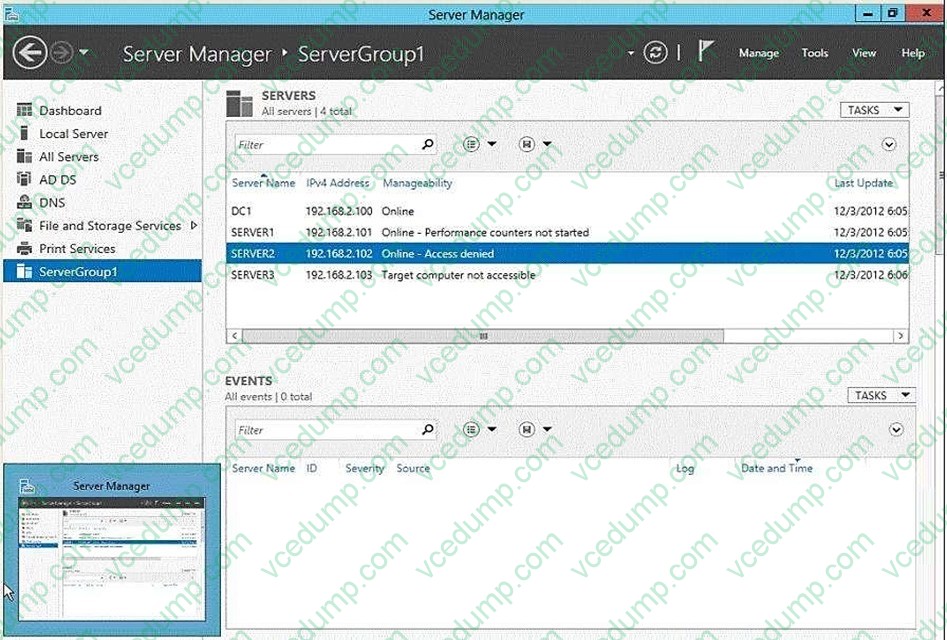
You need to ensure that Server2 can be managed remotely by using Server Manager.
What should you do?
A. On Server2, modify the Windows Management Instrumentation (WMI) firewall rule.
B. From Active Directory Users and Computers, add a computer account named Server2, and then restart Server2.
C. On DC1, run the New-ADComputer cmdlet.
D. On Server2, run the netdom.exe command.
Related Exams:
-
62-193
Technology Literacy for Educators -
70-243
Administering and Deploying System Center 2012 Configuration Manager -
70-355
Universal Windows Platform – App Data, Services, and Coding Patterns -
77-420
Excel 2013 -
77-427
Excel 2013 Expert Part One -
77-725
Word 2016 Core Document Creation, Collaboration and Communication -
77-726
Word 2016 Expert Creating Documents for Effective Communication -
77-727
Excel 2016 Core Data Analysis, Manipulation, and Presentation -
77-728
Excel 2016 Expert: Interpreting Data for Insights -
77-731
Outlook 2016 Core Communication, Collaboration and Email Skills
Tips on How to Prepare for the Exams
Nowadays, the certification exams become more and more important and required by more and more enterprises when applying for a job. But how to prepare for the exam effectively? How to prepare for the exam in a short time with less efforts? How to get a ideal result and how to find the most reliable resources? Here on Vcedump.com, you will find all the answers. Vcedump.com provide not only Microsoft exam questions, answers and explanations but also complete assistance on your exam preparation and certification application. If you are confused on your 70-417 exam preparations and Microsoft certification application, do not hesitate to visit our Vcedump.com to find your solutions here.