70-412 Exam Details
-
Exam Code
:70-412 -
Exam Name
:Configuring Advanced Windows Server 2012 Services -
Certification
:Microsoft Certifications -
Vendor
:Microsoft -
Total Questions
:450 Q&As -
Last Updated
:Feb 03, 2022
Microsoft 70-412 Online Questions & Answers
-
Question 181:
Your network contains two servers named Server1 and Server2 that run Windows Server 2012 R2. Server1 and Server2 have the Hyper-V server role installed. Server1 and Server2 are configured as Hyper-V replicas of each other.
Server2 hosts a virtual machine named VM5. VM5 is replicated to Server1.
You need to verify whether the replica of VM5 on Server1 is functional. The solution must ensure that VM5 remains accessible to clients.
What should you do from Hyper-V Manager?
A. On Server1, execute a Planned Failover.
B. On Server1, execute a Test Failover.
C. On Server2, execute a Planned Failover.
D. On Server2, execute a Test Failover. -
Question 182:
Your network contains an Active Directory domain named contoso.com.
All domain controllers run Windows Server 2012 R2. The domain contains two domain controllers.
The domain controllers are configured as shown in the following table.

The Branch site contains a perimeter network.
For security reasons, client computers in the perimeter network can communicate with client computers in the Branch site only.
You plan to deploy a new RODC to the perimeter network in the Branch site.
You need to ensure that the new RODC will be able to replicate from DC10.
What should you do first on DC10?
A. Enable the Bridge all site links setting.
B. Run the Active Directory Domain Services Configuration Wizard.
C. Create an Active Directory site link bridge.
D. Create an Active Directory site. -
Question 183:
You have a server named Server1 that runs Windows Server 2012 R2. Server1 has the DNS Server server role installed.
You need to store the contents of all the DNS queries received by Server1.
What should you configure?
A. Logging from Windows Firewall with Advanced Security
B. Debug logging from DNS Manager
C. Data Collector Set (DCS) from Performance Monitor
D. Monitoring from DNS Manager -
Question 184:
A user named User1 is a member of the local Administrators group on Node1 and Node2.
User1 creates a new clustered File Server role named File1 by using the File Server for general use option.
A report is generated during the creation of File1 as shown in the exhibit. (Click the Exhibit button.)
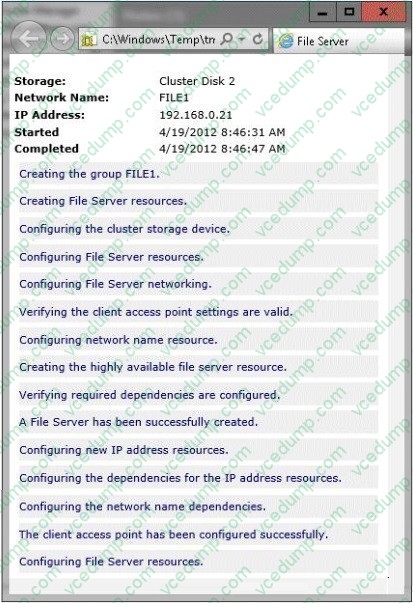
File1 fails to start.
You need to ensure that you can start File1.
What should you do?
A. Log on to the domain by using the built-in Administrator for the domain, and then recreate the clustered File Server role by using the File Server for general use option.
B. Assign the user account permissions of User1 to the Servers OU.
C. Assign the computer account permissions of Cluster2 to the Servers OU.
D. Increase the value of the ms-DS-MachineAccountQuota attribute of the domain.
E. Recreate the clustered File Server role by using the File Server for scale-out application data option. -
Question 185:
Your network contains an Active Directory domain named contoso.com. The domain contains two member servers named Server1 and Server2. All servers run Windows Server 2012 R2.
Server1 and Server2 have the Failover Clustering feature installed. The servers are configured as nodes in a failover cluster named Cluster1. Cluster1 contains a Clustered Shared Volume (CSV).
A developer creates an application named App1. App1 is NOT a cluster-aware application. App1 stores data in the file system.
You need to ensure that App1 runs in Cluster1. The solution must minimize development effort.
Which cmdlet should you run?
A. Add-ClusterServerRole
B. Add-ClusterScaleOutFileServerRole
C. Add-ClusterGenericApplicationRole
D. Add-ClusterGenericServiceRole -
Question 186:
You have a datacenter that contains six servers. Each server has the Hyper-V server role installed and runs Windows Server 2012 R2. The servers are configured as shown in the following table.
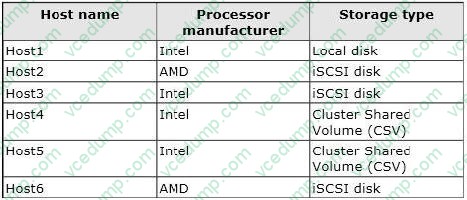
Host4 and Host5 are part of a cluster named Cluster1. Cluster1 hosts a virtual machine named VM1. You need to move VM1 to another Hyper-V host. The solution must minimize the downtime of VM1. To which server and by which method should you move VM1?
A. To Host3 by using a storage migration
B. To Host6 by using a storage migration
C. To Host2 by using a live migration
D. To Host1 by using a quick migration -
Question 187:
DRAG DROP
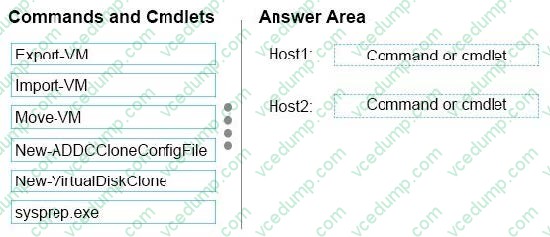
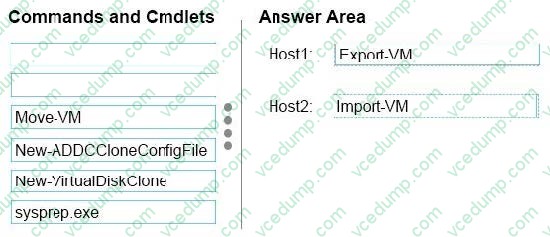
Your network contains one Active Directory domain. The domain contains two Hyper-V hosts named Host1 and Host2 that run Windows Server 2012 R2. Host1 contains a virtual machine named DC5. DC5 is a domain controller that runs Windows Server 2012 R2.
You configure Active Directory to support domain controller cloning for DC5, and then you shut down DC5.
You need to create a clone of DC5 on Host2.
What should you run on each Hyper-V host? To answer, drag the appropriate commands or cmdlets to the correct Hyper-v hosts. Each command or cmdlet may be used once, more than once, or not at all. You may need to drag the split bar between panes or scroll to view content.
Select and Place:
-
Question 188:
Your network contains an Active Directory domain named contoso.com. The domain contains a server named Server1 that runs Windows Server 2012 R2 and has the DNS Server server role installed. Server1 has a zone named contoso.com. The zone is configured as shown in the exhibit. (Click the Exhibit button.)
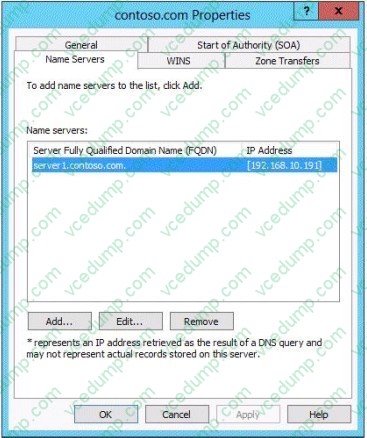
You need to assign a user named User1 permission to add and delete records from the contoso.com zone only. What should you do first?
A. Enable the Advanced view from DNS Manager.
B. Add User1 to the DnsUpdateProxy group.
C. Run the New Delegation Wizard.
D. Configure the zone to be Active Directory-integrated. -
Question 189:
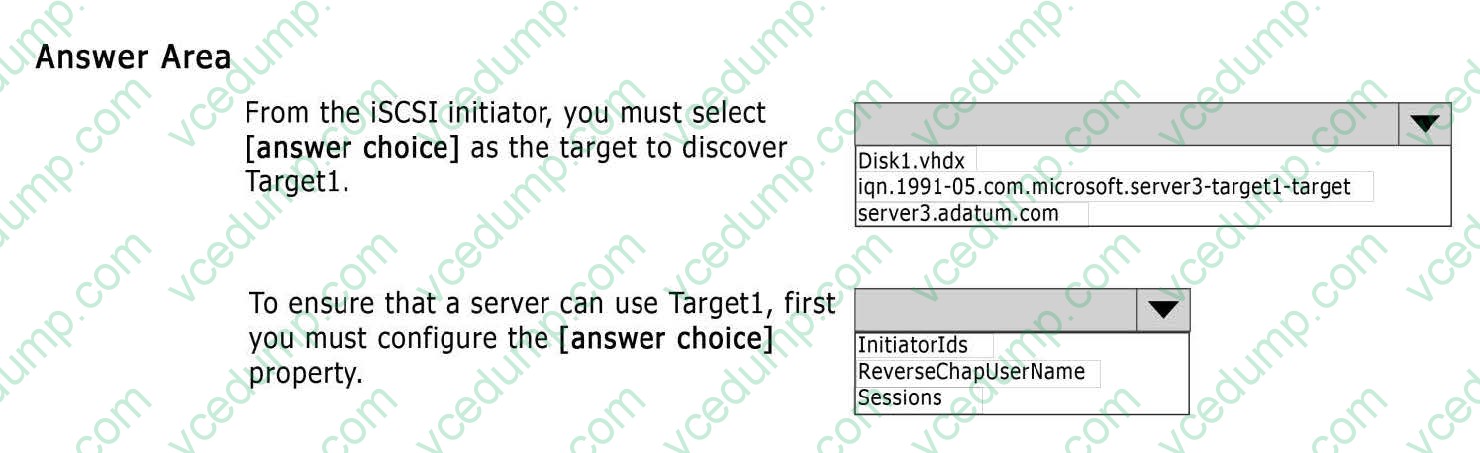
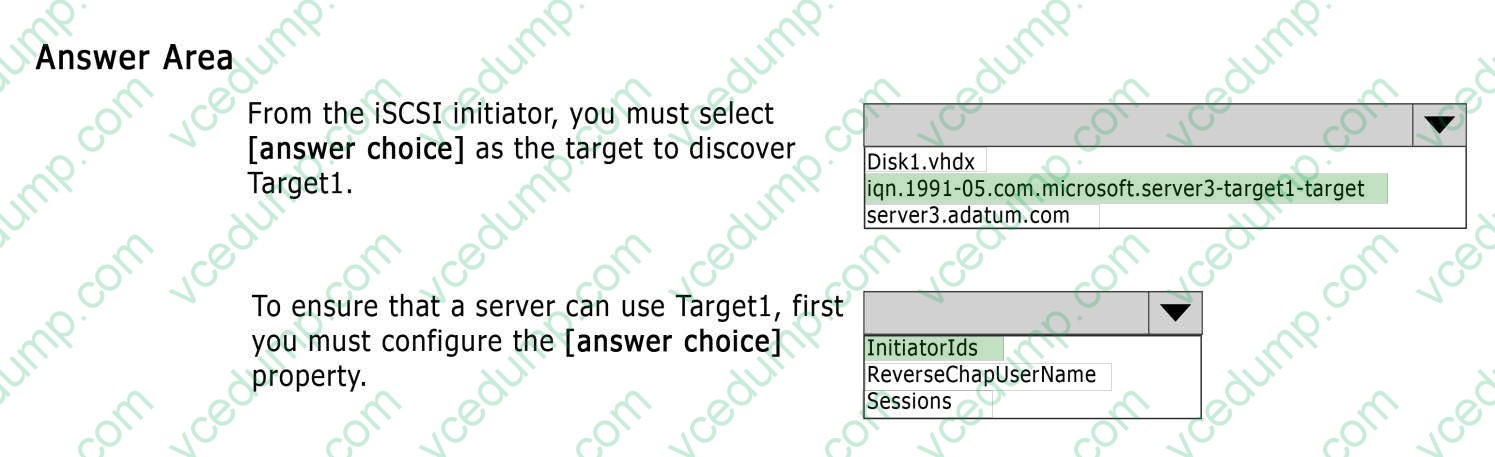
HOTSPOT
You run Get-ISCSIServerTarget and you receive the following output.
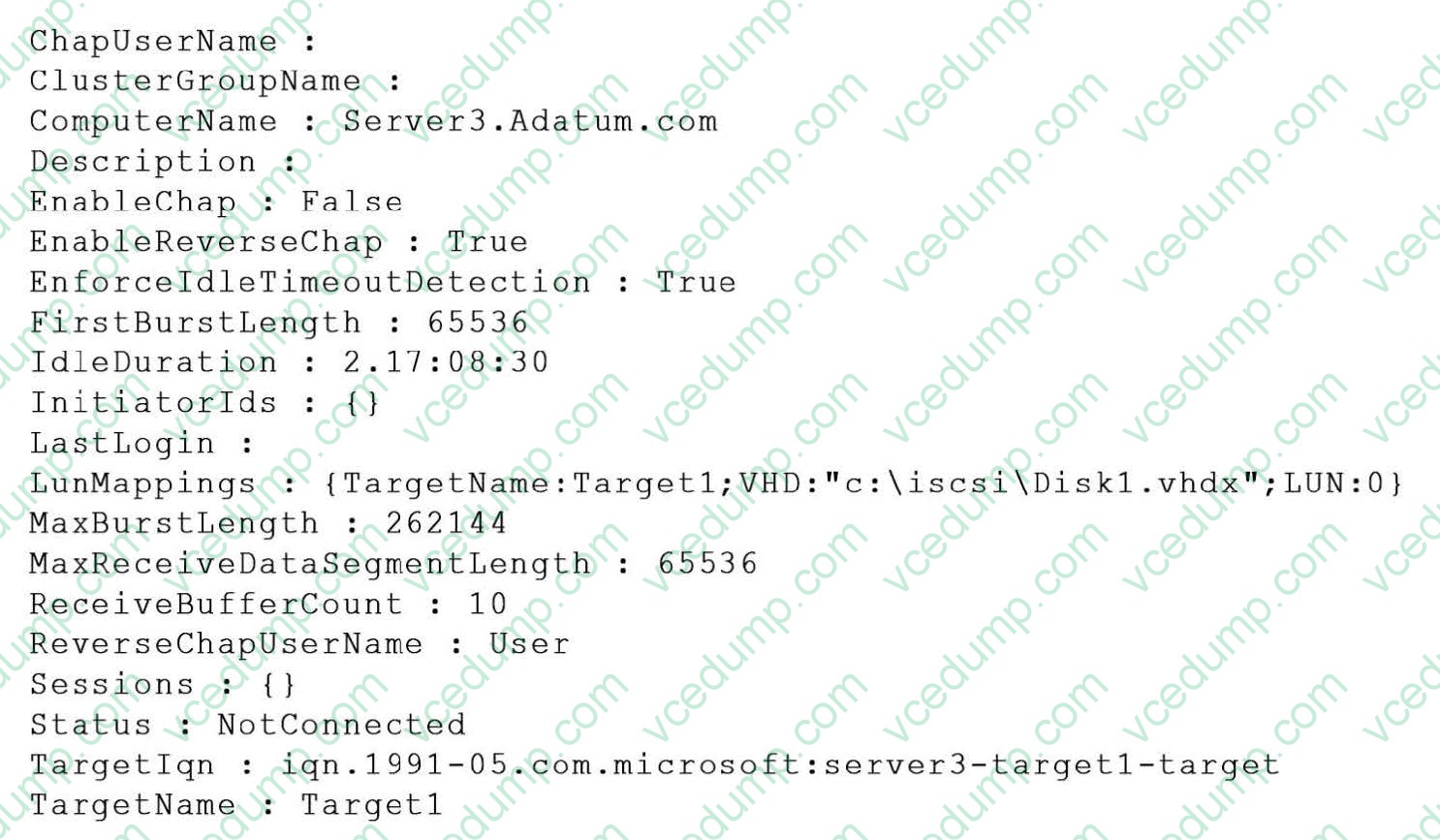
Use the drop-down menus to select the answer choice that completes each statement.
Hot Area:
-
Question 190:
Your network contains an Active Directory domain named contoso.com. The domain contains two member servers named Server1 and Server2. All servers run Windows Server 2012 R2.
Server1 and Server2 have the Failover Clustering feature installed. The servers are configured as nodes in a failover cluster named Cluster1.
Cluster1 hosts an Application named App1.
You need to ensure that Server2 handles all of the client requests to the cluster for App1. The solution must ensure that if Server2 fails, Server1 becomes the active node for App1.
What should you configure?
A. Affinity-None
B. Affinity-Single
C. The cluster quorum settings
D. The failover settings
E. A file server for general use
F. The Handling priority
G. The host priority
H. Live migration
I. The possible owner
J. The preferred owner
Related Exams:
-
62-193
Technology Literacy for Educators -
70-243
Administering and Deploying System Center 2012 Configuration Manager -
70-355
Universal Windows Platform – App Data, Services, and Coding Patterns -
77-420
Excel 2013 -
77-427
Excel 2013 Expert Part One -
77-725
Word 2016 Core Document Creation, Collaboration and Communication -
77-726
Word 2016 Expert Creating Documents for Effective Communication -
77-727
Excel 2016 Core Data Analysis, Manipulation, and Presentation -
77-728
Excel 2016 Expert: Interpreting Data for Insights -
77-731
Outlook 2016 Core Communication, Collaboration and Email Skills
Tips on How to Prepare for the Exams
Nowadays, the certification exams become more and more important and required by more and more enterprises when applying for a job. But how to prepare for the exam effectively? How to prepare for the exam in a short time with less efforts? How to get a ideal result and how to find the most reliable resources? Here on Vcedump.com, you will find all the answers. Vcedump.com provide not only Microsoft exam questions, answers and explanations but also complete assistance on your exam preparation and certification application. If you are confused on your 70-412 exam preparations and Microsoft certification application, do not hesitate to visit our Vcedump.com to find your solutions here.