70-412 Exam Details
-
Exam Code
:70-412 -
Exam Name
:Configuring Advanced Windows Server 2012 Services -
Certification
:Microsoft Certifications -
Vendor
:Microsoft -
Total Questions
:450 Q&As -
Last Updated
:Feb 03, 2022
Microsoft 70-412 Online Questions & Answers
-
Question 201:
You have a file server named Server1 that runs a Server Core Installation of Windows Server 2012 R2.
Server1 has a volume named D that contains user data. Server1 has a volume named E that is empty.
Server1 is configured to create a shadow copy of volume D every hour. You need to configure the shadow copies of volume D to be stored on volume E.
What should you run?
A. The Set-Volume cmdlet with the -driveletter parameter
B. The Set-Volume cmdlet with the -path parameter
C. The vssadmin.exe add shadowstorage command
D. The vssadmin.exe create shadow command -
Question 202:
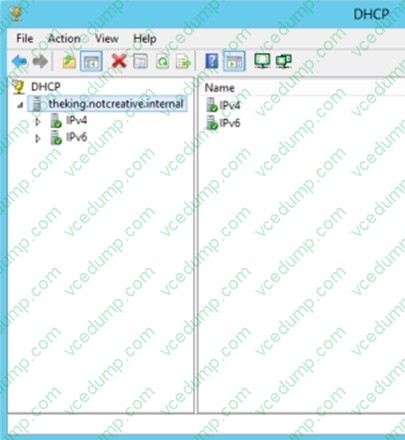
Your network contains an Active Directory domain named contoso.com. The domain contains a domain controller named DC2 that runs Windows Server 2012. DC2 has the DHCP Server server role installed. DHCP is configured as shown in the exhibit. (Click the Exhibit button.)
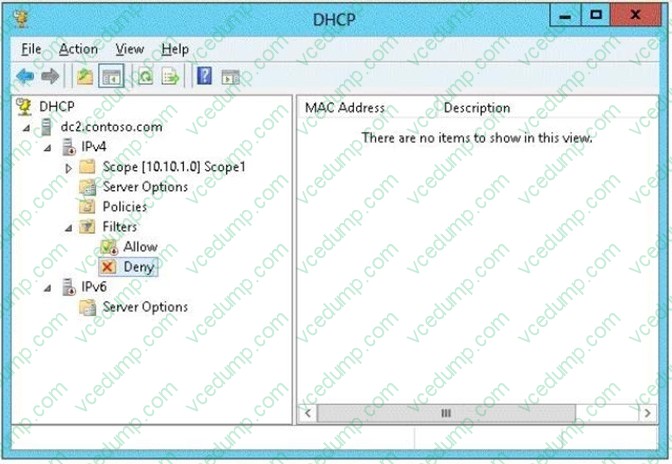
You discover that client computers cannot obtain IPv4 addresses from DC2.
You need to ensure that the client computers can obtain IPv4 addresses from DC2.
What should you do?
A. Enable the Allow filters.
B. Authorize DC2.
C. Disable the Deny filters.
D. Restart the DHCP Server service. -
Question 203:
Your network contains an Active Directory domain named contoso.com. The domain contains a server named Server1 that runs Windows Server 2012 R2.
Server1 is an enterprise root certification authority (CA) for contoso.com.
You need to ensure that the members of a group named Group1 can request code signing certificates. The certificates must be issued automatically to the members.
Which two actions should you perform? (Each correct answer presents part of the solution.
Choose two.)
A. From Certificate Templates, modify the certificate template.
B. From Certification Authority, add a certificate template to be issued.
C. From Certificate Authority, modify the CA properties.
D. From Certificate Templates, duplicate a certificate template.
E. From Certificate Authority, stop and start the Active Directory Certificate Services (AD CS) service. -
Question 204:
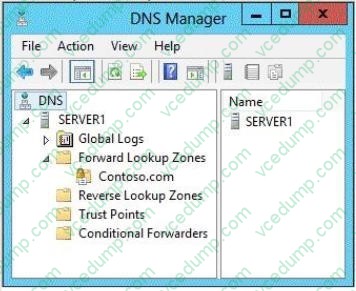
You have a server named Server1 that runs Windows Server 2012 R2. Server1 is located in the perimeter network and has the DNS Server server role installed.
Server1 has a zone named contoso.com. You App1y a security template to Server1.
After you App1y the template, users report that they can no longer resolve names from contoso.com. On Server1, you open DNS Manager as shown in the DNS exhibit. (Click the Exhibit button.)
On Server1, you open Windows Firewall with Advanced Security as shown in the Firewall exhibit. (Click the Exhibit button.)
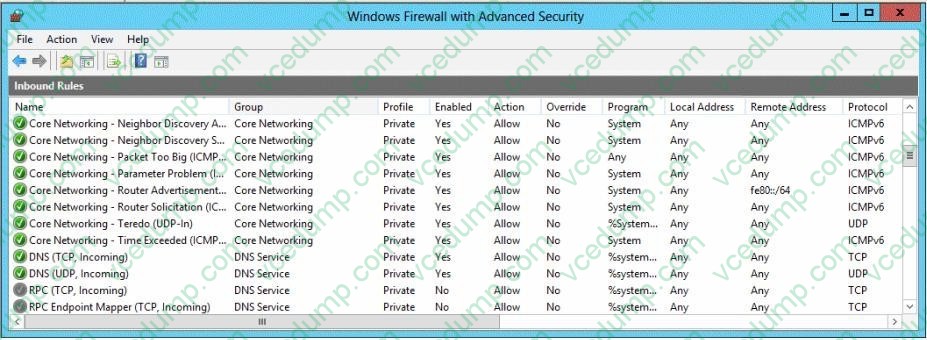
You need to ensure that users can resolve contoso.com names.
What should you do?
A. From Windows Firewall with Advanced Security, disable the DNS (TCP, Incoming) rule and the DNS (UDP, Incoming) rule.
B. From DNS Manager, modify the Zone Transfers settings of the contoso.com zone.
C. From DNS Manager, unsign the contoso.com zone.
D. From DNS Manager, modify the Start of Authority (SOA) of the contoso.com zone.
E. From Windows Firewall with Advanced Security, modify the profiles of the DNS (TCP, Incoming) rule and the DNS (UDP, Incoming) rule. -
Question 205:
Your network contains an Active Directory domain named contoso.com.
You deploy a server named Server1 that runs Windows Server 2012 R2.
A local administrator installs the Active Directory Rights Management Services server role on Server1.
You need to ensure that AD RMS clients can discover the AD RMS cluster automatically.
What should you do?
A. Run the Active Directory Rights Management Services console by using an account that is a member of the Schema Admins group, and then configure the proxy settings.
B. Run the Active Directory Rights Management Services console by using an account that is a member of the Schema Admins group, and then register the Service Connection Point (SCP).
C. Run the Active Directory Rights Management Services console by using an account that is a member of the Enterprise Admins group, and then register the Service Connection Point (SCP).
D. Run the Active Directory Rights Management Services console by using an account that is a member of the Enterprise Admins group, and then configure the proxy settings. -
Question 206:
Your network contains two servers named Server1 and Server 2. Both servers run Windows Server 2012 R2 and have the Hyper-V server role installed.
Server1 hosts a virtual machine named VM1. The virtual machine configuration files and the virtual hard disks for VM1 are stored in D: \VM1.
You shut down VM1 on Server1.
You copy D:\VM1 to D:\VM1 on Server2.
You need to start VM1 on Server2. You want to achieve this goal by using the minimum amount of administrative effort.
What should you do?
A. Run the Import-VMIntialReplication cmdlet.
B. Create a new virtual machine on Server2 and attach the VHD from VM1 to the new virtual machine.
C. From Hyper-V Manager, run the Import Virtual Machine wizard.
D. Run the Import-IscsiVirtualDisk cmdlet. -
Question 207:
You are employed as a network administrator ABC.com.
ABC.com has an active directory domain named ABC.com.
All servers on the ABC.com network have Windows Server 2012 R2 installed.
ABC.com has a server named server1 which is configured as a DHCP server.
You have created a superscope on server1.
Which of the following describes reason for creating a superscope?(choose all that apply.)
A. To support DHCP clients on a singlephysical network segment where multiple logical ip networks are used.
B. To allow for the sending of network traffic to a group of endpoints destination hosts.
C. To support remote DHCP clients located on the far side of DHCP and BOOTP relay agents.
D. Toprovide fault tolerance. -
Question 208:
You have a server named Server1 that runs Windows Server 2012 R2.
Server1 has a single volume that is encrypted by using BitLocker Drive Encryption (BitLocker).
BitLocker is configured to save encryption keys to a Trusted Platform Module (TPM). Server1 is configured to perform a daily system image backup.
The motherboard on Server1 is upgraded.
After the upgrade, Windows Server 2012 R2 on Server1 fails to start.
You need to start the operating system on Server1 as soon as possible.
Which two actions should you perform? (Each correct answer presents a complete solution. Choose two.)
A. Move the disk to a server that has a model of the old motherboard. Start the server from the installation media. Run startrec.exe.
B. Start Server1 from the installation media. Perform a system image recovery.
C. Move the disk to a server that has a model of the old motherboard. Start the server. Run tpm.msc.
D. Move the disk to a server that has a model of the old motherboard. Start the server from the installation media. Run the BitLocker Recovery Password Viewer tool. -
Question 209:
DRAG DROP
Your network contains an Active Directory domain named contoso.com.
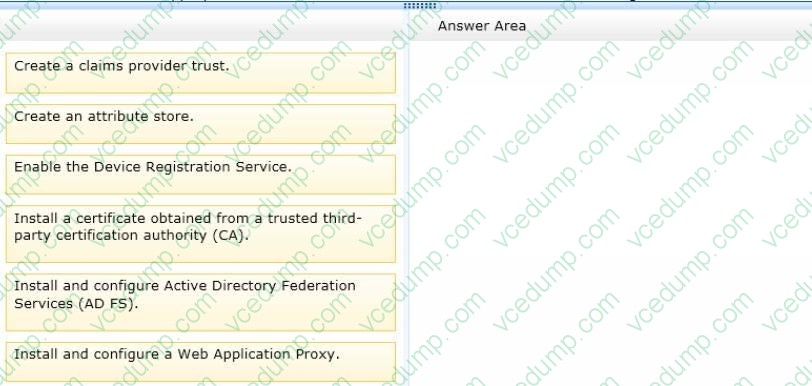
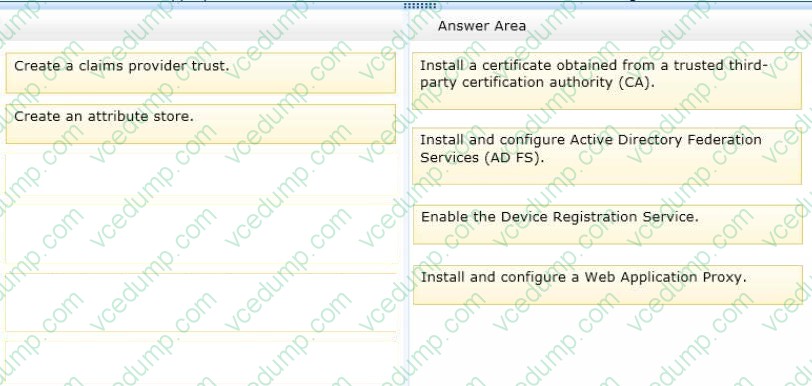
You need to ensure that third-party devices can use Workplace Join to access domain resources on the Internet.
Which four actions should you perform in sequence?
To answer, move the appropriate four actions from the list of actions to the answer area and arrange them in the correct order.
Select and Place:
-
Question 210:
Your network contains an Active Directory domain named contoso.com. The domain contains two servers named Server1 and Server2 that run Windows Server 2012 R2. Server1 has the IP Address Management (IPAM) Server feature
installed. Server2 has the DHCP Server server role installed. A user named User1 is a member of the IPAM Users group on Server1.
You need to ensure that User1 can use IPAM to modify the DHCP scopes on Server2.
The solution must minimize the number of permissions assigned to User1.
To which group should you add User1?
A. DHCP Administrators on Server2
B. IPAM ASM Administrators on Server1
C. IPAMUG in Active Directory
D. IPAM MSM Administrators on Server1
Related Exams:
-
62-193
Technology Literacy for Educators -
70-243
Administering and Deploying System Center 2012 Configuration Manager -
70-355
Universal Windows Platform – App Data, Services, and Coding Patterns -
77-420
Excel 2013 -
77-427
Excel 2013 Expert Part One -
77-725
Word 2016 Core Document Creation, Collaboration and Communication -
77-726
Word 2016 Expert Creating Documents for Effective Communication -
77-727
Excel 2016 Core Data Analysis, Manipulation, and Presentation -
77-728
Excel 2016 Expert: Interpreting Data for Insights -
77-731
Outlook 2016 Core Communication, Collaboration and Email Skills
Tips on How to Prepare for the Exams
Nowadays, the certification exams become more and more important and required by more and more enterprises when applying for a job. But how to prepare for the exam effectively? How to prepare for the exam in a short time with less efforts? How to get a ideal result and how to find the most reliable resources? Here on Vcedump.com, you will find all the answers. Vcedump.com provide not only Microsoft exam questions, answers and explanations but also complete assistance on your exam preparation and certification application. If you are confused on your 70-412 exam preparations and Microsoft certification application, do not hesitate to visit our Vcedump.com to find your solutions here.