70-411 Exam Details
-
Exam Code
:70-411 -
Exam Name
:Administering Windows Server 2012 -
Certification
:Microsoft Certifications -
Vendor
:Microsoft -
Total Questions
:306 Q&As -
Last Updated
:Feb 03, 2022
Microsoft 70-411 Online Questions & Answers
-
Question 161:
Your network contains a Network Policy Server (NPS) server named Server1. The network contains a server named SQL1 that has Microsoft SQL Server 2008 R2 installed. All servers run Windows Server 2012 R2.
You configure NPS on Server1 to log accounting data to a database on SQL1.
You need to ensure that the accounting data is captured if SQL1 fails. The solution must minimize cost.
What should you do?
A. Implement Failover Clustering.
B. Implement database mirroring.
C. Run the Accounting Configuration Wizard.
D. Modify the SQL Server Logging properties. -
Question 162:
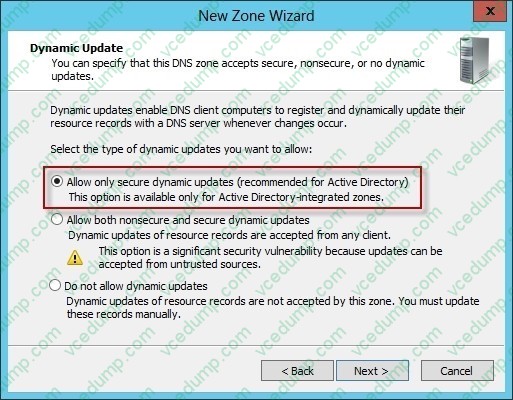
Your network contains an Active Directory domain named contoso.com. The domain contains a domain controller named DC1. DC1 is a DNS server for contoso.com. The properties of the contoso.com zone are configured as shown in the exhibit. (Click the Exhibit button.)
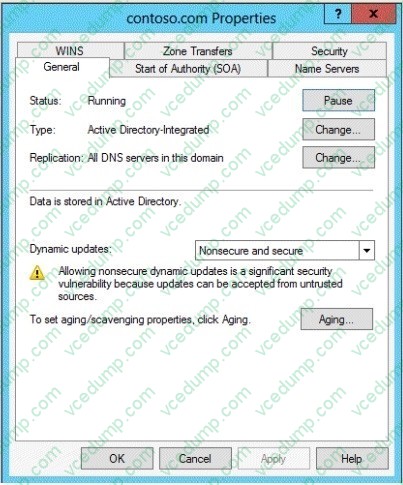
The domain contains a server named Server1 that is part of a workgroup named Workgroup. Server1 is configured to use DC1 as a DNS server.
You need to ensure that Server1 dynamically registers a host (A) record in the contoso.com zone.
What should you configure?
A. The workgroup name of Server1
B. The Security settings of the contoso.com zone
C. The Dynamic updates setting of the contoso.com zone
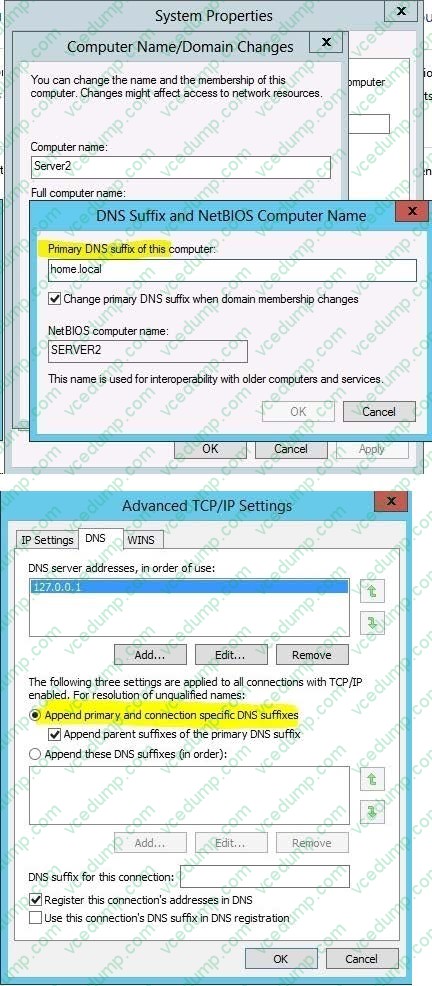
D. The primary DNS suffix of Server1 -
Question 163:
Your network contains an Active Directory domain named contoso.com. All domain controllers run Windows Server 2012 R2.
Administrators use client computers that run Windows 8 to perform all management tasks.
A central store is configured on a domain controller named DC1.
You have a custom administrative template file named App1.admx. App1.admx contains application settings for an application named Appl.
From a client computer named Computer1, you create a new Group Policy object (GPO) named GPO1.
You discover that the application settings for App1 fail to appear in GPO1.
You need to ensure that the App1 settings appear in all of the new GPOs that you create.
What should you do?
A. From the Default Domain Controllers Policy, add App1.admx to the Administrative Templates.
B. Copy App1.admx to \\Contoso.com\SYSVOL\Contoso.com\Policies\PolicyDefinitions\.
C. From the Default Domain Policy, add App1.admx to the Administrative Templates.
D. Copy App1.admx to \\Contoso.com\SYSVOL\Contoso.com\StarterGPOs. -
Question 164:
Your network contains an Active Directory domain named contoso.com. The domain contains a server named Server1 that runs Windows Server 2012 R2. Server1 has the Remote Desktop Session Host role service installed. The computer
account of Server1 resides in an organizational unit (OU) named OU1.
You create and link a Group Policy object (GPO) named GPO1 to OU1.
You need to prevent GPO1 from applying to your user account when you log on to Server1. GPO1 must apply to every other user who logs on to Server1.
What should you configure?
A. Security Filtering.
B. WMI Filtering.
C. Block Inheritance.
D. Item-level targeting. -
Question 165:
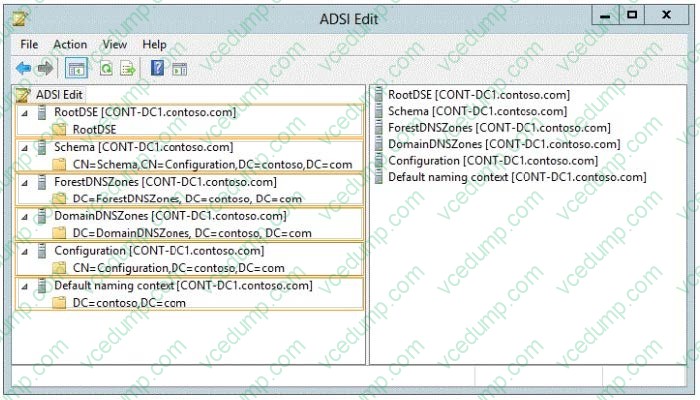
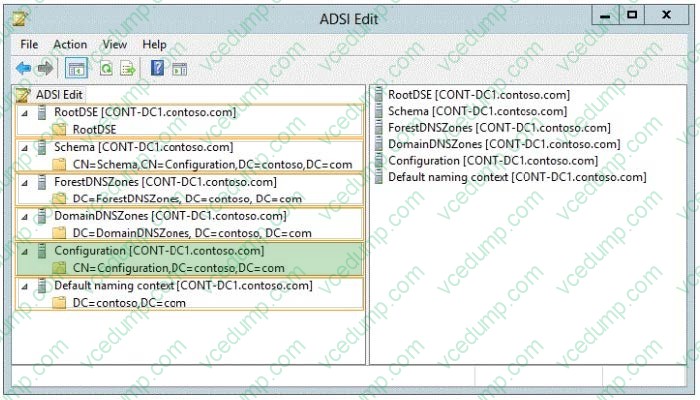
Your network contains an Active Directory forest named contoso.com. The forest contains a single domain. All domain controllers run Windows Server 2012 R2 and are configured as DNS servers. All DNS zones are Active Directory.
integrated. Active Directory Recycle Bin is enabled.
You need to modify the amount of time deleted objects are retained in the Active Directory Recycle Bin.
Which naming context should you use?
To answer, select the appropriate naming context in the answer area.
Hot Area:
-
Question 166:
Your network contains multiple Active Directory sites.
You have a Distributed File System (DFS) namespace that has a folder target in each site.
You discover that some client computers connect to DFS targets in other sites.
You need to ensure that the client computers only connect to a DFS target in their respective site.
What should you modify?
A. The properties of the Active Directory sites
B. The properties of the Active Directory site links
C. The delegation settings of the namespace
D. The referral settings of the namespace -
Question 167:
Your network contains an Active Directory domain named contoso.com. All servers run Windows Server 2012 R2.
An organizational unit (OU) named ResearchServers contains the computer accounts of all research servers.
All domain users are configured to have a minimum password length of eight characters.
You need to ensure that the minimum password length of the local user accounts on the research servers in the ResearchServers OU is 10 characters.
What should you do?
A. Configure a local Group Policy object (GPO) on each research server.
B. Create and link a Group Policy object (GPO) to the ResearchServers OU.
C. Create a universal group that contains the research servers. Create a Password Settings object (PSO) and assign the PSO to the group.
D. Create a global group that contains the research servers. Create a Password Settings object (PSO) and assign the PSO to the group. -
Question 168:
Your network contains an Active Directory domain named contoso.com. The domain contains a server named Server1 that runs Windows Server 2012 P.2. Server1 has the Network Policy and Access Services server role installed.
Your company's security policy requires that certificate-based authentication must be used by some network services.
You need to identify which Network Policy Server (NPS) authentication methods comply with the security policy.
Which two authentication methods should you identify? (Each correct answer presents part of the solution. Choose two.)
A. MS-CHAP
B. PEAP-MS-CHAP v2
C. Chap
D. EAP-TLS
E. MS-CHAP v2 -
Question 169:
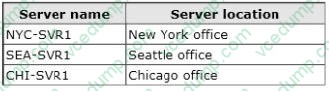
Your company has a main office and two branch offices. The main office is located in New York. The branch offices are located in Seattle and Chicago.
The network contains an Active Directory domain named contoso.com. An Active Directory site exists for each office. Active Directory site links exist between the main office and the branch offices. All servers run Windows Server 2012 R2.
The domain contains three file servers. The file servers are configured as shown in the following table.
You implement a Distributed File System (DFS) replication group named ReplGroup.
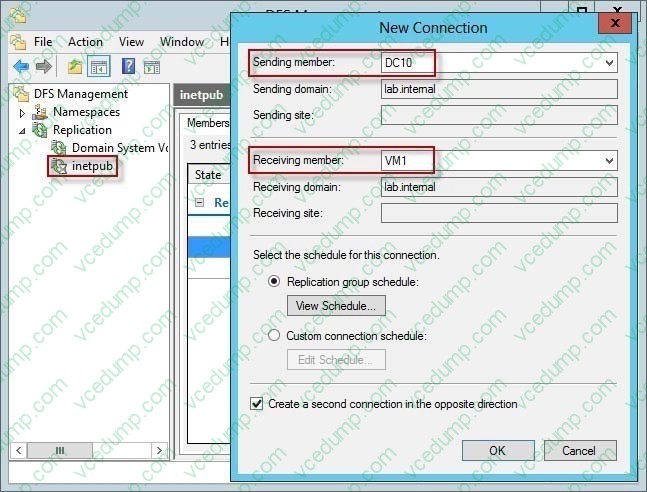
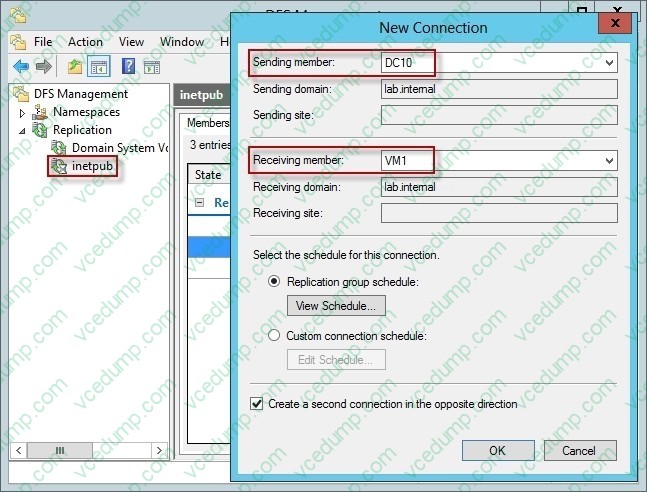
ReplGroup is used to replicate a folder on each file server. ReplGroup uses a hub and spoke topology. NYC-SVR1 is configured as the hub server.
You need to ensure that replication can occur if NYC-SVR1 fails.
What should you do?
A. Create an Active Directory site link bridge.
B. Create an Active Directory site link.
C. Modify the properties of Rep1Group.
D. Create a connection in Rep1Group. -
Question 170:
You deploy a Windows Server Update Services (WSUS) server named Server01.
You plan to use a Group Policy object (GPO) to configure all client computers to use Server01 as a Microsoft Update server and to assign the client computers to computer groups.
You need to ensure that the computers are assigned to the correct computer groups automatically when the GPO is deployed.
Which two actions should you perform before you deploy the GPO? Each correct answer presents part of the solution.
A. From Windows PowerShell, run the Approve-WSUSUpdate cmdlet.
B. From the Update Services console, modify the Computers option.
C. From Windows PowerShell, run the Add-WSUSUComputer cmdlet.
D. From the Update Services console, manually create the computer groups.
E. From the Update Services console, modify the Products and Classifications options.
Related Exams:
-
62-193
Technology Literacy for Educators -
70-243
Administering and Deploying System Center 2012 Configuration Manager -
70-355
Universal Windows Platform – App Data, Services, and Coding Patterns -
77-420
Excel 2013 -
77-427
Excel 2013 Expert Part One -
77-725
Word 2016 Core Document Creation, Collaboration and Communication -
77-726
Word 2016 Expert Creating Documents for Effective Communication -
77-727
Excel 2016 Core Data Analysis, Manipulation, and Presentation -
77-728
Excel 2016 Expert: Interpreting Data for Insights -
77-731
Outlook 2016 Core Communication, Collaboration and Email Skills
Tips on How to Prepare for the Exams
Nowadays, the certification exams become more and more important and required by more and more enterprises when applying for a job. But how to prepare for the exam effectively? How to prepare for the exam in a short time with less efforts? How to get a ideal result and how to find the most reliable resources? Here on Vcedump.com, you will find all the answers. Vcedump.com provide not only Microsoft exam questions, answers and explanations but also complete assistance on your exam preparation and certification application. If you are confused on your 70-411 exam preparations and Microsoft certification application, do not hesitate to visit our Vcedump.com to find your solutions here.