70-411 Exam Details
-
Exam Code
:70-411 -
Exam Name
:Administering Windows Server 2012 -
Certification
:Microsoft Certifications -
Vendor
:Microsoft -
Total Questions
:306 Q&As -
Last Updated
:Feb 03, 2022
Microsoft 70-411 Online Questions & Answers
-
Question 151:
Your network contains an Active Directory domain named contoso.com. The domain contains a server named Server1 that runs Windows Server 2008 R2. You plan to test Windows Server 2012 R2 by using native-boot virtual hard disks
(VHDs).
You have a Windows image file named file1.wim.
You need to add an image of a volume to file1.wim.
What should you do?
A. Run imagex.exe and specify the /append parameter.
B. Run imagex.exe and specify the /export parameter.
C. Run dism.exe and specify the /image parameter.
D. Run dism.exe and specify the /append-image parameter. -
Question 152:
Your network contains an Active Directory domain named contoso.com. All domain controllers run Windows Server 2012 R2. The domain contains 500 client computers that run Windows 8 Enterprise.
You implement a Group Policy central store.
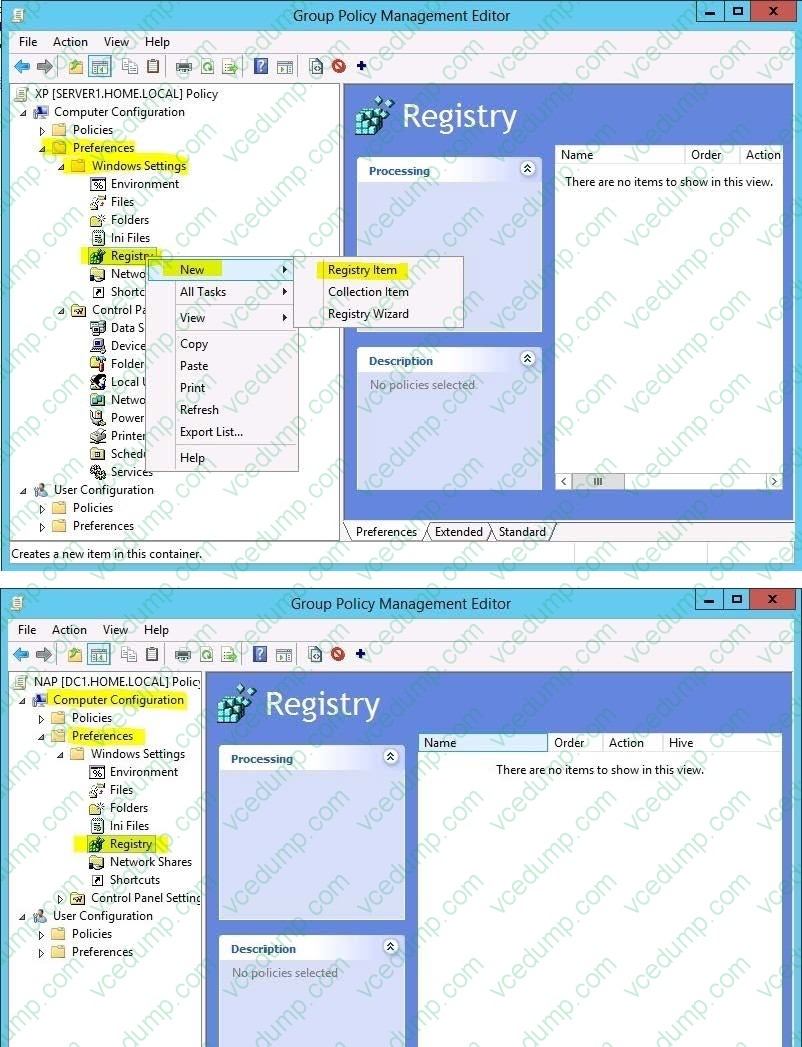
You have an application named App1. App1 requires that a custom registry setting be deployed to all of the computers.
You need to deploy the custom registry setting. The solution must minimize administrator effort.
What should you configure in a Group Policy object (GPO)?
A. The Software Installation settings
B. The Administrative Templates
C. An application control policy
D. The Group Policy preferences -
Question 153:
Your network contains on Active Directory domain named contoso.com. The domain contains an organizational unit (OU) named AIIServers_OU.
You create and link a Group Policy object (GPO) named GPO1 to AIIServer_OU. GPO1 is configured as shown in the exhibit. (Click the Exhibit button.)
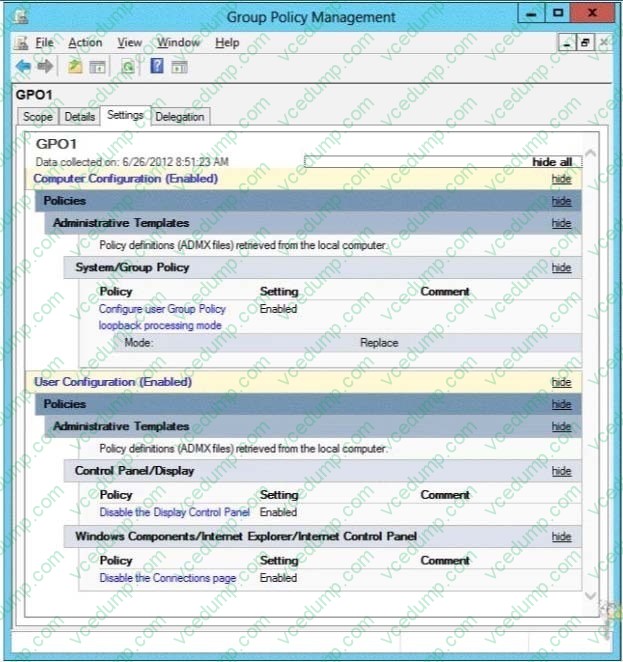
d You need to ensure that GPO1 only applies to servers that have Remote Desktop Services (RDS) installed What should you configure?
A. Item-level targeting
B. Block Inheritance
C. Security Filtering
D. WMI Filtering -
Question 154:
Your network contains an Active Directory domain named contoso.com.
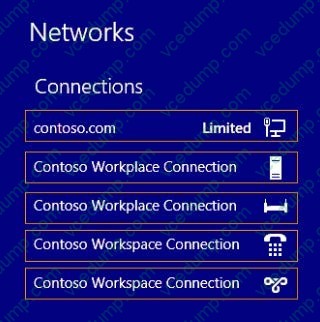
You implement DirectAccess.
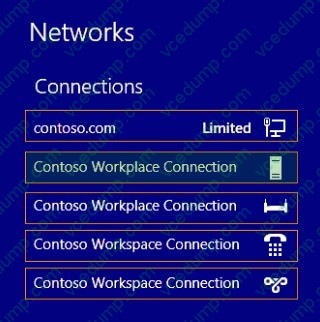
You need to view the properties of the DirectAccess connection.
Which connection properties should you view?
To answer, select the appropriate connection properties in the answer area.
Hot Area:
-
Question 155:
Note: This question is part of a series of questions that use the same or similar answer choices. An answer choice may be correct for more than one question in the series. Each question is independent of the other questions in this series.
Information and details provided in a question apply only to that question.
Your network contains an Active Directory domain named contoso.com. The domain contains more than 100 Group Policy objects (GPOs). Currently, there are no enforced GPOs.
You have a GPO named GPO1 that is linked to the domain.
You need to configure GPO1 to apply settings to Group1 only.
You need to configure GPO1 to apply settings to Group1 only.
What should you use?
A. Dcgpofix
B. Get-GPOReport
C. Gpfixup
D. Gpresult
E. Gpedit. msc
F. Import-GPO
G. Restore-GPO
H. Set-GPInheritance
I. Set-GPLink
J. Set-GPPermission -
Question 156:
Your company has a main office and a branch office.
The main office contains a server that hosts a Distributed File System (DFS) replicated folder.
You plan to implement a new DFS server in the branch office.
You need to recommend a solution that minimizes the amount of network bandwidth used to perform the initial synchronization of the folder to the branch office. You recommend using the Export-DfsrClone and Import-DfsrClonecmdlets.
Which additional command or cmdlet should you include in the recommendation?
A. Robocopy.exe
B. Synchost.exe
C. Export-BcCachePackage
D. Sync-DfsReplicationGroup -
Question 157:
Your network contains two Active Directory forests named adatum.com and contoso.com. The network contains three servers. The servers are configured as shown in the following table.
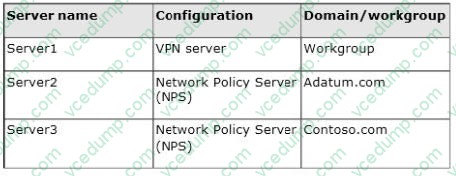
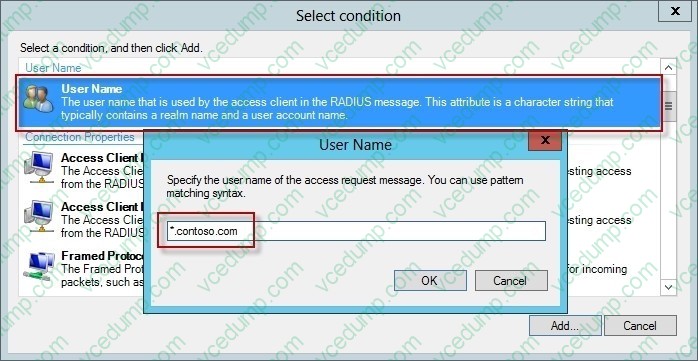
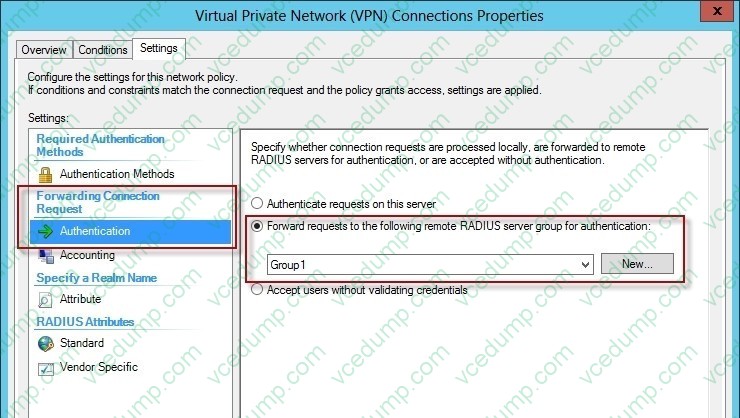
You need to ensure that connection requests from adatum.com users are forwarded to Server2 and connection requests from contoso.com users are forwarded to Server3. Which two should you configure in the connection request policies on Server1? (Each correct answer presents part of the solution. Choose two.)
A. The Authentication settings
B. The Standard RADIUS Attributes settings
C. The Location Groups condition
D. The Identity Type condition
E. The User Name condition -
Question 158:
You have a server named Server1 that runs Windows Server 2012 R2. Server1 has the File Server Resource Manager role service installed.
Each time a user receives an access-denied message after attempting to access a folder on Server1, an email notification is sent to a distribution list named DLL.
You create a folder named Folder1 on Server1, and then you configure custom NTFS permissions for Folder1.
You need to ensure that when a user receives an access-denied message while attempting to access Folder1, an email notification is sent to a distribution list named DL2. The solution must not prevent DL1 from receiving notifications about
other access-denied messages.
What should you do?
A. From the File Server Resource Manager console, create a local classification property.
B. From Server Manager, run the New Share Wizard to create a share for Folder1 by selecting the SMB Share - Applications option.
C. From the File Server Resource Manager console, modify the Access-Denied Assistance settings.
D. From the File Server Resource Manager console, set a folder management property. -
Question 159:
Your network contains an Active Directory domain named contoso.com. The domain contains a server named Server1 that runs Windows Server 2012 R2 and has the Network Policy Server role service installed.
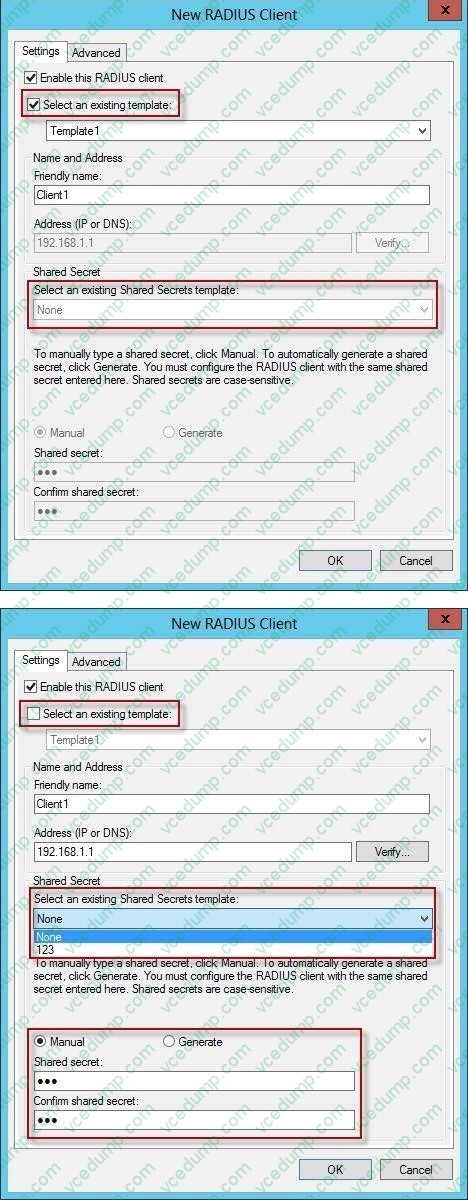
An administrator creates a RADIUS client template named Template1.
You create a RADIUS client named Client1 by using Template 1.
You need to modify the shared secret for Client1.
What should you do first?
A. Configure the Advanced settings of Template1.
B. Set the Shared secret setting of Template1 to Manual.
C. Clear Enable this RADIUS client for Client1.
D. Clear Select an existing template for Client1. -
Question 160:
Your network contains an Active Directory domain named contoso.com. The domain contains a server named Server1 that has the Remote Access server role installed.
DirectAccess is implemented on Server1 by using the default configuration.
You discover that DirectAccess clients do not use DirectAccess when accessing websites on the Internet.
You need to ensure that DirectAccess clients access all Internet websites by using their DirectAccess connection. What should you do?
A. Configure a DNS suffix search list on the DirectAccess clients.
B. Configure DirectAccess to enable force tunneling.
C. Disable the DirectAccess Passive Mode policy setting in the DirectAccess Client Settings Group Policy object (GPO).
D. Enable the Route all traffic through the internal network policy setting in the DirectAccess Server Settings Group Policy object (GPO).
Related Exams:
-
62-193
Technology Literacy for Educators -
70-243
Administering and Deploying System Center 2012 Configuration Manager -
70-355
Universal Windows Platform – App Data, Services, and Coding Patterns -
77-420
Excel 2013 -
77-427
Excel 2013 Expert Part One -
77-725
Word 2016 Core Document Creation, Collaboration and Communication -
77-726
Word 2016 Expert Creating Documents for Effective Communication -
77-727
Excel 2016 Core Data Analysis, Manipulation, and Presentation -
77-728
Excel 2016 Expert: Interpreting Data for Insights -
77-731
Outlook 2016 Core Communication, Collaboration and Email Skills
Tips on How to Prepare for the Exams
Nowadays, the certification exams become more and more important and required by more and more enterprises when applying for a job. But how to prepare for the exam effectively? How to prepare for the exam in a short time with less efforts? How to get a ideal result and how to find the most reliable resources? Here on Vcedump.com, you will find all the answers. Vcedump.com provide not only Microsoft exam questions, answers and explanations but also complete assistance on your exam preparation and certification application. If you are confused on your 70-411 exam preparations and Microsoft certification application, do not hesitate to visit our Vcedump.com to find your solutions here.