70-411 Exam Details
-
Exam Code
:70-411 -
Exam Name
:Administering Windows Server 2012 -
Certification
:Microsoft Certifications -
Vendor
:Microsoft -
Total Questions
:306 Q&As -
Last Updated
:Feb 03, 2022
Microsoft 70-411 Online Questions & Answers
-
Question 131:
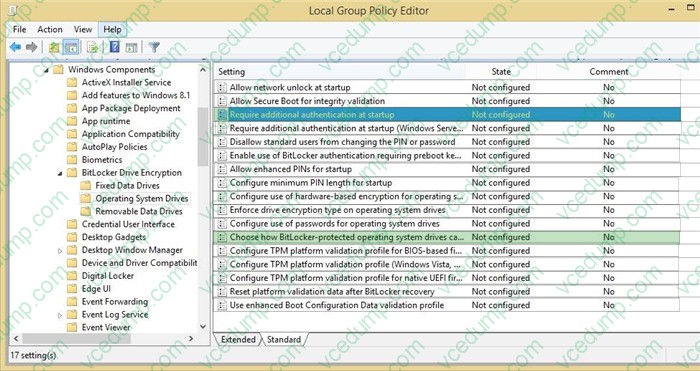
Your network contains one Active Directory domain named contoso.com. The domain contains 10 file servers that run Windows Server 2012 R2.
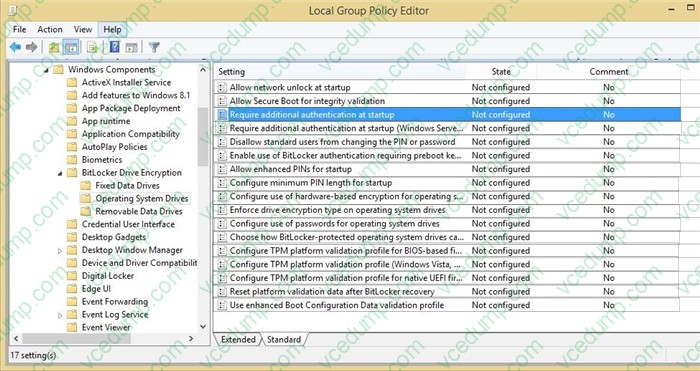
You plan to enable BitLocker Drive Encryption (BitLocker) for the operating system drives of the file servers.
You need to configure BitLocker policies for the file servers to meet the following requirements:
Ensure that all of the servers use a startup PIN for operating system drives encrypted with BitLocker.
Ensure that the BitLocker recovery key and recovery password are stored in Active Directory.
Which two Group Policy settings should you configure? To answer, select the appropriate settings in the answer area.
Hot Area:
-
Question 132:
Your network contains an Active Directory domain named contoso.com.
A user named User1 creates a central store and opens the Group Policy Management Editor as shown in the exhibit. (Click the Exhibit button.)
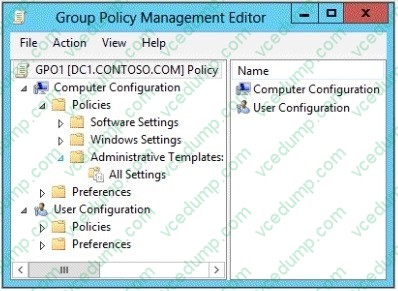
You need to ensure that the default Administrative Templates appear in GPO1. What should you do?
A. Link a WMI filter to GPO1.
B. Copy files from %Windir%\Policydefinitions to the central store.
C. Configure Security Filtering in GPO1.
D. Add User1 to the Group Policy Creator Owners group. -
Question 133:
Your network contains an Active Directory domain named contoso.com. The functional level of the forest is Windows Server 2008 R2.
Computer accounts for the marketing department are in an organizational unit (OU) named Departments\Marketing\Computers. User accounts for the marketing department are in an OU named Departments\Marketing\Users.
All of the marketing user accounts are members of a global security group named MarketingUsers. All of the marketing computer accounts are members of a global security group named MarketingComputers.
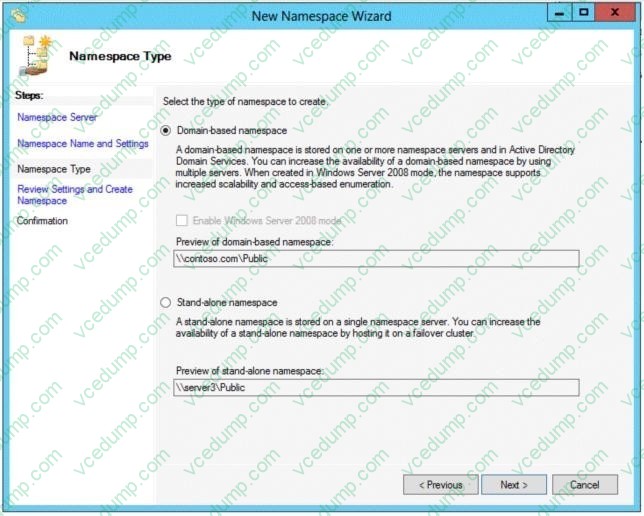
In the domain, you have Group Policy objects (GPOs) as shown in the exhibit. (Click the Exhibit button.)
You create two Password Settings objects named PSO1 and PSO2. PSO1 is applied to MarketingUsers. PSO2 is applied to MarketingComputers. The minimum password length is defined for each policy as shown in the following table.
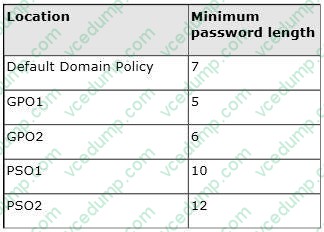
You need to identify the minimum password length required for each marketing user. What should you identify?
A. 5
B. 6
C. 7
D. 10
E. 12 -
Question 134:
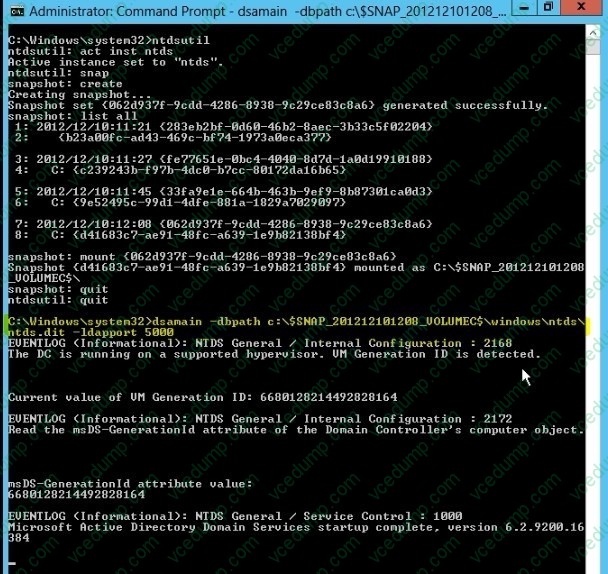
Your network contains an Active Directory domain named contoso.com. The domain contains a domain controller named DC1 that runs Windows Server 2012 R2.
You mount an Active Directory snapshot on DC1.
You need to expose the snapshot as an LDAP server.
Which tool should you use?
A. Ldp
B. ADSI Edit
C. Dsamain
D. Ntdsutil -
Question 135:
Your network has a router named Router1 that provides access to the Internet. You have a server named Server1 that runs Windows Server 2012 R2. Server1 to use Router1 as the default gateway.
A new router named Router2 is added to the network. Router2 provides access to the Internet. The IP address of the internal interface on Router2 is 10.1.14.2S4.
You need to configure Server1 to use Router2 to connect to the Internet if Router1 fails.
What should you do on Server1?
A. Add a route for 10.1.14.0/24 that uses 10.1.14.254 as the gateway and set the metric to 1.
B. Add 10.1.14.254 as a gateway and set the metric to 1.
C. Add a route for 10.1.14.0/24 that uses 10.1.14.254 as the gateway and set the metric to 500.
D. Add 10.1.14.254 as a gateway and set the metric to 500. -
Question 136:
Your network contains an Active Directory domain named contoso.com.
All user accounts reside in an organizational unit (OU) named OU1. All of the users in the marketing department are members of a group named Marketing. All of the users in the human resources department are members of a group named HR.
You create a Group Policy object (GPO) named GPO1. You link GPO1 to OU1. You configure the Group Policy preferences of GPO1 to add two shortcuts named Link1 and Link2 to the desktop of each user.
You need to ensure that Link1 only appears on the desktop of the users in Marketing and that Link2 only appears on the desktop of the users in HR.
What should you configure?
A. Security Filtering
B. WMI Filtering
C. Group Policy Inheritance
D. Item-level targeting -
Question 137:
You manage a server that runs Windows Server 2012 R2. The server has the Windows Deployment Services server role installed. You start a virtual machine named VM1 as shown in the exhibit. (Click the Exhibit button.)
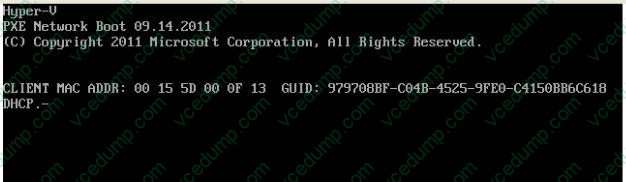
You need to configure a pre-staged device for VM1 in the Windows Deployment Services console.
Which two values should you assign to the device ID? (Each correct answer presents a complete solution. Choose two.)
A. 979708BFC04B45259FE0C4150BB6C618
B. 979708BF-C04B-4525-9FE0-C4150BB6C618
C. 00155D000F1300000000000000000000
D. 0000000000000000000000155D000F13
E. 00000000-0000-0000-0000-C4150BB6C618 -
Question 138:
Note: This question is part of a series of questions that use the same or similar answer choices. An answer choice may be correct for more than one question in the series. Each question is independent of the other questionsin this series. Information and details provided in a question apply only to that question.
Your network contains an Active Directory domain named contoso.com. The domain contains more than 100 Group Policy objects (GPOs). Currently, there are no enforced GPOs.
You need to prevent all of the GPOs at the site level and at the domain level from being applied to users and computers in an organizational unit (OU) named OU1. You want to achieve this goal by using the minimum amount of administrative
effort.
What should you use?
A. Dcgpofix
B. Get-GPOReport
C. Gpfixup
D. Gpresult
E. Gpedit.msc
F. Import-GPO
G. Restore-GPO
H. Set-GPInheritance
I. Set-GPLink
J. Set-GPPermission -
Question 139:
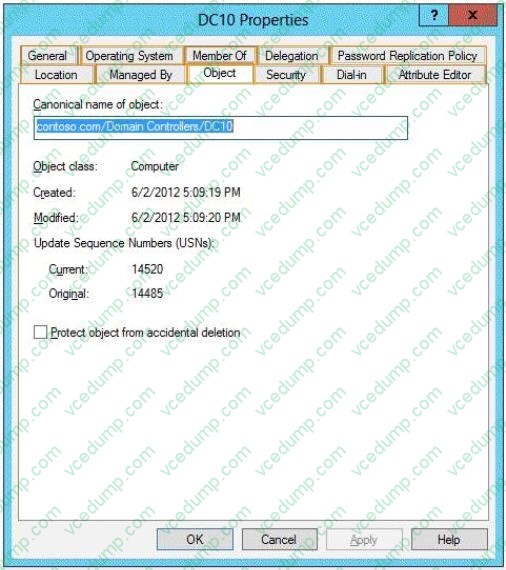
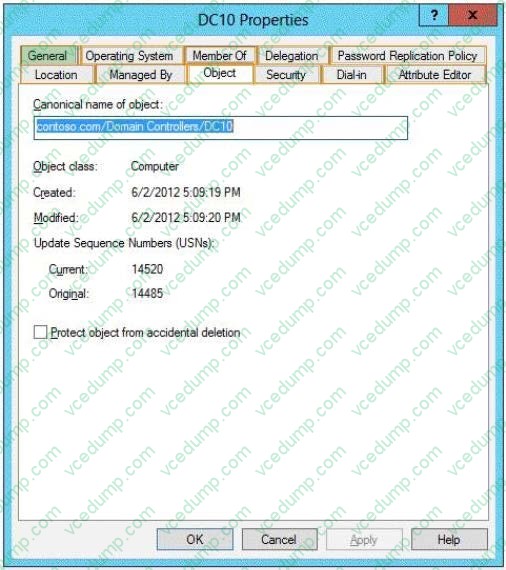
Your network contains an Active Directory forest named contoso.com. The forest contains a single domain. The forest contains two Active Directory sites named Site1 and Site2.
You plan to deploy a read-only domain controller (RODC) named DC10 to Site2. You precreate the DC10 domain controller account by using Active Directory Users and Computers.
You need to identify which domain controller will be used for initial replication during the promotion of the RODC.
Which tab should you use to identify the domain controller?
To answer, select the appropriate tab in the answer area.
Hot Area:
-
Question 140:
Your network contains a server named Server1 that has the Network Policy and Access Services server role installed.
All of the network access servers forward connection requests to Server1.
You create a new network policy on Server1.
You need to ensure that the new policy applies only to connection requests from the 192.168.0.0/24 subnet.
What should you do?
A. Set the Client IP4 Address condition to 192.168.0.0/24.
B. Set the Client IP4 Address condition to 192.168.0.
C. Set the Called Station ID constraint to 192.168.0.0/24.
D. Set the Called Station ID constraint to 192.168.0.
Related Exams:
-
62-193
Technology Literacy for Educators -
70-243
Administering and Deploying System Center 2012 Configuration Manager -
70-355
Universal Windows Platform – App Data, Services, and Coding Patterns -
77-420
Excel 2013 -
77-427
Excel 2013 Expert Part One -
77-725
Word 2016 Core Document Creation, Collaboration and Communication -
77-726
Word 2016 Expert Creating Documents for Effective Communication -
77-727
Excel 2016 Core Data Analysis, Manipulation, and Presentation -
77-728
Excel 2016 Expert: Interpreting Data for Insights -
77-731
Outlook 2016 Core Communication, Collaboration and Email Skills
Tips on How to Prepare for the Exams
Nowadays, the certification exams become more and more important and required by more and more enterprises when applying for a job. But how to prepare for the exam effectively? How to prepare for the exam in a short time with less efforts? How to get a ideal result and how to find the most reliable resources? Here on Vcedump.com, you will find all the answers. Vcedump.com provide not only Microsoft exam questions, answers and explanations but also complete assistance on your exam preparation and certification application. If you are confused on your 70-411 exam preparations and Microsoft certification application, do not hesitate to visit our Vcedump.com to find your solutions here.