Microsoft 70-243 Online Practice
Questions and Exam Preparation
70-243 Exam Details
Exam Code
:70-243
Exam Name
:Administering and Deploying System Center 2012 Configuration Manager
Certification
:Microsoft Certifications
Vendor
:Microsoft
Total Questions
:157 Q&As
Last Updated
:Jul 13, 2026
Microsoft 70-243 Online Questions &
Answers
Question 1:
Your network contains a System Center 2012 R2 Configuration Manager Service Pack 1 (SP1) environment."
You need to receive an email message every day that lists all non-compliant clients.
What should you do?
A. Create an alert subscription. B. Configure a Microsoft SQL Server Reporting Services (SSRS) report. C. Configurean in-console alert. D. Create a ConfigMgr query.
B. Configure a Microsoft SQL Server Reporting Services (SSRS) report.
Custom reports are intended for advanced users who are comfortable creating their own reports by using Microsoft SQL Server Reporting Services and SQL Server Business IntelligenceDevelopment Studio.
Configuring a Report Server for E-Mail Delivery
Reporting Services includes an e-mail delivery extension so that you can distribute reports through e-mail.
Depending on how you define the e-mail subscription, a delivery might consist ofa notification, link, attachment, or embedded report.
Question 2:
Your network contains a System Center 2012 Configuration Manager environment.
Your company develops a custom hardware device and installs the device on all of the client computers in the research department.
You discover that information about the device fails to appear in any inventory queries or reports.
Information about other hardware devices appears in the inventory queries and reports.
You need to ensure that Configuration Manager data include information about the custom hardware device.
What should you do?
A. Enable a default WMI class in the Hardware Inventory Classes list. B. Modify the Enable hardware inventory on clients setting. C. Add a WMI class to the Hardware inventory Classes list. D. Add a file name to the Software Inventory configuration. E. Select Collect NOIDMIF files in Hardware Inventory. F. Add a file name to the Hardware inventory configuration. G. Add a file name to Software Metering. H. Add a WMI class to the Sms_def.mof file. I. Modify the Enable software inventory on clients setting.
C. Add a WMI class to the Hardware inventory Classes list.
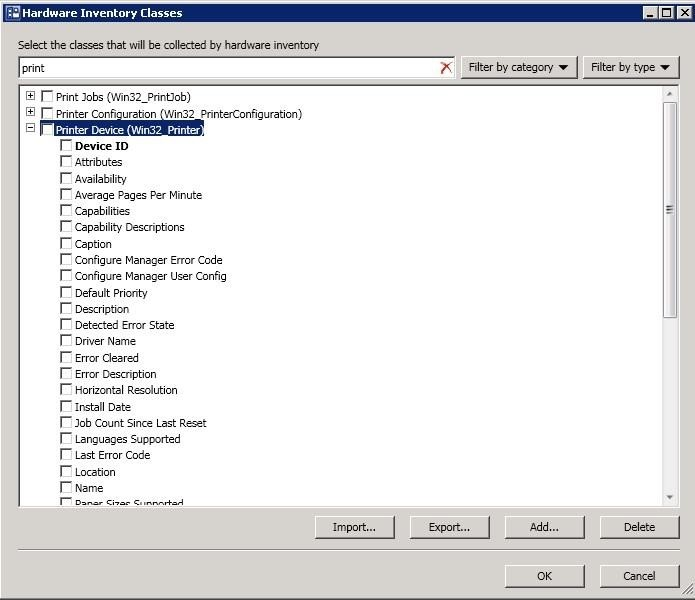
How to Extend Hardware Inventory in Configuration Manager System Center 2012 Configuration Manager hardware inventory reads information about devices by using Windows Management Instrumentation (WMI). WMI is the Microsoft
implementation of web-based Enterprise Management (WBEM), which is an industry standard foraccessing management information in an enterprise environment.
In previous versions of Configuration Manager, you could extend hardware inventory by modifying the file sms_def.mof on the site server.
In System Center 2012 Configuration Manager, you no longer edit the sms_def.mof file as you did in Configuration Manager 2007. Instead, you can enable and disable WMI classes, and add new classes to collect by hardware inventory by
using client settings. Configuration Manager provides the following methods to extend hardware inventory:
Enable or disable existing inventory classes - You can enable or disable the default inventory classes used by Configuration Manager or you can create custom client settings that allow you to collect different hardware inventory classes from
specified collections of clients.
Add a new inventory class - You can add a new inventory class from the WMI namespace of another device.
References: Reference: How to Extend Hardware Inventory in Configuration Manager http://technet.microsoft.com/en-us/library/gg712290.aspx
Question 3:
Your network contains a System Center 2012 Configuration Manager environment.
Your company deploys a custom Application to 2,000 client computers by using Configuration Manager.
The Application is not listed in Add Remove Programs.
You discover that information about the Application fails to appear in the inventory queries and inventory reports.
You verify that information about other Applications appear in the inventory reports.
You need to ensure that Configuration Manager data includes installation information about the custom Application.
What should you do?
A. Add a file name to Software Metering. B. Add a WMI class to the Hardware Inventory Classes file. C. Add a file name to the Hardware Inventory configuration. D. Enable a default WMI Cass in the Hardware Inventory Classes list. E. SelectCollect NOIDMIF filesin Hardware Inventory. F. Add a file name to the Software Inventory configuration. G. Modify the Enablehardware inventory on Cents setting. H. Add a WMI class to the Sms_def.mof file.
F. Add a file name to the Software Inventory configuration.
Introduction to Software Inventory in Configuration Manager Use software inventory inSystem Center 2012 Configuration Manager to collect information about files that are contained on client devices in your organization. Additionally, software inventory can collect files from client devices and store these on the site server. Software inventory is collected when the Enable software inventory on clients setting is enabled in client settings.
Note:
References: Introduction to Software Inventory in Configuration Manager http://technet.microsoft.com/en-us/library/gg682049.aspx
Question 4:
Note: This question is part of a series of questions that use the same or similar answer choices. An answer choice may be correct for more than one question in the series. Each question is independent of the other questions in this series.
Information and details provided in a question apply only to that question.
Your network contains a System Center 2012 R2 Configuration Manager Service Pack 1 (SP1) environment.
Your company develops a custom hardware device and installs the device on all of the client computers in the research department.
You discover that information about the device fails to appear in any inventory queries or reports.
Information about other hardware devices appears in the inventory queries and reports.
You need to ensure that Configuration Manager data includes information about the custom hardware device.
What should you do?
A. Add a WMI class to the Hardware Inventory Classes list. B. Enable a default WMI class in the Hardware Inventory Classes list. C. Add a file name to the Software Inventory configuration. D. Add a file name to the Hardware inventory configuration. E. Add a file name to Software Metering. F. SelectCollect NOIDMIFfilesin Hardware Inventory. G. Add a WMI class to the Sms_def.mof file. H. Modify the Enable software inventory on clients setting. I. Modify the Enable hardware inventory on clients setting.
A. Add a WMI class to the Hardware Inventory Classes list.
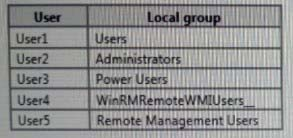
Your network contains a System Center 2012 Configuration Manager environment that contains six servers configured as shown in the following table:
Server5 and Server6 are in the perimeter network, while Server1, Server2, Server3, and Server4 are in the internal network.
Administrators currently apply software updates to servers manually.
You discover that Server4 was never updated.
You need to centrally manage software updates for all of the servers by using Configuration Manager.
What should you do first?
A. Install a management point on Server5. B. Configure IIS to support only HTTPS on Server6. C. Install a management point onServer2. D. Install Network Load Balancing(NLB) on Server3. E. Install an enrollment proxy point on Server6. F. Configure IIS to support only HTTP on Server3. G. Configure the Exchange connector on Server3. H. Install Network Load Balancing (NLB) on Server6. I. Install a PXE-enabled protected distribution point on Server5. J. Install the Windows Cluster service on Server3.
M
A WSUS service will simplify and automate software updates for all servers from a single management interface.
Note: The softwareupdate point is required on the central administration site and on the primary sites in order to enable software updates compliance assessment and to deploy software updates to clients. The software update point is optional on secondary sites. The software update point site system role must be created on a server that has WSUS installed.
Question 6:
You have a test network that contains a System Center 2012 R2 Configuration Manager Service Pack 1 (SP1) deployment.
You create an operating system deployment task sequence that deploys an image of Windows 8.1. You deploy the task sequence to the All Systems collection.
You discover that client computers in the test environment are not being re-imaged automatically.
You need to ensure that all of the client computers are re-imaged automatically.
What should you do?
A. Modify the deployment verification settings forthe site. B. For the operating system deployment task sequence deployment, set the Make available to the following option toOnly media and PXE. C. For the operating system deployment task sequence deployment, set the Make available to the following options toOnly Configuration Manager Clients. D. Create a new operating system deployment task sequence deployment that uses a custom collection, and then set the purpose toRequired.
D. Create a new operating system deployment task sequence deployment that uses a custom collection, and then set the purpose toRequired.
Question 7:
Your company uses System Center 2012 Configuration Manager to distribute operating system images.
You receive 300 new desktop computers. All of the client computers have the same hardware configuration.
When you attempt to deploy a Windows 7 image to one of the client computers, you receive an error message indicating that a storage device cannot be found during the pre- boot deployment phase.
You need to ensure that you can deploy Windows 7 to the new computers by using an image.
What should you do?
A. Update the existing boot image to include the storage drivers. B. Clear the contents of the Drivers container and update the task sequence. C. Import the storage drivers to the Drivers container and update the task sequence. D. Create a new driver package and update thetask sequence.
A. Update the existing boot image to include the storage drivers.
Planning a Device Driver Strategy in Configuration Manager You can add Windows device drivers that have been imported into the driver catalog to boot images. Use the following guidelines when you add device drivers toa boot image:
Question 8:
You manage s System Center 2012 R2 Configuration Manager Service Pack 1 (SP1) deployment.
You need to ensure that Configuration Manager clients can use the Application Catalog.
Which client settings should you configure?
A. Software Metering B. Computer Agent C. Software Deployment D. Software Inventory
B. Computer Agent
Computer Agent hasthe Default Application Catalog website point setting. Configuration Manager uses this setting to connect users to the Application Catalog from Software Center. Youcan specify a server that hosts the Application Catalog website point by its NetBIOS nameor FQDN, specify automatic detection, or specify a URL for customized deployments.
References: About Client Settings in Configuration Manager https://technet.microsoft.com/enus/library/gg682067.aspx#BKMK_ComputerAgentDeviceSettings
Question 9:
Your network contains a System Center 2012 R2 Configuration Manager Service Pack 1 (SP1) environment.
The environment contains a primary site server named Server1 and a server named Server2 that runs Microsoft SQL Server 2012. Server2 contains the Configuration Manager database.
Server2 fails.
You install SQL Server 2012 on a new server. You name the server Server3.
You need to restore the Configuration Manager database to Server3.
What should you do?
A. Register the Service Principal Name (SPN) for the SQL Server service account of Server3. From Server1, run the Configuration Manager Setup Wizard. B. From Server3, run Microsoft SQL Server Managements Studio, and then restore the backed up SQL Server database and log files. C. Register the Service Principal Name (SPN) for the SQL Server Service account of Server3. From Server1, run the Site Repair Wizard. D. From Server3, run Microsoft SQL Server Management Studio, and then attach the backed up SQL Server database and log files.
A. Register the Service Principal Name (SPN) for the SQL Server service account of Server3. From Server1, run the Configuration Manager Setup Wizard.
Question 10:
Your network contains a System Center 2012 Configuration Manager environment as shown in the exhibit. (Click the Exhibit button.)
(The exhibit shows that: Server5 and Server6 are in the perimeter network, while Server1, Server2, Server3, and Server4 are in the internal network.) The network contains six servers. The servers are configured as shown in the following table.
You need to ensure that mobile device information is available in the hardware inventory.
What should you do first?
A. Install a management point on Server5. B. Configure IIS to support only HTTPS on Server5. C. Install a management point on Server2. D. Install Network Load Balancing (NLB) on Server3. E. Install an enrollment proxy point on Server6. F. Configure IIS to support only HTTP on Server3. G. Configure the Exchange connector on Server3. H. Install Network Load Balancing (NLB) on Server6. I. Install a PXE-enabled protecteddistribution point on Server5. J. Install the Windows Cluster service on Server3.
G. Configure the Exchange connector on Server3.
http://technet.microsoft.com/en-us/library/gg682022.aspx Determine How to Manage Mobile Devices in Configuration Manager Thefollowing table lists these four mobile device management methods and provides information about the management functions that each method supports:
Nowadays, the certification exams become more and more important and required by more and more
enterprises when applying for a job. But how to prepare for the exam effectively? How to prepare
for the exam in a short time with less efforts? How to get a ideal result and how to find the
most reliable resources? Here on Vcedump.com, you will find all the answers.
Vcedump.com provide not only Microsoft exam questions,
answers and explanations but also complete assistance on your exam preparation and certification
application. If you are confused on your 70-243 exam preparations
and Microsoft certification application, do not hesitate to visit our
Vcedump.com to find your solutions here.