300-810 Exam Details
-
Exam Code
:300-810 -
Exam Name
:Implementing Cisco Collaboration Applications (CLICA) -
Certification
:CCNP Collaboration -
Vendor
:Cisco -
Total Questions
:220 Q&As -
Last Updated
:May 31, 2026
Cisco 300-810 Online Questions & Answers
-
Question 101:
Which dial-peer configuration routes calls from SIP-based phones on Cisco Unified Communications Manager Express to Cisco Unity Express?
A. dial-peer voice 7000 voip destination-pattern 7000 session protocol sipv2 session target ipv4: 10.3.6.127 codec g711alaw
B. dial-peer voice 7000 voip destination-pattern 7000 session protocol sipv2 session target ipv4: 10.3.6.127 codec ilbc
C. dial-peer voice 7000 voip destination-pattern 7000 session protocol sipv2 session target ipv4: 10.3.6.127 codec g711ulaw
D. dial-peer voice 7000 voip destination-pattern 7000 session protocol sipv2 session target ipv4: 10.3.6.127 codec g729r6 -
Question 102:
Refer to the exhibit.
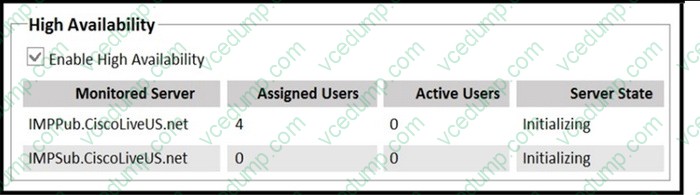
After configuration of the Cisco IMandP cluster in high-availability mode, both IMandP servers remain in the initializing state. Which two actions ensure normal operations of this IMandP high-availability cluster? (Choose two.)
A. Clear the Enable High Availability check box in the Presence Redundancy Group configuration.
B. Confirm that Cisco Presence Engine, Cisco XCP Router, and Cisco DB services are up and running on both IMandP servers.
C. Restart the Server Recovery Manager service in Cisco Unified Serviceability ?Network Services on both IMandP servers.
D. Verify that the Cisco XCP SIP Federation Connection Manager service is running.
E. Ensure that an equal number of users are assigned to each IMandP server. -
Question 103:
What are two Cisco Jabber 12.6 on-premises deployment types that can be run on a Windows-enabled PC? (Choose two.)
A. Contact Center Agent
B. IM-only
C. multicloud-based
D. Full UC
E. cloud-based -
Question 104:
A company deployed the Cisco Webex App with single sign-on enabled using the internal ldP, but users receive the error "Single Sign On Failed.Invalid Status code in Resume" when trying to log in through the security assertion markup language SSO.
Which action must an administrator taketo resolve the issue?
A. Configure SSO in Control Hub with Cisco DUO.
B. Configure SSO in Control Hub with Microsoft Azure.
C. Configure SSO in Control Hub with Okta.
D. Configure SSO in Control Hub ADFS. -
Question 105:
Users in a company have access to voice calling and voicemail from desktop phones. As the company transitions to remote work, users are utilizing the Cisco Jabber client through Mobile and Remote Access to access company phone services. Users cannot access voicemail through the Cisco Jabber client, even though voicemail is functioning in the office on the desk phone. Cisco Jabber works with IM and Presence, including calling through Mobile and Remote Access. What is the cause of the issue?
A. Cisco Unity Connection is missing from the internal Cisco UCM mobility profiles.
B. Cisco Unity Connection is missing from the internal Expressway-C clusters.
C. Cisco Unity Connection is missing from the internal Cisco UCM clusters.
D. Cisco Unity Connection is missing from the Expressway-E clusters for external communication. -
Question 106:
Which two authentication methods does Integrated Windows Authentication use to validate Windows credentials? (Choose two.)
A. NTLM
B. Digest Authentication
C. SAML
D. Kerberos
E. Smart Card -
Question 107:
Which service must be activated on Cisco Unity Connection to utilize LDAP synchronization?
A. Cisco Tomcat
B. Cisco Sync Agent
C. Cisco DirSync
D. Cisco RIS Data Collector -
Question 108:
Which SAML component defines the content of data transferred from an IdP to a service provider?
A. protocol
B. assertion
C. binding
D. profiles -
Question 109:
Refer to the exhibit.
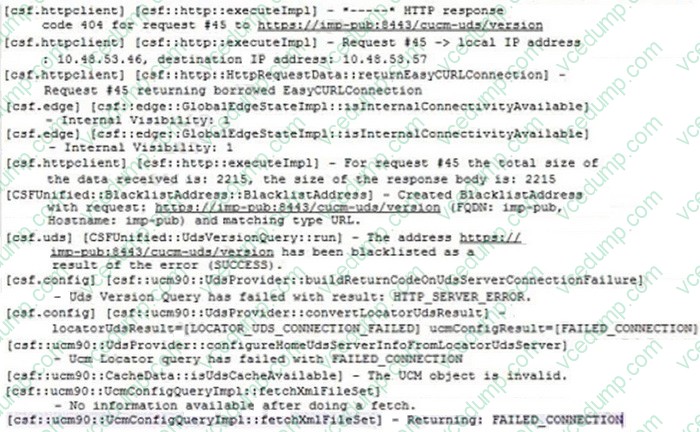
A collaboration engineer is troubleshooting Cisco Jabber for Windows login issues for clients on a corporate network with an on-premises Cisco IM and Presence server. This issue is impacting all users. Which action resolves the issue?
A. Add the host “imp-pub” to the proxy exceptions list on the users’ Windows computers.
B. Restore network connectivity to host “imp-pub”.
C. Restart the IM and Presence services on the host “imp-pub”.
D. Change the DNS SRV record to point to the Cisco UCM node instead of the IM and Presence node. -
Question 110:
Refer to the exhibit.
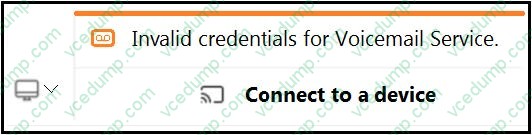
A Jabber user is unable to access voicemail. During troubleshooting, an administrator captures this screenshot. What are the two ways to resolve this issue? (Choose two.)
A. Ask the user to click on the Connect to a device" button and use the correct username and password.
B. Ensure the user is not locally created on Cisco Unity Connection with a password expiring separately from the password that is used for Jabber.
C. Make sure the Jabber service profile created in Cisco UCM contains Unity Connection UC service with a voicemail server configured.
D. Ask an administrator to create an account for this user in Cisco Unity Connection but remove the Unity Connection UC service from the Cisco UCM Jabber service profile.
E. Check if "OAuth with Refresh Login Flow" is enabled on Cisco Unity Connection but disabled in Cisco UCM.
Related Exams:
-
300-810
Implementing Cisco Collaboration Applications (CLICA) -
300-815
Implementing Cisco Advanced Call Control and Mobility Services (CLACCM) -
300-820
Implementing Cisco Collaboration Cloud and Edge Solutions (CLCEI) -
300-835
Automating Cisco Collaboration Solutions (CLAUTO) -
350-801
Implementing and Operating Cisco Collaboration Core Technologies (CLCOR)
Tips on How to Prepare for the Exams
Nowadays, the certification exams become more and more important and required by more and more enterprises when applying for a job. But how to prepare for the exam effectively? How to prepare for the exam in a short time with less efforts? How to get a ideal result and how to find the most reliable resources? Here on Vcedump.com, you will find all the answers. Vcedump.com provide not only Cisco exam questions, answers and explanations but also complete assistance on your exam preparation and certification application. If you are confused on your 300-810 exam preparations and Cisco certification application, do not hesitate to visit our Vcedump.com to find your solutions here.