300-440 Real Exam Questions

Designing and Implementing Cloud Connectivity (ENCC)

38 questions available · Page 1 of 4

Updated Exam DumpsVerified AnswersPass Guarantee

Get Complete Exam Dumps
Question 1 Single choice

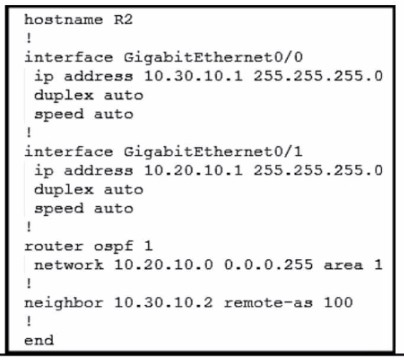
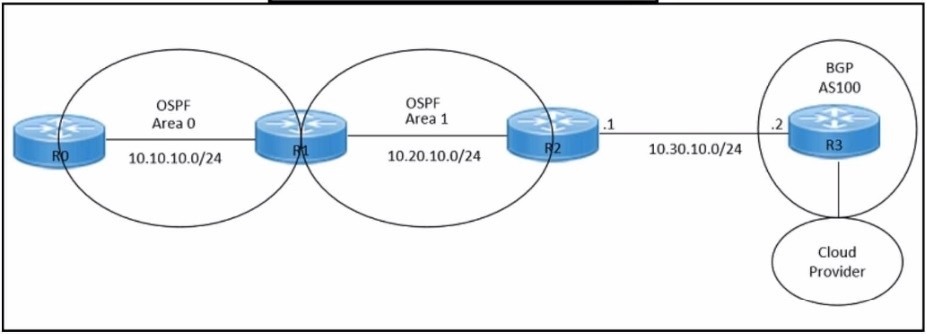
Refer to the exhibit.
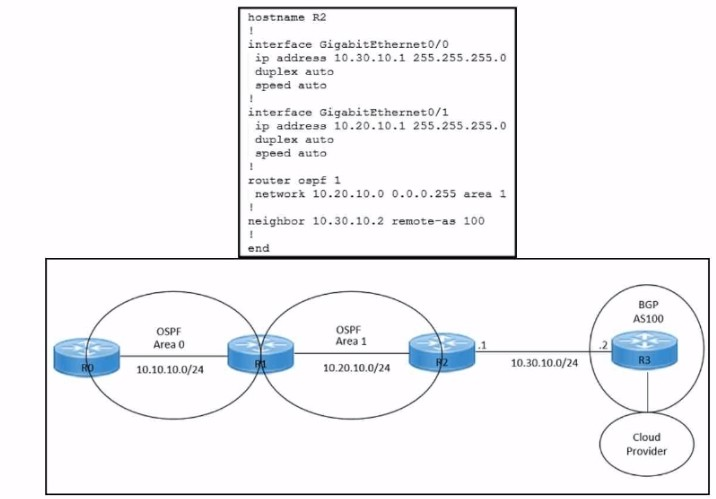
An engineer must redistribute IBGP routes into OSPF to connect an on-premises network to a cloud provider.

Which command must be configured on router R2?

  1. A

    redistribute ospf 1

  2. B

    redistribute bgp 100 ospf 1

  3. C

    redistribute bgp 100 subnets

  4. D

    bgp redistrlbute-lnternal

Show answer and explanation

Correct answer: B

Explanation

References:
Learning Plan: Designing and Implementing Cloud Connectivity v1.0 (ENCC 300-440) Exam Prep Designing and Implementing Cloud Connectivity (ENCC) v1.0
Cisco Multiprotocol Label Switching
Exploring Cisco Cloud OnRamp for Colocation ENCC: Configuring IPsec VPN from Cisco IOS XE to AWS : [Deploying Cisco IOS VTI-Based Point-to-
Point IPsec VPNs]
Question 2 Drag & drop

DRAG DROP

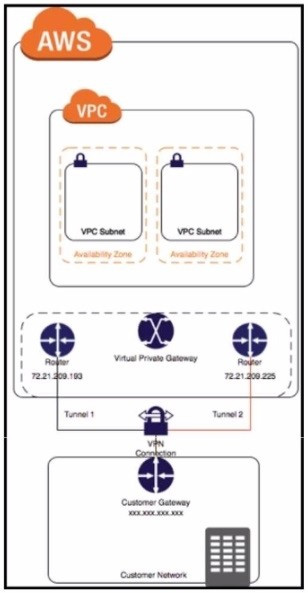
Refer to the exhibit.

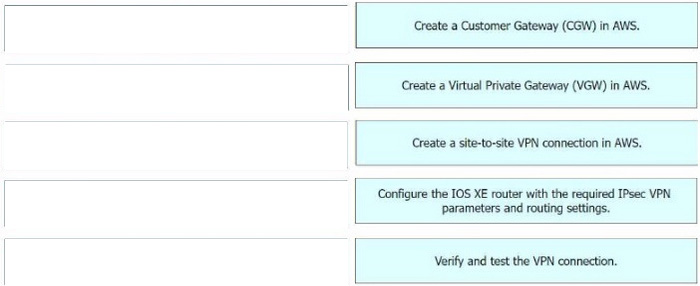
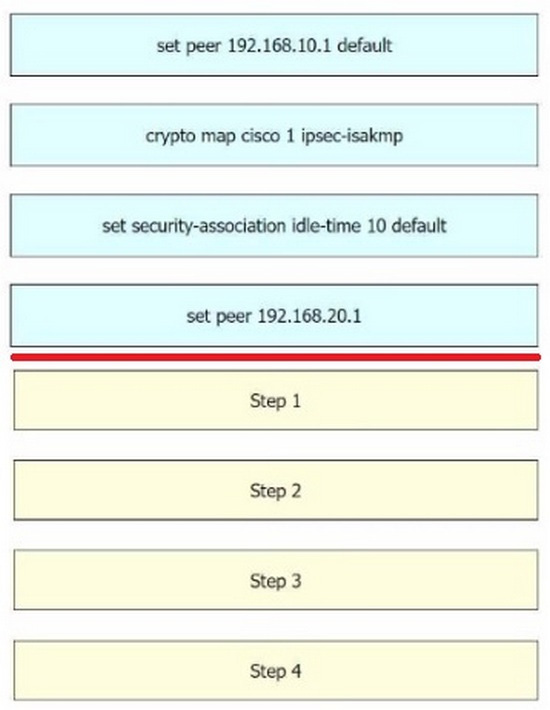
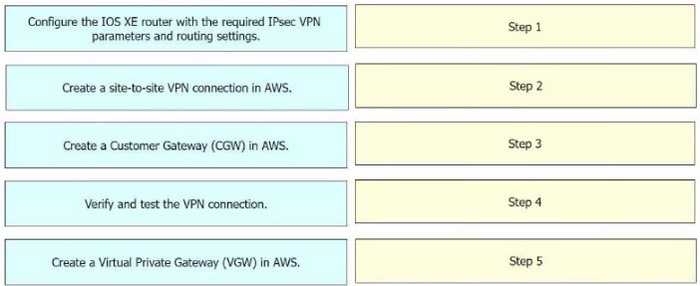
Drag and drop the steps from the left onto the order on the right to configure a site-to-site VPN connection between an on-premises Cisco IOS XE router and Amazon Web Services (AWS).

Question diagram
Show answer and explanation
Correct answer diagram
Explanation

Step 1 = Create a Customer Gateway (CGW) in AWS.
Step 2 = Create a Virtual Private Gateway (VGW) in AWS.
Step 3 = Create a site-to-site VPN connection in AWS.
Step 4 = Configure the IOS XE router with the required IPsec VPN parameters and routing settings.
Step 5 = Verify and test the VPN connection.

The process of configuring a site-to-site VPN connection between an on-premises Cisco IOS XE router and Amazon Web Services (AWS) involves several steps Create a Customer Gateway (CGW) in AWS: This is the first step where you define the public IP address of your on-premises Cisco IOS XE router in AWS. Create a Virtual Private Gateway (VGW) in AWS: This involves creating a VGW and attaching it to the VPC in AWS.
Create a site-to-site VPN connection in AWS: After setting up the CGW and VGW, you then create a site-to-site VPN connection in AWS. This involves specifying the CGW, VGW, and the static IP prefixes for your on-premises network. Configure the IOS XE router with the required IPsec VPN parameters and routing settings: After the AWS side is set up, you configure the on-premises Cisco IOS XE router with the required IPsec VPN parameters and routing settings. Verify and test the VPN connection: Finally, you verify and test the VPN connection to ensure that it is working correctly.

References:
Configure IOS-XE Site-to-Site VPN Connection to Amazon Web Services - Cisco Community SD-WAN Configuration Example: Site-to-site (LAN to LAN) IPSec between vEdge and Cisco IOS - Cisco Community

Question 3 Single choice

Refer to the exhibit.

While troubleshooting an IPsec connection between a Cisco WAN edge router and an Amazon Web Services (AWS) endpoint, a network engineer observes that the security association status is active, but no traffic flows between the devices

What is the problem?

  1. A

    wrong ISAKMP policy

  2. B

    identity mismatch

  3. C

    wrong encryption

  4. D

    IKE version mismatch

Show answer and explanation

Correct answer: B

Explanation

An identity mismatch occurs when the local and remote identities configured on the IPsec peers do not match. This can prevent the establishment of an IPsec tunnel or cause traffic to be dropped by the IPsec policy. In this case, the network engineer should verify that the local and remote identities configured on the Cisco WAN edge router and the AWS endpoint match the values expected by each peer. The identities can be an IP address, a fully qualified domain name (FQDN), or a distinguished name (DN). The identities are exchanged during the IKE phase 1 negotiation and are used to authenticate the peers. If the identities do not match, the peers will reject the IKE proposal and the IPsec tunnel will not be established or will be torn down.

References:
Configure IOS-XE Site-to-Site VPN Connection to Amazon Web Services,
Topic:Troubleshooting
3: Implementing Cloud Connectivity, Lesson
2: Implementing Cisco SD-WAN Cloud OnRamp for IaaS, Topic: Troubleshooting Cisco SD-WAN Cloud OnRamp for IaaS Cisco IOS Security Configuration Guide, Release 15M&T, Chapter: Configuring IPsec Network Security, Topic: Configuring IPsec Identity and Peer Addressing

Question 4 Single choice

Which approach does a centralized internet gateway use to provide connectivity to SaaS applications?

  1. A

    A cloud-based proxy server routes traffic from the on-premises infrastructure to the SaaS provider data center.

  2. B

    Internet traffic from the on-premises infrastructure is routed through a centralized gateway that provides access controls for SaaS applications.

  3. C

    VPN connections are used to provide secure access to SaaS applications from the on-premises infrastructure.

  4. D

    A dedicated, private connection is established between the on-premises infrastructure and the SaaS
    provider data center using colocation services.

Show answer and explanation

Correct answer: B

Explanation

A centralized internet gateway is a network design that routes all internet-bound traffic from the on-premises infrastructure through a single point of egress, typically located at the data center or a regional hub 1. This approach allows the enterprise to apply consistent security policies and access controls for SaaS applications, as well as optimize the bandwidth utilization and performance of the WAN links.
A centralized internet gateway can use various technologies to provide connectivity to SaaS applications, such as proxy servers, firewalls, web filters, and WAN optimizers. However, a cloud-based proxy server (option A) is not a part of the centralized internet gateway, but rather a separate service that can be used to route traffic from the on-premises infrastructure to the SaaS provider data center 4. VPN connections (option C) and dedicated, private connections (option D) are also not related to the centralized internet gateway, but rather alternative ways of providing secure and reliable access to SaaS applications from the on-premises infrastructure 5. Therefore, the correct answer is option B, which describes the basic function of a centralized internet gateway.

Question 5 Single choice

An engineer must enable the OMP advertisement of BGP routes for a specific VRF instance on a Cisco IOS XE SD-WAN device.

What should be configured after the global address-family ipv4 is configured?

  1. A

    Set the VRF-specific route advertisements.

  2. B

    Enable bgp advertisement.

  3. C

    Enter sdwan mode.

  4. D

    Disable bgp advertisement.

Show answer and explanation

Correct answer: B

Explanation

To enable the OMP advertisement of BGP routes for a specific VRF instance on a Cisco IOS XE SD-WAN device, the engineer must first configure the global address-family ipv4 and then enable bgp advertisement under the vrf definition. This will allow the device to advertise the BGP routes learned from the cloud provider to the OMP control plane, which will then distribute them to the other SD-WAN devices in the overlay network.

References:
Designing and Implementing Cloud Connectivity (ENCC) v1.0, Module 3:Implementing Cloud Connectivity, Lesson 3: Configuring IPsec VPN from Cisco IOS XE to AWS, Topic: Configuring BGP on the Cisco IOS
XE Device, Page 3-24.

Question 6 Drag & drop

DRAG DROP

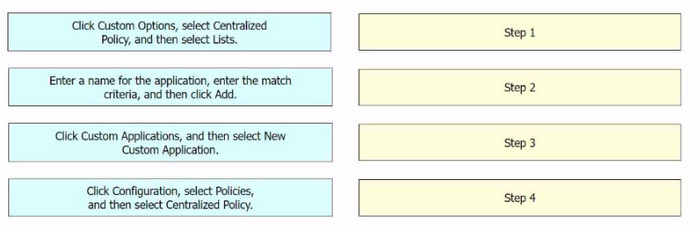
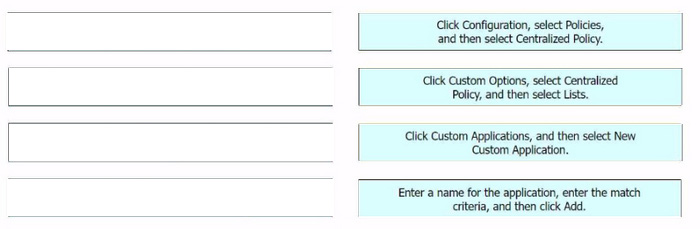
An engineer signs in to Cisco vManage and needs to configure a custom application with a Cisco SD-WAN centralized policy. Drag and drop the steps from the left onto the order on the right to complete the configuration.

Question diagram
Show answer and explanation
Correct answer diagram
Explanation

The process of configuring a custom application with a Cisco SD-WAN centralized policy using Cisco
vManage involves several steps.
Click Configuration, select Policies, and then select Centralized Policy: This is the first step where you navigate to the Policies section in the Configuration menu of Cisco vManage.
Click Custom Options, select Centralized Policy, and then select Lists: In this step, you select the Custom

Options, then select Centralized Policy, and finally select Lists.
Click Custom Applications, and then select New Custom Application: After setting up the Lists, you click on Custom Applications and then select New Custom Application.
Enter a name for the application, enter the match criteria, and then click Add: Finally, you enter a name for the application, specify the match criteria, and then click Add to complete the configuration.

References:
Cisco Catalyst SD-WAN Policies Configuration Guide, Cisco IOS XE

Question 7 Multiple choice

Refer to the exhibits.

An engineer must redistribute OSPF internal routes into BGP to connect an on-premises network to a cloud provider.

Which two commands should the engineer run on router R2? (Choose two.)

  1. A

    router bgp 100

  2. B

    redistribute bgp 100

  3. C

    router ospf 1

  4. D

    redistribute ospf 1

  5. E

    redistribute ospf 100

Show answer and explanation

Correct answers: A, D

Question 8 Drag & drop

DRAG DROP

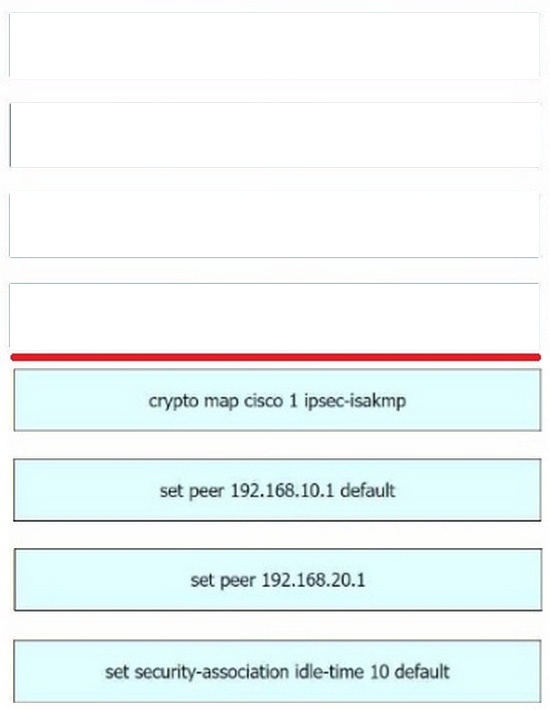
An engineer must edit the settings of a site-to-site IPsec VPN connection between an on-premises Cisco IOS XE router and Amazon Web Services (AWS). IPsec must be configured to support multiple peers and failover after 120 seconds of idle time on the first entry of the crypto map named Cisco. Drag and drop the commands from the left onto the order on the right.

Question diagram
Show answer and explanation
Correct answer diagram
Explanation

Step 1 = crypto map cisco 1 ipsec-isakmp
Step 2 = set peer 192.168.10.1 default
Step 3 = set peer 192.168.20.1
Step 4 = set security-association idle-time 120 default

The process of editing the settings of a site-to-site IPsec VPN connection between an on-premises Cisco IOS XE router and Amazon Web Services (AWS), and configuring IPsec to support multiple peers and failover after 120 seconds of idle time on the first entry of the crypto map named Cisco involves several steps123456. crypto map cisco 1 ipsec-isakmp: This command is used to create a new entry in the crypto map named "cisco". The "1" is the sequence number of the entry, and "ipsec-isakmp" specifies that the IPSec security associations (SAs) should be established using the Internet Key Exchange (IKE) protocol 13. set peer 192.168.10.1 default: This command is used to specify the IP address of the default peer for the crypto map entry. In this case, the default peer is at IP address 192.168.10.115. set peer 192.168.20.1: This command is used to add an additional peer to the crypto map entry. In this case, the additional peer is at IP address 192.168.20.1. This allows the IPsec VPN to support multiple peers 56. set security-association idle-time 120 default: This command is used to set the idle time for the security association. If no traffic is detected over the VPN for the specified idle time (in this case, 120 seconds), the security association is deleted, and the VPN connection fails over to the next peer 46.

References:
Configure a Site-to-Site IPSec IKEv1 Tunnel Between an ASA and a Cisco IOS Router - Cisco Configure IOS-XE Site-to-Site VPN Connection to Amazon Web Services - Cisco Community Configuring Site to Site IPSec VPN Tunnel Between Cisco Routers Configure Failover for IPSec Site-to-
Site Tunnels with Backup ISP Links on FTD Managed by FMC - Cisco Does Setting Multiple Peers in a Crypto Map Also Support Parallel IPSec Connections - Cisco Community Multiple WAN Connections -- IPsec in Multi-WAN Environments | pfSense Documentation
Multiple Set Peer for VPN Failover - Server Fault

Question 9 Drag & drop

DRAG DROP

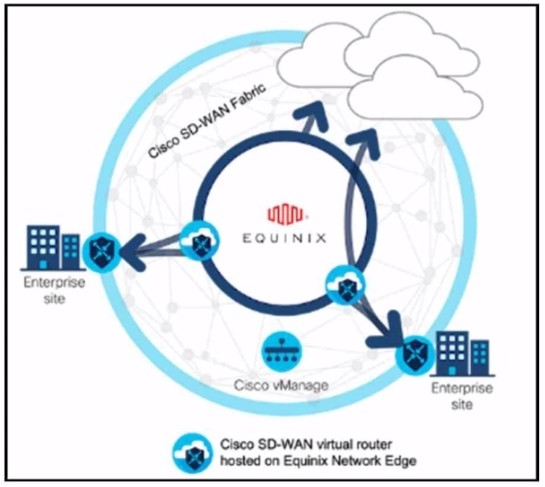
Refer to the exhibit.

These configurations are complete:

1. Create an account in the Equinix portal.
2. Associate the Equinix account with Cisco vManage.
3. Configure the global settings for Interconnect Gateways.

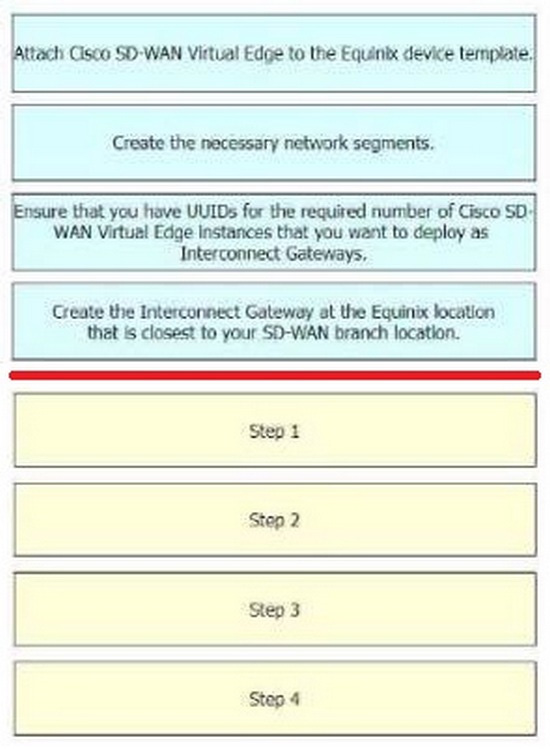
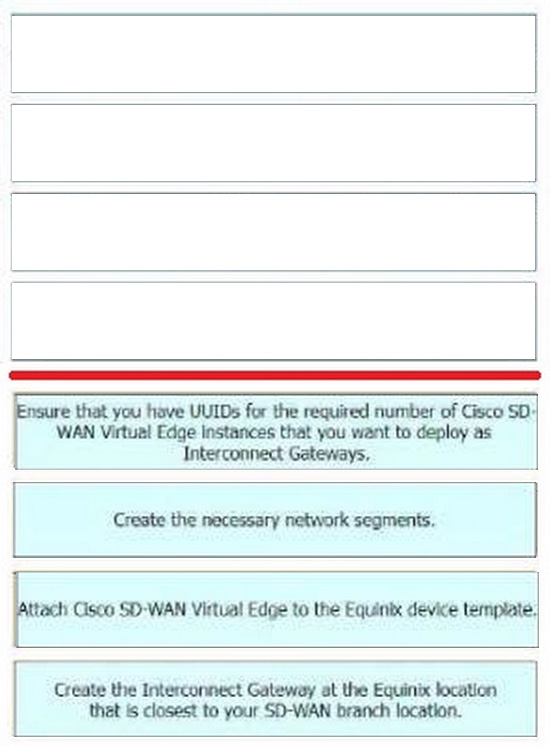
Drag the prerequisite steps from the left onto the order on the right to configure a Cisco SD-WAN Cloud Interconnect with Equinix

Question diagram
Show answer and explanation
Correct answer diagram
Explanation

The process of configuring a Cisco SD-WAN Cloud Interconnect with Equinix involves several steps.
Ensure that you have UUIDs for the required number of Cisco SD WAN Virtual Edge instances that you want to deploy as Interconnect Gateways: This is the first step where you ensure that you have the necessary UUIDs for the Cisco SD-WAN Virtual Edge instances that you want to deploy.
Create the necessary network segments: After ensuring the availability of UUIDs, you create the necessary network segments.
Attach Cisco SD-WAN Virtual Edge to the Equinix device template: After setting up the network segments, you attach the Cisco SD-WAN Virtual Edge to the Equinix device template.
Create the Interconnect Gateway at the Equinix location that is closest to your SD-WAN branch location: Finally, you create the Interconnect Gateway at the Equinix location that is closest to your SD-WAN branch location.
References:
[Cisco SD-WAN Cloud Interconnect with Equinix]
[Cisco SD-WAN Cloud OnRamp for CoLocation Deployment Guide]

Question 10 Drag & drop

DRAG DROP

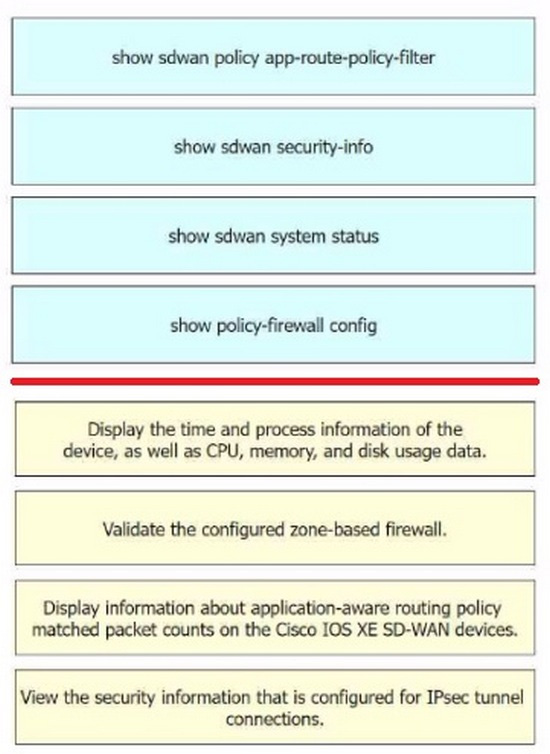
Drag and drop the commands from the left onto the purposes on the right to identify issues on a Cisco IOS
XE SD-WAN device.

Question diagram
Show answer and explanation
Correct answer diagram
Explanation

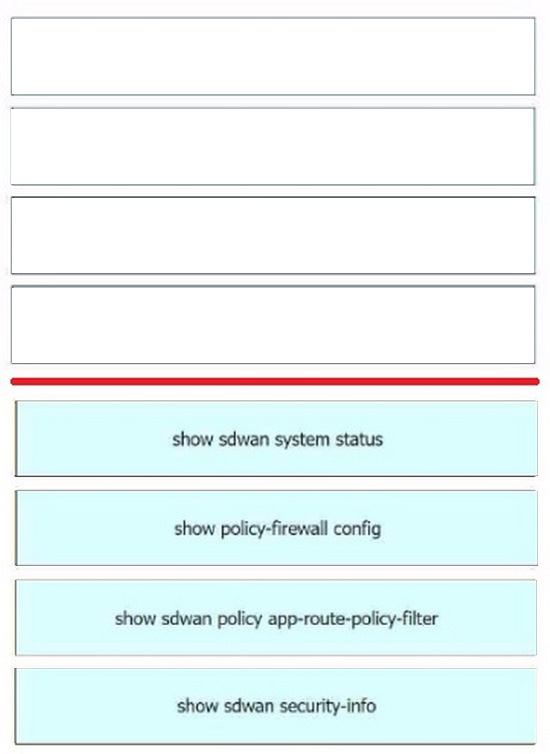
Display the time and process information of the device, as well as CPU, memory, and disk usage data. =
show sdwan system status
Validate the configured zone-based firewall. = show policy-firewall config1 Display information about application-aware routing policy matched packet counts on the Cisco IOS XE SD-WAN devices. = show sdwan policy app-route-policy-filter
View the security information that is configured for IPsec tunnel connections. = show sdwan security-info
The commands used to identify issues on a Cisco IOS XE SD-WAN device are as follows show sdwan system status: This command is used to display the time and process information of the device, as well as CPU, memory, and disk usage data. show policy-firewall config: This command is used to validate the configured zone-based firewall. show sdwan policy app-route-policy-filter: This command is used to display information about application-aware routing policy matched packet counts on the Cisco IOS XE SD-WAN devices. show sdwan security-info: This command is used to view the security information that is configured for IPsec tunnel connections

References:
Cisco IOS XE Catalyst SD-WAN Qualified Command Reference Cisco Catalyst SD-WAN Command
Reference
Cisco Catalyst SD-WAN Systems and Interfaces Configuration Guide, Cisco IOS XE SD-WAN Tunnel Interface Commands - Cisco